
Introduction
Thank you for choosing the Portronics Harmonics Twins 26 TWS Earbuds. This manual provides essential information for setting up, operating, maintaining, and troubleshooting your new earbuds. Please read it carefully to ensure optimal performance and longevity of your device.

Image: Portronics Harmonics Twins 26 TWS Earbuds with their charging case and a smartphone displaying music playback.
What's in the Box
Upon unboxing, please ensure all the following items are present:
- Smart TWS Earbuds (2 units)
- Charging Cable (USB Type-C)
- Documentation (User Manual)
Setup
1. Charging the Earbuds and Case
Before first use, fully charge the earbuds and the charging case. Connect the provided USB Type-C cable to the charging port on the case and a compatible USB power source.

Image: The charging case features a digital display indicating the battery percentage for both the left (L) and right (R) earbuds, as well as the case itself. The case weighs 47 grams and has a USB-C charging port.
- The digital display on the charging case indicates the battery level of the case and individual earbuds.
- A 7-minute charge provides approximately 70 minutes of playback.
2. Pairing with Your Device
The Harmonics Twins 26 earbuds utilize Bluetooth 5.1 for a stable and fast connection.
- Ensure the earbuds are charged.
- Open the charging case. The earbuds will automatically enter pairing mode.
- On your smartphone, tablet, or laptop, enable Bluetooth.
- Search for available devices and select "Portronics Harmonics Twins 26" from the list.
- Once paired, the earbuds will automatically connect to your device for subsequent uses.

Image: The Portronics Harmonics Twins 26 TWS Earbuds and their charging case are shown next to a smartphone. The image highlights the 'Auto Connect' feature, indicating that after the first pairing, the earbuds automatically detect and connect to your device via Bluetooth 5.1.
Operating Instructions
Touch Controls
The earbuds feature sensitive touch controls for easy management of music, calls, and voice assistants.

Image: A diagram illustrating the touch-sensitive area on the Portronics Harmonics Twins 26 earbuds. It indicates functions such as Play/Pause Music, Answer/Hangup Call, Volume +/-, and activating voice assistants (Siri, Google, or Alexa).
- Play/Pause Music: Tap once on either earbud.
- Answer/Hangup Call: Tap once on either earbud.
- Volume Control: Specific tap gestures (refer to quick start guide for detailed gestures).
- Activate Voice Assistant: Tap and hold on either earbud to activate Siri, Google Assistant, or Alexa.
Environmental Noise Cancellation (ENC)
The earbuds are equipped with active ENC technology to reduce background noise, providing a clearer audio experience for both music and calls.

Image: A single Portronics Harmonics Twins 26 earbud is shown with sound wave graphics, illustrating the 'No External Disturbance' feature provided by Auto ENC (Environmental Noise Cancellation) for clear calls.
Calling Functionality
Dual microphones on each earbud ensure sharp and clear call quality, even in noisy environments.
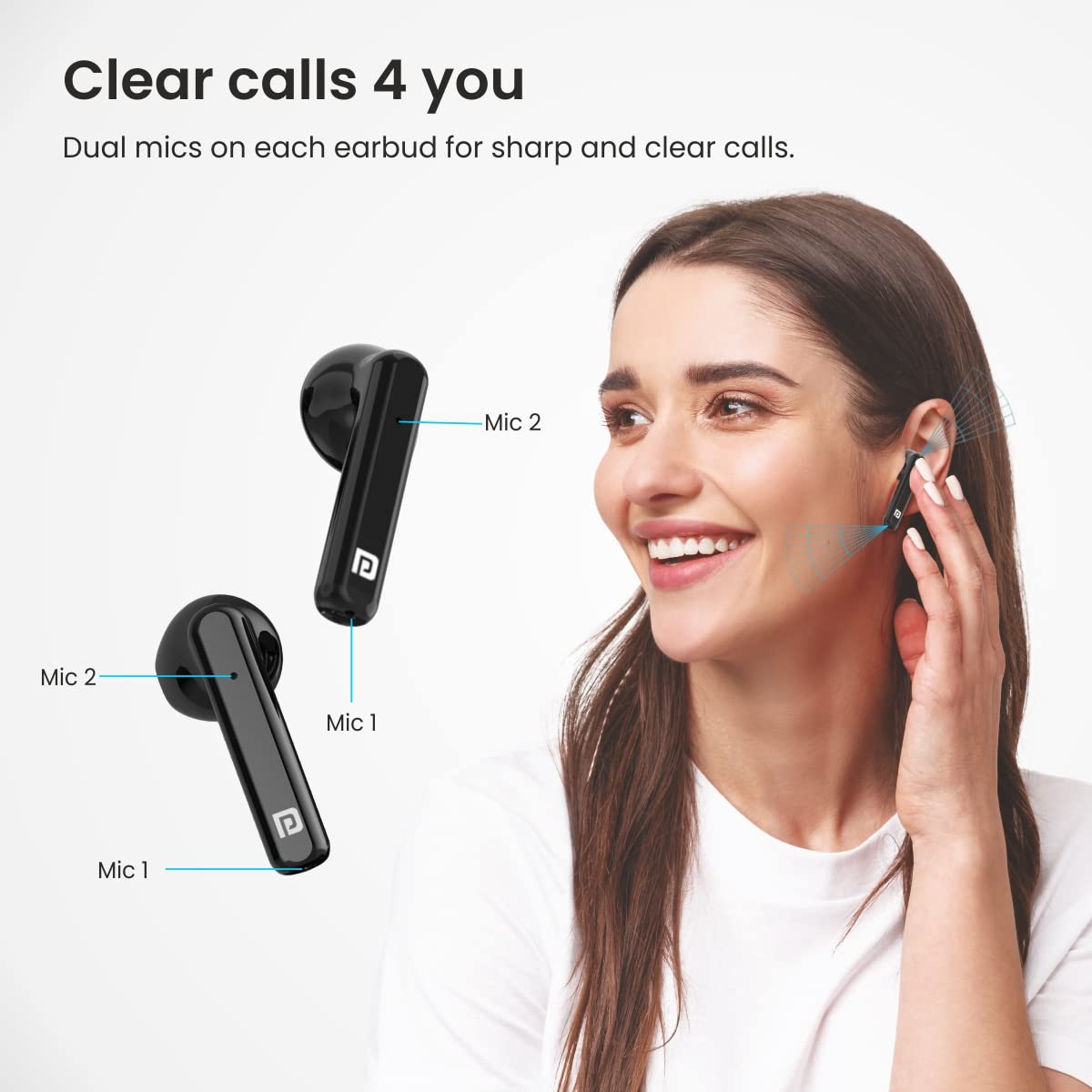
Image: A woman is shown wearing the Portronics Harmonics Twins 26 earbuds, with an overlay highlighting the dual microphones (Mic 1 and Mic 2) on each earbud, emphasizing the 'Clear calls' feature.
Battery Life and Playtime
The earbuds offer extended playtime with the charging case.
- Total Playtime (with charging case): Up to 27 hours.
- Music Playback: Up to 5 hours on a single charge.
- Call Time: Up to 4 hours on a single charge.

Image: An illustration showing the Portronics Harmonics Twins 26 earbuds and their charging case, with a large '27 hrs' graphic, indicating a total playtime of 27 hours with the charging case. It also mentions that a 7-minute charge provides 70 minutes of playback.
Maintenance
Cleaning
Regular cleaning helps maintain sound quality and hygiene.
- Use a soft, dry, lint-free cloth to wipe the earbuds and charging case.
- Do not use abrasive materials, solvents, or spray cleaners.
- Gently clean the ear tips and speaker mesh to remove earwax or debris.
Storage
When not in use, store the earbuds in their charging case to protect them and keep them charged.
Water Resistance
The earbuds are rated IP54 water resistant. This means they are protected against dust ingress and splashing water from any direction. They are not designed for submersion in water or exposure to heavy rain.
Troubleshooting
If you encounter issues with your Harmonics Twins 26 earbuds, try the following solutions:
- Earbuds not pairing: Ensure both earbuds are charged. Place them back in the case, close it, then open it again to re-initiate pairing mode. Check your device's Bluetooth settings and try reconnecting.
- No sound from one earbud: Ensure both earbuds are charged. Try placing them back in the case and taking them out again. If the issue persists, try resetting the earbuds (refer to the quick start guide for specific reset instructions).
- Charging issues: Ensure the charging cable is securely connected to both the case and the power source. Try a different USB port or power adapter. Clean the charging contacts on the earbuds and inside the case.
- Poor sound quality: Ensure the earbuds are properly seated in your ears. Check for any debris in the speaker mesh and clean if necessary. Ensure your device's volume is adequately adjusted.
- Earbuds disconnect frequently: Ensure you are within the Bluetooth range of your device. Avoid obstacles between the earbuds and your device.
Specifications
| Brand | Portronics |
| Model Name | Harmonics Twins 26 |
| Model Number | POR-1701 |
| Colour | Black |
| Ear Placement | In Ear |
| Form Factor | In Ear |
| Noise Control | Active Environmental Noise Cancellation (ENC) |
| Item Type | TWS Earbuds |
| Item Weight (Case) | 47 Grams |
| Audio Driver Size | 13 Millimetres |
| Enclosure Material | Plastic |
| Compatible Devices | Cellphones, Tablets, Laptops |
| Water Resistance Level | IP54 (Water Resistant) |
| Wireless Technology | Bluetooth |
| Bluetooth Version | 5.1 |
| Control Method | Touch, Voice Control |
| Total Playtime | Up to 27 hours (with charging case) |
| Charging Port | USB Type-C |
Warranty Information
The Portronics Harmonics Twins 26 TWS Earbuds come with a 1 Year Manufacturer Warranty from the date of purchase. Please retain your purchase receipt for warranty claims. The warranty covers manufacturing defects but does not cover damage caused by misuse, accidents, or unauthorized modifications.
Customer Support
For any support, service, or warranty-related queries, please contact Portronics Digital Pvt Ltd:
- Manufacturer Address: B-76, 1st & 2nd Floor, Wazirpur Ind Area, New Delhi-110052.
- Contact Number: 9555-245-245


