
1. Introduction
This manual provides essential instructions for the safe and effective use of your UpBright 5V AC/DC Adapter. This power supply is specifically designed for compatibility with Arcade1Up PAC-C-01334 Super PAC-Man Counter-Cade and similar 5V devices requiring a barrel round plug tip. Please read this manual thoroughly before use and retain it for future reference.
2. Important Safety Information
To ensure safe operation and prevent damage, observe the following precautions:
- Compatibility Check: This adapter features a barrel round plug tip and provides 5V output. It is NOT compatible with Micro USB connectors or 12V versions of devices. Verify your device's power requirements and connector type before use.
- Protection Features: The adapter includes Over Voltage Protection (OVP), Over Current Protection (OCP), and Short Circuit Protection (SCP) to safeguard your device and the adapter itself.
- Indoor Use Only: Use this adapter in dry, indoor environments. Avoid exposure to moisture or extreme temperatures.
- Proper Handling: Do not attempt to open, modify, or repair the adapter. Discontinue use if the adapter or cable appears damaged.
3. Setup
Follow these steps to connect your UpBright AC/DC Adapter to your Arcade1Up Counter-Cade:
- Inspect the Adapter: Ensure the adapter and its cable are free from any visible damage.
- Verify Device Compatibility: Confirm that your Arcade1Up PAC-C-01334 Super PAC-Man Counter-Cade requires a 5V power input and has a barrel round plug port.
- Connect to Device: Insert the barrel round plug tip of the adapter cable firmly into the power input port of your Arcade1Up Counter-Cade.
- Connect to Power Outlet: Plug the AC prongs of the adapter into a standard 100-240VAC 50/60Hz wall outlet.
- Power On: Once connected, your Arcade1Up Counter-Cade should receive power.

Figure 3.1: The UpBright 5V AC/DC Adapter with its barrel round plug tip.

Figure 3.2: Illustration of the UpBright AC/DC Adapter connected to an Arcade1Up Super PAC-MAN Counter-Cade machine.
4. Operating Instructions
The UpBright 5V AC/DC Adapter is designed for straightforward operation. Once properly connected to your compatible device and a power outlet, it will supply the necessary power. No additional user interaction is typically required for its basic function.
- Ensure the adapter is plugged into a functional wall outlet.
- The adapter is designed for continuous use within its specified voltage and current limits.
- Disconnect the adapter from the power outlet when not in use for extended periods.
5. Maintenance
Proper care and maintenance will extend the life of your UpBright AC/DC Adapter:
- Cleaning: Disconnect the adapter from power before cleaning. Use a soft, dry cloth to wipe the exterior. Do not use liquid cleaners or solvents.
- Storage: Store the adapter in a cool, dry place when not in use. Avoid wrapping the cable too tightly around the adapter to prevent damage.
- Protection Features: The adapter incorporates multiple protection mechanisms including Over Current, Over Charge, Temperature, Short Circuit, Over Load, and Over Voltage Protection to ensure safe and reliable operation.
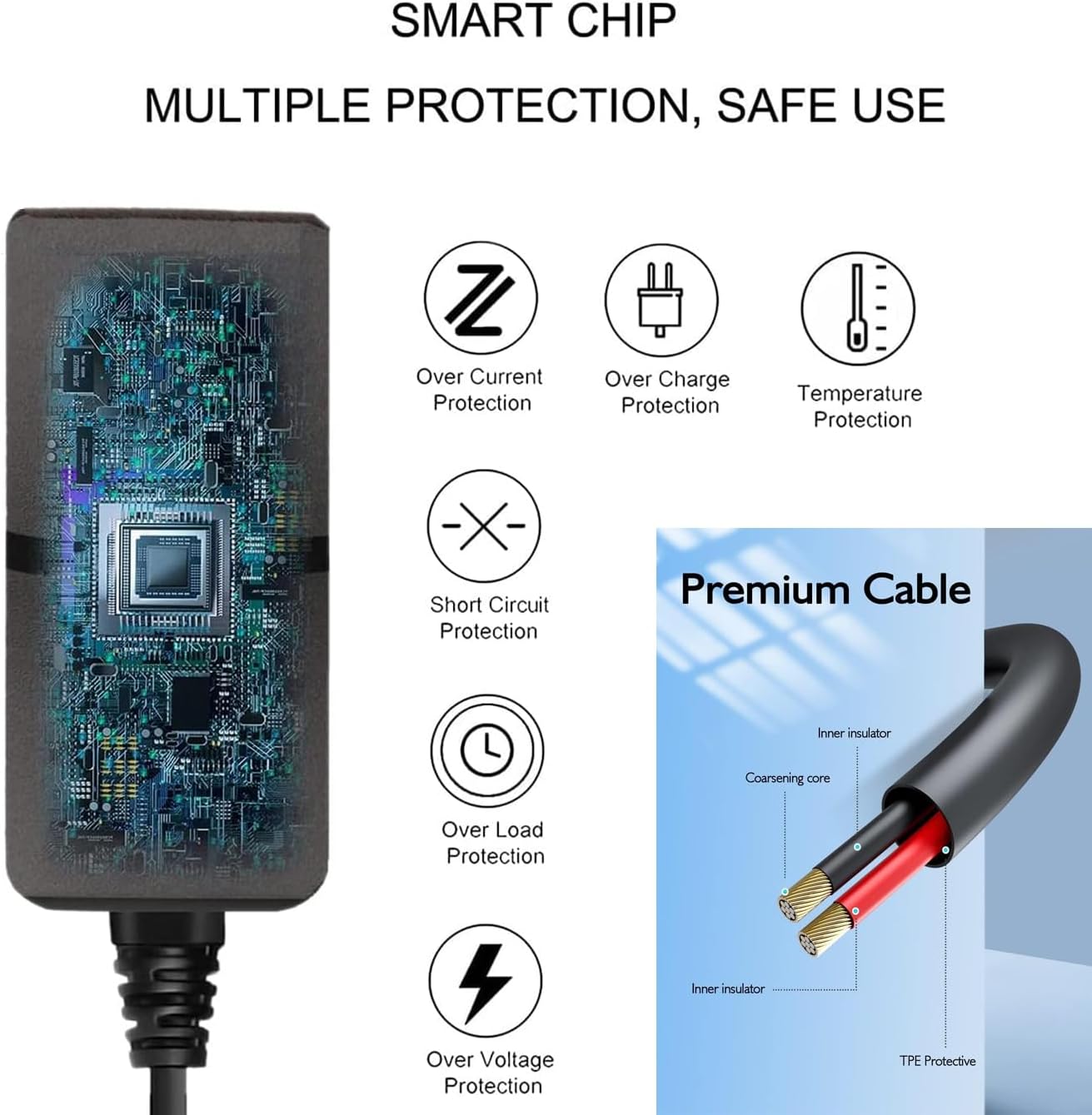
Figure 5.1: Diagram illustrating the adapter's internal smart chip and its multiple protection features.

Figure 5.2: Exploded view showing the internal components and security protection mechanisms of the adapter.
6. Troubleshooting
If you encounter issues with your UpBright AC/DC Adapter, consider the following:
- No Power to Device:
- Ensure the adapter is securely plugged into both the device and the wall outlet.
- Test the wall outlet with another device to confirm it is functional.
- Verify that your device's power input matches the adapter's 5V output and barrel round plug type.
- Adapter Overheating: While the adapter has temperature protection, excessive heat can indicate an issue. Ensure adequate ventilation around the adapter and that it is not covered. If overheating persists, discontinue use.
- Device Not Charging/Operating Correctly: Double-check all connections. If the issue persists, the problem may lie with the device itself rather than the adapter.
7. Specifications
| Feature | Specification |
|---|---|
| Input Voltage | 100-240VAC, 50/60Hz (World Wide Input) |
| Output Voltage | 5V DC |
| Output Current | 2 Amps (2000mA) |
| Wattage | 10 Watts |
| Connector Type | Barrel Round Plug Tip |
| Protection | OVP, OCP, SCP (Over Voltage, Over Current, Short Circuit Protection) |
| Product Dimensions | 4 x 3 x 2 inches |
| Item Weight | 4 ounces |
| Model Number | PAC-C-01334 5V Power Supply |
8. Warranty and Support
Your UpBright AC/DC Adapter comes with the following:
- 30-Day Refund Policy: If you are not satisfied with your purchase, you may be eligible for a refund within 30 days.
- 24-Month Exchange Policy: The product is covered by a 24-month exchange policy for manufacturing defects.
For warranty claims or technical support, please contact UpBright customer service through the retailer where the product was purchased or visit the official UpBright website for contact information.

Figure 8.1: Example of a UpBright Limited Warranty Certificate and various international outlet adapters.
