
DARKBEAM B40 PRO MAX 365NM
DARKBEAM B40 PRO MAX 365NM UV Flashlight Instruction Manual
Model: B40 PRO MAX 365NM | Brand: DARKBEAM
1. Introduction
The DARKBEAM B40 PRO MAX 365NM UV Flashlight is a powerful, USB rechargeable ultraviolet black light designed for a variety of professional and household detection needs. Featuring 3 LEDs with 36W high power and a specialized black filter optical lens, it emits pure 365nm UV light, making it highly effective for detecting pet urine, fluorescent minerals, scorpions, leaks, and for resin curing.

Figure 1: DARKBEAM B40 PRO MAX 365NM UV Flashlight
2. Safety Information
Important Note: For your safety, please do not look directly at the UV light for a long time. Prolonged direct exposure can be harmful to eyes.
Always use the flashlight responsibly and keep it out of reach of children. Ensure the flashlight is turned off when not in use to conserve battery life and prevent accidental activation.
3. What's in the Box
Upon opening your DARKBEAM B40 PRO MAX 365NM UV Flashlight package, you should find the following components:
- 1 x 3 LEDs UV 365nm flashlight
- 4 x Rechargeable Lithium Ion batteries (already inserted into the flashlight)
- 1 x USB-C Cable
- 1 x UV glasses
4. Setup
4.1 Battery Installation
The DARKBEAM B40 PRO MAX 365NM UV Flashlight comes with four rechargeable Lithium Ion batteries pre-installed. No initial battery installation is required. If replacement is ever needed, ensure correct polarity.
4.2 Charging the Flashlight
Before first use, or when the battery level is low, charge the flashlight using the provided USB-C cable. The flashlight features a Type-C fast charging port (5V/2A) for efficient charging.
- Locate the USB-C charging port on the flashlight.
- Connect one end of the provided USB-C cable to the flashlight's charging port.
- Connect the other end of the USB-C cable to a compatible USB power source (e.g., power bank, laptop, wall adapter).
- The charging indicator light will show red while charging and turn green when fully charged.
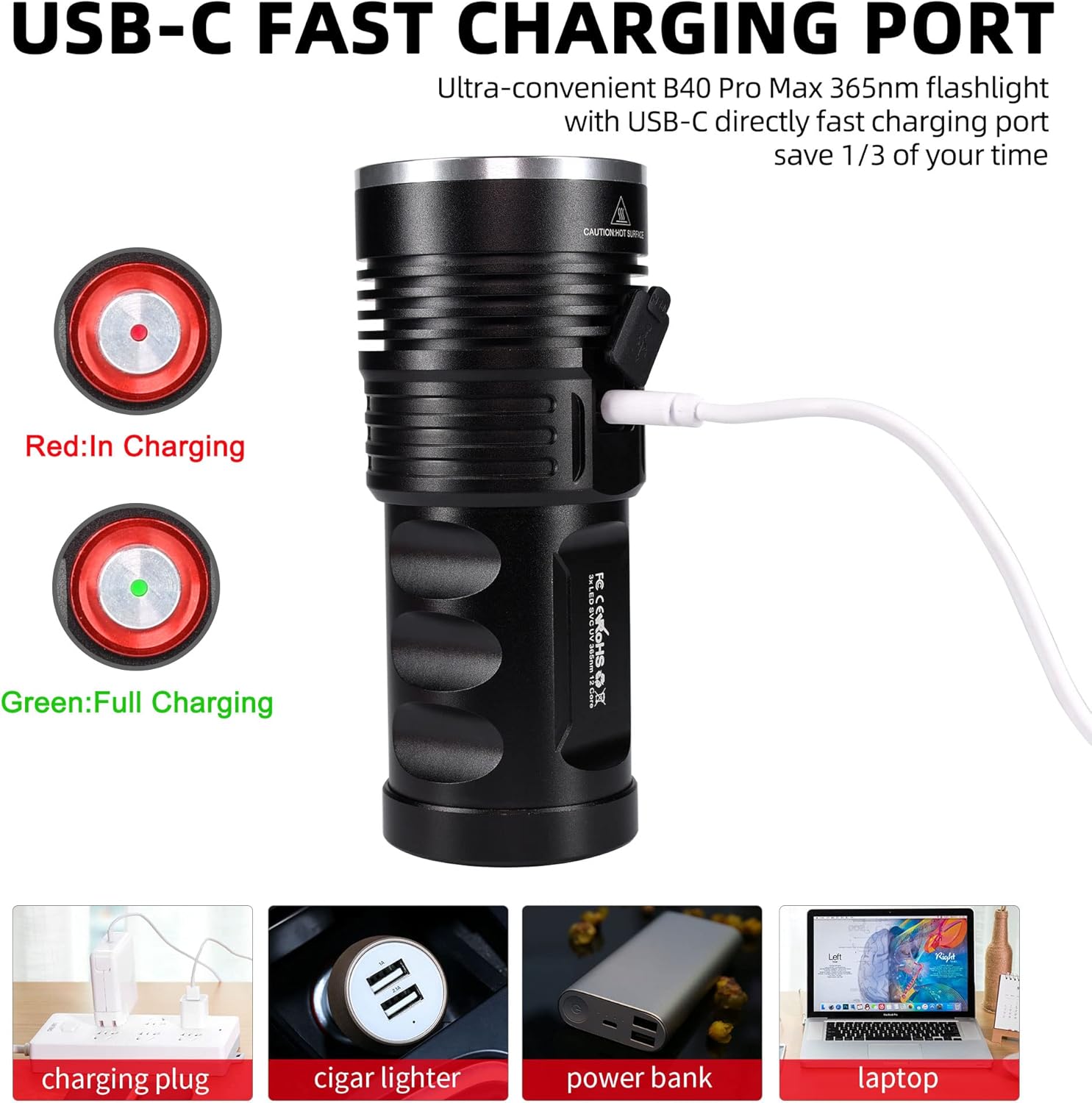
Figure 2: USB-C Fast Charging Port and Charging Indicators
5. Operating the Flashlight
5.1 Power On/Off and Mode Selection
The flashlight features a simple one-button operation for power and mode cycling.
- Press the power button once to turn the flashlight on to its brightest setting.
- Press the power button again to cycle to a lower light intensity.
- Press the power button a third time to cycle to an even lower light intensity.
- Press the power button a fourth time to turn the flashlight off.
5.2 Applications
The DARKBEAM B40 PRO MAX 365NM UV Flashlight is versatile and can be used for numerous applications due to its pure 365nm UV output:
- Pet Urine Detection: Effectively detects dried pet urine and stains on various surfaces in your home.
- Mineral and Rock Hounding: Ideal for identifying fluorescent minerals and rocks, even in daylight conditions. The specialized filter blocks visible light for clearer fluorescence.

Figure 3: Fluorescent display of ore under UV irradiation.

Figure 4: Comparison of mineral fluorescence under different UV lights.
- Scorpion Detection: Easily spot scorpions as they fluoresce under UV light, useful for outdoor activities or in scorpion-prone areas.

Figure 5: Scorpion detection using the UV flashlight.
- Leak Detection: Useful for detecting fluorescent leak dyes in automotive fluids (engine oil, A/C systems) or other industrial applications.

Figure 6: Fluorescent leak detection in an engine.
- Resin Curing: Accelerates the curing process of UV-reactive adhesive agents and resins.
- Banknote/Gemstone Identification: Helps verify the authenticity of banknotes and appraise gemstones by revealing security features or fluorescence.
- Hidden Cracks & Glue Detection: Can reveal hidden cracks or old glue on repairs in various materials.
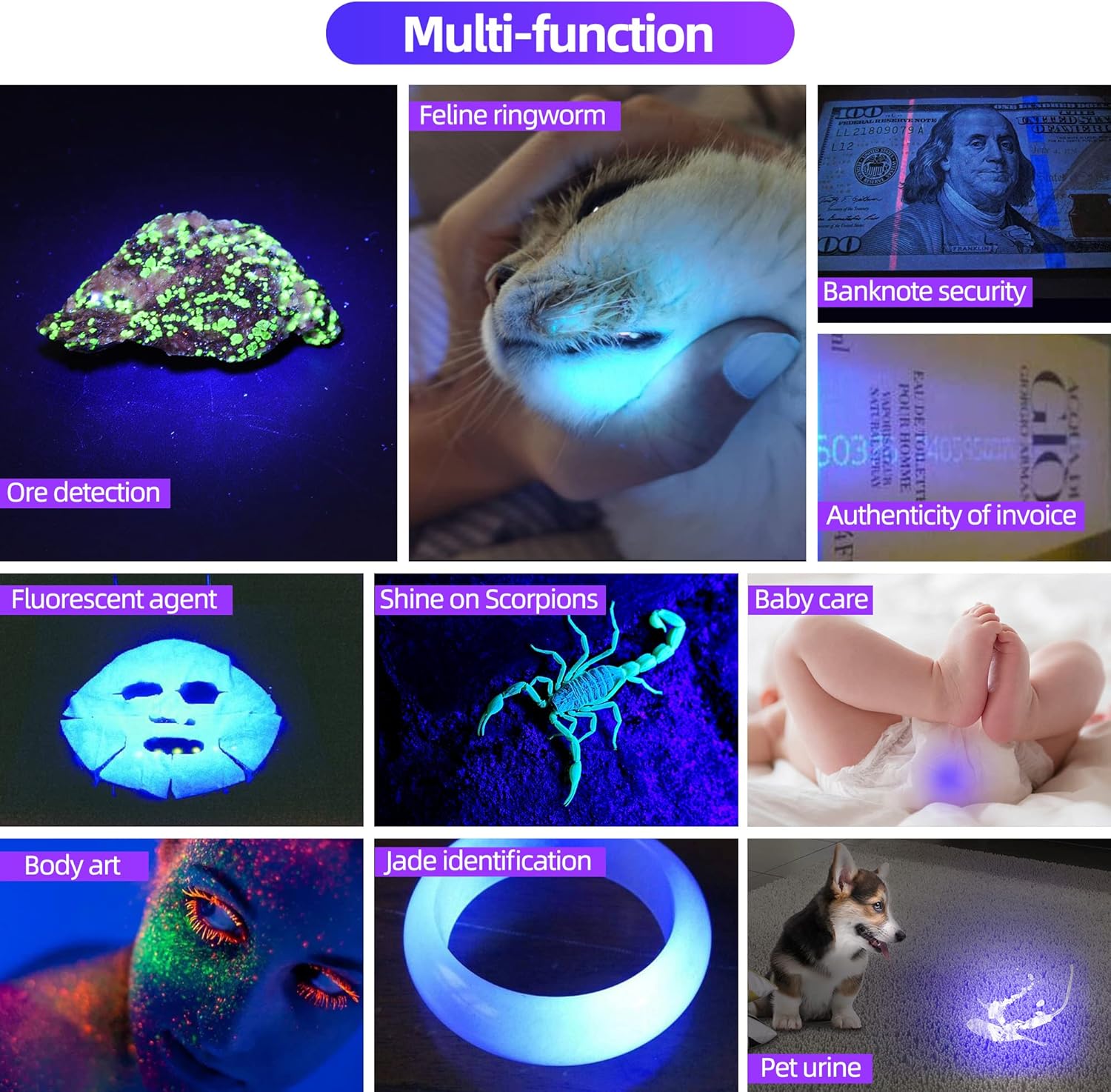
Figure 7: Multi-function applications of the UV flashlight.
6. Maintenance
6.1 Cleaning and Care
To ensure optimal performance and longevity of your DARKBEAM UV Flashlight:
- Wipe the flashlight body with a soft, damp cloth. Avoid abrasive cleaners.
- Keep the lens clean for clear and effective UV output. Use a lens cleaning cloth if necessary.
- Store the flashlight in a cool, dry place when not in use.
6.2 Water Resistance
The flashlight is rated IPX65 waterproof, meaning it is protected against low-pressure water jets from any direction. This makes it suitable for use in humid conditions or light rain. It is not designed for submersion in water or for use during swimming or showering.

Figure 8: IPX65 Water Resistance Feature.
7. Troubleshooting
If you encounter any issues with your DARKBEAM B40 PRO MAX 365NM UV Flashlight, please consider the following common solutions:
- Flashlight not turning on: Ensure the batteries are fully charged. Check that the battery compartment is securely closed and the batteries are inserted with correct polarity.
- Dim light output: Recharge the batteries. Clean the lens surface.
For persistent issues or problems not covered here, please refer to the Warranty & Support section for assistance.
8. Specifications
| Feature | Detail |
|---|---|
| Brand | DARKBEAM |
| Model Number | B40 PRO MAX 365NM |
| Special Feature | Portable, Rechargeable |
| Color | B40 uv 365nm |
| Power Source | Battery Powered |
| Light Source Type | LED (3 P50 LED four-core light sources) |
| Material | Aluminum |
| Product Dimensions | 5.4"D x 2.4"W x 2.1"H |
| Light Path Distance | 70+ Feet |
| Battery Cell Composition | Lithium Ion |
| Number of Batteries | 4 (included) |
| Water Resistance Level | IPX65 Waterproof |
| Runtime | 8 hours |
| Wattage | 36 watts |
| Radiant Intensity | 1550mW |
9. Warranty & Support
The DARKBEAM B40 PRO MAX 365NM UV Flashlight comes with a 3-Year Warranty. DARKBEAM is committed to customer satisfaction.
For any questions, concerns, or support needs, please contact DARKBEAM customer service. We provide friendly, easy-to-reach support and aim to respond within 24 hours.
Ask a question about this manual
Ask about setup, troubleshooting, compatibility, parts, safety, or missing instructions. Manuals+ will review the question and use this page’s manual context to help answer it.