
MAJORITY DAB400 Black UK
OAKCASTLE DAB400 User Manual
Bluetooth DAB+ Radio & CD Player
Model: DAB400 Black UK | Brand: MAJORITY
Important Safety Instructions
Please read all instructions carefully before using the OAKCASTLE DAB400 and retain them for future reference. Improper use may result in electric shock, fire, or other hazards.
- Do not expose this appliance to rain or moisture.
- Do not expose this appliance to direct sunlight or extreme temperatures.
- Ensure proper ventilation around the unit. Do not block ventilation openings.
- Only use attachments/accessories specified by the manufacturer.
- Disconnect the appliance from the mains power during lightning storms or when unused for long periods.
- Refer all servicing to qualified service personnel.
What's in the Box
Carefully unpack your OAKCASTLE DAB400 and ensure all items are present and in good condition:
- 1x OAKCASTLE DAB400 Unit
- 1x Remote Control
- 1x Power Adapter
- 1x User Guide (this manual)

Image: The OAKCASTLE DAB400 product box with the unit, remote control, and power adapter, indicating mains power, user guide, and remote control are included.
Product Overview
The OAKCASTLE DAB400 is a versatile hifi system designed for home use, featuring DAB+ and FM radio, a CD player, Bluetooth connectivity, and multiple input options.
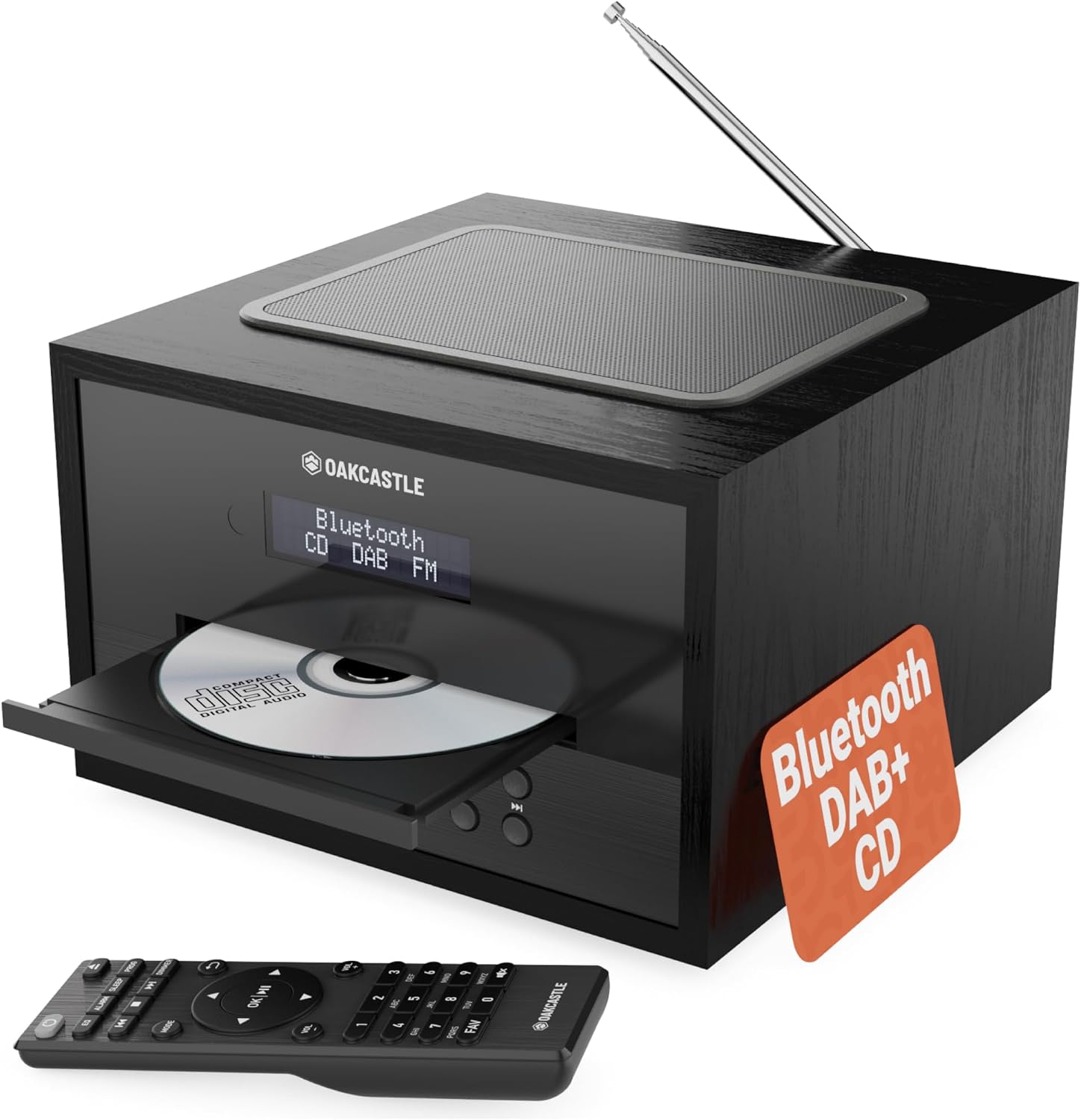
Image: Main product image, showing the OAKCASTLE DAB400 unit with CD tray closed and remote control.
Key features include a clear LED display, powerful 40W output through inbuilt speakers, and a compact design with a solid wood build.

Image: OAKCASTLE DAB400 unit with a smartphone connected via Bluetooth, highlighting solid wood build and Bluetooth 5.0.
The unit is equipped with high-quality internal speakers to deliver clear and dynamic sound.

Image: Close-up view of the internal speakers of the OAKCASTLE DAB400, illustrating the 40W dynamic sound capability.
Setup
1. Power Connection
- Insert the power adapter cable into the DC IN port on the back of the DAB400 unit.
- Plug the power adapter into a standard wall outlet.
2. Antenna Setup
Extend the telescopic antenna fully for optimal DAB+ and FM radio reception. Adjust its position for the best signal quality.
3. Initial Power On
Press the Power button on the unit or remote control to turn on the DAB400. The unit may automatically set the time and date upon first power-on.
Operating Instructions
Basic Operation
- Power On/Off: Press the Power button.
- Volume Control: Rotate the Volume knob or use the VOL+ / VOL- buttons on the remote.
- Mode Selection: Press the Mode button to cycle through DAB+, FM, CD, Bluetooth, USB, and AUX modes.
DAB+ Radio Mode
- Switch to DAB+ mode. The unit will automatically scan for available stations on first use.
- Use the Tune knob or Previous / Next buttons on the remote to navigate through stations.
- Saving Presets: To save a station, press and hold the Preset button, select a preset number using the Tune knob, and press Enter to confirm.
- Recalling Presets: Press the Preset button, then use the Tune knob to select a preset and press Enter.
FM Radio Mode
- Switch to FM mode.
- Auto Scan: Press and hold the Scan button to automatically scan and save available FM stations.
- Manual Tuning: Use the Tune knob or Previous / Next buttons to manually tune to a frequency.
- Saving/Recalling Presets: Follow the same steps as for DAB+ radio.
CD Player Operation
- Switch to CD mode.
- Press the Open/Close button to open the CD tray.
- Place a CD (MP3 CDs, CDs, CD-Rs, and HDCDs are supported) with the label side facing up into the tray.
- Press the Open/Close button again to close the tray. The unit will begin reading the disc.
- Use Play/Pause, Stop, Previous / Next buttons for playback control.

Image: OAKCASTLE DAB400 unit with the CD tray open, showing a CD inside, emphasizing compatibility with various CD formats and radio features.
Bluetooth Mode
- Switch to Bluetooth mode. The display will show "Bluetooth" and the unit will enter pairing mode.
- On your external device (smartphone, tablet, etc.), enable Bluetooth and search for available devices.
- Select "OAKCASTLE DAB400" from the list to pair. Once connected, you can stream audio from your device.
USB Playback & AUX Input
The DAB400 features a USB port and an AUX input for connecting external devices.
- USB Playback: Insert a USB flash drive into the USB port on the back of the unit. Switch to USB mode to play compatible audio files.
- AUX Input: Connect an external audio device (e.g., MP3 player) to the AUX IN port using a 3.5mm audio cable. Switch to AUX mode to play audio from the connected device.

Image: OAKCASTLE DAB400 unit in a home setting, showcasing USB playback, AUX input, and dual alarm features.
Alarm Function
The DAB400 supports dual alarms. Refer to the on-screen menu for detailed alarm setup, including alarm time, source (DAB/FM/Buzzer), and volume.
Remote Control
The included remote control provides full functionality for the DAB400, allowing you to control power, volume, mode, playback, and alarm settings from a distance.
Maintenance
- Cleaning: Use a soft, dry cloth to clean the unit. Do not use abrasive cleaners or solvents.
- CD Tray: Keep the CD tray free of dust and debris. Avoid touching the lens inside the CD player.
- Storage: If storing the unit for an extended period, disconnect it from the power outlet and store it in a cool, dry place.
Troubleshooting
| Problem | Possible Cause | Solution |
|---|---|---|
| No power | Power adapter not connected; power outlet faulty. | Ensure power adapter is securely connected and the outlet is working. |
| No sound | Volume too low; incorrect mode selected; external device not connected properly. | Increase volume; select correct mode; check connections for AUX/Bluetooth. |
| Poor radio reception | Antenna not extended; weak signal area. | Fully extend and reposition the antenna; try moving the unit to a different location. |
| CD not playing | CD inserted incorrectly; disc scratched/dirty; incompatible disc format. | Reinsert CD label side up; clean disc; ensure disc is supported (MP3 CD, CD, CD-R, HDCD). |
| Bluetooth pairing issues | Unit not in pairing mode; device too far; previously paired device connected. | Ensure DAB400 is in Bluetooth pairing mode; move device closer; disconnect from other Bluetooth devices. |
Specifications
| Product Dimensions | 20.5 x 39.5 x 13.2 cm |
| Weight | 2.2 kg |
| Power Output | 40 Watt |
| Connectivity Technology | Bluetooth |
| Speaker Type | Stereo, Inbuilt |
| Radio Tuner | DAB+, FM |
| CD Compatibility | MP3 CDs, CDs, CD-Rs, HDCDs |
| Additional Inputs | USB, AUX |
| Colour | Black |
| Model Number | DAB400 Black UK |
Warranty Information
The OAKCASTLE DAB400 comes with a 3-year coverage. Please retain your proof of purchase for warranty claims. For detailed terms and conditions, refer to the official MAJORITY website or contact customer support.

Image: A comparison chart highlighting features of the OAKCASTLE DAB400 versus other brands, including Bluetooth, DAB+/FM, CD compatibility, dual alarm, and 3-year coverage.
Support
For further assistance, technical support, or warranty inquiries, please visit the official MAJORITY website or contact their customer service department. Contact details can typically be found on the product packaging or the brand's official website.
Related documentsDAB400 Black UK


Ask a question about this manual
Ask about setup, troubleshooting, compatibility, parts, safety, or missing instructions. Manuals+ will review the question and use this page’s manual context to help answer it.