
Introduction
Thank you for purchasing the Thomson MIC401BT Stereo CD/Bluetooth Micro-Chain System. This manual provides essential information for the safe and efficient operation of your new audio system. Please read these instructions thoroughly before use and retain them for future reference.
Safety Information
- Power Source: Ensure the power supply voltage matches the rating label on the unit.
- Ventilation: Do not block ventilation openings. Allow adequate space around the unit for proper airflow.
- Water and Moisture: Do not expose the unit to rain, moisture, or dripping/splashing liquids. Keep objects filled with liquids, such as vases, away from the unit.
- Heat: Do not place the unit near heat sources such as radiators, heat registers, stoves, or other apparatus (including amplifiers) that produce heat.
- Cleaning: Unplug the unit from the wall outlet before cleaning. Use a soft, dry cloth only.
- Servicing: Do not attempt to service this product yourself. Refer all servicing to qualified service personnel.
Package Contents
Carefully unpack your micro-chain system and check that all items are present and in good condition. The package should contain:
- Thomson MIC401BT Stereo Micro-Chain System
- Remote Control
- Power Adapter
- User Manual
Packaging box of the Thomson MIC401BT Stereo CD/Bluetooth Micro-Chain System, showing the product and its features.
Product Overview
Familiarize yourself with the main components and controls of your Thomson MIC401BT system.
Front View

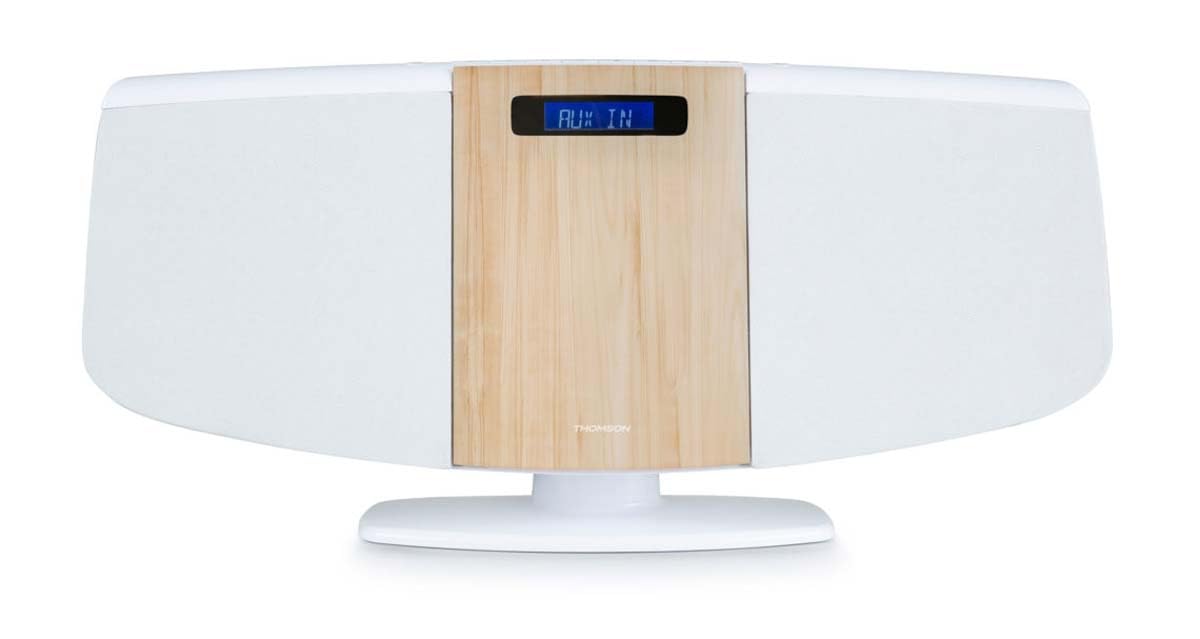
Front view of the Thomson MIC401BT micro-chain system, showcasing its white and wood-grain design with a digital display.
The front panel features the central digital display, the CD loading slot (behind the wood-grain panel), and integrated stereo speakers on either side.
Top Panel Controls and Ports

Close-up of the top panel controls of the Thomson MIC401BT, including the USB charge port, AUX-IN jack, and various function buttons for playback and settings.
The top panel includes:
- SOURCE Button: To switch between input modes (CD, Bluetooth, FM, AUX).
- SLEEP Button: To set the sleep timer.
- TIME Button: To set the clock.
- ALARM Button: To set the alarm function.
- ENTER Button: To confirm selections.
- Playback Control Buttons: Play/Pause, Stop, Skip Forward/Backward.
- USB CHARGE Port (5V === 1000mA): For charging external devices.
- AUX IN (3.5mm): For connecting external audio sources.
- Headphone Jack: For private listening.
Setup
1. Power Connection
- Connect the power adapter to the DC IN port on the back of the unit.
- Plug the power adapter into a standard wall outlet.
2. FM Antenna
Extend the FM wire antenna fully for optimal radio reception. Position it away from other electronic devices to minimize interference.
3. Placement Options
The MIC401BT can be placed on a flat surface using its integrated stand or mounted on a wall.
- Desktop Placement: Ensure the unit is placed on a stable, level surface.
- Wall Mounting: Use appropriate screws and wall plugs (not supplied) for your wall type. Consult a professional if unsure. Ensure the unit is securely fastened to prevent falling.

The Thomson MIC401BT micro-chain system mounted on a wall shelf, demonstrating its versatile placement options.
Operating Instructions
1. Power On/Off
Press the SOURCE button once to turn the unit on. Press and hold the SOURCE button to turn it off.
2. Source Selection
Press the SOURCE button repeatedly to cycle through available modes: CD, Bluetooth, FM Radio, AUX-IN.
3. CD Playback
- Select CD mode using the SOURCE button.
- Gently open the CD door (the wood-grain panel) and insert a CD with the label side facing forward.
- Close the CD door. The system will automatically begin playing the CD.
- Use the Play/Pause, Stop, and Skip buttons on the unit or remote control to manage playback.

Detailed view of the Thomson MIC401BT CD player mechanism with the disc tray open, ready for CD insertion.
4. Bluetooth Pairing
- Select Bluetooth mode using the SOURCE button. The display will show "BLUETOOTH" and flash, indicating it's in pairing mode.
- Enable Bluetooth on your mobile device (smartphone, tablet, etc.).
- Search for "MIC401BT" in your device's Bluetooth settings and select it to pair.
- Once paired, the display will stop flashing, and you can play audio from your device through the micro-chain system.
5. FM Radio
- Select FM Radio mode using the SOURCE button.
- Use the Skip Forward/Backward buttons to manually tune to a station or press and hold them for automatic scanning.
- To save a station, refer to the detailed instructions in the full manual for memory presets.
6. AUX-IN Connection
- Connect an external audio device (e.g., MP3 player) to the AUX IN port using a 3.5mm audio cable (not supplied).
- Select AUX-IN mode using the SOURCE button.
- Play audio from your connected device.
7. USB Charging
Connect your USB-powered device to the USB CHARGE port (5V === 1000mA) on the top panel to charge it. This port is for charging only and does not support media playback.
8. Alarm Function
Press the ALARM button to enter alarm setting mode. Use the navigation buttons to set the desired alarm time and source (e.g., FM radio, CD). Press ENTER to confirm each setting. Refer to the full manual for detailed alarm setup instructions.
Maintenance
- Cleaning the Unit: Use a soft, dry cloth to clean the exterior of the unit. Do not use abrasive cleaners, waxes, or solvents.
- CD Player Care: Keep the CD compartment clean. Avoid touching the lens. If a CD is dirty, wipe it with a soft, lint-free cloth from the center outwards.
- Storage: If the unit will not be used for an extended period, unplug it from the power outlet and store it in a cool, dry place.
Troubleshooting
| Problem | Possible Cause | Solution |
|---|---|---|
| No power | Power cable not connected; Power outlet faulty | Check power cable connection; Try a different outlet |
| No sound | Volume too low; Incorrect source selected; Headphones connected | Increase volume; Select correct source; Disconnect headphones |
| CD not playing | CD inserted incorrectly; CD is dirty or scratched; Incorrect mode | Re-insert CD correctly; Clean or replace CD; Select CD mode |
| Bluetooth not pairing | Device too far; Bluetooth not enabled on device; Incorrect mode | Move device closer; Enable Bluetooth on device; Select Bluetooth mode |
| Poor FM reception | Antenna not extended; Interference | Extend and adjust antenna; Move unit away from other electronics |
Specifications
- Model: MIC401BT
- Brand: Thomson (Manufactured by Big Ben)
- Connectivity: Auxiliary, Bluetooth, USB
- Color: White
- Speaker Type: Stereo
- Power Source: Electric cable
- Compatible Devices: MP3 player, Personal computer, Tablet, Television, Smartphone
- Style: CD Boombox
- Audio Power Output: 60 Watts
- Supported Standards: Bluetooth, FM
- Audio Format Support: CD, MP3
- Number of Speakers: 2
- USB Charge Output: 5V, 1000mA
Warranty and Support
This Thomson MIC401BT Stereo CD/Bluetooth Micro-Chain System comes with a 2-year warranty from the date of purchase. Please retain your proof of purchase for warranty claims.
For technical support, troubleshooting assistance beyond this manual, or warranty service, please contact your retailer or the official Thomson customer support channel. Contact information can typically be found on the product packaging or the manufacturer's website.


