
1. Introduction
The GÜDE Uni-Mig 125 SYN is a versatile inverter welding machine designed for various welding tasks. This compact 120 A device supports four primary welding processes: MIG/MAG, MMA (electrode welding), Flux (flux-cored wire welding), and TIG welding (requires optional TIG torch #41690). It is ideal for occasional and short welding tasks, suitable for small to medium projects in DIY and hobby applications.
Equipped with IGBT-supported Inverter technology, the Uni-Mig 125 SYN ensures extremely fast switching processes and precise welding current regulation. This technology simplifies welding thinner sheets and significantly reduces spatter formation. The integrated anti-stick function enhances welding comfort, especially under challenging conditions.
This manual provides essential information for the safe and efficient operation, setup, and maintenance of your GÜDE Uni-Mig 125 SYN welding machine. Please read it thoroughly before initial use.
2. Safety Instructions
WARNING: Welding can be dangerous. Always follow safety precautions to prevent injury or damage.
General Safety
- Personal Protective Equipment (PPE): Always wear a welding helmet with appropriate shade, flame-resistant gloves, protective clothing, and safety shoes. Ensure your welding helmet is in good condition and provides adequate UV/IR protection.
- Ventilation: Work in a well-ventilated area to avoid inhaling welding fumes, which can be hazardous to your health. If natural ventilation is insufficient, use local exhaust ventilation or respirators.
- Fire Hazards: Remove all flammable materials from the welding area. Keep a fire extinguisher readily available. Hot slag and sparks can travel considerable distances.
- Electrical Safety: Ensure the welding machine is properly grounded. Do not operate the machine with damaged cables or connections. Never touch live electrical parts. Disconnect power before performing any maintenance or changing accessories.
- Eye and Skin Protection: Arc rays can cause eye injury and skin burns. Protect bystanders with welding screens or ensure they wear appropriate PPE.
- Work Area: Keep the work area clean and free of clutter. Ensure stable footing and adequate lighting.
Specific Welding Machine Safety
- Do not use the welding machine in damp or wet conditions.
- Ensure the machine is placed on a stable, level surface.
- Never use the machine for purposes other than welding.
- Avoid overloading the machine. Observe the duty cycle specifications.
- Keep children and unauthorized persons away from the welding area.
3. Product Overview
The GÜDE Uni-Mig 125 SYN welding machine comes with essential accessories to get you started. Familiarize yourself with the components and controls before operation.
Included Components
- GÜDE Uni-Mig 125 SYN Universal Inverter Welding Machine
- MIG-MAG Torch
- Electrode Holder with Cable
- Ground Clamp with Cable
- Brush Hammer
- Welding Shield
- 0.45 kg Flux-Cored Wire
- 1 Gas Nozzle
- 3 Feed Nozzles (0.6/0.8/0.9 mm)
- Hose Package
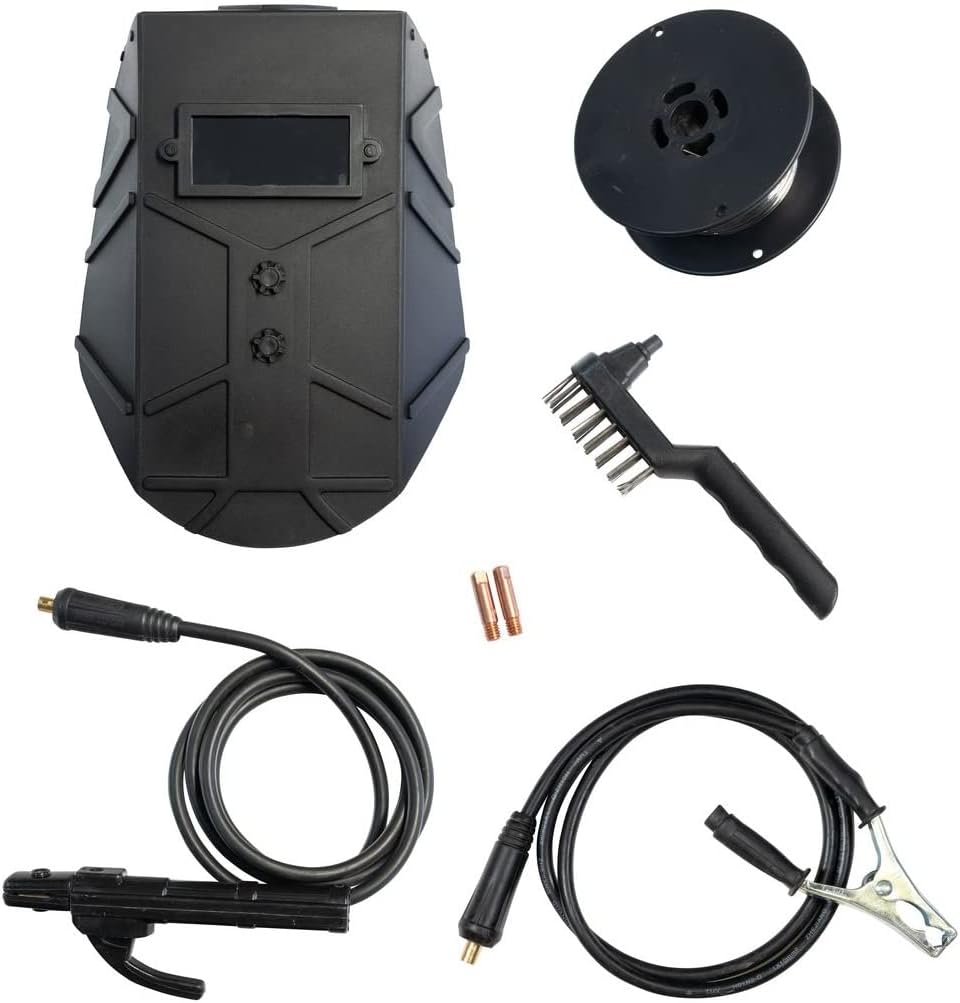
Image: Overview of the accessories included with the welding machine, such as the welding shield, wire spool, brush hammer, electrode holder, and ground clamp.

Image: The GÜDE Uni-Mig 125 SYN welding machine shown with its power cable, MIG torch, and ground clamp connected, ready for operation.
Control Panel and Connections

Image: Close-up of the welding machine's control panel, showing the main current adjustment knob, process selection switches (MIG, MMA, TIG), and wire feed settings.
The control panel features:
- Main Current Adjustment Knob: Used to set the welding current (Amperes).
- Process Selection Switches: Allows selection between MIG/MAG, MMA, and TIG welding modes.
- Wire Thickness Selector: For MIG/Flux welding, select the appropriate wire diameter (e.g., 0.6, 0.8, 0.9 mm).
- Polarity Switch: For changing polarity depending on the welding process and wire type (e.g., flux-cored wire often requires reverse polarity).
- Indicator Lights: Power on, overload/temperature warning.
- Front Connections: Positive (+) and Negative (-) terminals for electrode holder/ground clamp, and the connection for the MIG torch.
4. Setup
Unpacking and Inspection
- Carefully remove the welding machine and all accessories from the packaging.
- Inspect all components for any signs of damage during transit. Do not operate the machine if any damage is found.
- Ensure all listed components are present.
Power Connection
- Connect the welding machine to a standard 230 V, 50 Hz power outlet.
- Ensure the power circuit is protected by a 16A fuse.
- The power cable must be in perfect condition.
Connecting Welding Accessories
- Ground Clamp: Connect the ground clamp cable to the appropriate terminal on the machine (polarity depends on welding process). Securely attach the ground clamp to the workpiece or a clean, bare metal part of the welding table.
- MIG Torch: Insert the MIG torch connector into the designated socket on the front panel and secure it.
- Electrode Holder (for MMA): Connect the electrode holder cable to the appropriate terminal (polarity depends on electrode type).
- Wire Spool Installation (for MIG/Flux):
- Open the wire compartment.
- Place the wire spool onto the spindle, ensuring it rotates freely.
- Feed the wire through the guide tube and into the wire feed mechanism.
- Close the wire feed roller and adjust the pressure.
- Manually feed the wire through the MIG torch liner until it emerges from the contact tip.
- Gas Connection (for MIG/MAG): If using shielding gas, connect the gas hose from your gas cylinder to the gas inlet on the machine. Ensure the gas regulator is properly installed and set to the correct flow rate.
- Optional TIG Torch: If using the optional TIG torch (#41690), connect it according to its specific instructions and the machine's TIG setup.
5. Operating Instructions
General Operation
- Ensure all safety precautions are observed and PPE is worn.
- Turn on the main power switch of the welding machine. The power indicator light should illuminate.
- Select the desired welding process using the switches on the control panel.
- Adjust the welding current using the main adjustment knob.

Image: A welder performing a weld, demonstrating the machine in active use. Sparks and smoke are visible, highlighting the need for proper safety gear and ventilation.
MIG/MAG Welding
The Uni-Mig 125 SYN features an innovative synergistic wire feed system.
- Select MIG/MAG mode on the control panel.
- Select the wire thickness (e.g., 0.9 mm) and the approximate material thickness you intend to weld.
- The synergistic system will automatically adjust the optimal wire feed speed.
- Fine-tune the welding current as needed for your specific application.
- Ensure proper gas flow if using shielding gas.
MMA (Electrode) Welding
- Select MMA mode on the control panel.
- Insert the appropriate electrode (1.6-3.2 mm thickness) into the electrode holder.
- Adjust the welding current (20-100 A range) based on the electrode type and material thickness.
- The anti-stick function helps prevent the electrode from sticking to the workpiece, improving arc starting and welding comfort.
Flux-Cored Wire Welding
This process uses a special flux-cored wire that produces its own shielding gas, eliminating the need for an external gas cylinder.
- Ensure the machine is set to the correct polarity for flux-cored wire (usually reverse polarity).
- Select the flux-cored wire option if available, or use MIG mode with appropriate polarity.
- Adjust the wire thickness (0.9 mm) and material thickness.
- Set the welding current as required.
TIG Welding (Optional)
TIG welding with the Uni-Mig 125 SYN requires the optional TIG torch (#41690).
- Connect the TIG torch and gas supply (usually Argon) as per the TIG torch instructions.
- Select TIG mode on the control panel.
- Adjust the welding current (20-100 A range) for TIG welding.
- This machine supports Lift-TIG ignition.
6. Maintenance
Regular maintenance ensures the longevity and optimal performance of your welding machine.
Daily/Before Use
- Inspect all cables (power, welding, ground) for cuts, cracks, or damage. Replace immediately if damaged.
- Check the MIG torch nozzle and contact tip for wear or spatter buildup. Clean or replace as necessary.
- Ensure the ground clamp makes good contact with the workpiece.
Weekly/After Extended Use
- Cleaning: Disconnect the machine from power. Use compressed air to blow out dust and metal particles from the cooling vents. Do not use liquids.
- Wire Feed Mechanism: Clean the wire feed rollers and guide tubes. Check for proper tension and alignment.
- Torch Liner: If wire feeding issues occur, the MIG torch liner may need cleaning or replacement.
Storage
- Store the welding machine in a clean, dry, and dust-free environment.
- Protect it from extreme temperatures and humidity.
- Coil cables neatly to prevent damage.
7. Troubleshooting
This section addresses common issues you might encounter. For problems not listed here, contact customer support.
| Problem | Possible Cause | Solution |
|---|---|---|
| Machine does not power on | No power supply; Main switch off; Blown fuse | Check power connection; Turn on main switch; Check building fuse/circuit breaker. |
| No welding arc / Weak arc | Poor ground connection; Incorrect current setting; Wrong polarity; Worn contact tip/electrode | Ensure clean, secure ground connection; Adjust current; Check polarity setting; Replace contact tip/electrode. |
| Wire feed issues (MIG/Flux) | Wire tangled; Incorrect wire tension; Clogged torch liner; Wrong wire size selected | Untangle wire; Adjust wire tension; Clean/replace torch liner; Select correct wire size on machine. |
| Overload indicator on | Machine overheated (exceeded duty cycle); Insufficient ventilation | Allow machine to cool down; Ensure proper ventilation; Reduce welding time. |
| Excessive spatter (MIG/Flux) | Incorrect voltage/current; Insufficient gas flow (MIG); Dirty workpiece | Adjust settings; Check gas cylinder/flow rate; Clean workpiece thoroughly. |
8. Technical Specifications
Below are the technical specifications for the GÜDE Uni-Mig 125 SYN Universal Inverter Welding Machine (Model No. 20078).

Image: Detailed technical data sheet for the GÜDE Uni-Mig 125 SYN, listing electrical parameters, welding ranges, dimensions, and other key specifications.
| Specification | Value |
|---|---|
| Model Number | 20078 |
| Supply Voltage | 230 V |
| Frequency | 50 Hz |
| Protection Class | I |
| IP Rating | 21 S |
| Insulation Class | H |
| No-load Power | 36.4 W |
| Efficiency | 82% |
| Max. Power Consumption (230V) | 4.06 kVA |
| Fuse | 16A |
| No-load Voltage | 63 V |
| Max. Welding Current (230V) | 120 A |
| Welding Current Range (MIG/MAG/TIG) | 20-120 A |
| Welding Current Range (MMA) | 20-100 A |
| Duty Cycle at Max. Current (230V) | 15% |
| Recommended Material Thickness | 1-8 mm |
| Flux-Cored Wire Thickness | 0.9 mm |
| Electrode Thickness (MMA) | 1.6-3.2 mm |
| Anti-Stick Function | Yes |
| Hose Package Length | 2.0 m |
| Dimensions (L x W x H) | 380 x 300 x 285 mm |
| Net Weight | 7 kg |
9. Warranty and Support
For warranty information, please refer to the terms and conditions provided at the time of purchase or visit the official GÜDE website. Keep your proof of purchase for any warranty claims.
Customer Support
Should you require technical assistance, spare parts, or have questions regarding your GÜDE Uni-Mig 125 SYN, please contact the manufacturer directly:
- Manufacturer: GÜDE GmbH & Co. KG
- Address: Birkichstraße 6, D-74549 Wolpertshausen, Germany
- Phone: +49 (0)7904 700-0
- Fax: +49 (0)7904 700-250
- Email: info@guede.com
- Website: www.guede.com
When contacting support, please have your model number (20078) and purchase date ready.


