
1. Introduction
Thank you for choosing the 1 Hora Wireless Bluetooth 5.3 Earbuds. This manual provides detailed instructions on how to set up, operate, and maintain your new earbuds. Please read this manual carefully before use to ensure optimal performance and longevity of your device. Keep this manual for future reference.
2. Package Contents
Please check the package contents upon unboxing. If any items are missing or damaged, please contact customer support.
- 1 Pair of 1 Hora Wireless Earbuds (AUT205)
- 1 USB-C Charging Case
- 1 USB-C Charging Cable
- 3 Pairs of Ear Tips (S/M/L)
- 1 User Manual

Image: The 1 Hora Wireless Earbuds and their charging case, as included in the package.
3. Product Overview
3.1 Earbud Components
- Touch Control Area: For managing music, calls, and voice assistant.
- LED Indicator: Shows pairing status, battery level, and charging status.
- Microphone: For calls and voice commands.
- Ear Tip: Ensures comfortable fit and sound isolation.
3.2 Charging Case
- Charging Port (USB-C): For charging the case.
- Charging Indicators: Show the case's battery level.
- Earbud Charging Slots: Securely hold and charge the earbuds.
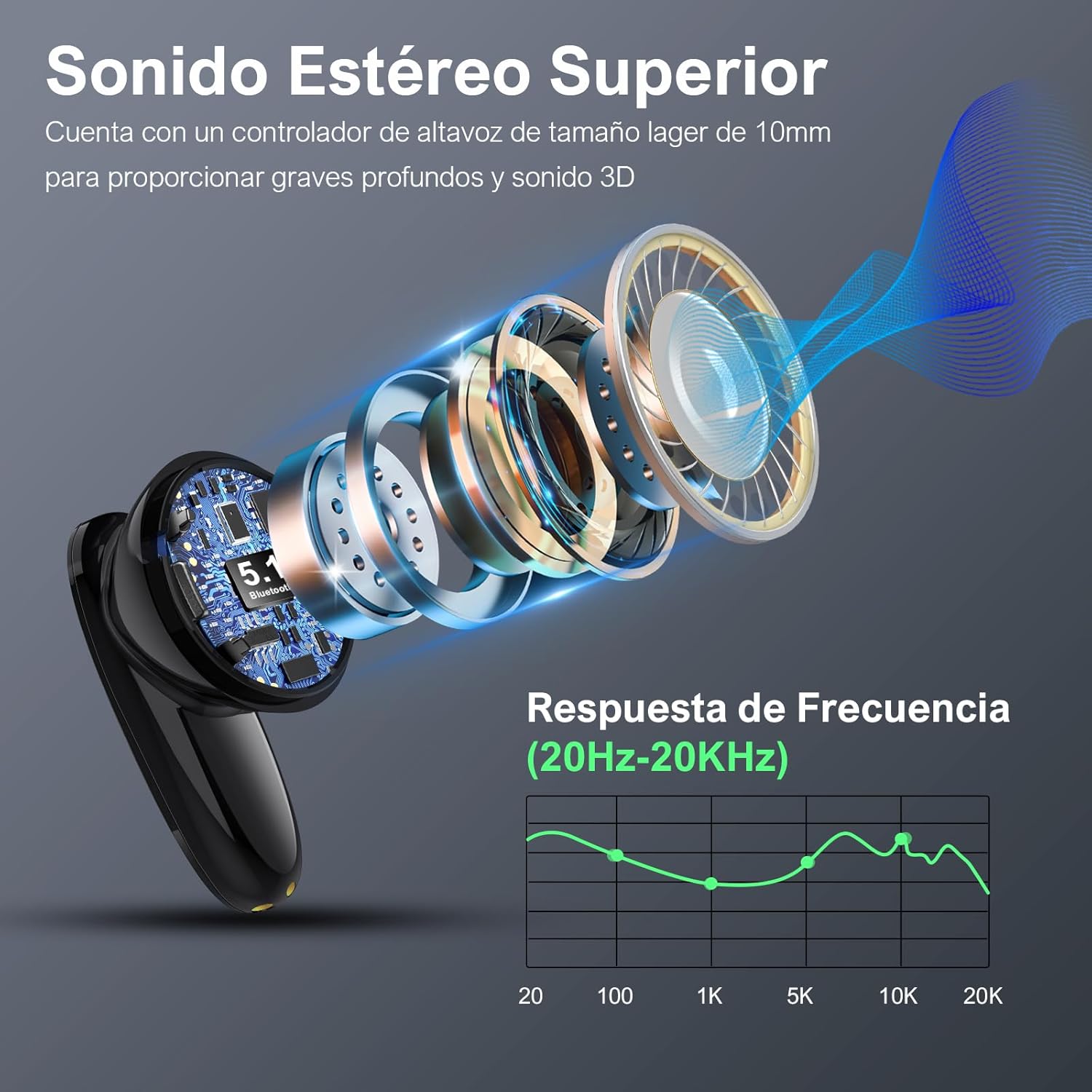
Image: An exploded view of an earbud showing its internal components, including the 10mm dynamic driver, which contributes to superior stereo sound and deep bass. A frequency response graph (20Hz-20KHz) is also displayed.
4. Setup
4.1 Charging the Earbuds and Case
Before first use, fully charge the earbuds and the charging case.
- Place the earbuds into the charging case, ensuring they are correctly seated. The earbuds will begin charging automatically.
- Connect the USB-C charging cable to the charging port on the case and the other end to a USB power source (e.g., wall adapter, computer USB port).
- The LED indicators on the case will show the charging status. Once fully charged, the indicators will change or turn off.
- A full charge provides approximately 7 hours of playback for the earbuds, with the charging case providing an additional 14 hours, totaling up to 21 hours of use.

Image: The 1 Hora earbuds and charging case illustrating their long duration playback, with 7 hours from the earbuds and an additional 14 hours from the charging case, for a total of 21 hours.
4.2 Bluetooth Pairing
The earbuds utilize Bluetooth 5.3 technology for a fast and stable connection.
- First-time Pairing: Open the charging case. The earbuds will automatically enter pairing mode, and their LED indicators will flash.
- On your device (smartphone, tablet, laptop), enable Bluetooth.
- Search for "AUT205" in the list of available Bluetooth devices and select it to connect.
- Once connected, the earbud LED indicators will stop flashing or turn off, and you will hear a confirmation tone.
- Automatic Reconnection: After the initial pairing, the earbuds will automatically connect to the last paired device when taken out of the case, provided Bluetooth is enabled on the device.

Image: A visual comparison demonstrating the stable connection provided by 1 Hora earbuds, contrasting it with less stable connections from other headphones, ensuring uninterrupted audio and gaming experience.

Image: A comparison chart highlighting the advantages of Bluetooth 5.3 technology over Bluetooth 5.0, including more stable connection, faster transmission speed, and greater transmission distance.
5. Operating Instructions
The 1 Hora earbuds feature intelligent touch controls for easy management of your audio and calls.

Image: A diagram illustrating the smart touch controls of the earbuds, showing actions for tapping, pausing, next track, voice assistant, answering calls, and rejecting calls.
5.1 Music Control
- Play/Pause: Tap the touch control area on either earbud once.
- Next Track: Tap the touch control area on the right earbud once.
5.2 Call Management
- Answer/End Call: Tap the touch control area on either earbud once.
- Reject Call: Tap the touch control area on either earbud once during an incoming call.
5.3 Voice Assistant
- Activate Voice Assistant (Siri/Google Assistant): Press and hold the touch control area on either the left or right earbud for 2 seconds.
6. Maintenance
Proper maintenance ensures the longevity and optimal performance of your earbuds.
- Cleaning: Regularly clean the earbuds and charging case with a soft, dry, lint-free cloth. Do not use harsh chemicals or abrasive materials.
- Ear Tips: Remove and clean the ear tips periodically with mild soap and water, then dry thoroughly before reattaching.
- Charging Contacts: Ensure the charging contacts on both the earbuds and the case are clean and free of debris to ensure proper charging.
- Storage: Store the earbuds in their charging case when not in use to protect them and keep them charged. Avoid extreme temperatures and humidity.
- Water Resistance: These earbuds are not waterproof. Avoid exposure to water, sweat, or moisture to prevent damage.
7. Troubleshooting
If you encounter any issues with your 1 Hora earbuds, please refer to the following common solutions:
| Problem | Possible Cause / Solution |
|---|---|
| Earbuds not charging | Ensure the protective film on the earbud charging contacts is removed. Check if the charging cable is securely connected and the power source is active. Clean the charging contacts on both earbuds and case. |
| Only one earbud is working | Place both earbuds back into the charging case, close the lid, wait a few seconds, then open the lid and try reconnecting. Ensure both earbuds are charged. Try resetting the earbuds (refer to specific reset instructions if available in a full manual, otherwise, try re-pairing). |
| Earbuds not pairing with device | Ensure Bluetooth is enabled on your device. Make sure the earbuds are in pairing mode (LEDs flashing). Forget the device from your Bluetooth list and try pairing again. Ensure earbuds are charged. |
| Connection is unstable or frequently disconnects | Ensure there are no obstacles between the earbuds and your device. Move closer to your device. Avoid strong electromagnetic interference. Ensure earbuds are fully charged. |
| Touch controls are unresponsive or slow | Ensure your fingers are clean and dry. Try restarting the earbuds by placing them in the case and taking them out again. |
8. Specifications
Key technical specifications for the 1 Hora Wireless Bluetooth 5.3 Earbuds (Model AUT205):
| Feature | Specification |
|---|---|
| Model Name | AUT205 |
| Connectivity Technology | Bluetooth 5.3, Wireless |
| Earbud Battery Life | Up to 7 hours (single charge) |
| Total Playtime (with case) | Up to 21 hours |
| Charging Time | Approx. 1.5 hours |
| Charging Port | USB-C |
| Driver Size | 10mm Dynamic Driver |
| Frequency Response | 20 Hz - 20 KHz |
| Impedance | 32 Ohm |
| Wireless Range | Up to 10 meters (33 feet) |
| Control Type | Touch Control, Voice Control |
| Product Weight | 7.6 Grams |
| Material | Plastic |
| Compatible Devices | Tablets, Laptops, Mobile Phones |
9. Warranty and Support
1 Hora is committed to providing high-quality products and excellent customer service.
- Warranty: Your product is covered by a 365-day replacement warranty from the date of purchase. This warranty covers manufacturing defects.
- Customer Service: For any questions, technical support, or warranty claims, please contact our customer service team. We aim to provide 24-hour customer support.
- Returns: Enjoy 30 days of free returns.


Image: The 1 Hora Wireless Earbuds (AUT205) and a banner highlighting key features such as Deep Bass, Touch Control, Type-C Charging, Bluetooth 5.3, Call Receiving, and Lightweight design.