
Introduction
Thank you for choosing the Bozily Golf Rangefinder. This device is designed to provide accurate distance measurements for golf, hunting, hiking, and construction. Featuring advanced optical technology, continuous scanning, and slope compensation, it enhances your precision and game. Please read this manual thoroughly to understand the proper operation and care of your new rangefinder.

Image: The Bozily Golf Rangefinder, a compact device with red and black accents, designed for precise distance measurement.
Key Features
- HD 6X Optical Lens: Equipped with a multi-layer coated optical lens for reduced reflection, increased light transmittance, and brighter, clearer images. Offers 6X adjustable magnification and a 7-degree field of view, with a distance range of 5-1000 yards.
- Continuous Scanning Function: Features a 25mm objective lens aperture. Mode 1 allows for continuous scanning, providing faster, more stable, and accurate readings.
- Slope and Flag Lock Function: Mode 2 displays both the angle and slope-adjusted distance. The flagpole lock feature enhances aiming and provides vibration feedback upon target identification.
- High-Speed Reading: Delivers laser rangefinding with an accuracy of ±1 yard.
- Ergonomic Design: Crafted for comfortable handling and ease of use.
- Power Supply: Comes with two free lithium batteries, ensuring extended use without immediate need for recharging.
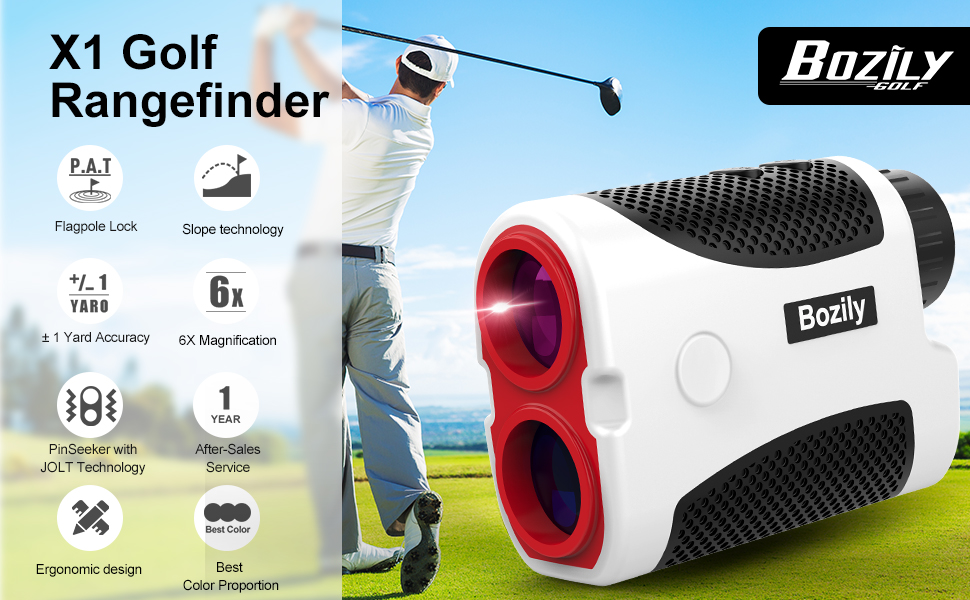
Image: Overview of the Bozily X1 Golf Rangefinder's key features, including Flagpole Lock, Slope technology, ±1 Yard Accuracy, 6X Magnification, PinSeeker with JOLT Technology, 1 Year After-Sales Service, and Ergonomic design.
Package Contents
Please check the package carefully to ensure all items are present:
- Bozily Golf Rangefinder (Model X1)
- Protective Carrying Case
- 2 x Lithium Batteries
- User Manual (this document)
- Cleaning Cloth

Image: The Bozily Golf Rangefinder shown with its protective carrying case, highlighting portability.
Setup
1. Battery Installation
- Locate the battery compartment on the device.
- Open the battery cover.
- Insert the provided lithium battery, ensuring correct polarity (+ and -).
- Close the battery cover securely.
2. Adjusting the Eyepiece
Rotate the eyepiece (diopter adjustment) until the display and target appear clear and sharp. This adjustment compensates for individual eyesight differences.
Operating Instructions
Power On/Off
Press the Power/Measurement button once to turn on the device. The device will automatically power off after a period of inactivity to conserve battery.
Mode Selection
Press the Mode button to cycle through the available measurement modes:
- Mode 1: Continuous Scan Mode
In this mode, you can continuously scan multiple targets to get real-time distance updates. Press and hold the Power/Measurement button while sweeping across targets.

Image: Display view of the Bozily Rangefinder in Continuous Scan Mode, showing multiple distance readings to flags.
- Mode 2: Slope and Flag Lock Mode
This mode is ideal for golf. It provides the actual distance, the angle, and the slope-adjusted distance. When targeting a flagpole, the device will vibrate to confirm flag lock.

Image: A golfer using the Bozily Rangefinder, with an overlay showing the display in Slope and Flag Lock Mode, indicating both direct and slope-adjusted distances.

Image: Diagram illustrating the Slope Mode, showing the straight-line distance, horizontal distance, and slope-adjusted distance to a target on an incline.
Taking a Measurement
- Look through the eyepiece and aim the crosshairs at your desired target.
- Press the Power/Measurement button once to activate the laser and obtain a reading.
- The distance will be displayed on the internal LCD.

Image: A person looking through the eyepiece of the Bozily Rangefinder, demonstrating its high-speed reading capability with ±1 yard accuracy.
Maintenance and Care
- Cleaning Lenses: Use the provided cleaning cloth or a soft, lint-free cloth to gently wipe the lenses. Avoid using abrasive materials or harsh chemicals.
- Cleaning Body: Wipe the body of the rangefinder with a soft, damp cloth.
- Storage: Store the device in its protective carrying case when not in use. Keep it in a cool, dry place, away from direct sunlight and extreme temperatures.
- Battery Care: Remove the battery if the device will not be used for an extended period to prevent leakage.
- Water Resistance: The device has an IP54 rating, meaning it is protected from dust and splashing water. Do not submerge the device in water.
Troubleshooting
| Problem | Possible Cause | Solution |
|---|---|---|
| Device does not power on. | Battery is dead or incorrectly installed. | Check battery polarity. Replace with a new battery if necessary. |
| Inaccurate readings. | Lens is dirty; target is too small or reflective; unstable hand. | Clean lenses. Aim at a larger target. Ensure a steady hand or use continuous scan mode. |
| Display is blurry. | Eyepiece not adjusted. | Rotate the eyepiece (diopter adjustment) until the display is clear. |
| No flag lock vibration. | Not in Mode 2; target not clearly identified as flagpole. | Ensure device is in Mode 2. Re-aim carefully at the flagpole. |
Specifications
| Feature | Detail |
|---|---|
| Brand | Bozily |
| Model Name | X1 |
| Magnification | 6X |
| Measuring Range | 5-1000 yards |
| Accuracy | ±1 yard |
| Field of View | 7 degrees |
| Objective Lens Aperture | 25mm |
| International Protection Rating | IP54 |
| Battery Type | Lithium (2 included) |
| Color | Black / White with Red accents |
Warranty and Support
Bozily offers a 12-month warranty for any product defects and customer dissatisfaction. Additionally, a 30-day return policy is available via Amazon.
For any questions, concerns, or support inquiries, please contact Bozily customer service. When contacting support, please provide your order number for faster assistance.
Bozily aims for a 24-hour reply to all customer inquiries.