
DELTACO CM769
DELTACO Portable Bluetooth Speaker STREETZ CM769 IPX7
Model: CM769
Introduction
Thank you for purchasing the DELTACO Portable Bluetooth Speaker STREETZ CM769 IPX7. This manual provides essential information for the safe and efficient operation of your new speaker. Please read it thoroughly before use and keep it for future reference.
Safety Information
- Do not expose the speaker to extreme temperatures or direct sunlight for prolonged periods.
- Avoid dropping or subjecting the speaker to strong impacts.
- Keep the speaker away from water and liquids, despite its IPX7 rating, to prevent damage to internal components.
- Do not attempt to disassemble, repair, or modify the speaker yourself. This will void the warranty.
- Use only the specified charging cable and power adapter.
- Clean the speaker with a soft, dry cloth. Do not use abrasive cleaners or solvents.
Package Contents
Please check the package for the following items:
- DELTACO Portable Bluetooth Speaker STREETZ CM769 IPX7
- Charging Cable (USB-C)
- User Manual
Product Overview
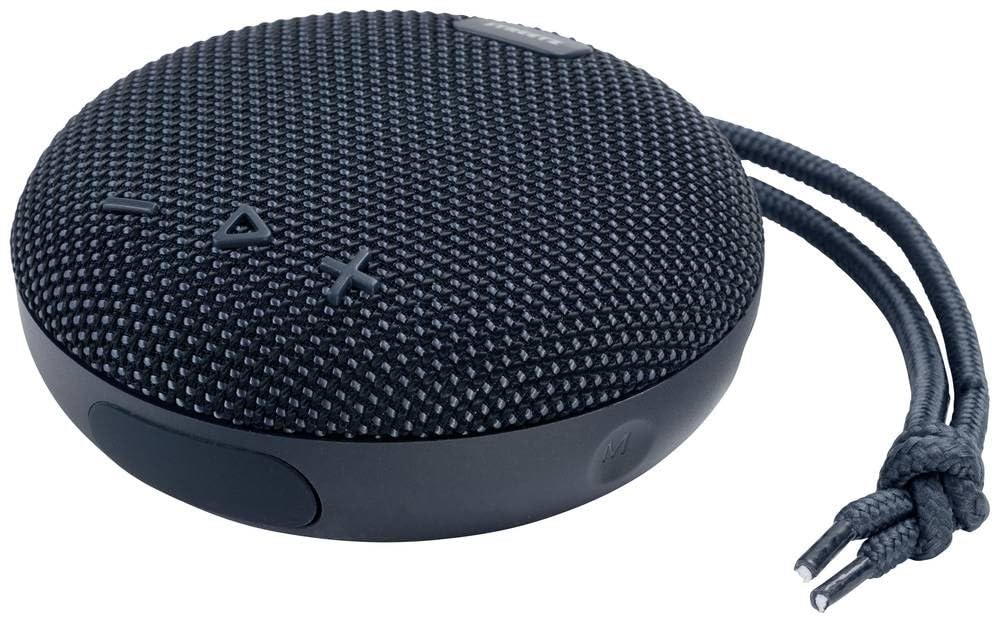
The DELTACO Portable Bluetooth Speaker STREETZ CM769 IPX7 features a compact, round design with a dark grey mesh fabric covering the speaker grille. On the top surface, there are embossed control buttons for volume down (-), play/pause (triangle), and volume up (+). A durable braided strap is attached to the side for easy portability. The speaker's base is made of a smooth, dark grey material.
Controls and Ports:
- Power Button: Located on the side/bottom. Press and hold to turn on/off.
- Volume Down (-): Press to decrease volume.
- Play/Pause (Triangle): Press to play or pause audio.
- Volume Up (+): Press to increase volume.
- USB-C Charging Port: For charging the speaker.
Setup
1. Charging the Speaker:
- Connect the USB-C charging cable to the speaker's charging port.
- Connect the other end of the cable to a USB power adapter (not included) or a computer's USB port.
- The LED indicator will show the charging status. It will typically turn off or change color when fully charged.
2. Bluetooth Pairing:
- Ensure the speaker is fully charged.
- Press and hold the Power button to turn on the speaker. It will enter Bluetooth pairing mode automatically, indicated by a flashing LED light.
- On your device (smartphone, tablet, laptop), enable Bluetooth and search for available devices.
- Select "STREETZ CM769" from the list of devices.
- Once paired, the LED indicator will stop flashing and remain solid, and you may hear a confirmation tone.
Operating
Power On/Off:
- To turn on: Press and hold the Power button for approximately 3 seconds.
- To turn off: Press and hold the Power button for approximately 3 seconds.
Music Playback:
- Play/Pause: Press the Triangle button once.
- Volume Up: Press the '+' button.
- Volume Down: Press the '-' button.
- Next Track: Press and hold the '+' button.
- Previous Track: Press and hold the '-' button.
Hands-Free Calling:
- Answer Call: Press the Triangle button once.
- End Call: Press the Triangle button once during a call.
- Reject Call: Press and hold the Triangle button for 2 seconds.
Maintenance
- Clean the speaker surface with a soft, dry, lint-free cloth.
- Do not use alcohol, benzene, thinners, or other chemical cleaners, as they may damage the casing or finish.
- Store the speaker in a cool, dry place when not in use for extended periods.
- Avoid exposing the speaker to extreme temperatures or high humidity.
Troubleshooting
| Problem | Possible Cause | Solution |
|---|---|---|
| Speaker does not turn on. | Battery is low or depleted. | Charge the speaker fully. |
| Cannot pair with device. | Bluetooth is off on device; speaker is not in pairing mode; too far from device. | Ensure Bluetooth is on; put speaker in pairing mode; move device closer to speaker (within 10m). |
| No sound or low volume. | Volume too low on speaker or device; speaker not connected. | Increase volume on both speaker and device; ensure speaker is paired and connected. |
| Sound distortion. | Volume too high; interference. | Lower volume; move speaker away from other electronic devices. |
Specifications
- Model Name: CM769
- Product Dimensions: 14 x 11 x 8 cm
- Weight: 1 Kilogram
- Connectivity Technology: Bluetooth
- Audio Output Mode: Stereo
- Mounting Type: Tabletop
- Special Feature: Bluetooth, Waterproof (IPX7)
- Recommended Product Use: For smartphone or tablet
- Compatible Devices: Laptop, Smartphone
- Controller Type: Touchpad
- Manufacturer: DELTACO
- Country of Origin: China
- ASIN: B0BGCGF91Y
Warranty and Support
This product is covered by a standard manufacturer's warranty. For detailed warranty information, please refer to the warranty card included in the package or contact your local DELTACO distributor or retailer. For technical support or service inquiries, please visit the official DELTACO website or contact their customer service.
Guaranteed Software Updates Until: Unknown
Ask a question about this manual
Ask about setup, troubleshooting, compatibility, parts, safety, or missing instructions. Manuals+ will review the question and use this page’s manual context to help answer it.