
FTOYIN FT-FL-2
FTOYIN Small Powerful EDC Flashlight
User Manual
Model: FT-FL-2
Introduction
The FTOYIN Mini EDC Flashlight is a compact, high-performance lighting tool designed for everyday carry, outdoor activities, and emergency situations. With an ultra-high output of 900 lumens, it provides powerful illumination in various environments. Its durable, waterproof design and versatile lighting modes make it an essential companion for camping, hiking, fishing, and general utility.
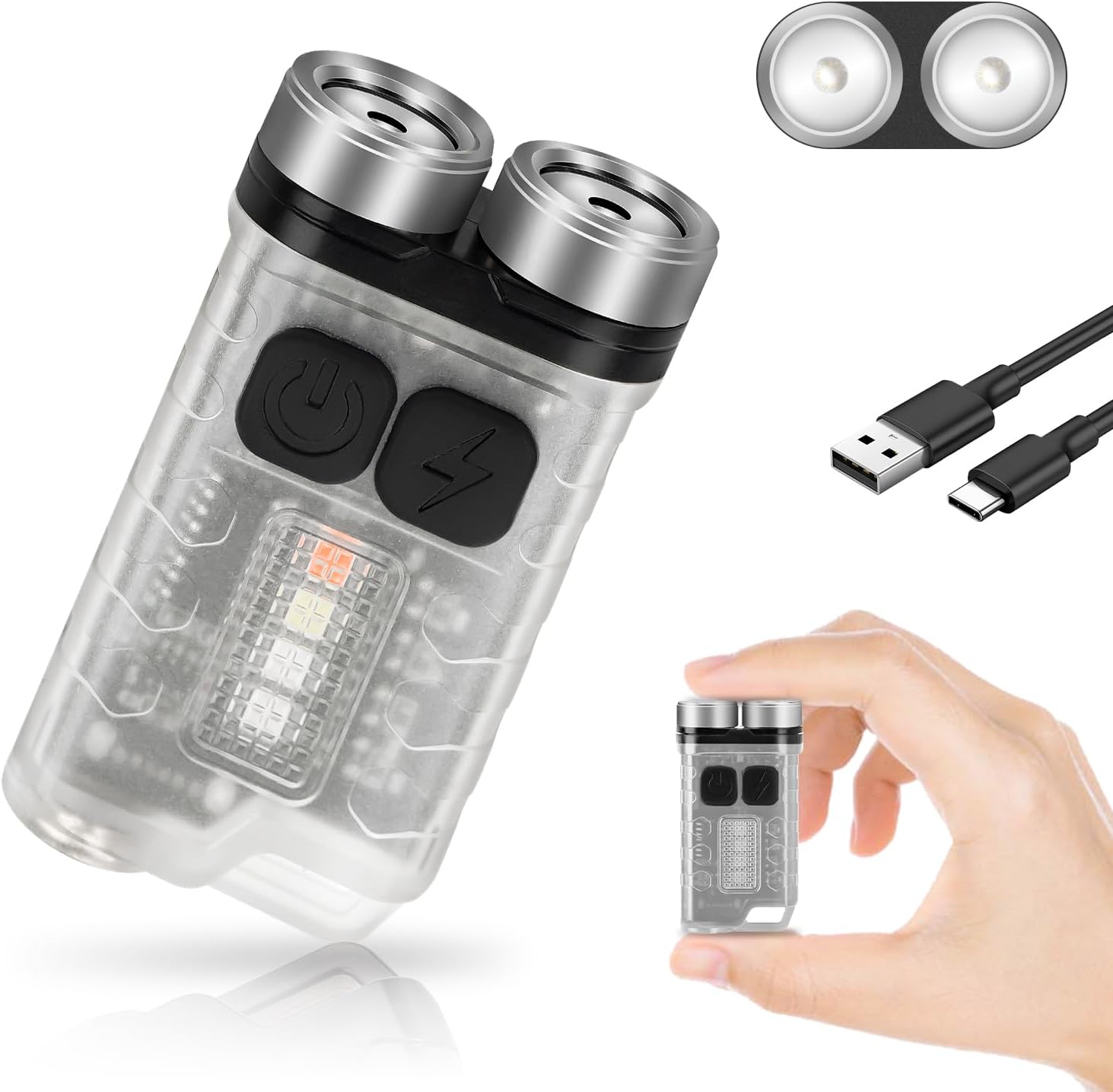
Image: The FTOYIN EDC Flashlight, showcasing its compact size, dual light sources, and included USB-C charging cable. A hand is shown holding the flashlight to illustrate its small form factor.

Image: Visual representation of the FTOYIN EDC Flashlight's dimensions (2.2 inches by 1.2 inches) and examples of its portability, including being carried in a backpack, a jeans pocket, and attached to a keychain.
Setup
Charging the Flashlight
The FTOYIN EDC Flashlight is equipped with a built-in rechargeable polymer lithium battery. Before first use, or when the battery is low, charge the device using the provided Type-C USB cable.
- Locate the Type-C charging port on the flashlight.
- Connect one end of the Type-C USB cable to the flashlight's charging port.
- Connect the other end of the USB cable to a compatible USB power source (e.g., power bank, laptop, PC, or USB wall adapter).
- The charging indicator light will show the charging status. A full charge typically takes approximately 2.5 hours.
Once fully charged, the flashlight can provide up to 76 hours of battery life depending on the mode of use.
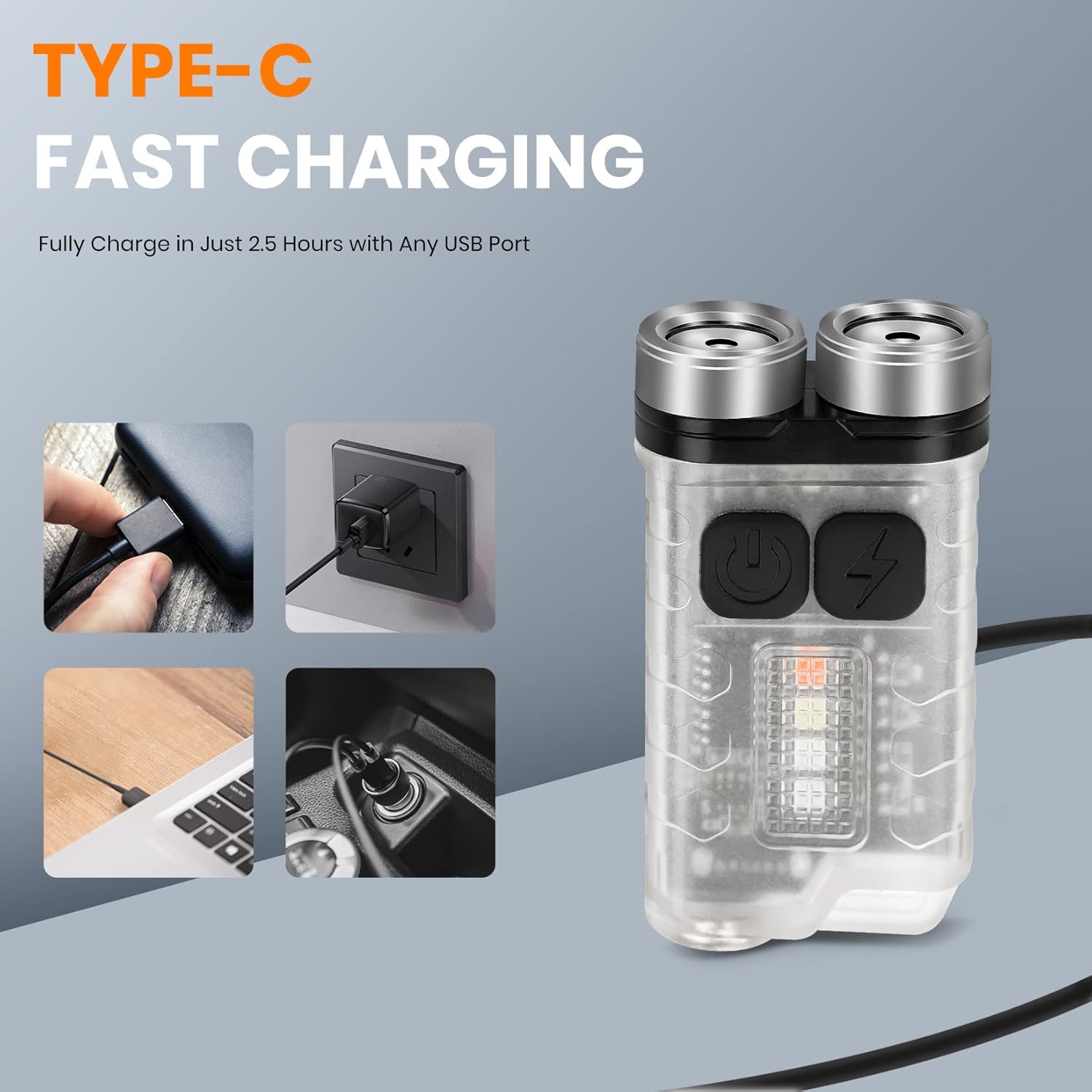
Image: The FTOYIN EDC Flashlight connected via its Type-C port, illustrating various charging methods including a wall adapter, laptop, and car charger, highlighting its fast charging capability in 2.5 hours.
Operating Instructions
The FTOYIN EDC Flashlight features 10 distinct lighting modes, divided into main light and auxiliary light functions.
Main Light Modes (5 Modes)
- Extremely Bright: Provides maximum illumination (900 lumens).
- High: Bright illumination for general use.
- Medium: Balanced brightness for extended use.
- Low: Dim illumination for close-range tasks or preserving night vision.
- Energy Saving: Lowest brightness for maximum battery life.
To activate Extremely Bright mode: Long press the switch of the main light.
To activate other Main Light modes: Double click the main light switch to turn on, then click to cycle through High, Medium, Low, and Energy Saving modes. Long press to turn off.
Auxiliary Light Modes (5 Modes)
- White Light: General white light from the side.
- UV (365nm): Ultraviolet light for banknote verification or detecting fluorescent materials.
- Red Light: For preserving night vision or signaling.
- Red Flashing: Warning or emergency signal.
- Red and Blue Flashing: Enhanced warning or emergency signal.
To activate Auxiliary Light modes: Double click the auxiliary light switch to turn on, then click to cycle through White, UV, Red, Red Flashing, and Red and Blue Flashing modes. Long press to turn off.
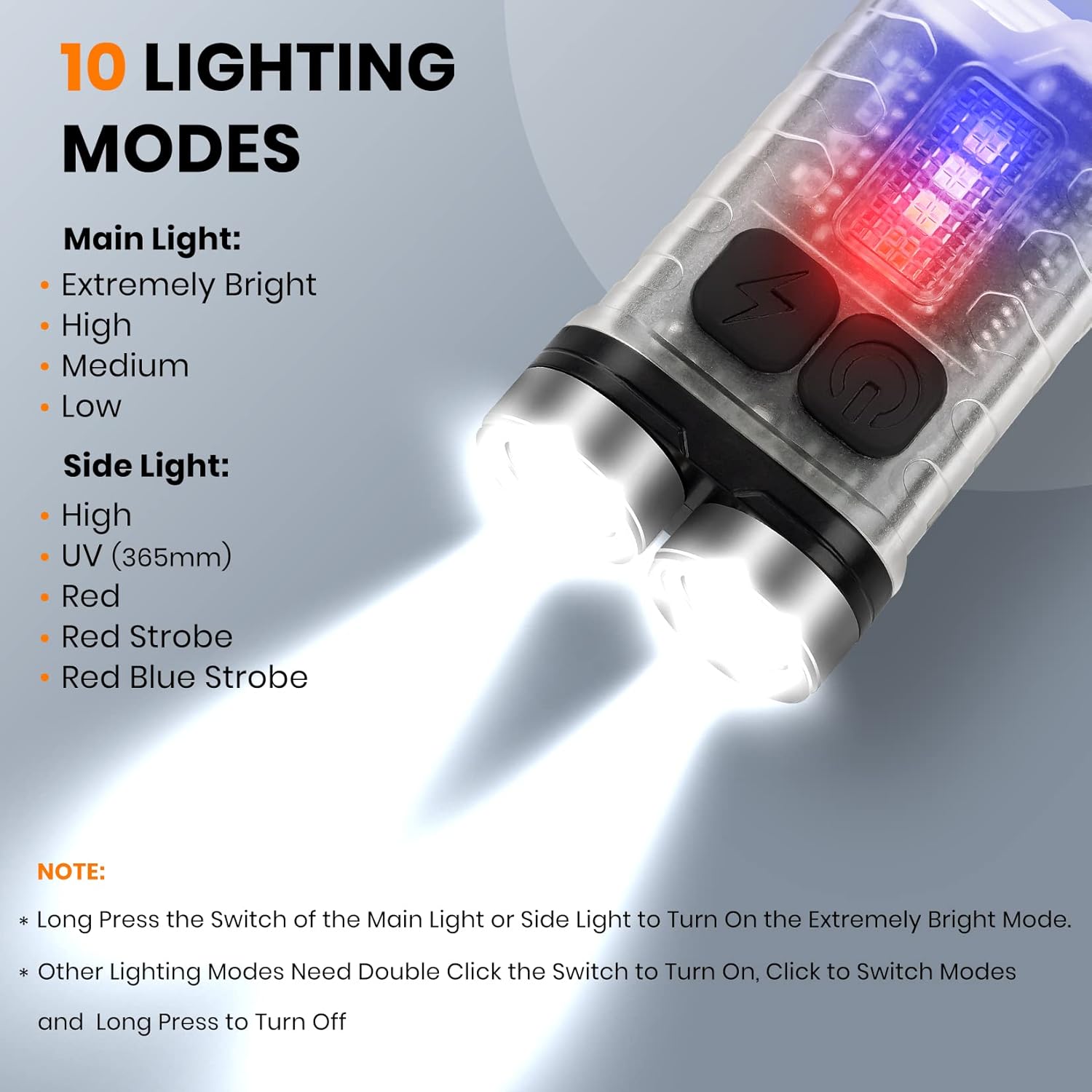
Image: A detailed diagram illustrating the 10 lighting modes of the FTOYIN EDC Flashlight, including five main light modes (Extremely Bright, High, Medium, Low, Energy Saving) and five side light modes (High, UV, Red, Red Strobe, Red Blue Strobe), along with instructions for activation.
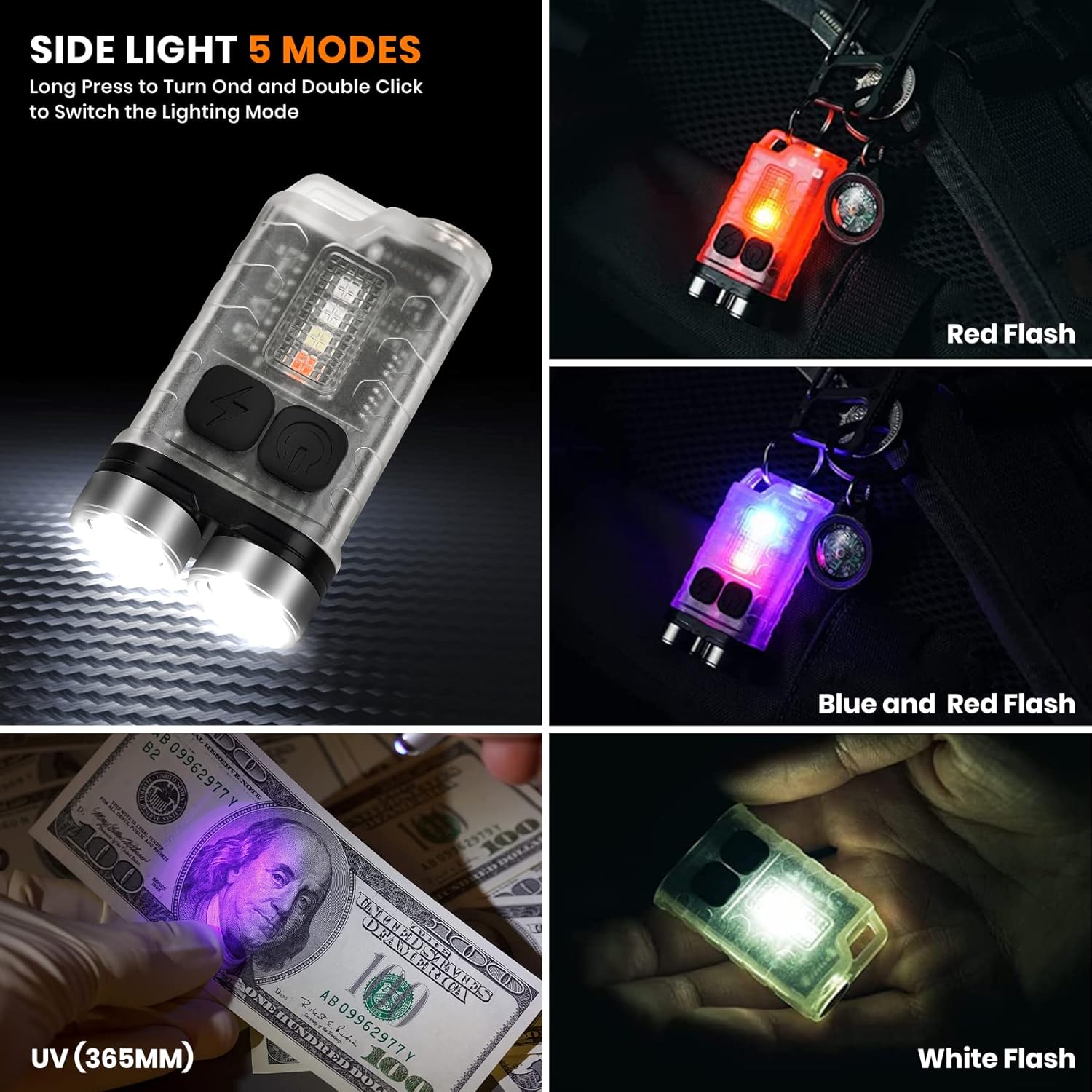
Image: Demonstrations of the FTOYIN EDC Flashlight's side light modes, including Red Flash, Blue and Red Flash, UV (365nm) for banknote verification, and White Flash, showing the versatility of the auxiliary lighting.
Magnetic Base Functionality
The flashlight features a strong magnet on its back, allowing it to be securely attached to metal surfaces. This hands-free capability is ideal for tasks requiring both hands, such as vehicle repairs, working in confined spaces, or illuminating a workspace.

Image: Various applications of the FTOYIN EDC Flashlight, demonstrating its magnetic base for hands-free use (e.g., attached to an oven, under a sink) and the UV light function for detecting stains or verifying currency.
Maintenance
Cleaning
To maintain optimal performance and appearance, clean the flashlight regularly. Use a soft, damp cloth to wipe the exterior. Avoid using abrasive cleaners or solvents, as these can damage the PC and stainless steel materials.
Storage
When not in use for extended periods, store the flashlight in a cool, dry place away from direct sunlight and extreme temperatures. It is recommended to charge the battery every 3-6 months to maintain its health, even if not in use.
Water Resistance
The FTOYIN EDC Flashlight is designed with an IP65 waterproof rating, meaning it is protected from dust ingress and low-pressure water jets from any direction. While it can withstand splashes and light rain, it is not intended for submersion in water. Ensure the charging port cover is securely closed to maintain water resistance.
Troubleshooting
| Problem | Possible Cause | Solution |
|---|---|---|
| Flashlight does not turn on. | Battery is depleted. | Charge the flashlight using the Type-C USB cable. |
| Flashlight does not turn on. | Incorrect operation (e.g., not long-pressing for extremely bright, or not double-clicking for other modes). | Refer to the "Operating Instructions" section for correct button presses for each mode. |
| Light is dim or flickers. | Low battery. | Recharge the flashlight. |
| Flashlight not charging. | Charging cable or adapter issue. | Try a different Type-C USB cable or a different USB power source. Ensure connections are secure. |
| Water ingress after exposure. | Charging port cover not securely closed. | Always ensure the Type-C charging port cover is firmly sealed when not charging, especially in wet conditions. |
Specifications
- Model: FT-FL-2
- Brand: FTOYIN
- Light Output: Up to 900 Lumens (Main Light)
- Light Modes: 10 (5 Main Light, 5 Auxiliary Light)
- Battery: Built-in Polymer Lithium Battery
- Charging Port: Type-C USB
- Charging Time: Approximately 2.5 hours
- Max Battery Life: Up to 76 hours (Energy Saving Mode)
- Material: PC + Stainless Steel
- Waterproof Rating: IP65
- Dimensions: 7.62 x 7.62 x 33.02 cm (3 x 3 x 13 inches)
- Weight: 31 grams (1.1 oz)
- Special Features: Magnetic Base, Keychain Attachment
Warranty and Support
Information regarding product warranty and customer support is not available in the provided product data. Please refer to the product packaging or the manufacturer's official website for details on warranty coverage and how to contact customer support for assistance.
Ask a question about this manual
Ask about setup, troubleshooting, compatibility, parts, safety, or missing instructions. Manuals+ will review the question and use this page’s manual context to help answer it.