
1. Introduction
This manual provides essential information for the proper installation, operation, and maintenance of your Antec NeoECO NE850GM White 850W 80 Plus Gold Full Modular Power Supply. Please read this manual thoroughly before installation to ensure optimal performance and safety.

Image 1.1: The Antec NeoECO NE850GM White 850W Power Supply. This image displays the power supply unit from an angled perspective, highlighting its white casing, fan grille, power switch, and AC inlet.
2. Safety Information
Always observe the following safety precautions:
- Ensure the power supply is disconnected from the AC outlet before installation or handling.
- Do not open the power supply casing. High voltages are present inside, which can cause electric shock.
- Install the power supply in a well-ventilated area, away from heat sources and moisture.
- Use only the modular cables provided with this power supply. Using incompatible cables may damage the unit or connected components.
- Ensure all cables are securely connected before powering on the system.
3. Package Contents
Verify that all items are present in your package:
- Antec NeoECO NE850GM White 850W Power Supply Unit
- AC Power Cord
- Modular Cable Set (refer to Image 3.1 for details)
- Mounting Screws
- User Manual (this document)
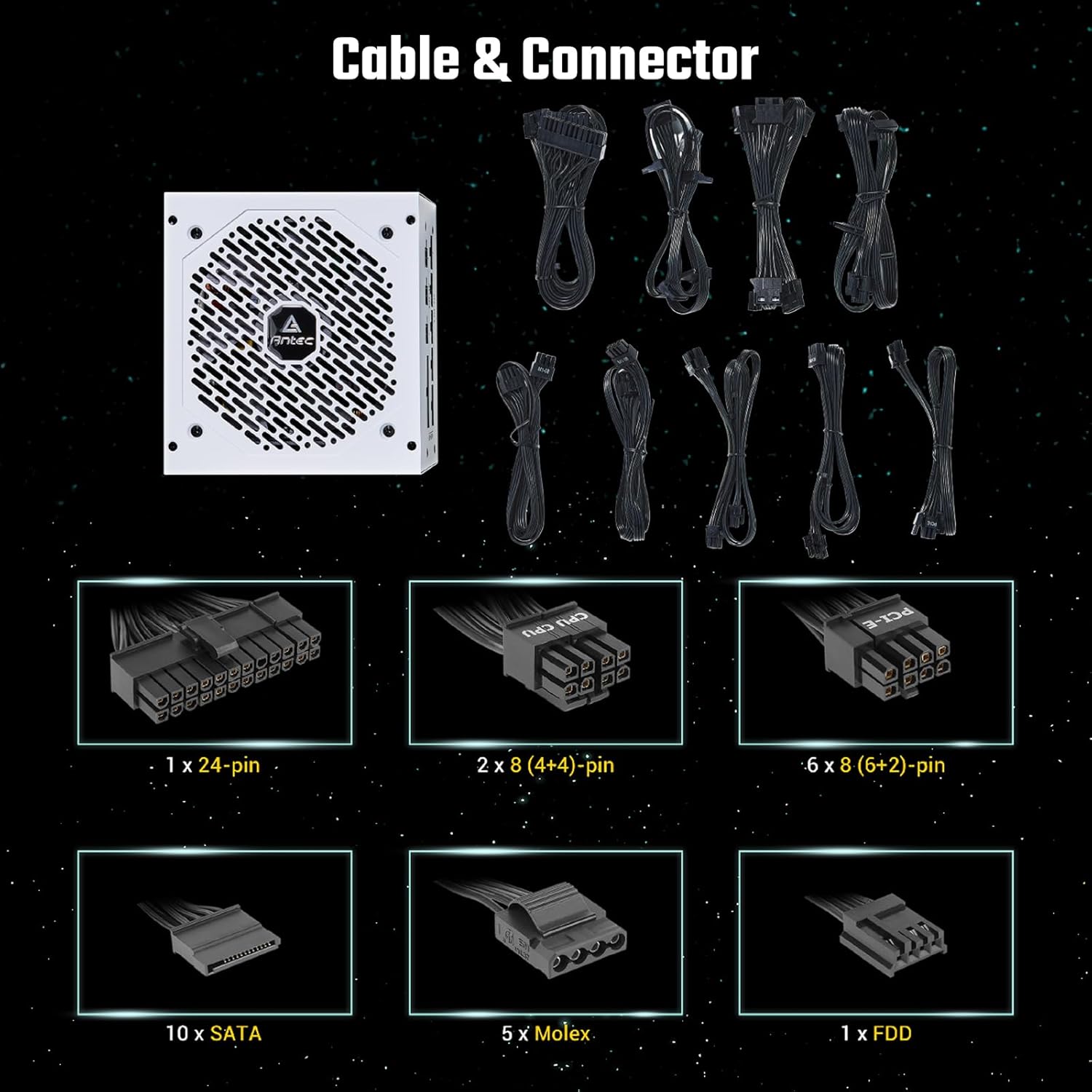
Image 3.1: Overview of the modular cables and connectors included with the Antec NeoECO NE850GM power supply. The image shows the power supply unit alongside various modular cables, including 24-pin ATX, 8-pin (4+4) CPU, 8-pin (6+2) PCIe, SATA, and Molex connectors.
4. Product Features
The Antec NeoECO NE850GM White power supply incorporates several advanced features for reliable and efficient operation:
- 850W Continuous Power: Delivers a guaranteed 850W of continuous power.
- 80 PLUS Gold Certified: Achieves high energy efficiency, reducing electricity consumption.
- High-Quality Japanese Heavy-Duty Capacitors: Ensures stable performance and extended lifespan.
- Full Modular Design: Allows users to connect only necessary cables, improving airflow and cable management.
- PhaseWave Design: Features a server-class full-bridge LLC design with synchronous rectification based on a DC-DC topology for stable power delivery.
- Zero RPM Manager: An advanced low voltage fan control with a fan-off mode at low loads for absolute silence.
- 120 mm Silent Fan: A whisper-quiet fluid bearing fan designed for optimal cooling and durability.
- CircuitShield: Provides industrial-grade protections including OCP, OVP, SCP, OPP, OTP, SIP, and NLO.
- ATX 12V 2.4: Engineered according to the newest PSU guideline, compatible with the latest CPU generations.

Image 4.1: The 80 PLUS Gold certification logo, indicating high energy efficiency.

Image 4.2: Internal view illustrating the PhaseWave LLC+DC to DC design, showcasing the advanced power conversion circuitry within the PSU.

Image 4.3: Close-up view of the Japanese heavy-duty capacitors inside the power supply, emphasizing their role in ensuring stable DC output and reliability.

Image 4.4: Rear view of the power supply showing the Zero RPM mode switch, which allows the fan to remain off at low loads for silent operation.

Image 4.5: A detailed view of the 120mm silent fan, highlighting its design for improved airflow and durability.

Image 4.6: An illustration of the 100% full modular design, showing the various ports on the power supply for connecting only the necessary cables.
5. Setup and Installation
Follow these steps to install your Antec NeoECO NE850GM power supply:
- Prepare Your System: Ensure your computer case is compatible with ATX power supplies. Disconnect the old power supply if replacing one.
- Mount the Power Supply: Insert the NE850GM into the power supply bay of your computer case. Secure it with the provided mounting screws.
- Connect Essential Cables:
- Connect the 24-pin ATX motherboard cable to your motherboard.
- Connect the 8-pin (4+4) CPU power cable(s) to your motherboard's CPU power connector(s).
- Connect the 8-pin (6+2) PCIe power cable(s) to your graphics card(s).
- Connect Peripheral Cables: Attach SATA power cables to your storage drives (HDDs, SSDs) and optical drives. Use Molex cables for other peripherals as needed.
- Cable Management: Utilize the full modular design to connect only the cables required for your system. Route cables neatly to improve airflow and aesthetics.
- Connect AC Power: Ensure the power supply's main switch is in the 'OFF' (0) position. Connect the AC power cord to the power supply and then to a wall outlet or surge protector.
6. Operating Instructions
After installation, follow these steps to operate your power supply:
- Power On: Flip the main power switch on the back of the power supply to the 'ON' (I) position.
- System Start-up: Press the power button on your computer case to start your system.
- Zero RPM Mode: The NE850GM features a Zero RPM mode. When enabled (via the switch on the PSU's rear), the fan will remain off at low system loads for silent operation. The fan will automatically activate as the load increases to maintain optimal temperatures.
- Power Off: Shut down your computer through the operating system. Once the system is off, you can flip the main power switch on the PSU to 'OFF' (0) for complete power disconnection.
7. Maintenance
Proper maintenance ensures the longevity and performance of your power supply:
- Cleaning: Periodically clean the exterior of the power supply and its fan grille using compressed air to remove dust buildup. Ensure the power supply is disconnected from the AC outlet before cleaning.
- Ventilation: Ensure that the power supply's intake and exhaust vents are not obstructed. Maintain adequate airflow within your computer case.
- Cable Integrity: Regularly check all modular cable connections to ensure they are secure and free from damage.
8. Troubleshooting
If you encounter issues with your power supply, refer to the following common problems and solutions:
- No Power:
- Check if the AC power cord is securely connected to both the power supply and the wall outlet.
- Ensure the main power switch on the PSU is in the 'ON' (I) position.
- Verify that all modular cables (24-pin ATX, CPU, PCIe) are correctly and firmly seated.
- Test the wall outlet with another device to confirm it has power.
- System Instability/Random Shutdowns:
- Ensure the power supply is adequately rated for your system's components.
- Check for proper ventilation and ensure the PSU fan is operating when under load.
- Verify that all power connections to components are secure.
- If the issue persists, it may indicate a component failure (not necessarily the PSU). Consider testing components individually.
- Fan Not Spinning (Zero RPM Mode):
- This is normal behavior at low loads if Zero RPM mode is enabled. The fan will spin up automatically when the system load increases.
- If the fan never spins even under heavy load, ensure the Zero RPM switch is in the desired position and check for obstructions.
If troubleshooting steps do not resolve the issue, contact Antec customer support.
9. Specifications
Key specifications for the Antec NeoECO NE850GM White power supply:
| Specification | Value |
|---|---|
| Brand | Antec |
| Model Name | NE850GM White |
| Item Model Number | 0-761345-11230-7 |
| Output Wattage | 850 Watts |
| 80 PLUS Certification | Gold |
| Form Factor | ATX |
| Power Supply Design | Full Modular |
| Cooling Method | Air (120mm Silent Fan) |
| Item Weight | 5.85 pounds |
| Product Dimensions (LxWxH) | 5.51 x 5.9 x 3.38 inches |
| Compatible Devices | Personal Computer |
10. Warranty and Support
The Antec NeoECO NE850GM White power supply comes with a 7-year warranty, ensuring long-term reliability and peace of mind. This warranty covers defects in materials and workmanship under normal use.

Image 10.1: Antec NeoECO Gold Modular series highlighting the 7-year warranty, indicating the product's durability and manufacturer support.
For technical support, warranty claims, or further assistance, please visit the official Antec website or contact their customer service department. Keep your proof of purchase for warranty validation.


