
Citizen CB5004-59W Analog Watch Instruction Manual
Model: CB5004-59W
Introduction
Welcome to your new Citizen CB5004-59W Analog Eco-Drive Radio-Controlled Pilot watch. This manual provides detailed instructions for proper setup, operation, and maintenance to ensure optimal performance and longevity of your timepiece. Please read this manual thoroughly before using your watch.
Safety Information
- Avoid exposing the watch to extreme temperatures or direct sunlight for prolonged periods, as this may affect its performance and lifespan.
- Do not attempt to open the watch case or replace internal components yourself. This should only be performed by authorized service personnel.
- Keep the watch away from strong magnetic fields, which can interfere with its accuracy.
- This watch is not waterproof. Avoid all contact with water, including showering, swimming, or exposure to rain.
Package Contents
Your Citizen CB5004-59W package typically includes:
- Citizen CB5004-59W Analog Watch
- Instruction Manual (this document)
- Warranty Card
Product Overview
The Citizen CB5004-59W is an analog watch featuring Eco-Drive technology, a chronograph, and radio-controlled timekeeping. It is designed for precision and reliability with a classic aesthetic.
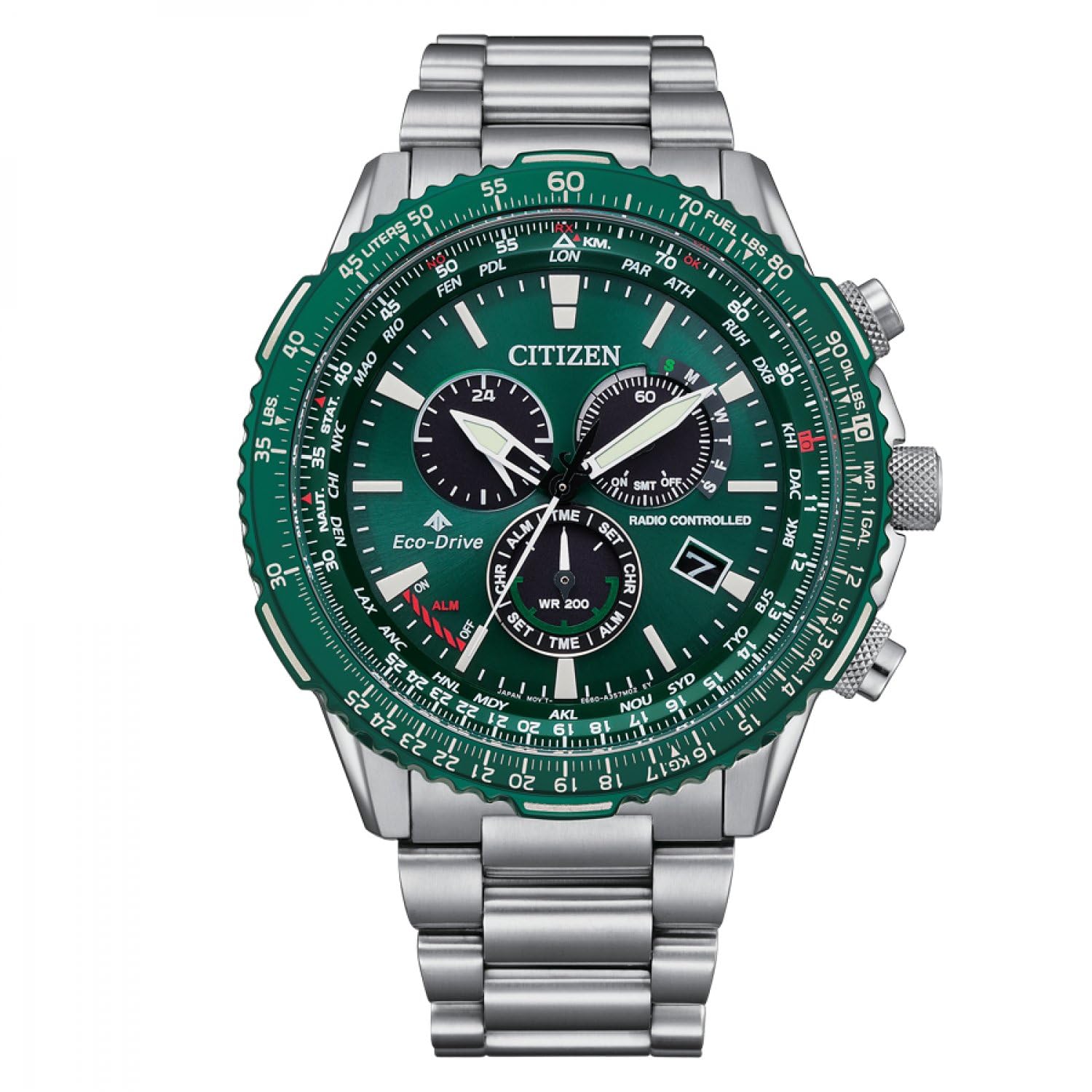
Image: Front view of the Citizen CB5004-59W Analog Watch, showcasing the white dial, chronograph sub-dials, and stainless steel bracelet.
Key Components
- Main Dial: Displays hours, minutes, and seconds.
- Sub-dials: Used for chronograph functions and other indicators.
- Crown: Used for setting time and date, and for mode selection.
- Pushers (A & B): Used to operate the chronograph and other functions.
Setup
Initial Charge (Eco-Drive)
Your Citizen Eco-Drive watch is powered by light. Before initial use, expose the watch dial to bright light (natural or artificial) for several hours to ensure it is fully charged. A fully charged watch can operate for an extended period in the dark.
Setting the Time Manually
- Pull the crown out to the time setting position (usually the outermost click).
- Rotate the crown to set the hour and minute hands to the correct time.
- Push the crown back in to the normal position.
Setting the Date
- Pull the crown out to the date setting position (usually the first click).
- Rotate the crown to adjust the date.
- Push the crown back in to the normal position.
Radio Control Synchronization
The CB5004-59W features radio-controlled timekeeping, which automatically synchronizes the watch with an atomic clock signal for precise time. Ensure the watch is placed in an area with good signal reception, away from electronic devices that may cause interference. Manual synchronization can also be initiated; refer to the detailed function guide on Citizen's official website for advanced radio control settings specific to your model.
Operating Instructions
Using the Chronograph
The chronograph function allows you to measure elapsed time.
- Start: Press pusher A (typically the top pusher) to start the chronograph.
- Stop: Press pusher A again to stop the chronograph.
- Reset: Press pusher B (typically the bottom pusher) to reset the chronograph hands to zero.
Other Special Features
This watch includes additional features such as a 24-hour indicator and potentially a world time function, given its "Pilot" designation. For detailed instructions on these advanced features, please consult the comprehensive manual available on the official Citizen website for model CB5004-59W.
Maintenance
Cleaning Your Watch
To maintain the appearance of your watch, wipe the case and bracelet regularly with a soft, dry cloth. For stubborn dirt, a slightly damp cloth can be used, followed by a dry cloth. Avoid using chemical cleaners or abrasive materials, as these can damage the watch's finish or acrylic dial window.
Storage
When not wearing your watch, store it in a clean, dry place. As an Eco-Drive watch, it benefits from exposure to light, so avoid storing it in complete darkness for extended periods to prevent power depletion.
Power Management (Eco-Drive)
The Eco-Drive system converts any light source into electrical energy, storing it in a power cell. To ensure continuous operation, expose your watch to light regularly. If the watch stops or the second hand moves in two-second intervals, it indicates a low power reserve and requires charging.
Troubleshooting
- Watch not running: Ensure the watch is adequately charged by exposing it to bright light for several hours.
- Incorrect time/date: Manually set the time and date as described in the "Setup" section. If radio control is active, ensure good signal reception.
- Hands not aligning: Perform a hand home position correction. Refer to the detailed manual for your specific model on the Citizen website for instructions on this advanced procedure.
Specifications
- Model Number: CB5004-59W
- Display Type: Analog
- Movement Type: Quartz (Eco-Drive)
- Special Features: Chronograph, Radio-Controlled Timekeeping
- Case Material: Stainless Steel
- Case Diameter: 11 Millimeters
- Case Thickness: 11 Millimeters
- Band Material: Stainless Steel
- Band Width: 22 Millimeters
- Band Length: 1 Centimeter
- Dial Window Material: Acrylic
- Dial Color: White
- Clasp Type: Buckle
- Water Resistance Level: Not waterproof
- Power Source: Light (Eco-Drive)
- Country of Origin: Japan
Warranty and Support
Your Citizen CB5004-59W watch comes with a Limited Warranty. For specific terms and conditions, please refer to the warranty card included with your purchase or visit the official Citizen Watch website. For technical support, service, or to find an authorized service center, please visit the Citizen support page or contact their customer service directly.


