
Introduction
This manual provides detailed instructions for the safe and efficient operation of your JAYEGT Motorized Rotating Display Stand. Designed for 360-degree product display, photography, and live shows, this turntable offers robust performance with a high load capacity and versatile control options. Please read this manual thoroughly before initial use and retain it for future reference.
Safety Information
- Power Supply: Use only the provided AC/DC adapter. Ensure the input voltage (100-240VAC) matches your local power supply.
- Placement: Place the turntable on a stable, flat, and level surface to prevent tipping or instability, especially when loaded.
- Load Capacity: Do not exceed the maximum load capacity of 330 lbs (150 kg). Overloading can damage the motor and internal components.
- Centering Load: Always place items as close to the center of the turntable as possible to ensure smooth rotation and prevent imbalance.
- Moisture: Keep the device away from water and other liquids. Do not operate with wet hands.
- Cleaning: Disconnect power before cleaning. Use a soft, dry cloth. Avoid abrasive cleaners or solvents.
- Children: Keep out of reach of children. This is not a toy.
- Maintenance: Do not attempt to disassemble or repair the unit yourself. Refer all servicing to qualified personnel.
Package Contents
- 1 x JAYEGT Motorized Rotating Display Stand (White/23.6 Inch)
- 1 x AC/DC Power Adapter (110~220 V to DC 15V)
- 1 x Remote Control
- 5 x Color Backgrounds (White, Black, Grey, Blue, Orange)
Setup
- Unpacking: Carefully remove all components from the packaging.
- Placement: Place the display stand on a firm, level, and stable surface. Ensure there is enough clear space around the turntable for rotation.
- Power Connection: Locate the power input port on the side of the turntable. Connect the provided AC/DC adapter to the port and then plug the adapter into a suitable power outlet.
- Power On: Flip the red power switch on the side of the turntable to the "ON" position. A green indicator light will illuminate, confirming the unit is powered.
- Remote Control: Ensure the remote control has working batteries. The remote operates via an infrared sensor located near the power switch on the turntable. Point the remote directly at this sensor for optimal control.
- Backgrounds: If desired, place one of the five provided color backgrounds on top of the turntable surface.

Figure 1: Side view of the JAYEGT Motorized Rotating Display Stand, highlighting the power switch, socket, and remote control sensor light. Dimensions are also shown: 23.6 inches (60cm) diameter and 2.5 inches (7cm) height.

Figure 2: Underside of the JAYEGT Motorized Rotating Display Stand, illustrating the non-slip feet for stable placement on various surfaces.
Operating Instructions
The JAYEGT Motorized Rotating Display Stand can be controlled using the included remote. Ensure items are centered on the turntable for optimal performance and stability.
Remote Control Functions:
- Power Button ((O)): Press to start or stop rotation.
- Direction Control (↻ / ↺): Toggle between clockwise and counter-clockwise rotation.
- Speed Adjustment (+ / -): Increase or decrease the rotation speed. The speed ranges from 50 seconds per cycle (fastest) to 120 seconds per cycle (slowest).
- Rotation Mode (↻ / ↺ with arrows): Switch between continuous rotation and intermittent rotation.
- Angle Circulation Modes (∠): Select specific rotation angles for automated stops: 45°, 90°, or 180° circulation modes.
- Position Memory (↻ with dot): This function allows the turntable to return to a previously set position.

Figure 3: Remote control functions for the JAYEGT Motorized Rotating Display Stand, illustrating controls for direction, continuous/intermittent rotation, angle circulation, and position memory.
Loading the Turntable:
The turntable has a substantial load capacity of 330 lbs (150 kg), making it suitable for a wide range of products, including large items or even a person for modeling purposes. Always ensure the weight is distributed evenly and placed centrally on the turntable to maintain balance and smooth operation.
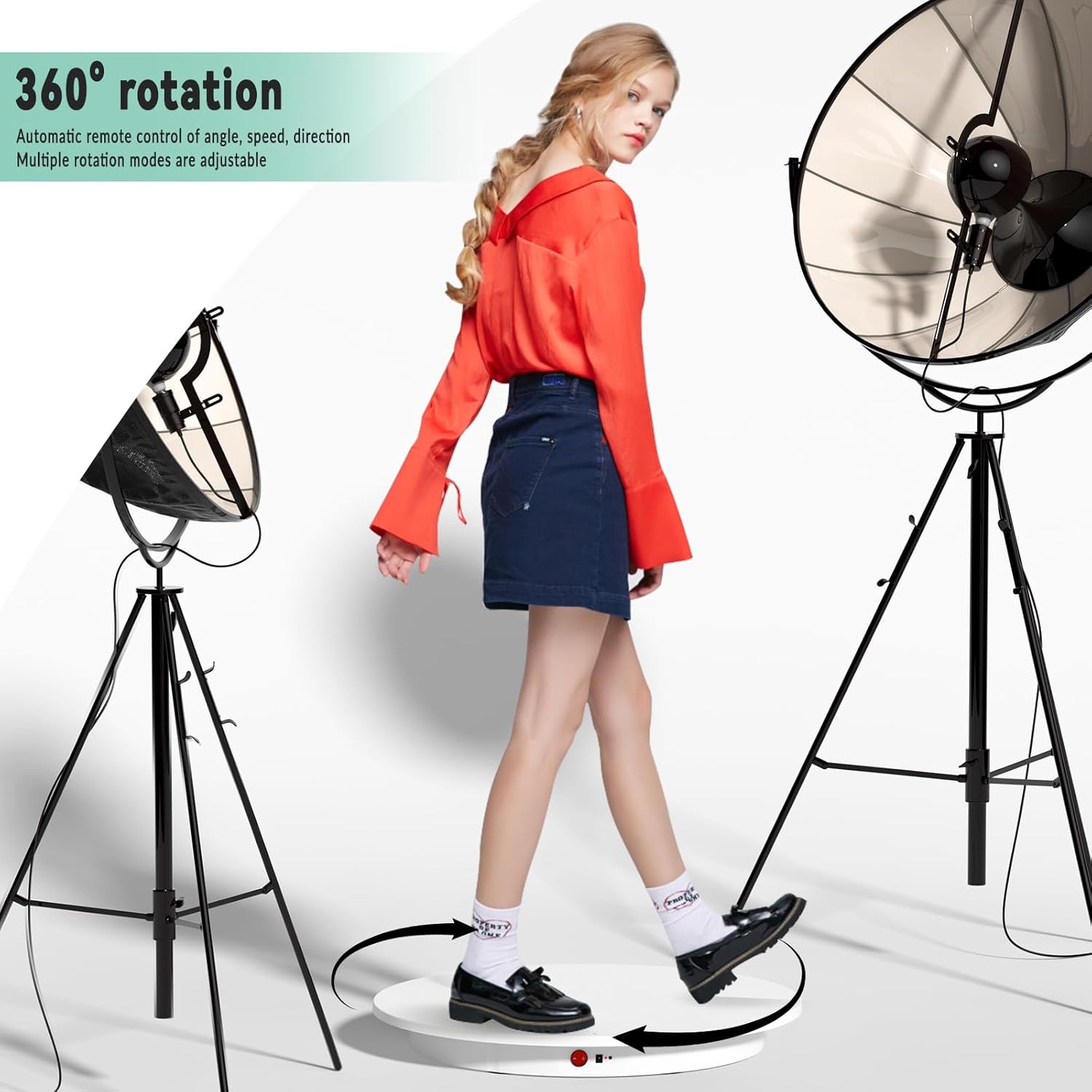
Figure 4: The JAYEGT Motorized Rotating Display Stand in use, demonstrating its 360-degree rotation capability and suitability for displaying larger items or even a person for photography.
Maintenance
- Cleaning: To clean the surface of the turntable, first unplug the power adapter. Use a soft, slightly damp cloth to wipe away dust or smudges. Do not use harsh chemicals, abrasive cleaners, or excessive water, as these can damage the finish or internal components.
- Storage: When not in use, store the display stand in a cool, dry place, away from direct sunlight and extreme temperatures.
- Inspection: Periodically check the power cord and adapter for any signs of damage. If damage is found, discontinue use and contact customer support.
Troubleshooting
| Problem | Possible Cause | Solution |
|---|---|---|
| Turntable does not rotate. | Not powered on; power adapter not connected; remote control batteries low/dead. | Ensure the power switch is ON and the green indicator light is lit. Check if the power adapter is securely plugged into both the turntable and the wall outlet. Replace remote control batteries if necessary. |
| Rotation is jerky or uneven. | Item is not centered; load exceeds maximum capacity; uneven surface. | Reposition the item to the exact center of the turntable. Reduce the load if it exceeds 330 lbs (150 kg). Ensure the turntable is placed on a completely flat and stable surface. |
| Remote control is unresponsive. | Remote not pointed at sensor; obstruction; low/dead batteries. | Point the remote directly at the infrared sensor on the turntable. Remove any obstructions between the remote and the sensor. Replace remote control batteries. |
| Unusual noises during operation. | Overload; internal issue. | Ensure the load is within the specified weight limit and is centered. If noises persist, discontinue use and contact customer support. |
Specifications
| Feature | Detail |
|---|---|
| Brand | JAYEGT |
| Model Number | JY-60cm-W |
| Material | Acrylonitrile Butadiene Styrene (ABS) |
| Color | White |
| Item Diameter | 23.6 Inches (60 cm) |
| Item Height | 2.8 Inches (7 cm) |
| Net Weight | 8.14 lbs (3.7 kg) |
| Maximum Weight Recommendation | 330 lbs (150 kg) |
| Speed Range | 50-120 seconds per cycle |
| Power Input | 110-220V AC to DC 15V |
| Control Method | Remote Control |
| Rotation Features | 360-degree rotation, Clockwise/Counter-clockwise, Continuous/Intermittent, 45°/90°/180° Angle Circulation, Position Memory |
Warranty and Support
For warranty information or technical support, please refer to the product packaging or contact JAYEGT customer service directly through the retailer's platform where the product was purchased. Please have your model number (JY-60cm-W) and purchase details ready when contacting support.
