
JAYEGT JY-60cm-B
JAYEGT Motorized Rotating Display Stand Instruction Manual
Model: JY-60cm-B | Brand: JAYEGT
Introduction
Thank you for choosing the JAYEGT Motorized Rotating Display Stand. This product is designed to provide a versatile and reliable solution for showcasing various items, from small products to large displays, with smooth 360-degree rotation. Its robust construction and remote control functionality make it ideal for photography, video shooting, live shows, and retail displays. Please read this manual thoroughly before operation to ensure proper setup and safe use.
Safety Information
- Ensure the power adapter is connected to a compatible power outlet (110~220V to DC 15V).
- Do not exceed the maximum load capacity of 330 lbs (150 KG) to prevent damage to the motor and stand.
- Keep the display stand away from water or excessive moisture.
- Avoid placing the stand on unstable or uneven surfaces.
- Do not attempt to disassemble or repair the unit yourself. Contact customer support for assistance.
- Keep out of reach of children and pets.
Package Contents
Please check the package to ensure all items are present:
- 1 x JAYEGT Motorized Rotating Display Stand (Black/23.6 Inch)
- 1 x Power Adapter (110~220V to DC 15V)
- 1 x Remote Control
- 5 x Colors PVC Backgrounds (Black, White, Grey, Blue, Beige)
- 1 x User Manual (this document)

Image: The JAYEGT Motorized Rotating Display Stand, including the turntable, power cable, remote control, and instructions. This image illustrates the complete set of items included in the package.
Setup
- **Placement:** Choose a stable, flat surface for the display stand. Ensure there is enough clear space around the stand for the rotating item.
- **Power Connection:** Locate the power socket on the side of the turntable. Connect the provided power adapter to the socket and then plug the adapter into a suitable electrical outlet.
- **Power On:** Flip the power switch on the side of the turntable to the 'ON' position. A small indicator light will illuminate.
- **Remote Control:** Insert batteries into the remote control (if not pre-installed). The remote control is used to operate the stand's functions.
- **Backgrounds (Optional):** If desired, place one of the five colored PVC backgrounds on top of the turntable to suit your display needs.
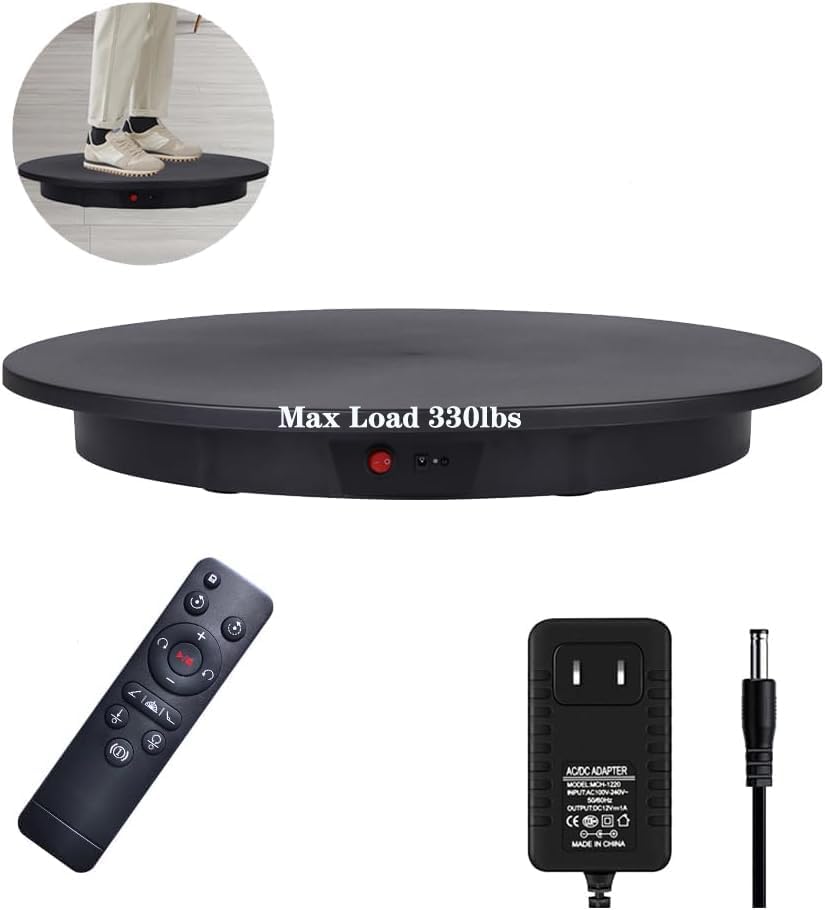
Image: The main components of the JAYEGT Motorized Rotating Display Stand: the turntable, remote control, and power adapter. This image highlights the simplicity of the setup process.

Image: Close-up view of the JAYEGT Motorized Rotating Display Stand's underside showing non-slip feet, and the side panel with the power switch, power socket, and remote control sensor light. These features ensure stability and ease of connection.
Operating Instructions
The JAYEGT Motorized Rotating Display Stand is operated using the included remote control. Ensure the remote is pointed towards the sensor light on the turntable for optimal response.
- **Power Button:** Press the power button on the remote to turn the turntable ON or OFF.
- **Direction Control:** Use the directional arrows (clockwise/counter-clockwise) to change the rotation direction.
- **Speed Adjustment:** Use the '+' and '-' buttons to increase or decrease the rotation speed. The speed ranges from 50 to 120 seconds per cycle.
- **Rotation Modes:**
- **Continuous Rotation:** The default mode, providing uninterrupted 360-degree rotation.
- **Intermittent Rotation:** Press the mode button (three lines icon) to switch to intermittent rotation. The turntable will pause at set intervals (45°, 90°, or 180°) before continuing.
- **Angle Circulation Modes:** The stand supports 45°, 90°, and 180° angle circulation options. When set to a specific angle (e.g., 45°), the turntable will rotate to that angle and then reverse, moving back and forth within that range. Pressing the left or right key again will resume full circle continuous rotation.
- **Position Memory:** The stand features position memory, allowing it to return to a previously set starting point.

Image: Visual guide to the remote control functions, illustrating clockwise/counter-clockwise rotation, continuous/intermittent rotation, 45°/90°/180° angle circulation, and position memory. This helps users understand the various operational modes.

Image: A more detailed illustration of the remote control's directional and mode buttons, showing how to switch between continuous and intermittent rotation, and how the 45°, 90°, and 180° angle circulation modes function. A note clarifies the behavior of angle circulation.
Features
- **High Load Capacity:** Supports up to 330 lbs (150 KG), suitable for large and heavy products, including clothing models.
- **Versatile Rotation:** Offers full 360-degree rotation with options for clockwise and counter-clockwise directions.
- **Adjustable Speed:** Speed can be adjusted from 50 to 120 seconds per cycle, providing flexibility for different display needs.
- **Multiple Angle Modes:** Features 45°, 90°, and 180° angle circulation modes for precise display control.
- **Remote Control Operation:** Conveniently control all functions from a distance.
- **Low Noise Operation:** Designed for quiet operation, minimizing distractions during use.
- **Durable Material:** Constructed from Acrylonitrile Butadiene Styrene (ABS) for durability and stability.
- **Non-Slip Feet:** Equipped with non-slip feet to ensure stability on various surfaces.
- **Included Backgrounds:** Comes with 5 colored PVC backgrounds (Black, White, Grey, Blue, Beige) for enhanced visual presentation.

Image: Detailed product features including high-quality motor, smooth speed, even rotation, low noise, 360° rotation, and max bearing of 330 lbs. The image also shows the dimensions of the turntable (23.6 inches / 60 cm diameter, 2.5 inches / 7 cm height).

Image: A model standing on the JAYEGT Motorized Rotating Display Stand in a studio setting with lighting equipment. This demonstrates the stand's capability to support human weight for live shows or photography.

Image: A woman in a red dress standing on the JAYEGT Motorized Rotating Display Stand, with a table summarizing key specifications: Size (60cm / 24inch), Rotating speed (50-120s/r), Load bearing (150kg / 330lb), Remote control distance (6m / 19.7feet), and Power cord length (1.5m / 5feet).

Image: The JAYEGT Motorized Rotating Display Stand shown with five different colored PVC backgrounds (black, white, grey, blue, beige). This illustrates the versatility for various product photography and display needs.
Maintenance
- **Cleaning:** Wipe the surface of the display stand with a soft, dry cloth. For stubborn marks, use a slightly damp cloth and mild detergent, then dry thoroughly. Do not use abrasive cleaners or solvents.
- **Storage:** When not in use, store the display stand in a cool, dry place, away from direct sunlight and extreme temperatures.
- **Handling:** Handle the stand with care to avoid dropping or impacting it, which could damage internal components.
Troubleshooting
| Problem | Possible Cause | Solution |
|---|---|---|
| Stand does not turn on. | No power, power switch off, or faulty adapter. | Check power outlet, ensure adapter is securely plugged in, and verify the power switch is ON. Try a different outlet. |
| Turntable does not rotate. | Overloaded, remote control issue, or motor malfunction. | Reduce the weight on the stand. Ensure remote control batteries are fresh and pointed at the sensor. If problem persists, contact support. |
| Rotation is jerky or uneven. | Uneven load distribution or surface. | Distribute the item's weight evenly on the turntable. Ensure the stand is on a flat, stable surface. |
| Remote control not responding. | Batteries low/dead, remote not aimed at sensor, or interference. | Replace remote control batteries. Point the remote directly at the sensor light on the turntable. Remove any obstructions. |
Specifications
| Attribute | Detail |
|---|---|
| Brand | JAYEGT |
| Model Number | JY-60cm-B |
| Material | Acrylonitrile Butadiene Styrene (ABS) |
| Color | Black |
| Item Diameter | 23.6 Inches (60 cm) |
| Item Height | 2.8 Inches (7 cm) |
| Maximum Weight Recommendation | 330 Pounds (150 KG) |
| Rotation Speed | 50-120 seconds per cycle |
| Power Adapter | 110~220V to DC 15V |
| Item Weight | 8.14 pounds (3.7 KG) |
| UPC | 743645149771 |
Warranty and Support
For warranty information or technical support, please contact JAYEGT customer service through the retailer's platform or visit the official JAYEGT store online. Please have your model number (JY-60cm-B) and purchase details ready when contacting support.
JAYEGT Store Link: Visit JAYEGT Store
Related documentsJY-60cm-B


Ask a question about this manual
Ask about setup, troubleshooting, compatibility, parts, safety, or missing instructions. Manuals+ will review the question and use this page’s manual context to help answer it.