
Introduction
This manual provides essential information for the installation, operation, and maintenance of your Avidsen Orane Connect 114202 articulated arm motorization system for swing gates. This system is designed for various gate types, including wooden, steel, aluminum, and PVC gates, whether solid or openwork. It incorporates advanced safety features such as slowdown at the end of travel and obstacle detection. The system offers smart connectivity, allowing control via the Avidsen Home application and integration with voice assistants like Google Home and Amazon Alexa. A built-in position sensor enables remote monitoring of your gate's status.
Safety Instructions
- Read all instructions carefully before installation and use.
- Ensure that the installation is performed by qualified personnel and complies with local electrical and safety regulations.
- Disconnect power before performing any maintenance or repair work.
- Keep children and pets away from the gate area during operation.
- Do not attempt to repair or modify the system components yourself. Contact Avidsen support for assistance.
- Regularly check the gate and motorization system for signs of wear, damage, or misalignment.
Package Contents
Verify that all components are present in the package:
- 1 Flashing Light
- 1 Set of Photocell Sensors
- 2 Articulated Arm Motors (24 Vdc) with Integrated Electronics
- 2 Remote Controls (433.92 MHz, 4 buttons)
- Mounting Brackets and Plates
- 1 Avidsen Home Gate Connected Module with Pre-wired Position Sensor
Setup
The installation process involves mounting the motors, connecting electrical components, and configuring the system. It is crucial to follow the detailed instructions provided in the separate installation guide for precise measurements and wiring diagrams.
Motor Mounting
Mount the articulated arm motors securely to your gate pillars using the provided brackets and hardware. Ensure the motors are level and aligned correctly with the gate leaves to allow for smooth operation. Proper alignment is critical for the system's longevity and performance.

Image: The Avidsen Orane Connect 114202 motor unit, showing its compact design and articulated arm mechanism.

Image: A different perspective of the Avidsen Orane Connect 114202 motor unit, highlighting its robust construction.
Electrical Connections
Connect the motors, photocells, flashing light, and the Avidsen Home Gate module to the control unit according to the wiring diagrams. Ensure all connections are secure and properly insulated. The system operates on 24 Vdc.

Image: Side view of the Avidsen Orane Connect 114202 motor unit, illustrating the arm's pivot point.

Image: The Avidsen Orane Connect 114202 motor unit with its articulated arm fully extended, ready for gate attachment.
System Configuration
After physical installation, perform the auto-learning procedure as described in the detailed installation guide. This calibrates the gate's travel limits and ensures proper slowdown and obstacle detection functionality.
Operating Instructions
Remote Control Operation
Your system comes with two 4-button remote controls. Pressing a programmed button will initiate the gate's opening or closing cycle. A second press during operation will stop the gate, and a third press will reverse its direction.
Avidsen Home Application
Download the Avidsen Home application from your smartphone's app store. Follow the in-app instructions to pair your Orane Connect system. The app allows you to open, close, and monitor the status of your gate remotely.

Image: A smartphone displaying the Avidsen Home app interface, controlling a gate in the process of opening.

Image: The Avidsen Home app on a smartphone, showing the status of a closed gate, indicating remote monitoring capability.
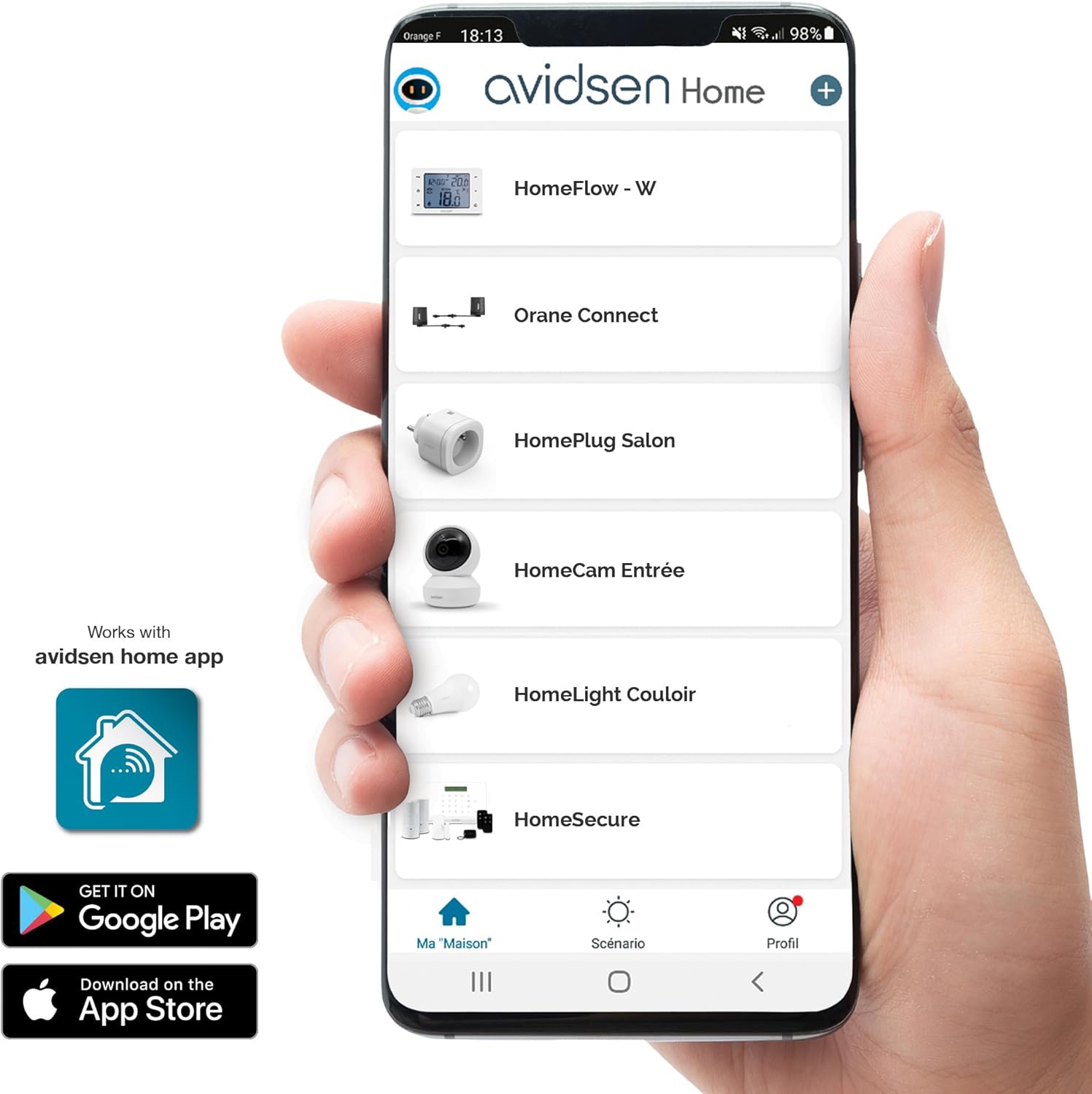
Image: A close-up of the Avidsen Home application interface on a smartphone, showcasing various connected devices and control options.
Voice Assistant Integration
The Orane Connect system is compatible with Google Home and Amazon Alexa. Once integrated, you can use voice commands to control your gate. Refer to the Avidsen Home app settings for detailed instructions on linking your system with these voice assistants.

Image: Logos indicating compatibility with Amazon Alexa and Google Assistant, highlighting the smart home integration features.
Maintenance
Regular maintenance ensures the optimal performance and longevity of your gate motorization system.
- Monthly: Inspect the gate's mechanical components, hinges, and mounting points for any signs of wear, corrosion, or loosening. Ensure the gate moves freely without obstruction when disengaged from the motors.
- Quarterly: Clean the photocell sensors to ensure they are free from dirt, dust, or spiderwebs that could interfere with their operation. Test the obstacle detection feature by placing an object in the gate's path during closing.
- Annually: Check all electrical connections for tightness and signs of corrosion. Verify the functionality of the flashing light. If any issues are detected, consult a qualified technician.
Troubleshooting
If you encounter issues with your Avidsen Orane Connect system, refer to the following common problems and solutions:
| Problem | Possible Cause | Solution |
|---|---|---|
| Gate does not open or close | No power, remote control battery low, photocells obstructed, motor disengaged. | Check power supply. Replace remote battery. Clear photocell path. Re-engage motor if in manual mode. |
| Gate stops or reverses unexpectedly | Obstacle detected, photocells misaligned or dirty, motor overload. | Remove obstacles. Clean and align photocells. Check for mechanical resistance in gate movement. |
| Remote control not working | Battery flat, out of range, not programmed. | Replace battery. Move closer to the gate. Refer to programming instructions. |
| Avidsen Home app not connecting | Internet connection issue, module not paired, app outdated. | Check Wi-Fi/internet connection. Re-pair the Avidsen Home Gate module. Update the app. |
For persistent issues or problems not listed here, please contact Avidsen customer support.
Specifications
- Model Number: 114202
- Power: 250 Watts
- Product Dimensions (L x W x H): 55.6 x 42.7 x 27 cm
- Weight: 18 Kilograms
- Color: Black
- Included Components: 1 flashing light, 1 set of photocells, 2 articulated arm motors 24 Vdc with integrated electronics, 2 remote controls 433.92 MHz with 4 buttons, mounting brackets and plates, 1 Avidsen Home Gate connected module with pre-wired position sensor.
Warranty and Support
For warranty information and technical support, please refer to the documentation included with your product or visit the official Avidsen website. Keep your proof of purchase for warranty claims.