
Angry miao Angrymiao01
CYBERBLADE Wireless Gaming Earbuds User Manual
Model: Angrymiao01 | Brand: Angry miao
Introduction
Welcome to the CYBERBLADE Wireless Gaming Earbuds user manual. These earbuds are designed to provide a superior audio experience for gaming, music, and movies, featuring ultra-low latency, active noise cancellation, and versatile compatibility. Please read this manual carefully to ensure optimal performance and longevity of your device.
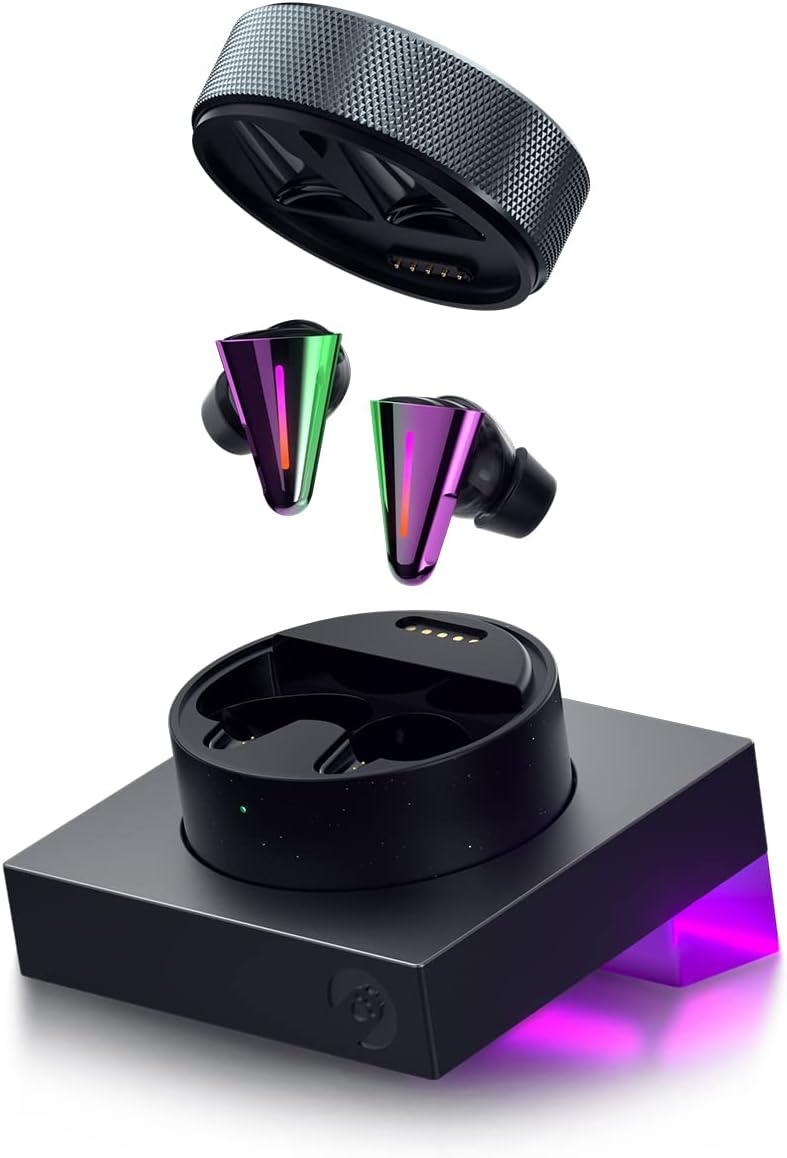
Image: The CYBERBLADE Wireless Gaming Earbuds, showcasing the earbuds, their charging case, and the accompanying dock, highlighting their sleek design and integrated lighting.
What's in the Box
Upon unboxing your CYBERBLADE Wireless Gaming Earbuds, please verify that all the following components are included:
- CYBERBLADE Earbuds (Left and Right)
- Wireless Charging Case
- Dock
- 0.8m USB Cable (Type C to Type C)
- 2m USB Cable (Type C to Type A)
- Liquid Silicone Eartips (4 Pairs: XS, S, M, L)
- Memory Foam Eartips (3 Pairs: S, M, L)
- User Manual/Warranty Card

Image: A detailed diagram illustrating all components included in the CYBERBLADE Earbuds package, such as the earbuds, charging case, dock, various cables, and multiple sizes of eartips.
Setup
Initial Charging
Before first use, place the earbuds into the charging case and connect the charging case to the dock. Connect the dock to a power source using the provided USB cables. Ensure the indicator light on the dock illuminates, indicating charging is in progress. A full charge typically takes approximately 2 hours.
Pairing and Connectivity
The CYBERBLADE earbuds support Bluetooth 5.2 and Plug&Play functionality for seamless connection across various devices.
- Plug & Play (ASE Mode): For devices like PC, Mac, PS4/PS5, Switch, Steam Deck, and Smart TVs, simply connect the dock to your device via USB. The earbuds will automatically connect to the dock when placed inside or removed.
- Bluetooth Pairing: For mobile devices (iPhone, Android) or other Bluetooth-enabled systems, ensure the earbuds are in the charging case with the lid open. The earbuds will enter pairing mode. Select "CYBERBLADE" from your device's Bluetooth settings.

Image: The CYBERBLADE dock positioned on a desk, connected to a gaming console (PS5) and a smartphone, illustrating its versatile connectivity options for various devices.

Image: The CYBERBLADE earbuds and their dock in a gaming environment, demonstrating the Plug and Play (ASE mode) connection with a PlayStation 5 console.
Angry Miao App & AM Master
Download the Angry Miao App (for mobile) or AM Master software (for PC) to get the latest firmware updates, customize settings, and personalize your audio experience. This software allows you to fine-tune audio boosters, RGB lighting, and other features.
Operating
Audio Modes (Gaming Booster)
The CYBERBLADE earbuds offer three powerful audio boosters to optimize your listening experience:
- Gaming Mode: Enhances spatial awareness, making footsteps and gunshots more distinct for competitive gaming.
- Movie Mode: Provides a more immersive audio experience for watching films.
- Music Mode: Delivers a superior audio experience for general music listening.

Image: A visual representation of the CYBERBLADE Earbuds' three distinct audio modes: Superior Gaming Mode, Spatial Movie Mode, and Luxurious Music Mode, each optimized for different content.
Active Noise Cancelling (ANC) & Transparency Mode
The earbuds feature Hybrid ANC, filtering out over 35dB of ambient noise, allowing for focused listening. For situations where you need to be aware of your surroundings, activate Transparency Mode to hear external sounds without removing your earbuds.
Superior Call Performance
Equipped with six microphones and Dual-Mic AI ENC (Environmental Noise Cancellation), these earbuds ensure outstanding call quality by effectively reducing background noise in noisy environments.
Customizable RGB Lighting
Personalize your earbuds with customizable RGB lighting integrated into the charging case, dock, and even the earbuds themselves. Adjust colors and effects via the Angry Miao App or AM Master software.
Battery Life
The earbuds provide up to 6 hours of battery life on a single charge. The charging case extends the total listening time significantly. Always ensure your charging case and dock are charged for extended use.
Maintenance
Cleaning
Regularly clean your earbuds and charging case with a soft, dry, lint-free cloth. Avoid using abrasive materials or harsh chemicals. For eartips, remove them from the earbuds and gently wipe them with a damp cloth, ensuring they are completely dry before reattaching.
Eartips
The CYBERBLADE earbuds come with both Liquid Silicone and Memory Foam eartips in various sizes (XS, S, M, L for silicone; S, M, L for memory foam). Experiment with different sizes to find the most comfortable and secure fit for optimal sound quality and noise isolation.
Water Resistance
The earbuds feature an IPX4 water resistance rating, meaning they are protected against splashing water from any direction. This makes them suitable for light rain or sweaty workouts. However, they are not designed for submersion in water. Avoid exposing them to excessive moisture or liquids.

Image: A composite image highlighting the CYBERBLADE Earbuds' 6-hour battery life, the variety of included silicone and memory foam eartips, and their IPX4 water resistance rating.
Troubleshooting
| Problem | Possible Cause | Solution |
|---|---|---|
| Earbuds not connecting/pairing | Low battery, out of range, pairing mode not active, interference. | Ensure earbuds are charged. Place earbuds closer to the device. Re-enter pairing mode. Restart Bluetooth on your device. |
| Poor sound quality/distortion | Improper fit, low battery, interference, outdated firmware. | Adjust eartips for a secure fit. Charge earbuds. Move away from sources of interference. Update firmware via Angry Miao App/AM Master. |
| Microphone not working/poor call quality | Microphone blocked, software settings, low battery. | Ensure microphones are clear. Check audio input settings on your device. Charge earbuds. |
| RGB lights not working/customizing | App/software not connected, firmware issue. | Ensure earbuds/dock are connected to the Angry Miao App/AM Master. Check for firmware updates. |
For further assistance, please refer to the Angry Miao App or AM Master software for detailed diagnostics and the latest firmware updates. You can also visit the official Angry Miao support website.
Specifications
| Feature | Detail |
|---|---|
| Model Name | Angrymiao01 |
| Noise Control | Active Noise Cancellation |
| Connectivity Technology | Bluetooth 5.2, Plug&Play |
| Wireless Communication Technology | Bluetooth |
| Audio Latency | 36 Milliseconds |
| Battery Life (Earbuds) | 6 Hours |
| Charging Time | 2 Hours |
| Item Weight (Earbuds) | 6.5g per earbud |
| Water Resistance Level | IPX4 Water Resistant |
| Frequency Range | 20Hz-20kHz |
| Impedance | 32 Ohm |
| Audio Driver Type | Dynamic Driver |
| Compatible Devices | Desktops, Gaming Consoles (PS4/PS5, Switch), Laptops, iPhone & Android |
Warranty and Support
Angry miao products are manufactured to the highest quality standards. For information regarding warranty coverage and terms, please refer to the warranty card included in your product packaging or visit the official Angry miao website. For technical support, troubleshooting, or any inquiries, please contact Angry miao customer service through their official channels.
Related documentsAngrymiao01


Ask a question about this manual
Ask about setup, troubleshooting, compatibility, parts, safety, or missing instructions. Manuals+ will review the question and use this page’s manual context to help answer it.