
Thrustmaster 4460219
Thrustmaster TCA Sidestick Airbus X Edition (Compatible with XBOX & PC) Sidestick X User Manual
Brand: Thrustmaster | Model: 4460219
1. Introduction
The Thrustmaster TCA Sidestick Airbus X Edition is an advanced flight control device designed for an immersive flight simulation experience. This ultimate version builds upon its predecessor by featuring a redesigned base, an enhanced throttle for improved comfort and reliability, new tact switch buttons, and an integrated ecosystem hub. It is officially licensed by Airbus and Xbox Series X|S, ensuring broad compatibility with both Xbox consoles and PC.
Key features include an ergonomic replica of the Airbus sidestick, 21 action buttons with responsive tact switch technology, and Xbox configuration buttons (Xbox Guide, Share, etc.) for seamless integration with your console or PC gaming environment. The device also offers 4 swappable joystick head button modules and 14 remappable buttons, providing extensive customization options for various flight scenarios.

Figure 1: Thrustmaster TCA Sidestick Airbus X Edition. This image displays the full product, highlighting its ergonomic design and button layout.
2. Setup
To set up your TCA Sidestick Airbus X Edition, follow these general guidelines:
- Unboxing: Carefully remove all components from the packaging. Ensure all parts listed in the quick start guide are present.
- Connection: Connect the sidestick to your Xbox Series X|S console or PC using the provided USB cable. The device is designed for plug-and-play functionality on both platforms.
- Ecosystem Hub: The new Ecosystem Hub simplifies connectivity for your existing Thrustmaster Airbus ecosystem components, allowing them to be compatible with Xbox. Refer to the specific instructions for connecting additional Thrustmaster peripherals.
- Driver Installation (PC): For PC users, it is recommended to visit the official Thrustmaster website to download and install the latest drivers and firmware updates for optimal performance and compatibility.
- Platform Selection: Ensure the correct platform mode (Xbox or PC) is selected on the device if applicable.

Figure 2: Xbox & PC Compatibility. This image illustrates the sidestick's compatibility with both Xbox and PC platforms.
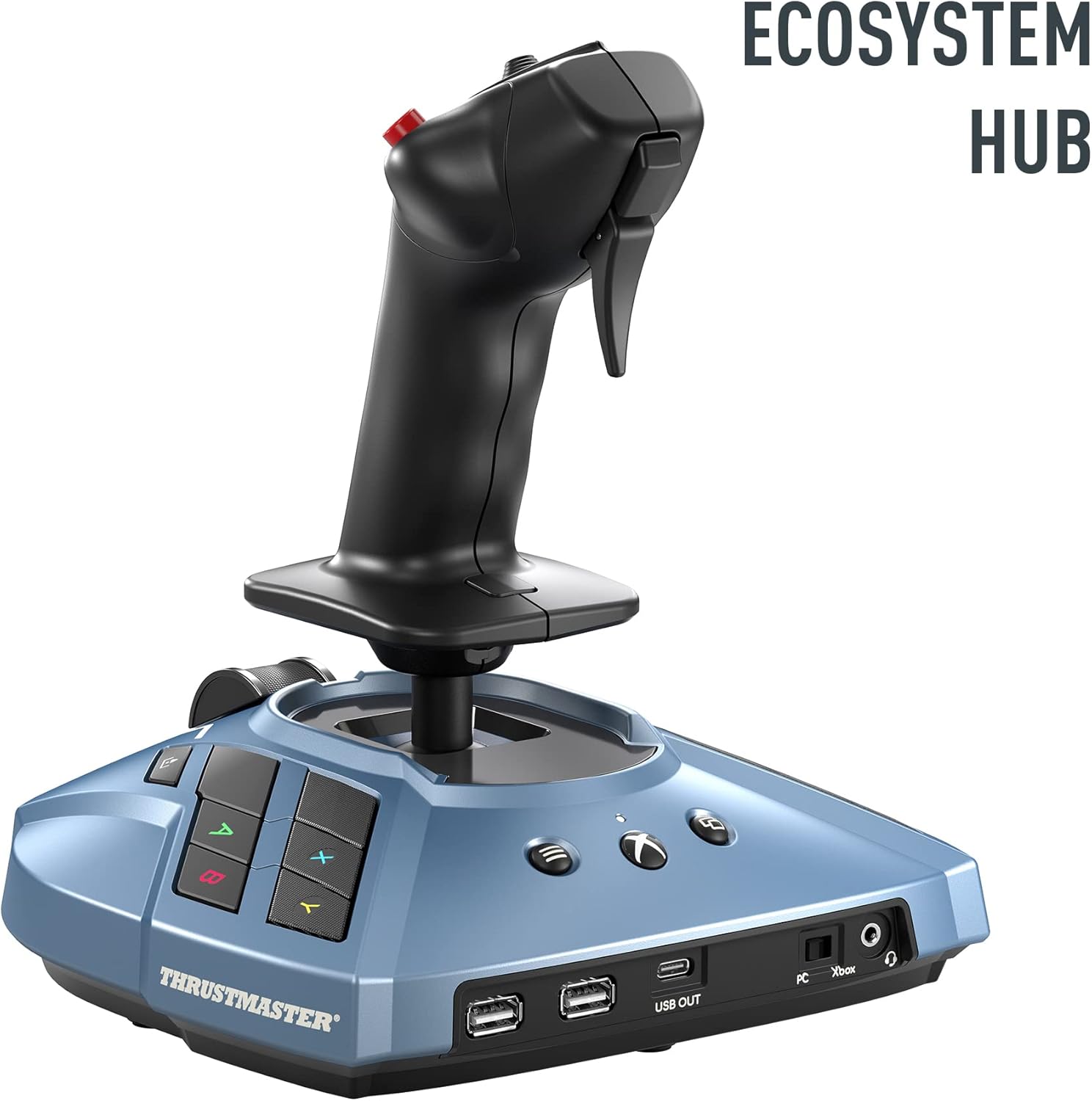
Figure 3: Ecosystem Hub. This image shows the base of the sidestick, highlighting the integrated ecosystem hub for connecting other Thrustmaster peripherals.
3. Operating Instructions
The TCA Sidestick Airbus X Edition is designed to replicate the feel and functionality of an actual Airbus sidestick, providing an authentic flight simulation experience.
3.1. Sidestick Control
The primary control is the ergonomic sidestick, which provides precise pitch and roll inputs. Its design is directly inspired by the flight controls found in iconic Airbus airliners, such as the A320.

Figure 4: Inspired by the Iconic Airbus Sidestick. This image highlights the design inspiration from real Airbus aircraft controls.
3.2. Button Functionality
The sidestick features 21 action buttons utilizing tact switch technology for crisp, reliable feedback. These include standard Xbox configuration buttons (Xbox Guide, Share, etc.) for seamless integration with your console or PC gaming environment.
- Swappable Joystick Head Button Modules: The device includes 4 swappable modules for the joystick head, allowing you to customize the button layout to your preference or specific aircraft profiles.
- Remappable Buttons: With 14 remappable buttons, you can assign various in-game functions, enhancing your control and efficiency during flight.

Figure 5: Ergonomic Design and Extra Modules. This image shows the sidestick handle with its interchangeable button modules, demonstrating customization options.

Figure 6: Sidestick Base Buttons. A close-up view of the buttons on the base of the sidestick, including the Xbox-specific controls.
4. Maintenance
Proper maintenance ensures the longevity and optimal performance of your Thrustmaster TCA Sidestick. Keep the device clean and free from dust and debris. Use a soft, dry cloth for cleaning. Avoid using abrasive cleaners or solvents, as these can damage the surface and internal components. Store the sidestick in a cool, dry place when not in use.
5. Troubleshooting
If you encounter issues with your TCA Sidestick, consider the following common troubleshooting steps:
- No Recognition: Ensure the USB cable is securely connected to both the sidestick and your console/PC. Try a different USB port. For PC, verify that the latest drivers are installed.
- Incorrect Button Mapping: Check your game's control settings to ensure buttons are correctly assigned. Utilize the Thrustmaster control panel (PC) for advanced calibration and remapping.
- Inconsistent Performance: Ensure your device's firmware is up to date. This can often resolve performance inconsistencies.
- Physical Issues: Inspect the sidestick and buttons for any visible damage or obstructions.
For more detailed troubleshooting or specific error codes, please refer to the official user manual PDF or the Thrustmaster support website.
6. Specifications
| Attribute | Detail |
|---|---|
| Language | English |
| Product Dimensions | 10.43 x 8.86 x 8.46 inches; 3 Pounds |
| Item Model Number | 4460219 |
| Date First Available | November 2, 2022 |
| Manufacturer | Thrustmaster |
| ASIN | B0BG3DH3GW |
7. Warranty and Support
Thrustmaster offers various support options for its products. For detailed warranty information, please refer to the documentation included with your product or visit the official Thrustmaster website.
7.1. Protection Plans
Extended protection plans may be available for purchase to provide additional coverage beyond the standard manufacturer's warranty. These plans typically cover repairs or replacements for a specified period.
- 2-Year Protection Plan: Available for purchase.
- 3-Year Protection Plan: Available for purchase.
- Complete Protect: A monthly plan covering eligible past and future purchases.
7.2. User Manual and Online Resources
A comprehensive user manual is available in PDF format for detailed instructions and information.
- Official User Manual (PDF): Download Here
- Thrustmaster Store: Visit the Official Store
Related documents4460219


Ask a question about this manual
Ask about setup, troubleshooting, compatibility, parts, safety, or missing instructions. Manuals+ will review the question and use this page’s manual context to help answer it.