
DCCStands PAX A35 Fixed Stand
PAX A35 4" Fixed Stand Instruction Manual
Model: PAX A35 Fixed Stand | Brand: DCCStands
1. Introduction
The DCCStands PAX A35 4" Fixed Stand is a robust metal terminal holder designed to provide a stable and secure mounting solution for your PAX A35 credit card terminal. Manufactured from durable mild steel with a powder-coated finish, this stand enhances customer experience and merchant efficiency by securing the terminal and preventing accidental drops or damage. Its angled design allows for seamless customer interactions, making it an essential staple for any checkout environment.

Image 1.1: The PAX A35 4" Fixed Metal Terminal Stand with a PAX A35 terminal securely mounted, showcasing its angled design for optimal user interaction.
2. Safety Information
- Ensure the stand is installed on a stable, flat surface to prevent tipping.
- Do not overtighten screws during installation, as this may damage the terminal or the stand.
- Keep small parts (screws, adhesive pads) out of reach of children.
- This product is designed for indoor use only.
- Do not attempt to modify the stand. Any modifications may void the warranty and compromise safety.
3. Package Contents
Please verify that all items listed below are included in your package:
- DCCStands PAX A35 4" Fixed Stand (1 unit)
- Mounting Screws (4 units)
- Adhesive Sticker (1 unit)
Note: The PAX A35 PIN Pad terminal is not included with this stand.
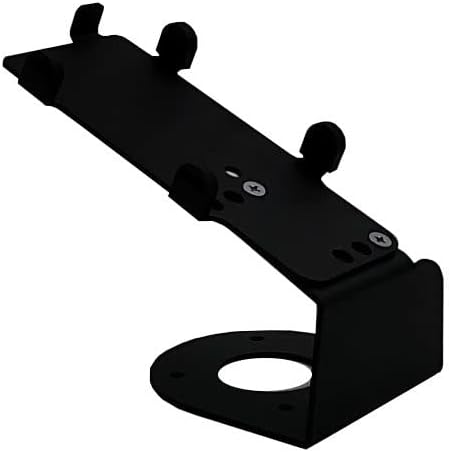
Image 3.1: The PAX A35 Fixed Stand, illustrating the base with pre-drilled holes for screw-in mounting and the top plate for terminal attachment.
4. Setup & Installation
The PAX A35 Fixed Stand offers two installation options: screw-in for permanent fixture or adhesive for a less permanent solution.
4.1. Attaching the PAX A35 Terminal to the Stand
- Carefully align your PAX A35 terminal with the mounting points on the stand's top plate.
- Secure the terminal to the stand using the provided screws. Ensure the terminal is firmly attached but do not overtighten.

Image 4.1: A close-up view of the PAX A35 terminal securely attached to the stand, demonstrating the proper fit and angled presentation.
4.2. Mounting the Stand to a Surface (Screw-in Method)
- Choose a desired location on your countertop or desk. Ensure the surface is clean and dry.
- Place the stand in the desired position and mark the locations for the four mounting screws through the holes in the base.
- If necessary, pre-drill pilot holes into the surface at the marked locations.
- Secure the stand to the surface using the provided screws. Ensure the stand is stable and does not wobble.
4.3. Mounting the Stand to a Surface (Adhesive Method)
- Choose a desired location on your countertop or desk. Ensure the surface is clean, dry, and free of dust or grease.
- Peel the backing from the adhesive sticker.
- Carefully apply the adhesive sticker to the bottom of the stand's base, ensuring it is centered.
- Press the stand firmly onto the chosen surface for at least 30 seconds to ensure proper adhesion. Allow the adhesive to cure for several hours before heavy use.

Image 4.2: The PAX A35 terminal stand in a typical retail environment, demonstrating its low height and stable design on a countertop.
5. Usage
Once installed, the PAX A35 Fixed Stand provides a secure and ergonomic position for your PAX A35 credit card terminal. The angled design allows for easy viewing and interaction by both customers and staff, improving the efficiency of payment transactions. The fixed nature of the stand minimizes movement, reducing the risk of accidental drops or damage to the terminal during use.
6. Maintenance
The PAX A35 Fixed Stand requires minimal maintenance due to its durable metal construction and powder-coated finish.
- Cleaning: Wipe the stand periodically with a soft, damp cloth to remove dust and smudges. Avoid using abrasive cleaners or solvents, as these may damage the finish.
- Inspection: Regularly check the mounting screws (if applicable) to ensure they remain tight. Inspect the stand for any signs of wear or damage.
7. Troubleshooting
Most issues with the stand are related to installation. Refer to the following common problems and solutions:
| Problem | Possible Cause | Solution |
|---|---|---|
| Stand wobbles after installation. | Screws are loose or surface is uneven. | Tighten all mounting screws. Ensure the installation surface is flat and stable. If using adhesive, ensure the surface was clean and dry before application. |
| Terminal feels loose on the stand. | Terminal mounting screws are loose. | Ensure the screws attaching the PAX A35 terminal to the stand's top plate are securely tightened. |
| Stand detaches from surface (adhesive method). | Surface was not clean/dry, or insufficient pressure applied during installation. | Clean the surface thoroughly with an alcohol wipe and allow to dry completely. Reapply a new adhesive sticker (if available) and apply firm, consistent pressure for at least 30 seconds. Allow adequate curing time. |
8. Specifications
| Feature | Detail |
|---|---|
| Model | PAX A35 Fixed Stand |
| Brand | DCCStands |
| Material | Robust Mild Steel |
| Color | Black |
| Finish Type | Powder Coated |
| Height | 4 inches (at the top of the plate) |
| Mounting Options | Screw-in or Adhesive |
| Assembly Required | No (stand comes pre-assembled) |
| Compatible Terminal | PAX A35 |
| UPC | 614524841041 |
9. Warranty Information
This DCCStands product comes with a 1-year warranty from the date of purchase. This warranty covers defects in materials and workmanship under normal use. It does not cover damage caused by misuse, accident, unauthorized modification, or improper installation. Please retain your proof of purchase for warranty claims.
10. Customer Support
For technical assistance, warranty claims, or any questions regarding your PAX A35 Fixed Stand, please contact DCCStands customer support. While specific contact details are not provided in this manual, you can typically find support information on the official DCCStands website or through your original point of purchase.
When contacting support, please have your product model (PAX A35 Fixed Stand) and any relevant purchase information ready to assist in a quicker resolution.
Ask a question about this manual
Ask about setup, troubleshooting, compatibility, parts, safety, or missing instructions. Manuals+ will review the question and use this page’s manual context to help answer it.