
Product Overview
The Char-Broil Medallion Series Modular Outdoor Kitchen Corner Module is designed to seamlessly integrate with other Medallion Series components, providing versatile configuration options for your outdoor kitchen setup. This unit offers additional counter space and storage, enhancing the functionality and aesthetic of your outdoor cooking area.

Image: Front view of the Char-Broil Medallion Series Modular Outdoor Kitchen Corner Module, showcasing its black finish and granite countertop.
Safety Information
Please read and understand all safety warnings and instructions before assembling or operating this product. Failure to follow these instructions may result in property damage or personal injury.
- This product is intended for outdoor use only.
- Ensure all components are securely fastened during assembly.
- Do not overload the countertop or storage area.
- Keep children and pets away from the unit during assembly and operation.
- Always use caution when handling tools during assembly.
Package Contents
Verify that all components are present before beginning assembly:
- Corner Module Unit (with pre-installed granite countertop)
- Assembly Hardware (bolts, washers, nuts, interlocking brackets)
- Instruction Manual
Setup and Assembly
Assembly of the corner module is required. It is recommended to have two people for easier and safer assembly.
Step 1: Unpacking
Carefully remove all components from the packaging. Place them on a soft, clean surface to prevent scratches. Retain packaging materials until assembly is complete.
Step 2: Positioning the Module
Determine the desired location for your corner module within your Medallion Series outdoor kitchen layout. Ensure the area is level and stable.
Step 3: Interlocking with Other Modules
Align the corner module with adjacent Medallion Series modules. Use the provided interlocking brackets and hardware to securely connect the units. Ensure a snug fit to maintain stability and alignment across the kitchen.

Image: Close-up view of the interlocking bracket used to connect the corner module to other Medallion Series units.

Image: Detailed view of how two modules connect, showing the alignment and securing points.
Step 4: Leveling the Unit
The module features height-adjustable legs. Use these to level the unit on uneven surfaces, ensuring the countertop is flat and stable. Adjust each leg individually until the module is firm and does not wobble.

Image: An example of a complete outdoor kitchen setup, demonstrating the corner module's integration and its contribution to the overall layout.
Operating Instructions
The corner module provides additional granite countertop space for food preparation and serving, as well as enclosed storage below.
- Countertop Use: Utilize the durable granite surface for preparing meals, holding serving dishes, or as a general workspace. Avoid placing extremely hot items directly on the granite without protection.
- Storage Access: The module features two front-opening doors for accessing the internal storage compartment. This space is suitable for storing outdoor kitchen accessories, cleaning supplies, or other items that need protection from the elements.

Image: Front view of the corner module with both doors open, revealing the spacious interior storage area.
Maintenance and Care
Regular cleaning and maintenance will prolong the life and appearance of your corner module.
- Granite Countertop: Clean the granite surface with a mild soap and water solution. Wipe dry with a soft cloth. Avoid abrasive cleaners or harsh chemicals that can damage the stone. Periodically, a granite sealer can be applied to maintain its luster and stain resistance.
- Stainless Steel and Painted Surfaces: Wipe down stainless steel and painted components with a damp cloth and mild detergent. Dry thoroughly to prevent water spots or corrosion. Do not use steel wool or abrasive pads on stainless steel.
- General Cleaning: Keep the interior storage area clean and dry. Remove any debris or spills promptly.
Troubleshooting
If you encounter issues with your corner module, refer to the following common solutions:
- Module is not level: Adjust the height-adjustable legs on the bottom of the unit until the countertop is level and stable.
- Modules are not connecting securely: Ensure all interlocking brackets are correctly positioned and tightened. Check for any obstructions between the modules.
- Doors are misaligned or sticking: Check the door hinges for proper installation and tightness. Minor adjustments to hinge screws may resolve alignment issues.
Specifications
| Feature | Detail |
|---|---|
| Brand | Char-Broil |
| Model Number | 463246718 |
| Product Dimensions (D x W x H) | 21.6" x 38.3" x 35.6" |
| Item Weight | 90 Pounds |
| Frame Material | Stainless Steel |
| Top Material Type | Granite |
| Color | Black, Granite |
| Mounting Type | Interlocking Modular |
| Assembly Required | Yes |
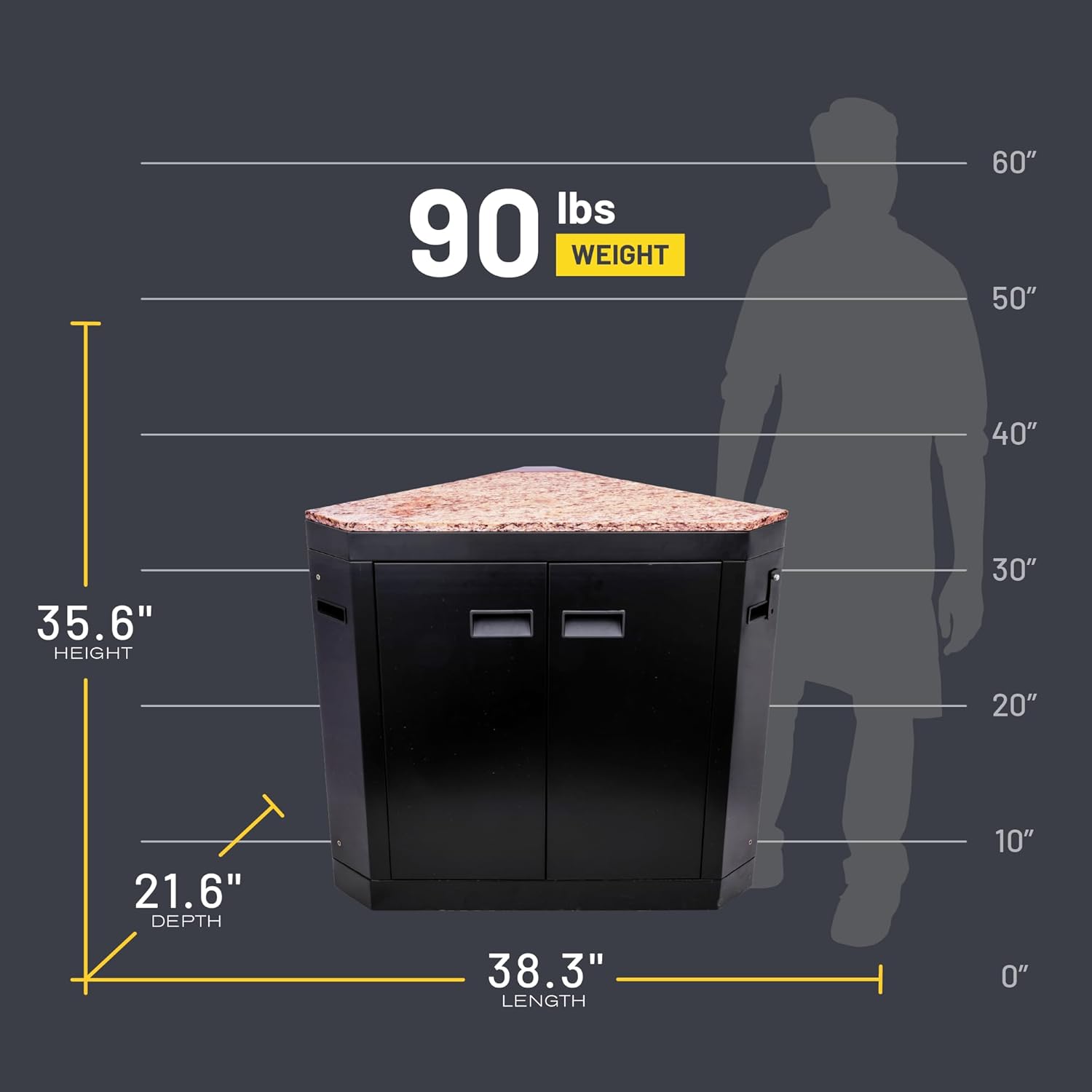
Image: A visual representation of the corner module's dimensions (depth, width, height) and weight.
Warranty Information
This Char-Broil Medallion Series Modular Outdoor Kitchen Corner Module (Model 463246718) comes with a 1-year warranty on all parts from the date of purchase. This warranty covers defects in materials and workmanship under normal use and service. For warranty claims or further details, please contact Char-Broil customer support.
Customer Support
For assistance with assembly, parts, or any other inquiries regarding your Char-Broil Medallion Series Modular Outdoor Kitchen Corner Module, please visit the official Char-Broil website or contact their customer service department. You can find contact information on the Char-Broil website or within your product packaging.
Online Resources: www.charbroil.com

