
EVTSCAN ULE08RL
EVTSCAN 18V Lithium Battery Converter with Spotlight and Dual USB Output
Model: ULE08RL
Brand: EVTSCAN
Introduction
This manual provides essential information for the safe and effective use of your EVTSCAN 18V Lithium Battery Converter. This device transforms your 18V lithium power tool battery into a versatile power source, offering dual USB outputs for charging mobile devices and a built-in spotlight for illumination. Please read this manual thoroughly before operation and retain it for future reference.

Figure 1: Front view of the EVTSCAN 18V Lithium Battery Converter, highlighting the product label and spotlight.
Product Features
- 18V Lithium Battery Compatibility: Designed for seamless integration with RYOBI P743, PSK005, PBP2003, P107, and other RYOBI P series 18V lithium power tool batteries. The robust design ensures a secure and stable connection, preventing accidental dislodgement during use.
- Dual USB Output (5V 2A): Equipped with two USB ports, allowing simultaneous charging of up to two USB-powered devices such as smartphones, tablets, and other small electronics.
- Integrated Spotlight (200lm): Features a bright 200 lumen spotlight, providing convenient illumination for work areas or emergency situations.
- DC Interface (14-21V < 5A): Includes a DC head interface with low voltage protection, suitable for connecting various DIY power tools and toys that operate within the specified voltage and current range.
- Durable ABS Shell: Constructed from high-quality ABS material, ensuring a glossy finish, resistance to burrs, and a long service life. The material contributes to the device's overall durability and ease of handling.

Figure 2: Side view illustrating the dual USB output ports for charging external devices.
Setup
- Insert Battery: Align your compatible 18V RYOBI P series lithium battery with the battery slot on the converter. Slide the battery firmly into place until it clicks, indicating a secure connection.
- Verify Connection: Gently tug on the battery to ensure it is securely attached and does not wobble. A stable connection is crucial for proper operation and safety.
- Ready for Use: Once the battery is securely connected, the converter is ready to provide power through its USB and DC outputs, and the spotlight can be activated.

Figure 3: Angled view demonstrating the battery insertion slot.

Figure 4: Rear view showing the battery connection interface.
Operating Instructions
Using the USB Output:
- Connect your USB charging cable to one of the two USB ports on the converter.
- Connect the other end of the cable to your mobile device (e.g., smartphone, tablet).
- The converter will automatically begin charging your device. You can charge two devices simultaneously.
Using the DC Output:
- Connect the DC plug of your compatible DIY power tool or toy to the DC interface on the converter.
- Ensure the connected device operates within the converter's DC output specifications (14-21V, less than 5A).
Using the Spotlight:
- Locate the power button for the spotlight, typically on the top of the converter.
- Press the button once to turn the spotlight on.
- Press the button again to turn the spotlight off.
Maintenance
- Cleaning: Wipe the converter with a soft, dry cloth to remove dust and debris. Do not use abrasive cleaners or solvents, as they may damage the ABS shell. Ensure the device is disconnected from any battery before cleaning.
- Storage: Store the converter in a cool, dry place away from direct sunlight and extreme temperatures. If storing for extended periods, remove the battery from the converter.
- Inspection: Periodically inspect the converter for any signs of damage, such as cracks in the casing or damaged ports. Do not use the device if any damage is observed.
Troubleshooting
| Problem | Possible Cause | Solution |
|---|---|---|
| USB devices not charging. | Battery not properly connected or depleted. USB cable is faulty. Device requires more than 2A per port. | Ensure the 18V battery is fully charged and securely attached. Try a different USB cable. Verify your device's charging requirements. |
| Spotlight not turning on. | Battery not properly connected or depleted. Spotlight button not pressed correctly. | Ensure the 18V battery is fully charged and securely attached. Press the spotlight button firmly. |
| DC output not working. | Battery not properly connected or depleted. Connected device exceeds 5A current limit or is outside 14-21V range. | Ensure the 18V battery is fully charged and securely attached. Check the power requirements of your connected device. Do not exceed 5A. |
Specifications
| Attribute | Value |
|---|---|
| Model | ULE08RL |
| Brand | EVTSCAN |
| Input Voltage (from battery) | 18V (compatible with RYOBI P series lithium batteries) |
| USB Output | 5V, 2A (Dual USB ports) |
| DC Output | 14-21V, < 5A |
| Spotlight Flux | 200lm |
| Material | ABS |
| Item Weight | 0.21 Kilograms |
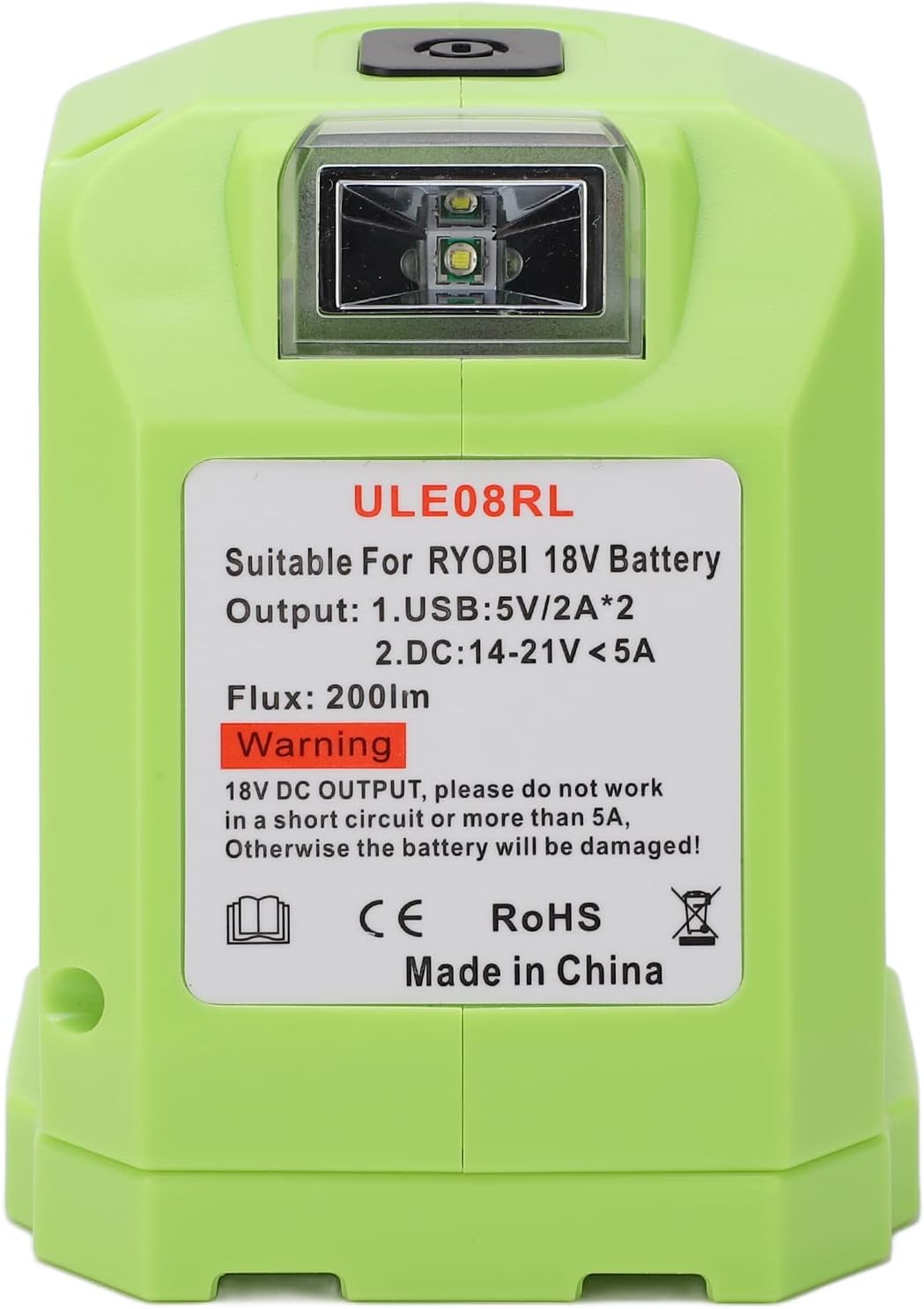
Figure 5: Close-up of the product label, detailing output specifications and warnings.
Safety Information
Please observe the following safety precautions to prevent injury or damage to the device:
- Overload Protection: WARNING: The 18V DC output should not be used in a short circuit or with a current exceeding 5A. Exceeding this limit may cause damage to the connected battery.
- Battery Compatibility: Only use compatible 18V RYOBI P series lithium batteries with this converter. Using incompatible batteries may result in damage to the converter or battery.
- Environmental Conditions: Do not expose the converter to rain, moisture, or extreme temperatures. Operate and store in a dry environment.
- Physical Damage: Do not drop, disassemble, or attempt to repair the converter yourself. Refer to qualified personnel for service.
- Children and Pets: Keep the device out of reach of children and pets.
- Ventilation: Ensure adequate ventilation around the converter during operation to prevent overheating.
Warranty and Support
For warranty information, technical support, or service inquiries, please contact EVTSCAN customer service through the retailer where the product was purchased or visit the official EVTSCAN brand store on Amazon. Please have your product model number (ULE08RL) and purchase details ready when contacting support.
EVTSCAN Store Link: Visit the EVTSCAN Store on Amazon
Ask a question about this manual
Ask about setup, troubleshooting, compatibility, parts, safety, or missing instructions. Manuals+ will review the question and use this page’s manual context to help answer it.