
Photon VW Polo 6R 09-17
Photon VW Polo 6R 09-17 Cornering LED Bulb User Manual
Model: VW Polo 6R 09-17 | Brand: Photon
1. Introduction
This user manual provides comprehensive instructions for the installation, operation, maintenance, and troubleshooting of your Photon VW Polo 6R 09-17 Cornering LED Lighting Bulb. Please read this manual carefully before installation to ensure proper function and safety.
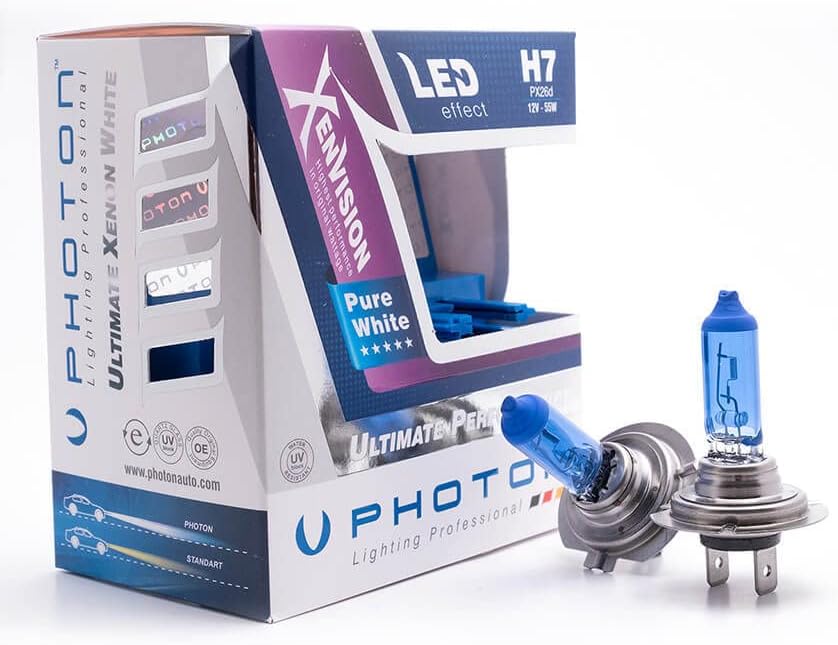
This image displays the product packaging for the Photon VW Polo 6R 09-17 Cornering LED Lighting Bulb, alongside two individual LED bulbs. The packaging is white and purple, featuring the 'Photon Lighting Professional' logo and indicating 'LED H7 effect' with specifications 'PX26d 12V-55W'. The two bulbs are blue-tinted, indicating their LED nature, and are designed for automotive headlight assemblies.
2. Safety Information
To ensure safe operation and prevent damage, please observe the following safety precautions:
- Always disconnect the vehicle's battery before performing any electrical work.
- Wear appropriate safety gear, including gloves and eye protection, during installation.
- Ensure the bulb is cool before handling to avoid burns.
- Do not touch the glass part of the bulb with bare hands, as oils can reduce bulb life.
- Consult a qualified automotive technician if you are unsure about any installation steps.
- Dispose of old bulbs according to local regulations.
3. Package Contents
Verify that all items are present in your package:
- 2 x Photon VW Polo 6R 09-17 Cornering LED Lighting Bulbs
- 1 x User Manual (this document)
4. Installation
4.1. Pre-installation Checklist
- Ensure your vehicle's engine is off and the ignition is in the 'off' position.
- Allow existing bulbs to cool down if they have been recently in use.
- Locate the headlight assembly in your VW Polo 6R (2009-2017 model).
- Identify the access point for the cornering light bulb, typically behind the headlight unit or through the wheel well liner.
4.2. Installation Steps
- Carefully remove any covers or access panels to expose the bulb housing.
- Disconnect the electrical connector from the existing bulb.
- Unclip or twist to remove the old bulb from its socket.
- Insert the new Photon LED bulb into the socket, ensuring it is seated firmly and correctly oriented.
- Reconnect the electrical connector to the new bulb.
- Replace any covers or access panels that were removed.
- Test the new bulbs by turning on your vehicle's ignition and activating the cornering lights.
5. Operation
The Photon VW Polo 6R 09-17 Cornering LED Lighting Bulb is designed to provide enhanced illumination for cornering maneuvers. It operates automatically with your vehicle's electrical system when the cornering light function is activated, typically when turning the steering wheel at low speeds or when the turn signal is engaged.
6. Maintenance
To ensure the longevity and optimal performance of your LED bulbs, follow these maintenance guidelines:
- Periodically inspect the bulbs for any signs of damage or loose connections.
- Keep the headlight lenses clean to ensure maximum light output.
- If cleaning the bulb itself, use a clean, lint-free cloth and avoid abrasive materials.
- Do not use harsh chemicals or solvents on the bulb or its housing.
7. Troubleshooting
If you encounter any issues with your Photon LED bulbs, refer to the table below for common problems and solutions:
| Problem | Possible Cause | Solution |
|---|---|---|
| Bulb does not light up | Loose connection | Check electrical connector and ensure it is securely attached. |
| Blown fuse | Inspect the vehicle's fuse box and replace any blown fuses related to the lighting system. | |
| Incorrect installation | Re-check that the bulb is correctly seated in its socket. | |
| Bulb flickers or is dim | Loose connection | Ensure the electrical connector is tight. |
| Voltage irregularity | Consult a qualified technician to check the vehicle's electrical system. | |
| Light pattern is incorrect | Bulb not seated properly | Re-install the bulb, ensuring it is fully inserted and oriented correctly. |
8. Specifications
| Feature | Detail |
|---|---|
| Brand | Photon |
| Model Compatibility | VW Polo 6R (2009-2017) |
| Bulb Type | H7 (PX26d) |
| Voltage | 12V |
| Wattage | 55W |
| Color Temperature | 6000 Kelvin (Pure White) |
| Technology | LED Effect |
| Manufacturer | PHOTON |
9. Warranty & Support
Photon products are manufactured to high standards and are designed for durability. For warranty information or technical support, please refer to the contact details provided on the product packaging or visit the official Photon website. Please have your product model and purchase date available when contacting support.
Ask a question about this manual
Ask about setup, troubleshooting, compatibility, parts, safety, or missing instructions. Manuals+ will review the question and use this page’s manual context to help answer it.