
1. Introduction
This manual provides instructions for the ALLIMITY universal remote control, model QYSY-RC-WH-TA14NE-QYSY, designed for use with various Toshiba air conditioner units. This remote control is a direct replacement and covers all essential functions of your original remote. No programming is required; simply insert batteries for immediate use.
2. Setup: Battery Installation
To begin using your remote control, you must first install the batteries. The remote requires alkaline batteries (not included).
- Locate the battery compartment cover on the back of the remote control.
- Slide the cover downwards or press the latch (if present) and lift to open the compartment.
- Insert two new alkaline batteries, ensuring the positive (+) and negative (-) terminals match the diagrams inside the compartment.
- Replace the battery compartment cover by sliding it back into place until it clicks securely.

Once batteries are installed, the remote is ready for use with compatible Toshiba AC units.
3. Operating Instructions
This remote control features a clear LCD display and multiple buttons for various functions. Refer to the image below for button identification.
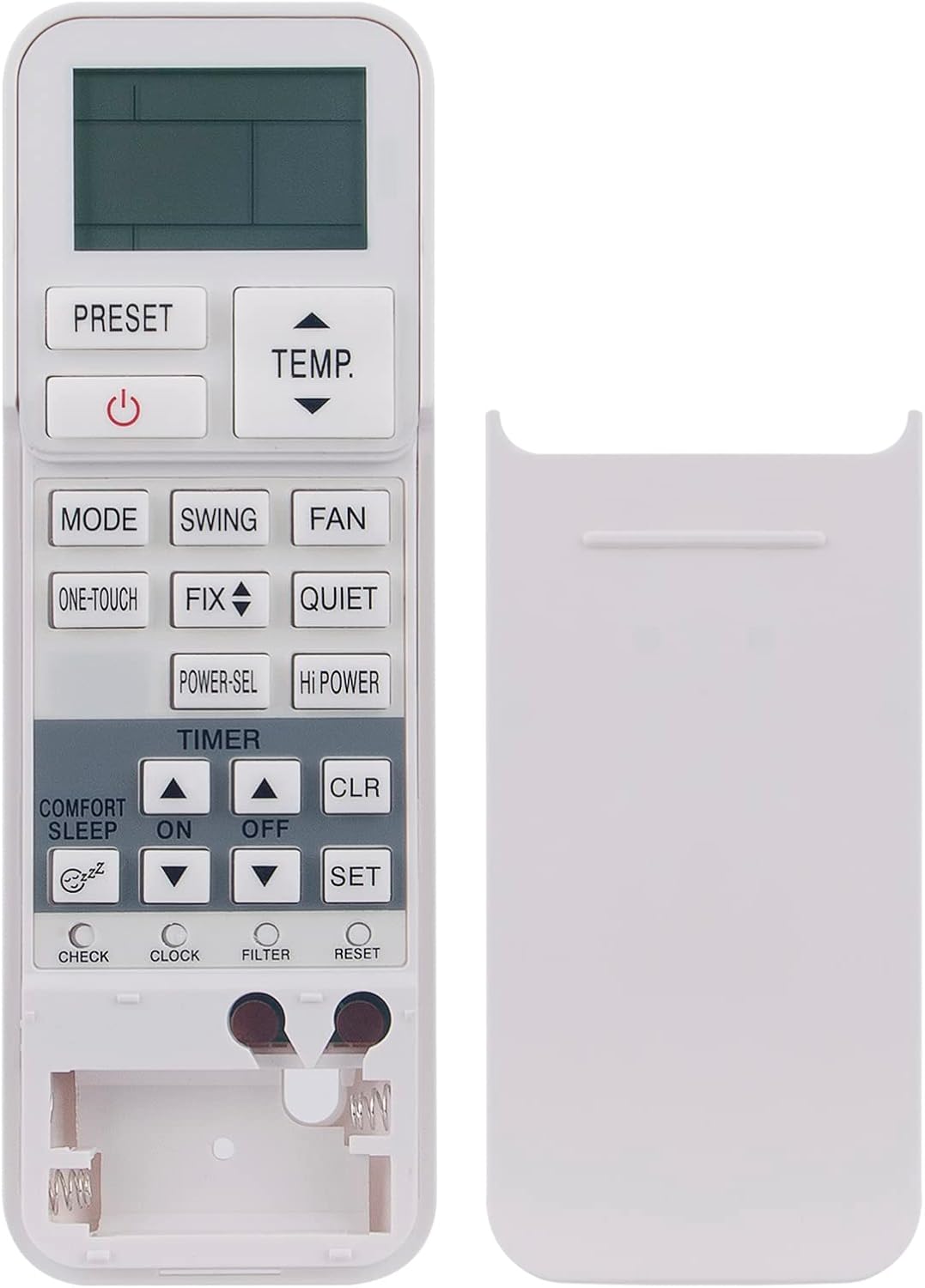
Button Functions:
- POWER (⏻): Turns the air conditioner unit on or off.
- PRESET: Recalls a favorite or pre-programmed setting.
- TEMP. ▲/▼: Adjusts the desired temperature setting up or down.
- MODE: Cycles through operating modes such as Cool, Heat, Fan, Dry, and Auto.
- SWING: Controls the horizontal louver swing direction.
- FAN: Adjusts the fan speed (e.g., Low, Medium, High, Auto).
- ONE-TOUCH: Activates a pre-set comfort setting with a single press.
- FIX ▲/▼: Adjusts the vertical louver position.
- QUIET: Activates a low-noise operation mode.
- POWER-SEL: Engages power selection mode for energy saving.
- HI POWER: Activates maximum power operation for rapid cooling or heating.
- TIMER ON/OFF: Sets the timer for automatic unit power-on or power-off.
- COMFORT SLEEP: Activates sleep mode for comfortable night operation, often with gradual temperature adjustments.
- CLR: Clears a selected setting, such as a timer.
- SET: Confirms a selected setting, typically used with timer functions.
- CHECK: Displays the current operating settings.
- CLOCK: Used to set the current time on the remote's display.
- FILTER: Indicates a reminder to clean the air filter.
- RESET: Resets the remote control to its factory default settings.
4. Maintenance
Proper maintenance ensures the longevity and optimal performance of your remote control.
- Cleaning: Wipe the remote control with a soft, dry cloth. Do not use liquid cleaners, sprays, or abrasive materials, as these can damage the remote.
- Battery Replacement: Replace batteries when the remote's range decreases or the display becomes dim. Always replace both batteries at the same time with new alkaline batteries. Do not mix old and new batteries or different types of batteries.
- Storage: If the remote control will not be used for an extended period, remove the batteries to prevent leakage and potential damage. Store in a cool, dry place away from direct sunlight.
5. Troubleshooting
If you encounter issues with your remote control, try the following troubleshooting steps:
- Remote Not Responding: Ensure the batteries are correctly inserted with the correct polarity. Replace old batteries with new ones.
- Short Operating Range: Check battery levels. Ensure there are no obstructions between the remote control and the air conditioner unit's infrared receiver. The maximum effective range is approximately 10 meters.
- Display Issues: If the LCD display is dim or blank, replace the batteries. If the issue persists, the remote may require service.
- Unit Not Responding to Commands: Verify that the remote is pointed directly at the air conditioner's receiver. Ensure the AC unit is powered on. If the issue continues, try resetting the remote (if a reset button is available, or by removing and reinserting batteries).
6. Specifications
| Brand | ALLIMITY |
| Model Name | QYSY-RC-WH-TA14NE-QYSY |
| Connectivity Technology | Infrared |
| Maximum Range | 10 Meters |
| Battery Description | Alkaline |
| Color | White |
| Country of Origin | China |
7. Compatible Air Conditioner Models
This ALLIMITY remote control is compatible with a wide range of Toshiba air conditioner models, including but not limited to:
- WH-TA03NE, WH-TA04NE, WH-TA05LE, WH-TG01NE
- RAS-B10N3KV2, RAS-B13N3KV2, RAS-B16N3KV2, RAS-B22N3KV2
- RAS-B10N3KV2-E1, RAS-B13N3KV2-E1, RAS-B16N3KV2-E1, RAS-B22N3KV2-E1
- RAS-M07N3KV2, RAS-M24N3KV2
- RAV-RM301KRTP-NZ, RAV-RM401KRTP-NZ, RAV-RM561KRTP-NZ, RAV-RM801KRTP-NZ
- RAS-13N3KCV, RAS-16N3KCV, RAS-18N3KCV, RAS-22N3KCV, RAS-24N3KCV
- RAV-GM1101KRTP-E
- RAS-10N3KV2-E1, RAS-13N3KV2-E1, RAS-16N3KV2-E1, RAS-18N3KV2-E1, RAS-22N3KV2-E1, RAS-24N3KV2-E1
- RAS-10N3KVR, RAS-13N3KVR, RAS-16N3KVR, RAS-18N3KVR, RAS-22N3KVR
- RAS-10G2KVP, RAS-13G2KVP, RAS-16G2KVP
- RAS-10PKVSG-E, RAS-13PKVSG-E, RAS-16PKVSG-E
- RAS-10PAVSG-E, RAS-13PAVSG-E, RAS-16PAVSG-E
8. Warranty and Support
For any questions, technical support, or warranty inquiries regarding your ALLIMITY remote control, please contact the seller directly through your purchase platform. Please retain your proof of purchase for warranty claims.
