
1. Introduction
This manual provides essential instructions for the safe and efficient operation of your TUXING TXET063 12V Mini PCP Air Compressor LCD Control Box. This control box is designed to be compatible with the TUXING TXET063 12V PCP air compressor and is applicable to most piston air compressors. It features a compact structure, stable performance, and is made from high-quality, corrosion-resistant, and anti-aging materials, ensuring a long service life. Please read this manual thoroughly before installation and use.
2. Safety Instructions
Always adhere to the following safety guidelines to prevent injury or damage to the equipment.
- Ensure the control box is connected to the correct voltage (12V) as specified for the TUXING TXET063 compressor.
- Do not operate the control box in wet conditions or expose it to water.
- Verify all connections are secure before powering on the device.
- Keep hands and loose clothing away from moving parts of the compressor when the control box is in operation.
- If any unusual sounds, smells, or malfunctions occur, immediately disconnect power and consult the troubleshooting section or contact support.
- This control box is a replacement part; ensure it is installed by a knowledgeable individual or professional if you are unsure.
3. Product Overview
The TUXING TXET063 LCD Control Box provides an intuitive interface for managing your air compressor. It features a multi-function intelligent controller with an LCD display and various control buttons.
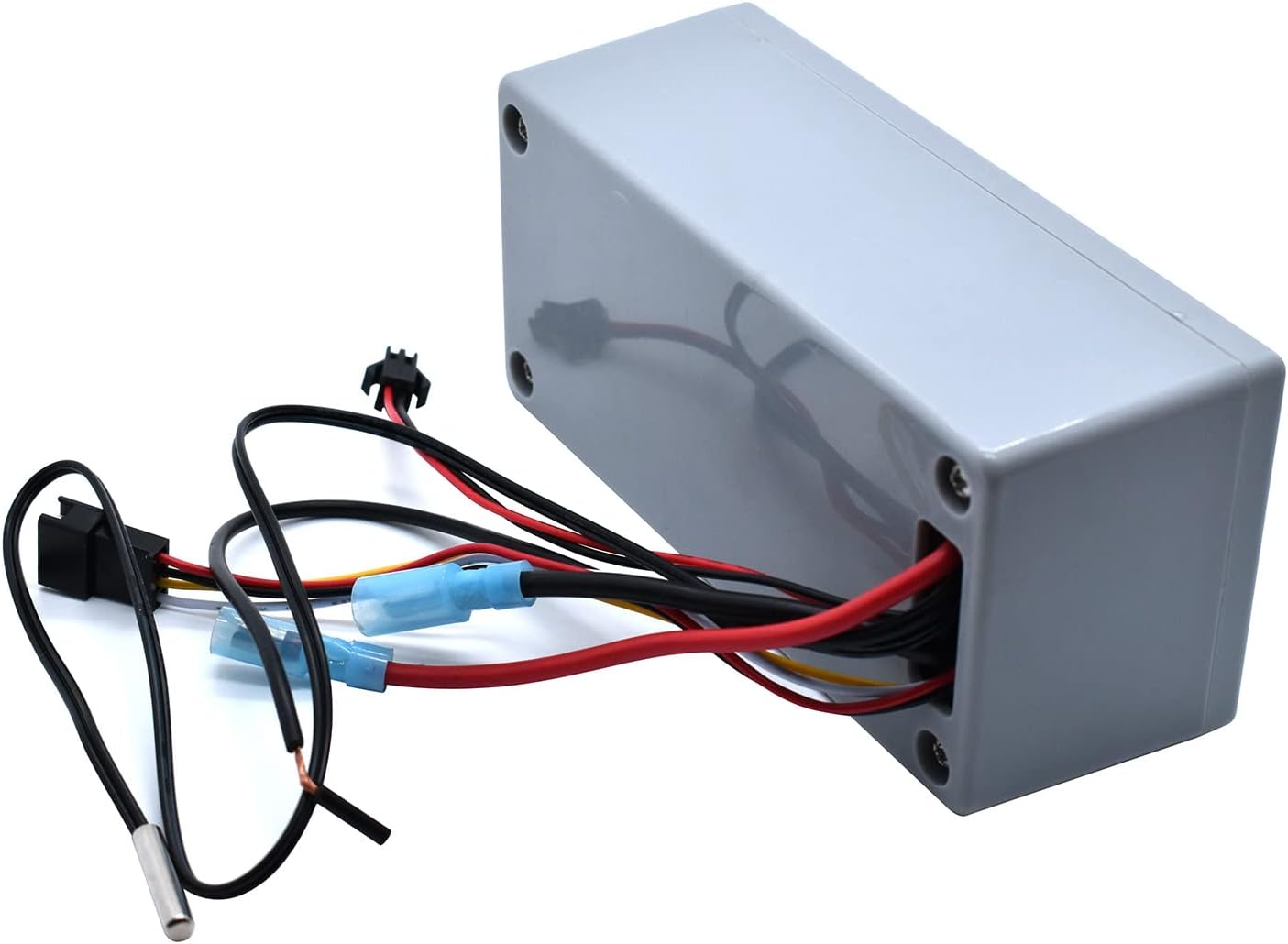
Figure 3.1: TUXING TXET063 LCD Control Box showing the main unit with various electrical wires connected, including a temperature sensor wire. This image highlights the compact design and the wiring harness for integration with the compressor system.

Figure 3.2: Top view of the TUXING TXET063 LCD Control Box, clearly displaying the LCD screen and the control buttons: POWER, FAN ON/OFF, MOTOR ON/OFF, SET, and arrow buttons for navigation. The text "Multi-function intelligent controller" is visible below the screen.
Key Components:
- LCD Display: Shows operational status, pressure readings, and settings.
- Control Buttons:
- POWER: Turns the control box on/off.
- FAN ON/OFF: Controls the cooling fan.
- MOTOR ON/OFF: Controls the compressor motor.
- SET: Enters settings menu or confirms selections.
- Arrow Buttons (Up/Down): Navigates menus and adjusts values.
- Wiring Harness: For connection to the compressor's power supply, motor, fan, and sensors.
4. Setup and Installation
The TUXING TXET063 LCD Control Box is designed for easy installation. Follow these steps carefully:
- Power Disconnection: Ensure the main power to your TUXING TXET063 12V PCP air compressor is completely disconnected before beginning installation.
- Identify Connections: Locate the corresponding connection points on your compressor for the control box's wiring harness. These typically include power input, motor control, fan control, and sensor inputs (e.g., temperature, pressure).
- Connect Wires: Carefully connect each wire from the control box's harness to its designated terminal on the compressor. Pay close attention to polarity (positive/negative) for power connections. Refer to your compressor's specific wiring diagram if available.
- Secure Mounting: Mount the control box in a secure, dry location, away from excessive heat or vibration. Ensure proper ventilation around the unit.
- Initial Check: Once all connections are made and secured, double-check every connection point for tightness and correct placement.
- Power On: Reconnect the main power to the compressor. The LCD display on the control box should illuminate.
5. Operating Instructions
This section details how to operate the LCD Control Box for your air compressor.
5.1 Basic Operation
- Power On/Off: Press the POWER button to turn the control box on or off.
- Motor Control: Press the MOTOR ON/OFF button to start or stop the compressor motor.
- Fan Control: Press the FAN ON/OFF button to activate or deactivate the cooling fan. It is recommended to keep the fan running during compressor operation to prevent overheating.
5.2 Setting Parameters
The control box allows you to set various operational parameters, such as target pressure or temperature limits.
- Enter Settings: Press the SET button to enter the settings menu.
- Navigate: Use the Up and Down arrow buttons to scroll through the available settings.
- Adjust Values: Once a setting is selected, press SET again to edit its value. Use the Up and Down arrow buttons to change the value.
- Confirm: Press SET to confirm the new value and exit the editing mode for that parameter.
- Exit Settings: To exit the settings menu, navigate to the 'Exit' option or press and hold the SET button for a few seconds (refer to specific model behavior).
Note: Specific settings and their ranges may vary. Consult your compressor's main manual for recommended operating parameters.
6. Maintenance
The TUXING TXET063 LCD Control Box requires minimal maintenance. Regular checks ensure optimal performance and longevity.
- Cleaning: Keep the control box and its display clean. Use a soft, dry cloth to wipe away dust and debris. Do not use abrasive cleaners or solvents.
- Connection Checks: Periodically inspect all wire connections to ensure they remain secure and free from corrosion.
- Environmental Conditions: Ensure the control box is operated within its specified environmental conditions (temperature, humidity) to prevent damage.
7. Troubleshooting
If you encounter issues with your TUXING TXET063 LCD Control Box, refer to the table below for common problems and solutions.
| Problem | Possible Cause | Solution |
|---|---|---|
| LCD display does not light up. | No power supply; Loose connection; Faulty unit. | Check power source and connections. Ensure the POWER button is pressed. If problem persists, contact support. |
| Compressor motor does not start. | MOTOR ON/OFF not pressed; Motor connection loose; Overload protection activated. | Press MOTOR ON/OFF. Check motor wiring. Allow compressor to cool down if it was recently overloaded. |
| Fan does not operate. | FAN ON/OFF not pressed; Fan connection loose; Fan motor failure. | Press FAN ON/OFF. Check fan wiring. If fan still doesn't work, it may need replacement. |
| Incorrect readings on display. | Sensor malfunction; Loose sensor connection. | Check sensor connections. If readings are consistently incorrect, the sensor or control box may be faulty. |
8. Specifications
Technical specifications for the TUXING TXET063 LCD Control Box.
| Feature | Detail |
|---|---|
| Brand | TUXING |
| Model Number | LCD Display |
| Compatible Compressor | TUXING TXET063 12V PCP Air Compressor |
| Voltage | 110 Volts (Input for compressor, control box operates on 12V from compressor) |
| Power Source | Electric Cable |
| Special Features | Corrosion Resistant, Easy to Install |
| Item Weight | 1 Kilogram |
| Color | Grey |
| UPC | 774696334472 |
| Country of Origin | China |
9. Warranty and Support
For warranty information, please refer to the documentation provided with your original TUXING TXET063 12V Mini PCP Air Compressor or contact TUXING customer support directly. If you require technical assistance or have questions regarding the installation or operation of this LCD Control Box, please reach out to the manufacturer or your authorized dealer.