
1. Introduction
This user manual provides comprehensive instructions for the installation, operation, and maintenance of your Weiser SmartCode Keypad Electronic Deadbolt. This advanced keyless entry system offers enhanced security and convenience for your home.
The SmartCode deadbolt features a sleek design, a backlit keypad for visibility, and the ability to store up to 50 user codes. It operates on 4 AA batteries and includes SmartKey re-key technology for added security and flexibility.
2. Safety Information
Please read and understand all instructions before installing and using this product. Keep this manual for future reference.
- Do not attempt to disassemble or modify the lock. This may cause damage to the product and void the warranty.
- Use only the specified battery type (4 AA alkaline batteries). Do not mix old and new batteries or different types of batteries.
- Ensure proper polarity when inserting batteries.
- Keep all keys and user codes in a secure location.
- Avoid exposing the lock to extreme temperatures or direct moisture.
- Regularly check the lock's functionality and battery level.
3. Package Contents
Verify that all components are present before beginning installation:

Image: Complete package contents of the Weiser SmartCode Keypad Electronic Deadbolt.
- Electronic Deadbolt (Exterior Keypad Assembly)
- Electronic Deadbolt (Interior Battery Unit)
- Latch
- Strike Plate
- Mounting Plate
- Installation Hardware (Screws)
- 2 Keys
- SmartKey Tool
- Installation Manual (this document)
Note: 4 AA batteries are required and not included in the package.
4. Setup & Installation
The Weiser SmartCode deadbolt is designed for easy installation. For a seamless setup experience, it is highly recommended to use the free BILT app, which provides step-by-step interactive 3D instructions with voice and video guidance.
4.1 Door Compatibility
This lock is designed to fit standard doors 1-3/8" to 1-3/4" (35 mm - 44 mm) thick with an adjustable backset (2-3/8" or 2-3/4"). It is ideal for most exterior and interior residential doors.
4.2 Installation Steps (Overview)
- Prepare the Door: Ensure your door is properly drilled and aligned for a deadbolt installation.
- Install the Latch: Insert the latch into the door edge, ensuring the correct backset is selected.
- Install the Exterior Assembly: Place the exterior keypad assembly onto the door, feeding the cable through the cross bore.
- Install the Mounting Plate: Secure the mounting plate to the door using the provided screws, ensuring the cable passes through the plate.
- Connect the Cable and Install Interior Assembly: Connect the cable from the exterior assembly to the interior battery unit. Mount the interior unit to the mounting plate.
- Install Batteries: Insert 4 AA alkaline batteries into the interior unit, observing polarity.
- Perform Door Handing Process: This crucial step teaches the lock the orientation of your door. Follow the specific instructions in the full manual or BILT app.
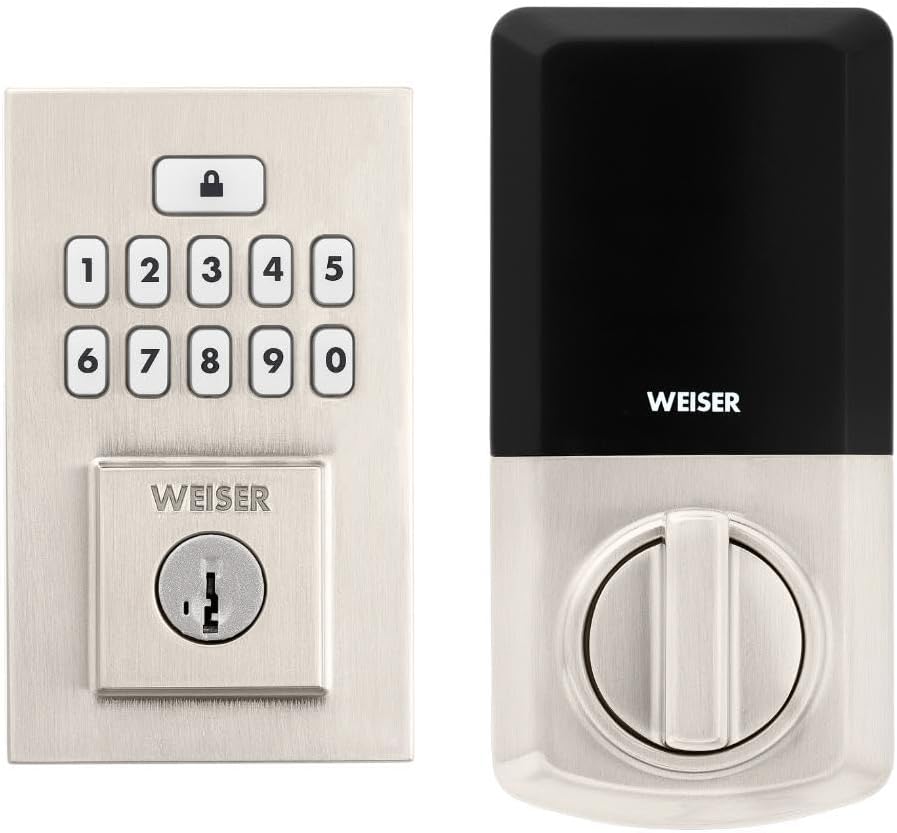
Image: Assembled Weiser SmartCode Keypad Electronic Deadbolt, showing both exterior and interior components.

Image: Close-up of the exterior keypad, featuring the backlit numeric buttons and keyhole.
5. Operating Instructions
5.1 Locking the Door
- One-Touch Locking: Press the Lock button (top button with padlock icon) on the keypad. The deadbolt will extend.
- Auto-Lock Feature: If enabled, the deadbolt will automatically extend after a set period (e.g., 30 seconds) once unlocked.
5.2 Unlocking the Door
- Using a User Code: Enter your personalized 4-8 digit user code on the keypad. The deadbolt will retract.
- Using the Key: Insert the physical key into the keyhole and turn to unlock.
5.3 Programming User Codes
The lock supports up to 50 user codes and 1 master code. Refer to the detailed programming instructions in the full manual for adding, deleting, or modifying codes.
- Master Code: The master code is used to add and delete user codes. It does not unlock the door.
- User Codes: These codes are used to unlock the door.


Image: Icons illustrating user management, programming, and auto-lock features.
5.4 SmartKey Re-key Technology
The SmartKey re-key technology allows you to re-key your lock in seconds, maintaining key control and protecting against lost, stolen, or unauthorized keys without removing the lock from your door. Use the provided SmartKey tool and follow the instructions carefully.

Image: SmartKey Security feature, demonstrating how to re-key the lock.
6. Maintenance
6.1 Battery Replacement
The lock operates on 4 AA alkaline batteries. When the batteries are low, the lock will provide an audible and/or visual low battery warning. Replace all four batteries simultaneously to ensure optimal performance.
- Remove the battery cover on the interior unit.
- Remove old batteries and dispose of them properly.
- Insert new AA alkaline batteries, ensuring correct polarity (+/-).
- Replace the battery cover.
Note: Battery life can vary based on usage frequency and environmental conditions. If the auto-lock feature is frequently used, battery life may be shorter.
6.2 Cleaning
Clean the lock with a soft, damp cloth. Avoid using abrasive cleaners, solvents, or chemical sprays, as these can damage the finish and electronic components.
7. Troubleshooting
| Problem | Possible Cause | Solution |
|---|---|---|
| Lock does not respond or keypad is not lit. | Dead batteries. | Replace all four AA batteries. |
| Lock beeps 3 times during programming or code entry. | Incorrect code, programming error, or lock not handed correctly. | Verify the code. Re-attempt programming steps carefully. Perform the door handing process again. If issues persist, reset the unit to factory settings (refer to full manual). |
| Deadbolt extends when door is open (Auto-lock issue). | The lock does not have a sensor to detect if the door is open or closed. Auto-lock activates after the set time regardless of door position. | This is normal operation. Ensure the door is closed before the auto-lock time expires, or disable the auto-lock feature if it causes inconvenience. |
| Keypad is difficult to see at night. | Backlight not active. | The keypad is backlit and stays lit for 30 seconds after inactivity. Ensure there is enough battery power. |
| Lock is not operating smoothly. | Misalignment of door or strike plate, or internal mechanism issue. | Check door and frame alignment. Ensure the strike plate is correctly installed. If the issue persists, contact customer support. |
8. Specifications
| Feature | Detail |
|---|---|
| Model Number | 9GED92600-003 |
| Product Dimensions | 6.99 x 2.86 x 13.97 cm (2.75 x 1.13 x 5.5 inches) |
| Item Weight | 454 g (1 lb) |
| Color | Satin Nickel |
| Style | Contemporary |
| Finish | Brushed |
| Material | Metal |
| Lock Type | Deadbolt, Electronic |
| Keypad | 10-Button, Backlit |
| User Codes | Up to 50 user codes, 1 master code |
| Power Source | 4 AA Batteries (not included) |
| Door Thickness Compatibility | 1-3/8" to 1-3/4" (35 mm - 44 mm) |
| Backset | Adjustable 2-3/8" or 2-3/4" |
| Special Features | Weather Resistant, Anti-Bump, Auto-Lock, One-Touch Lock, Back-Lit Keypad, SmartKey Security |
| ANSI Grade | Grade 2 |
| Country of Origin | China |
9. Warranty & Support
9.1 Warranty Information
The Weiser SmartCode Keypad Electronic Deadbolt comes with a 1-year warranty from the date of purchase. This warranty covers defects in material and workmanship under normal use. Please retain your proof of purchase for warranty claims.
For full warranty details and limitations, please refer to the official Weiser website or contact customer support.
9.2 Customer Support
For technical assistance, troubleshooting, or warranty inquiries, please contact Weiser customer support:
- Online Support: Visit the official Weiser website for FAQs, video tutorials, and contact forms.
- Phone Support: Refer to the contact information provided on the Weiser packaging or website for phone support hours.
- BILT App: Utilize the BILT app for interactive 3D installation and programming guidance.
When contacting support, please have your product model number (9GED92600-003) and purchase date available.


