
1. Introduction
The Tefal X-Plorer Serie 45 robotic vacuum cleaner is designed to provide efficient and convenient cleaning for your home. It combines advanced technology with powerful cleaning performance to ensure a thorough clean across various surfaces.
This automatic vacuum cleaner features intelligent sensors to navigate your home, avoiding obstacles and preventing falls. Its 4-in-1 cleaning process includes sweeping, brushing, vacuuming, and mopping, making it a comprehensive solution for daily floor maintenance.
2. Important Safety Instructions
Please read all instructions carefully before using this appliance. Failure to follow these instructions may result in electric shock, fire, or serious injury.
- Do not operate the vacuum cleaner with a damaged cord or plug.
- Keep hair, loose clothing, fingers, and all parts of the body away from openings and moving parts.
- Do not pick up anything that is burning or smoking, such as cigarettes, matches, or hot ashes.
- Do not use without dust bin and/or filters in place.
- Use only as described in this manual. Use only manufacturer's recommended attachments.
- Unplug from outlet when not in use and before servicing.
- This appliance is for household use only.
3. Product Components
Familiarize yourself with the main components of your Tefal X-Plorer Serie 45 robotic vacuum cleaner:
- Main Robot Unit
- Charging Dock
- Power Adapter
- Dust Bin
- Water Tank (Aqua Power System)
- Side Brushes (2)
- High-Efficiency Turbo Brush
- Mop Pad
- User Manual

Image: Overview of the Tefal X-Plorer Serie 45 robotic vacuum cleaner, including the main unit, charging dock, and water tank/mop pad.

Image: Top view of the robotic vacuum cleaner, showing its sleek black design and control button.

Image: The robotic vacuum cleaner with its dustbin/water tank module partially removed, illustrating easy access for cleaning.
4. Setup Guide
4.1 Unpacking and Initial Charge
- Carefully remove all components from the packaging.
- Place the charging dock against a wall in an open area, ensuring there are no obstacles within 1 meter to the sides and 2 meters in front.
- Connect the power adapter to the charging dock and plug it into a wall outlet.
- Place the robot vacuum onto the charging dock. Ensure the charging contacts on the robot align with those on the dock. The indicator light will show charging status.
- Allow the robot to fully charge before first use (approximately 4-6 hours).

Image: The robotic vacuum cleaner automatically returning to its charging dock, with a visual representation of battery charging.
4.2 Installing Side Brushes and Dust Bin/Water Tank
- Turn the robot upside down.
- Attach the side brushes by pressing them onto the square posts until they click into place.
- Open the top cover of the robot and insert the dust bin. For mopping, fill the water tank and attach the mop pad before inserting the combined unit.
- Close the top cover.
4.3 Connecting to the Tefal Robots App
For enhanced control and features, download the "Tefal Robots" app from your smartphone's app store (iOS and Android compatible).
- Ensure your robot is charged and powered on.
- Open the Tefal Robots app and follow the on-screen instructions to add your device.
- Connect the robot to your home Wi-Fi network as prompted by the app.

Image: A hand holding a smartphone displaying the Tefal app logo, positioned next to the robotic vacuum cleaner, indicating app connectivity.

Image: The robotic vacuum cleaner operating on a light-colored carpet, with a smartphone showing the Tefal app in the foreground, highlighting remote control capabilities.
5. Operating Your Robot Vacuum
5.1 Starting a Cleaning Cycle
- Manual Start: Press the power button on the robot once to start a cleaning cycle.
- App Control: Open the Tefal Robots app and select "Start Cleaning" to begin.
5.2 Cleaning Modes
The X-Plorer Serie 45 offers three distinct cleaning modes:
- Automatic Mode: The robot navigates freely, covering the entire floor area.
- Fast Automatic Mode: A quicker cleaning cycle for general tidying.
- Wall-Following Mode: The robot cleans along walls and baseboards, ideal for edges and corners.
You can select and switch between these modes using the Tefal Robots app.

Image: The robotic vacuum cleaner on a hard floor, with graphical overlays illustrating its three different cleaning patterns: automatic, fast automatic, and wall-following.
5.3 Aqua Power System (Mopping Function)
- Remove the combined dust bin/water tank unit.
- Fill the water tank with clean water. Do not use cleaning solutions that are not specifically designed for robotic vacuums.
- Attach the mop pad securely to the water tank.
- Reinsert the unit into the robot. The robot will automatically begin mopping during its cleaning cycle.

Image: The robotic vacuum cleaner in action, with blue lines illustrating the powerful suction and airflow, demonstrating its vacuuming capability.
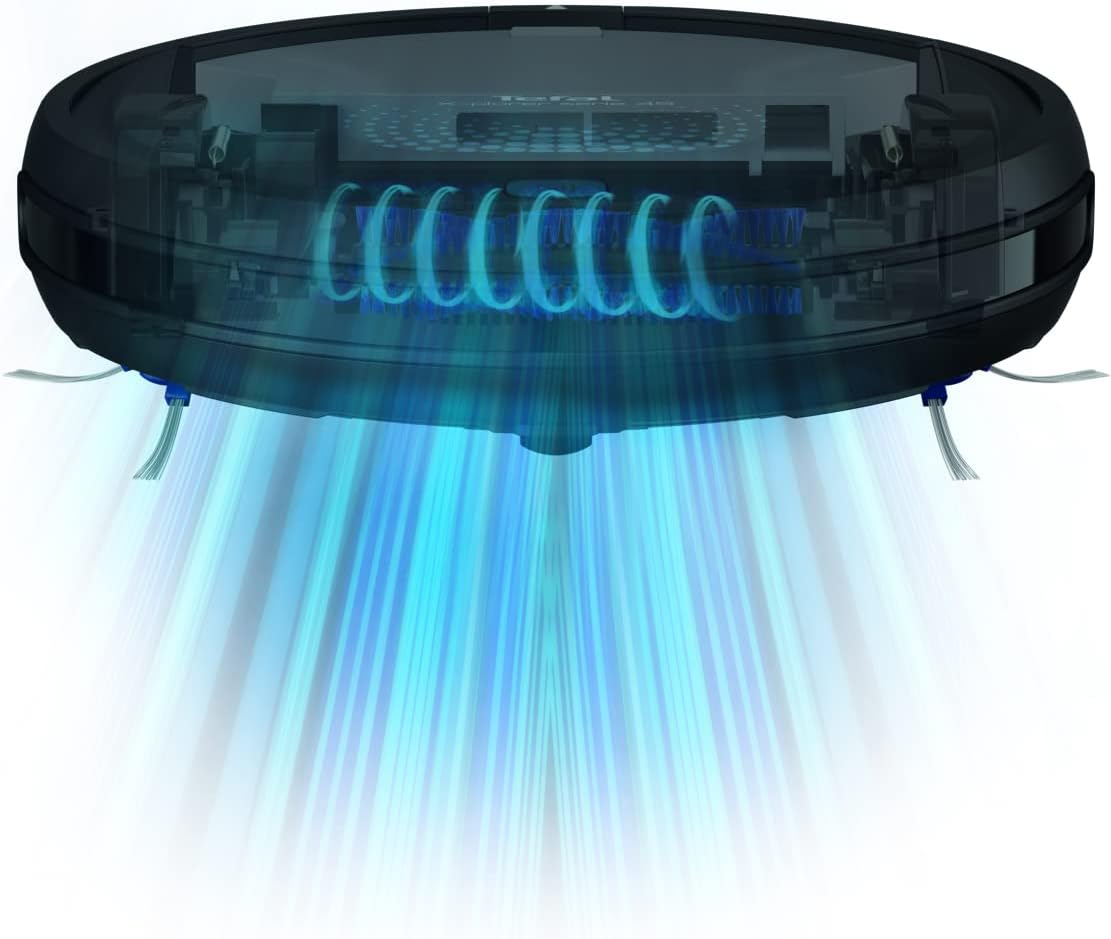
Image: A transparent view of the robotic vacuum cleaner, highlighting its internal components and the path of airflow during operation, emphasizing its efficient design.
5.4 Remote Control and Scheduling via App
The Tefal Robots app allows you to:
- Control your robot remotely from anywhere.
- Check cleaning history and statistics.
- Schedule cleaning sessions for specific times and days.
- Manage navigation modes and cleaning preferences.
Video: Official product video demonstrating the features and operation of the Tefal X-Plorer Serie 45 Automatic Robot Vacuum Cleaner, including its 4-in-1 cleaning action, smart navigation, long battery life, and app control.
6. Maintenance and Care
Regular maintenance ensures optimal performance and extends the lifespan of your robot vacuum.
6.1 Emptying the Dust Bin
- Press the release button to remove the dust bin.
- Open the dust bin and empty its contents into a trash can.
- Rinse the dust bin with water if necessary, and ensure it is completely dry before reinserting.
6.2 Cleaning Filters
- Remove the filter from the dust bin.
- Tap the filter gently to remove dust and debris. Do not wash the filter unless specified in the manual.
- Replace the filter every 3-6 months, or as needed, to maintain suction power.
6.3 Cleaning Brushes and Wheels
- Regularly check the side brushes and turbo brush for tangled hair or debris. Use a cleaning tool or scissors to remove them.
- Clean the main wheels and front caster wheel to ensure smooth movement.
6.4 Cleaning Sensors and Charging Contacts
- Wipe the infrared sensors and drop sensors on the bottom of the robot with a clean, dry cloth.
- Clean the charging contacts on both the robot and the charging dock to ensure proper charging.
7. Troubleshooting
| Problem | Possible Cause | Solution |
|---|---|---|
| Robot does not turn on. | Low battery; Power switch off. | Charge the robot; Ensure power switch is on. |
| Robot does not charge. | Charging contacts dirty; Dock not powered. | Clean charging contacts; Check power connection to dock. |
| Poor cleaning performance. | Dust bin full; Brushes tangled; Filter clogged. | Empty dust bin; Clean brushes; Clean/replace filter. |
| Robot gets stuck frequently. | Obstacles in path; Drop sensors dirty. | Clear obstacles; Clean sensors. |
| App connection issues. | Wi-Fi signal weak; Incorrect password. | Ensure strong Wi-Fi; Re-enter password; Restart robot and app. |
8. Technical Specifications
- Model: RG8275HO
- Brand: Tefal
- Battery Type: Lithium-Ion
- Battery Life: Up to 150 minutes
- Cleaning Modes: Automatic, Fast Automatic, Wall-Following
- Cleaning System: 4-in-1 (Sweeping, Brushing, Vacuuming, Mopping)
- Navigation: Smart Exploration 2.0 (Infrared and Drop Sensors)
- Control: On-device button, Tefal Robots App (iOS/Android)
- Dimensions: 31.5 cm (L) x 31.5 cm (W) x 8 cm (H)
- Weight: 3.6 kg
- Color: Black
9. Warranty and Support
This Tefal X-Plorer Serie 45 Robotic Vacuum Cleaner comes with a 2-year manufacturer's warranty from the date of purchase. This warranty covers defects in materials and workmanship under normal use.
For warranty claims, technical support, or spare parts, please contact Tefal customer service or visit their official website. Keep your proof of purchase for warranty validation.
Tefal is committed to product reparability for 15 years, as part of their efforts to protect the environment and reduce waste.


