
Introduction
Thank you for purchasing the ODK Gaming Desk. This desk is designed to provide a functional and organized workspace with features such as a monitor stand, two spacious drawers, and an adjustable side storage rack. This manual will guide you through the assembly process, explain its features, and provide essential maintenance and troubleshooting tips to ensure long-lasting use.
Safety Information
- Read all instructions carefully before assembly and use.
- Keep all small parts and packaging materials away from children.
- Assemble the desk on a soft, clean surface to prevent scratches.
- Ensure all screws and fasteners are tightened securely before use. Periodically check and re-tighten if necessary.
- Do not overload the desk, drawers, or shelves beyond their weight capacity.
- Avoid placing hot items directly on the desk surface without protection.
- Use the desk on a level surface to prevent wobbling and instability.
Package Contents
Please verify that all components listed below are present before beginning assembly. If any parts are missing or damaged, please contact customer support.
- Desktop Panel
- Monitor Stand
- Desk Frame (Legs and Support Bars)
- Fabric Drawers (2 units)
- Side Storage Rack Shelves (2 units)
- Assembly Hardware (Screws, Allen Wrench)
- Instruction Manual
Setup and Assembly
Follow these steps carefully for proper assembly. It is recommended to have two people for certain steps.
Step 1: Prepare Components
Unpack all parts and lay them out on a clean, soft surface. Identify each component using the provided parts list in your physical manual.

Image: Exploded view of desk components with dimensions.
Step 2: Assemble the Main Frame
Attach the desk legs to the main desktop support structure using the provided screws. Ensure all connections are firm but do not overtighten initially.
Step 3: Install the Side Storage Rack
The side storage rack can be installed on either the left or right side of the desk to suit your preference. Attach the rack frame to the main desk structure. The two shelves for the rack are height-adjustable; select your desired positions and secure them.
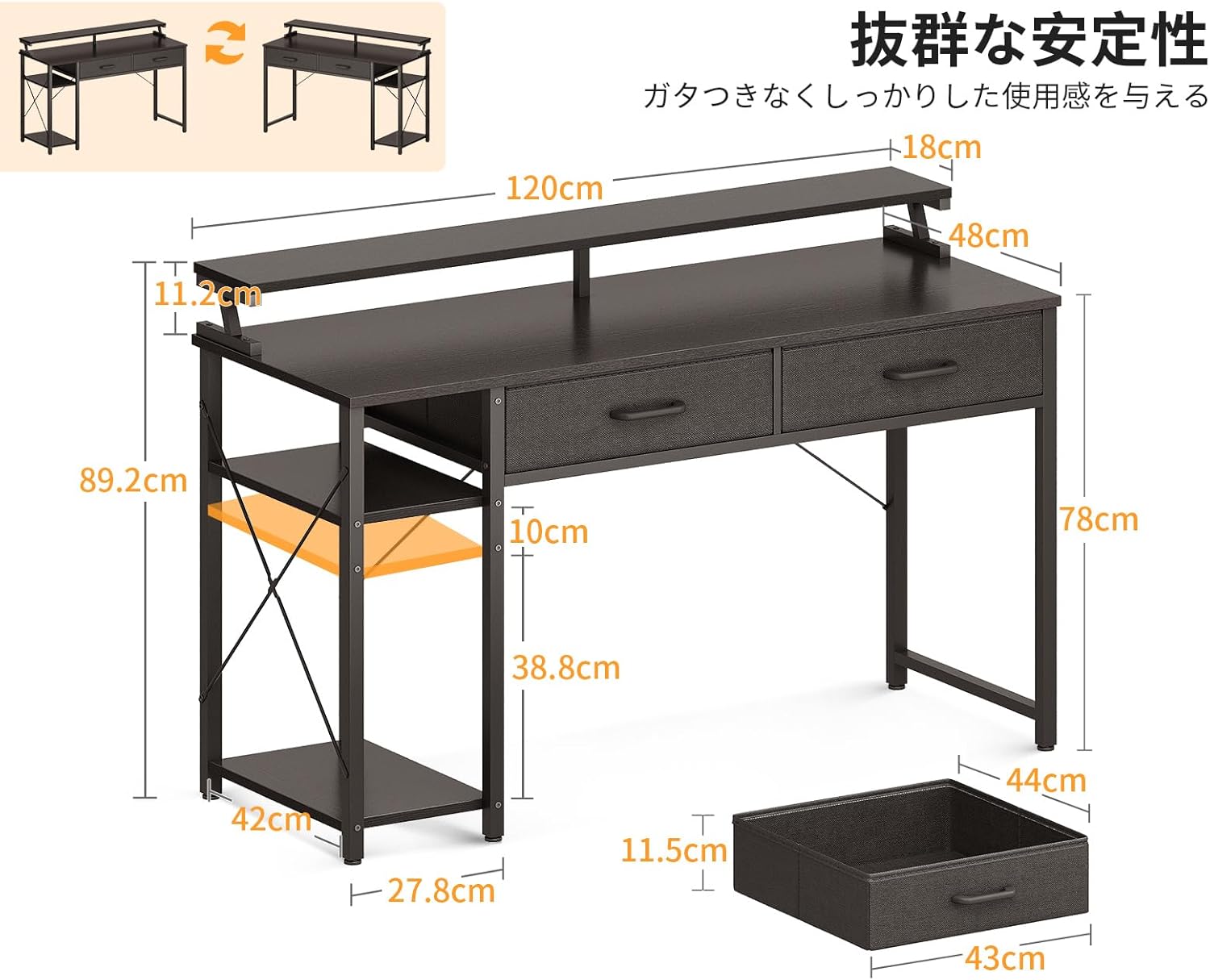
Image: Desk with side rack configurable to left or right.
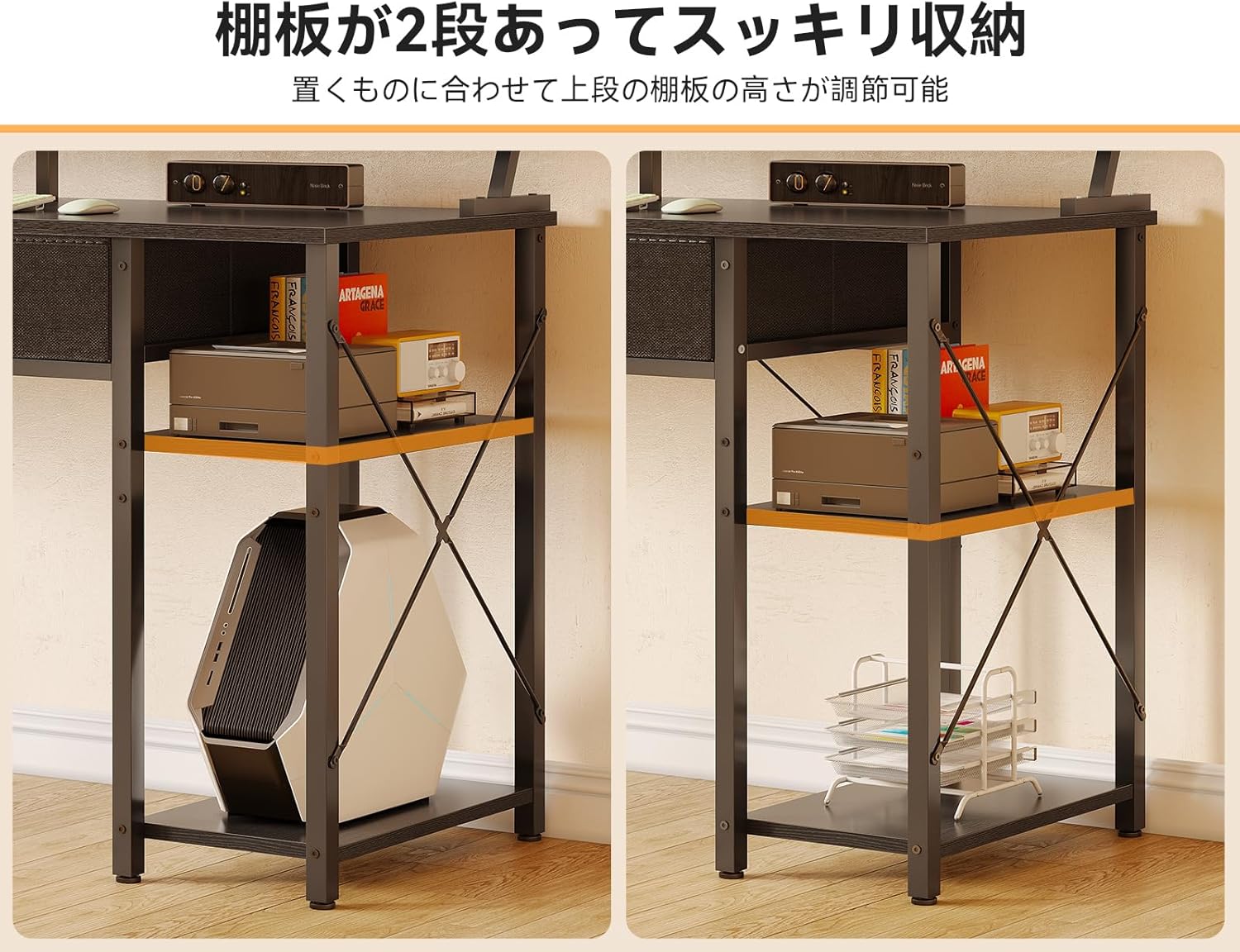
Image: Adjustable shelves on the side storage rack.
Step 4: Attach the Monitor Stand
Secure the monitor stand to the top of the desk using the designated fasteners. This stand elevates your monitor for improved ergonomics.

Image: Desk with monitor stand and dual monitors.
Step 5: Assemble and Insert Drawers
Assemble the two fabric drawers according to the instructions in your physical manual. Once assembled, slide them into their designated slots under the desktop. These drawers are designed for convenient storage of office supplies and documents.

Image: Close-up of the two fabric drawers.

Image: Drawers pulled out, showing storage capacity.
Step 6: Final Tightening and Leveling
Once all components are assembled, carefully tighten all screws. Check the desk for stability and adjust the leveling feet at the bottom of the legs if necessary to eliminate any wobbling.
Operating Instructions
Monitor Stand
The integrated monitor stand elevates your screen by approximately 11.2 cm, promoting a correct sitting posture and reducing strain on your neck and shoulders during long periods of use. The space underneath the monitor stand can be used to store your keyboard, mouse, or other small accessories, freeing up valuable desktop space.

Image: Monitor stand promoting ergonomic posture.
Storage Drawers
The two A4-compatible fabric drawers provide convenient storage for documents, stationery, and other small items. They help keep your desktop clutter-free and your essentials within easy reach. The sturdy construction of the drawers resists deformation even when holding heavier items.
Side Storage Rack
The two-tier side storage rack offers versatile storage options. The upper shelf is height-adjustable, allowing you to customize it based on the size of the items you wish to store. The lower shelf is designed to accommodate larger items such as a PC tower. This rack can be positioned on either the left or right side of the desk during assembly to best fit your room layout and needs.
Maintenance
- Cleaning: Wipe the desk surfaces with a soft, damp cloth. Avoid harsh chemicals or abrasive cleaners that may damage the finish.
- Spills: Clean up spills immediately to prevent staining or damage to the wood.
- Heat Protection: Use coasters or protective pads under hot dishes or cups to prevent heat marks.
- Fasteners: Periodically check all screws and bolts to ensure they remain tight. Re-tighten if any looseness is detected to maintain stability.
- Drawer Care: The fabric drawers can be spot cleaned with a mild detergent and damp cloth. Allow to air dry completely.
Troubleshooting
| Problem | Possible Cause | Solution |
|---|---|---|
| Desk is wobbly | Uneven floor; loose fasteners | Adjust the leveling feet at the bottom of the desk legs. Ensure all assembly screws are tightened. |
| Drawers do not slide smoothly | Improper assembly; obstruction | Check drawer assembly and ensure they are inserted correctly into their slots. Remove any obstructions. |
| Missing or damaged parts | Packaging error; shipping damage | Contact ODK customer support with your purchase details for assistance. |
Specifications
| Feature | Detail |
|---|---|
| Overall Dimensions | 120 cm (Width) x 48 cm (Depth) x 78 cm (Height to main desktop) / 89.2 cm (Total Height with monitor stand) |
| Monitor Stand Height | Approximately 11.2 cm above main desktop |
| Material | Engineered Wood (Desktop), Steel (Frame), Fabric (Drawers) |
| Color | Black |
| Product Weight | 15.3 kg |
| Package Weight | 17.7 kg |
| Special Features | Space-saving design, Reversible side rack, 2 drawers, Monitor stand |
Warranty and Support
ODK products are manufactured with quality and care. In the unlikely event of a manufacturing defect or if you encounter any issues with your product, please contact ODK customer support. Please retain your proof of purchase for warranty claims. Our support team is available to assist you with any questions or concerns regarding your ODK Gaming Desk.


