
1. Introduction
Thank you for choosing the Cxy T18 Portable Car Jump Starter Power Bank. This device is designed to provide a reliable solution for starting 12V vehicles with up to 6L gas or 3L diesel engines, and also functions as a power bank for your electronic devices and an LED flashlight. Please read this manual thoroughly before use to ensure safe and optimal operation.
2. Safety Instructions
Always observe the following safety precautions when using the Cxy T18 Jump Starter:
- Do not jump start a frozen battery.
- Do not use the jump starter if the battery clamps or cables are damaged.
- Do not connect the positive (+) and negative (-) clamps together.
- Do not allow children to operate the device.
- Ensure the vehicle is in park (P) or neutral (N) and the parking brake is engaged before jump starting.
- Wear eye protection and gloves when working with vehicle batteries.
- Use the device in a well-ventilated area.
- If the device shows "Clamps Reversely" on the display, immediately disconnect the clamps and re-attach them correctly.
- If the device shows "Over Heat", allow it to cool down before further use.
- Keep the device away from water, moisture, and extreme temperatures.
- Store the device in a cool, dry place when not in use.
3. Package Contents
Verify that all items are present in your package:
- Cxy T18 Auto Start Aid Power Bank
- 12V Smart Battery Clamp (Heavy-duty jump leads)
- USB-C Cable
- User Manual
4. Product Overview
Familiarize yourself with the components and display indicators of your Cxy T18 Jump Starter.
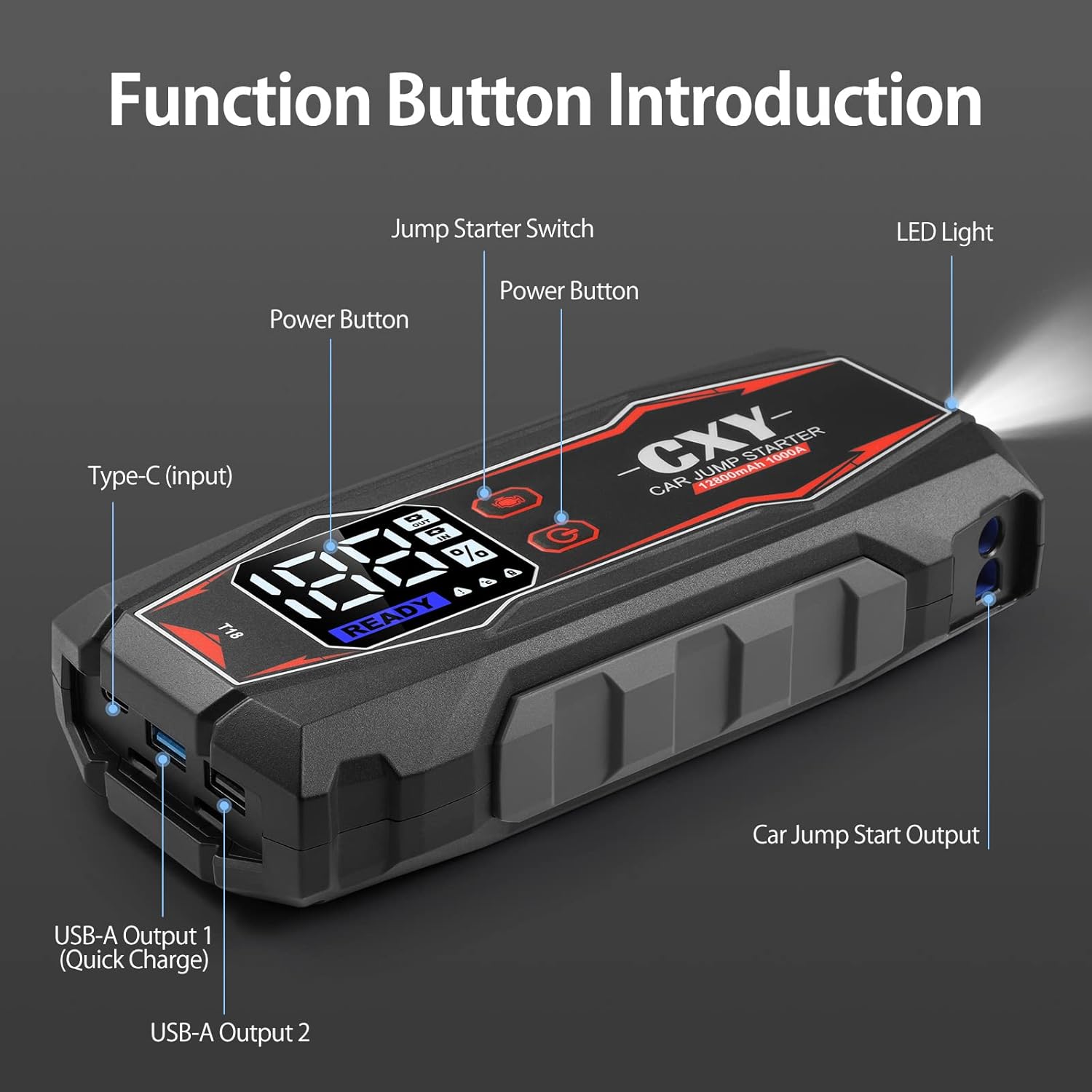
Figure 4.1: Cxy T18 Jump Starter with labeled function buttons and ports.
- 1. Jump Starter Switch: Activates the jump start function.
- 2. Power Button: Turns the device on/off and cycles through display modes.
- 3. Type-C (Input): Used for charging the jump starter.
- 4. USB-A Output 1 (Quick Charge): High-speed charging port for compatible devices.
- 5. USB-A Output 2: Standard charging port for electronic devices.
- 6. Car Jump Start Output: Port for connecting the smart battery clamps.
- 7. LED Light: Built-in flashlight with multiple modes.
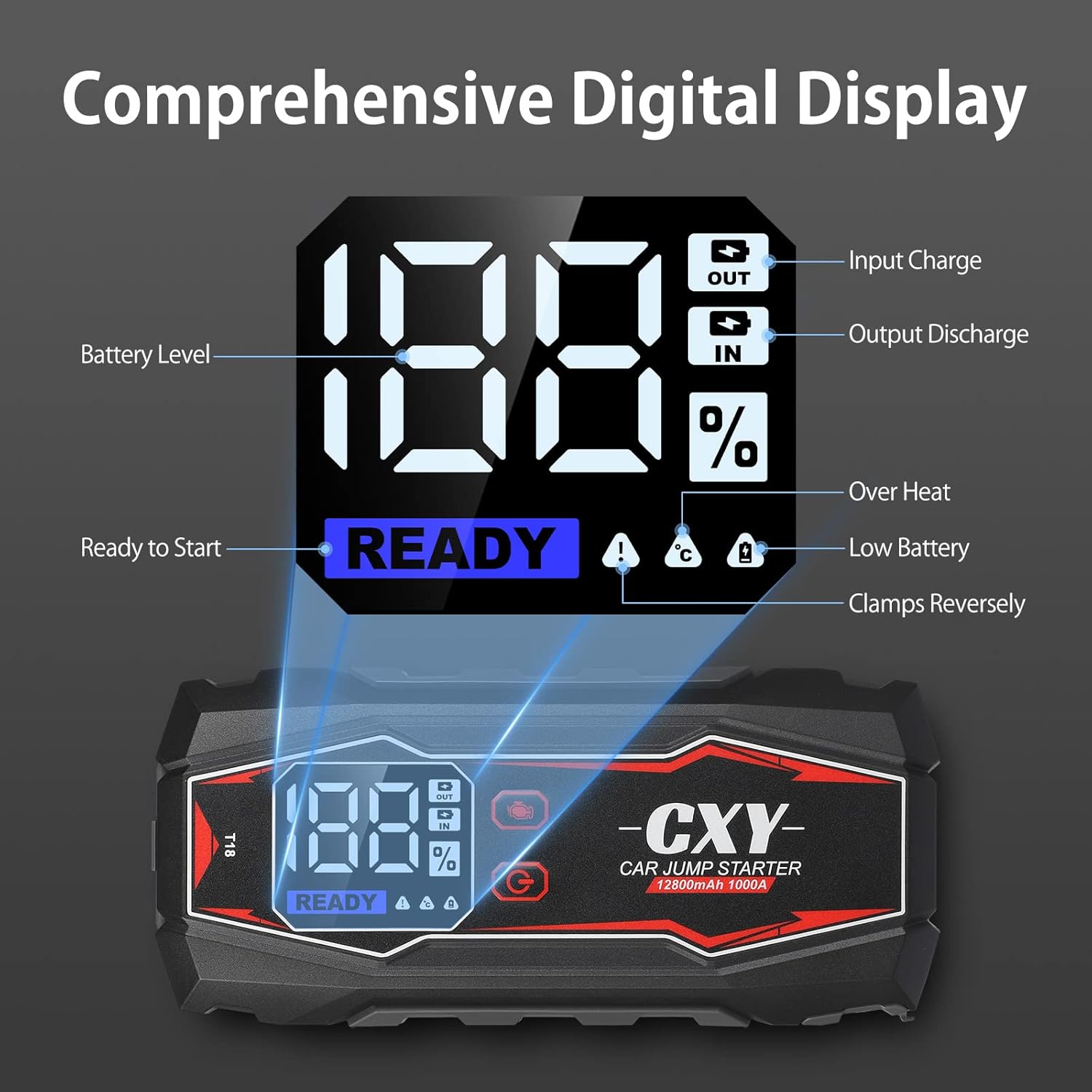
Figure 4.2: Digital LED display showing battery level, charging status, and error indicators.
- Battery Level (%): Indicates the remaining charge of the jump starter.
- Input Charge (IN): Illuminates when the device is being charged.
- Output Discharge (OUT): Illuminates when the device is charging external devices.
- Ready to Start: Indicates the device is ready for jump starting.
- Over Heat: Warning indicator for overheating.
- Low Battery: Warning indicator for low internal battery.
- Clamps Reversely: Warning indicator for incorrect clamp connection.

Figure 4.3: The heavy-duty smart battery clamps feature double and long metal contacts for better conductivity and increased durability compared to standard clamps.
5. Setup and Initial Charge
Before first use, fully charge the Cxy T18 Jump Starter. Connect the USB-C cable to the Type-C input port on the device and plug the other end into a suitable USB wall adapter (not included). The digital display will show "IN" and the battery percentage increasing. A full charge is indicated when the display shows 100%.
It is recommended to recharge the device every 3-6 months to maintain battery health, even if not in use.
6. Operating Instructions: Jump Starting a Vehicle
Follow these steps carefully to safely jump start your vehicle:
- Prepare the Vehicle: Ensure the vehicle's ignition is off, and the parking brake is engaged. Place the vehicle in park (P) or neutral (N).
- Connect Clamps to Jump Starter: Insert the blue plug of the smart battery clamps into the "Car Jump Start Output" port on the Cxy T18. Ensure a firm connection.
- Connect Clamps to Battery:
- Connect the red positive (+) clamp to the positive (+) terminal of the vehicle's battery.
- Connect the black negative (-) clamp to the negative (-) terminal of the vehicle's battery.
Important: If the display shows "Clamps Reversely", immediately disconnect and re-attach the clamps correctly.
- Activate Jump Start: Press the "Jump Starter Switch" button on the Cxy T18. The digital display should show "READY".
- Start the Vehicle: Turn the vehicle's ignition key to start the engine.
- Disconnect Clamps: Once the engine starts, immediately disconnect the black negative (-) clamp first, then the red positive (+) clamp from the vehicle battery. Finally, disconnect the smart battery clamps from the Cxy T18.
- Store the Device: Store the Cxy T18 in its case in a cool, dry place.

Figure 6.1: Proper connection of the Cxy T18 Jump Starter to a vehicle battery for safe starting.
7. Charging the Cxy T18 Power Bank
To charge the Cxy T18, connect the provided USB-C cable to the Type-C input port on the device. Plug the other end into a USB wall adapter (5V/2A or higher recommended for faster charging). The digital display will show the "IN" indicator and the battery percentage. The device is fully charged when the display shows 100%.
8. Multifunction Features
8.1. Power Bank Function
The Cxy T18 can charge various electronic devices such as smartphones, tablets, and other USB-powered gadgets. It features two USB-A output ports:
- USB-A Output 1 (Quick Charge): Provides faster charging for compatible devices.
- USB-A Output 2: Standard charging output.
To use, connect your device's USB charging cable to one of the USB-A output ports on the Cxy T18. The "OUT" indicator will illuminate on the digital display.

Figure 8.1: The Cxy T18 functioning as a power bank, charging a smartphone via its USB output ports.
8.2. LED Flashlight
The built-in LED flashlight offers three modes for various situations:
- Normal Flashlight: For general illumination.
- SOS Mode: Emits an SOS signal for emergencies.
- Strobe Mode: Flashing light for signaling or attracting attention.
To activate the flashlight, press and hold the LED Light button. Press again to cycle through the modes. Press and hold again to turn off.

Figure 8.2: The Cxy T18's integrated LED flashlight providing illumination, useful for emergency lighting, night walking, and rescue situations.
9. Troubleshooting
If you encounter issues with your Cxy T18, refer to the following common problems and solutions:
| Problem | Possible Cause | Solution |
|---|---|---|
| Device does not turn on. | Low battery or completely discharged. | Charge the device fully using the USB-C cable. |
| "Clamps Reversely" error on display. | Positive and negative clamps are connected incorrectly. | Immediately disconnect clamps and re-attach them to the correct battery terminals (red to +, black to -). |
| Vehicle does not start after jump attempt. |
|
|
| "Over Heat" error on display. | Device has been used excessively or in high temperatures. | Disconnect the device and allow it to cool down for at least 15-30 minutes before attempting further use. |
| USB charging not working. |
|
|
10. Specifications
| Feature | Detail |
|---|---|
| Brand | Cxy |
| Model Number | FR-CXY-T18V-TC-CXY |
| Peak Current | 1000 Amps |
| Battery Capacity | Up to 12800mAh (as per product description) |
| Vehicle Service Type | Passenger Car |
| Compatible Engine Type | Up to 6L Gas or 3L Diesel Engines |
| Voltage | 12 Volts |
| Item Weight | 1.3 Kilograms |
| USB Output 1 | Quick Charge (18W) |
| USB Output 2 | Standard USB Output |
| LED Light Modes | SOS, Spotlight, Strobe |
| UPC | 721295738293 |
11. Warranty and Support
The Cxy T18 Jump Starter Power Bank comes with a 30-day money-back guarantee. For any questions, technical assistance, or warranty claims, please contact our customer service. We offer 24/7 friendly customer service to assist you.
Please refer to your purchase documentation for specific contact details or visit the official Cxy website.

