
1. Introduction
This manual provides essential information for the installation and understanding of the VANJUNN Replacement Module Board, model CE0678, designed for Nintendo Wii consoles. This component is intended to replace a damaged or defective original module board, restoring specific functionalities of your console.
Please read this manual thoroughly before attempting any installation or repair. Professional skills are required for the proper handling and installation of this component.
2. Product Overview
The VANJUNN Replacement Module Board (CE0678) is a printed circuit board (PCB) component specifically designed for Nintendo Wii consoles. It serves as a direct replacement for the original module board, which typically manages wireless communication functionalities such as Bluetooth and Wi-Fi connectivity within the console.

Figure 2.1: Front view of the Replacement Module Board, displaying the CE0678 identification.
Key features of this replacement board include:
- Direct replacement for original Wii console module boards.
- Ensures compatibility with Nintendo Wii console systems.
- Designed for durability and long service life.

Figure 2.2: Rear view of the Replacement Module Board, showing the connector pins and circuit layout.
This product includes one PCB Module Board. No other accessories are included in the package.
3. Setup and Installation
Important: Installation of this replacement board requires professional technical skills and specialized tools. Attempting installation without adequate experience may result in damage to the console or the replacement part. It is recommended to seek assistance from a qualified technician.
3.1. Pre-Installation Checklist
- Ensure the Nintendo Wii console is completely powered off and unplugged from all power sources.
- Gather necessary tools (e.g., specialized screwdrivers, spudgers, anti-static wrist strap).
- Work in a clean, well-lit, and static-free environment.
- Familiarize yourself with the internal layout of the Wii console and the location of the module board.
3.2. Installation Steps (General Guidance)
- Carefully disassemble the Nintendo Wii console casing according to service manual instructions for your specific Wii model.
- Locate the existing module board. This board is typically responsible for wireless communication (Bluetooth/Wi-Fi).
- Gently disconnect any cables or connectors attached to the old module board.
- Remove the old module board, noting its orientation and connection points.
- Align the new VANJUNN Replacement Module Board (CE0678) with the designated slot and carefully connect it. Ensure all pins and connectors are properly seated.
- Reconnect any cables or antennas that were detached from the original board.
- Carefully reassemble the Wii console casing, ensuring all screws and clips are secured.
- Perform a functional test to verify proper operation of wireless features.
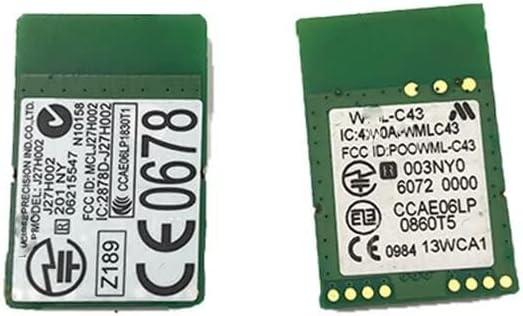
Figure 3.1: Detail of the module board's regulatory labels, including FCC ID and IC information.
4. Operating the Module Board
The VANJUNN Replacement Module Board is an internal component that facilitates the wireless functionalities of your Nintendo Wii console. Once correctly installed, the board operates automatically as part of the console's system. It enables:
- Bluetooth Connectivity: For connecting Wii Remotes and other compatible Bluetooth accessories.
- Wi-Fi Connectivity: For accessing online features, system updates, and network-enabled games (where supported by the console's firmware and network services).
No direct user interaction with the module board itself is required after installation. Its operation is managed by the Wii console's operating system.
5. Maintenance
As an internal electronic component, the VANJUNN Replacement Module Board requires minimal maintenance. To ensure its longevity and proper function:
- Keep the Console Clean: Regularly clean the exterior of your Wii console to prevent dust and debris from entering the internal components.
- Avoid Extreme Conditions: Do not expose the console to extreme temperatures, high humidity, or direct sunlight, as these can degrade electronic components.
- Handle with Care: If the console needs to be opened for any reason, always handle internal components, including the module board, with anti-static precautions to prevent electrostatic discharge (ESD) damage.
- Firmware Updates: Ensure your Wii console's system software is up to date, as firmware updates can sometimes improve hardware compatibility and performance.
6. Troubleshooting
If you experience issues with wireless connectivity after installing the replacement module board, consider the following troubleshooting steps:
6.1. No Bluetooth/Wi-Fi Connectivity
- Check Connections: Power off and unplug the console. Carefully re-open the console and verify that the module board is securely seated in its slot and all associated cables (e.g., antenna cables) are properly connected.
- Console Settings: Ensure that wireless communication is enabled in the Wii console's system settings.
- Router/Access Point: For Wi-Fi issues, verify that your wireless router is functioning correctly and within range. Try restarting your router.
- Interference: Move the console away from other electronic devices that might cause wireless interference (e.g., cordless phones, microwaves).
6.2. Intermittent Connectivity
- Signal Strength: Ensure the console is not too far from the wireless access point or that there are no significant obstructions.
- Antenna Check: Confirm that the internal antenna cable connected to the module board is not damaged or loose.
- Console Overheating: Ensure the console has adequate ventilation. Overheating can sometimes affect internal components.
If issues persist after performing these steps, it may indicate a more complex problem with the console or the replacement board. Professional diagnosis is recommended.
7. Specifications
| Feature | Detail |
|---|---|
| Model Number | CE0678 |
| Compatibility | Nintendo Wii Console |
| Dimensions (Approx.) | 5 x 2 x 0.01 inches |
| Item Weight | 0.16 ounces |
| Manufacturer | WIDTECH (for VANJUNN) |
| Connectivity Type | Wireless (Bluetooth/Wi-Fi) |
8. Warranty and Support
For information regarding warranty coverage, returns, or technical support for your VANJUNN Replacement Module Board, please refer to the seller's return policy or contact the seller directly through the platform where the purchase was made. Keep your proof of purchase for any warranty claims.
As this is a replacement part requiring professional installation, warranty terms may vary. It is advisable to confirm these details prior to installation.