Introduction
This manual provides essential instructions for the setup, operation, and maintenance of your ICLEBO Omega Robot Vacuum Cleaner Charging Station. This station is designed to automatically charge your compatible ICLEBO Omega robot vacuum models (YCR-M07-10, YCR-M07-20, YCR-M07-30), ensuring it is always ready for cleaning tasks.
Setup
- Unpack the Charging Station: Carefully remove the charging station and its power adapter from the packaging. Ensure all components are present and undamaged.
- Choose a Suitable Location:
- Place the charging station against a wall in an open area, free from obstacles.
- Ensure there is at least 0.5 meters (1.6 feet) of clear space on either side and 1 meter (3.3 feet) in front of the station for the robot to easily dock.
- Avoid placing the station near stairs, heat sources, or direct sunlight.
- Connect the Power Adapter: Plug the power adapter into the charging station's power input port, then plug the other end into a standard wall outlet. The station's status indicator light should illuminate, indicating it is powered on.
- Initial Robot Placement: Manually place your ICLEBO Omega robot vacuum onto the charging station. Ensure the charging contacts on the robot align with those on the station. The robot will begin charging automatically. The station utilizes infrared internal sensors and a navigation base locator to guide the robot for automatic docking.
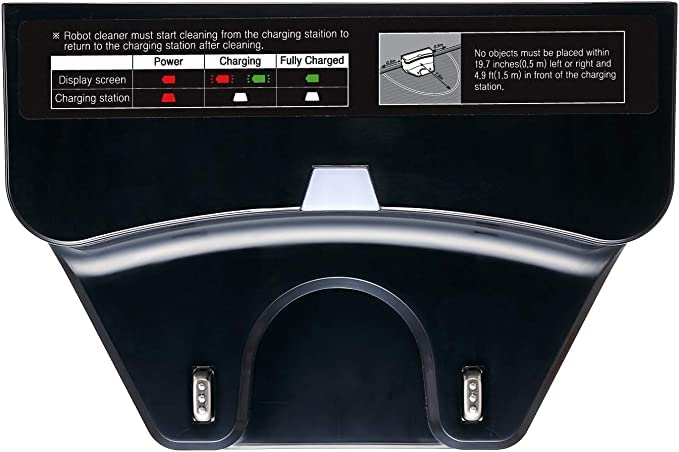
Image: ICLEBO Omega Robot Vacuum Cleaner docked in its charging station. The robot's display shows "7:00" and a green charging indicator. The black charging station is positioned behind the robot.
Operating the Charging Station
The ICLEBO Omega Charging Station is designed for automatic operation. Once properly set up, it will manage the robot vacuum's charging needs.
- Automatic Charging: When the robot's battery level is low, it will automatically return to the charging station to recharge. The "Auto charging" feature ensures the robot is always prepared for its next cleaning cycle.
- Resume Charging: If the robot is interrupted during a cleaning cycle due to low battery, it will return to the station, recharge, and then resume cleaning from where it left off (if supported by the robot model).
- Status Light Indicator: The charging station may feature a status light indicator to show its operational status. Refer to your robot vacuum's manual for specific light patterns and their meanings regarding charging status.
- Charging Period: A full charge for the ICLEBO Omega robot vacuum typically takes approximately 2 hours when docked on this station.
Maintenance
Regular maintenance ensures optimal performance and longevity of your charging station.
- Clean Charging Contacts: Periodically inspect and clean the metal charging contacts on both the station and the robot vacuum. Use a dry, clean cloth to wipe away any dust or debris that may accumulate. Ensure the power adapter is unplugged from the wall outlet before cleaning.
- Keep Area Clear: Ensure the area around the charging station remains clear of obstacles, dust, and debris. This allows the robot to dock efficiently and prevents interference with the station's sensors.
- Power Adapter Inspection: Regularly check the power adapter and cable for any signs of damage. If damaged, discontinue use and replace with an official Yujin Robot or Generic approved adapter.
Troubleshooting
If you encounter issues with your charging station, refer to the following common problems and solutions:
| Problem | Possible Cause | Solution |
|---|---|---|
| Robot does not charge when docked. |
|
|
| Station indicator light is off. |
|
|
| Robot has difficulty docking automatically. |
|
|
Specifications
| Brand | Generic |
| Model Name | YCR-M07 |
| Compatible Robot Models | ICLEBO Omega (YCR-M07-10, YCR-M07-20, YCR-M07-30) |
| Charging Station Model Number | YCRM07CGR |
| Color | Black |
| Product Dimensions (L x W x H) | 7" x 3" x 4" |
| Approximate Charging Period | 2 Hours |
| Material | ABS |
| Item Weight | 1 pound |
| Manufacturer | Yujin Robot |
| Key Features | Infrared internal sensors, Auto charging, Resume charging, Navigation base locator |
Warranty and Support
For warranty information or technical support, please refer to the documentation provided with your original ICLEBO Omega robot vacuum cleaner or contact the manufacturer, Yujin Robot, or your retailer directly. Keep your purchase receipt as proof of purchase.


