
OTTOVAC 43240
OTTOVAC Electric Vacuum Suction Cup Lifting Clamp User Manual
Model: 43240
Brand: OTTOVAC by GRABO
1. Introduction
The OTTOVAC Electric Vacuum Suction Cup Lifting Clamp is a portable, battery-powered device designed to assist in lifting, moving, and placing various materials such as tiles, glass, doors, drywall, furniture, and large appliances. Its intelligent design automatically monitors and maintains vacuum pressure, ensuring a secure hold for heavy-duty lifting tasks.
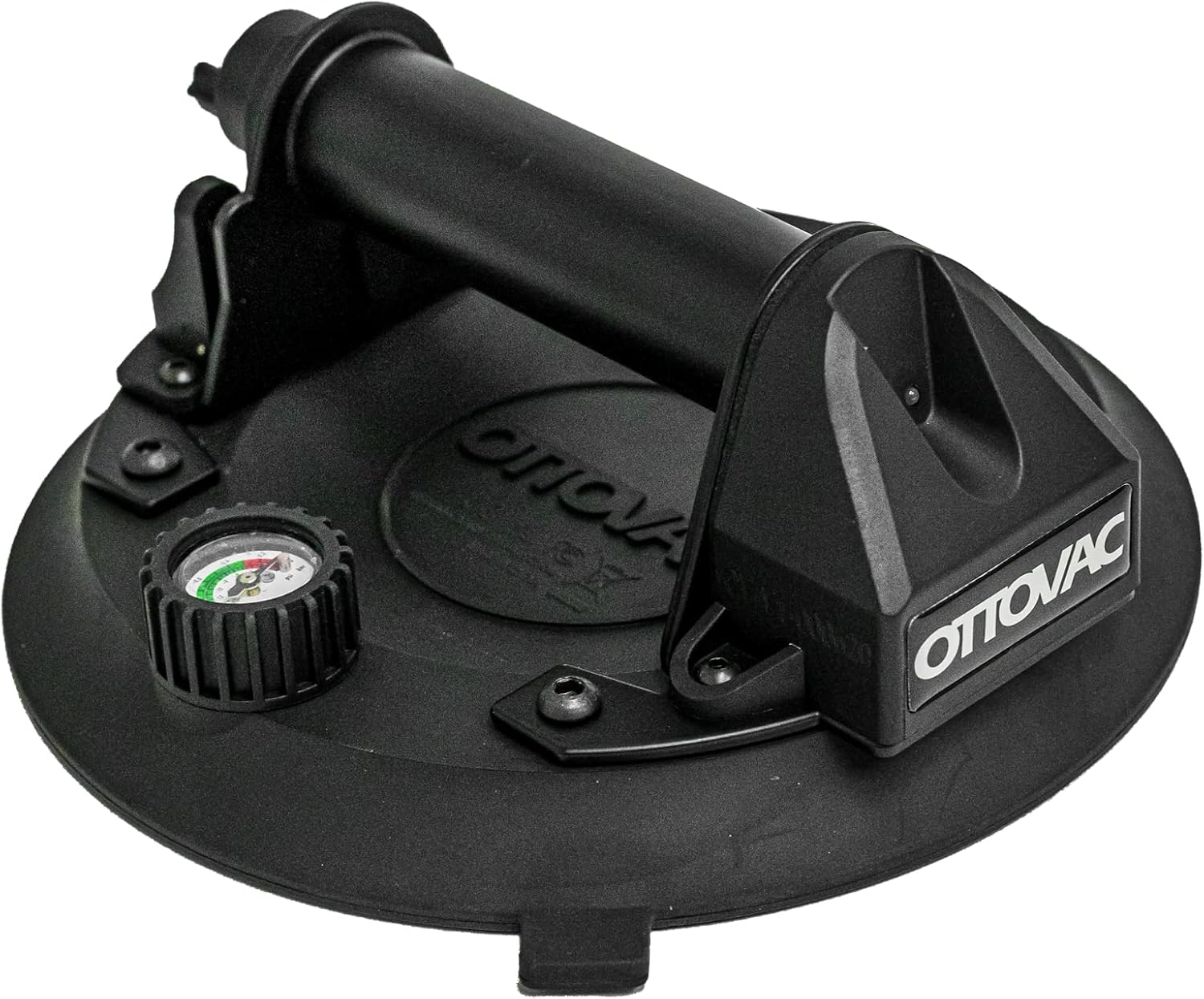
Figure 1.1: The OTTOVAC Electric Vacuum Suction Cup Lifting Clamp, showcasing its robust design and integrated pressure gauge.
2. Product Overview
The OTTOVAC unit is engineered for efficiency and safety. It features a durable construction with a comfortable handle for easy grip and maneuverability. A key component is the integrated pressure gauge, which provides real-time feedback on the vacuum level, ensuring optimal suction before lifting.
2.1 Key Features:
- Portable Electric Vacuum: Designed for lifting, moving, and placing various materials.
- Automatic Vacuum Monitoring: The pump automatically activates to restore pressure if a loss is detected.
- High Lifting Capacity: Capable of lifting up to 200 kg (440 lbs) at a maximum vacuum rate of -0.7 Bar (-70kPa).
- Integrated Pressure Gauge: Provides visual confirmation of vacuum status.
- Durable Construction: Features a steel handle frame for enhanced robustness.

Figure 2.1: The OTTOVAC unit is supplied with a protective hardshell case for convenient storage and transport.
3. Setup
3.1 Battery Installation:
The OTTOVAC requires 4 AA batteries (not included) for operation. To install the batteries:
- Locate the battery compartment on the unit.
- Open the battery compartment cover.
- Insert 4 AA batteries, ensuring correct polarity (+/-).
- Close the battery compartment cover securely.
Video 3.1: This video demonstrates the battery installation process and initial setup of the OTTOVAC unit.
4. Operating Instructions
4.1 Attaching the Suction Cup:
- Ensure the surface of the material to be lifted is clean, dry, and non-porous.
- Place the suction cup firmly onto the desired surface.
- Press the green power button located on the handle. The electric pump will activate, creating a vacuum seal.
- Monitor the pressure gauge. The needle should move into the green zone, indicating sufficient vacuum. The pump will automatically shut off once optimal pressure is reached.

Figure 4.1: The OTTOVAC in action, securely attached to a tile surface, ready for lifting or positioning.
4.2 Maintaining Suction:
The OTTOVAC is equipped with a smart sensor that continuously monitors the vacuum pressure. If the pressure drops below a safe level, the pump will automatically reactivate to restore the vacuum, ensuring a constant and secure hold without manual intervention.
4.3 Releasing the Suction Cup:
To release the suction cup, press the pressure release tabs located near the handle. This will break the vacuum seal, allowing the unit to be easily removed from the surface.
Video 4.2: This video provides a comparison of the OTTOVAC's operation versus traditional suction cups, highlighting its ease of use and automatic features.
5. Safety Guidelines
- Always ensure the suction cup and the surface are clean and free of dust, debris, or moisture before use.
- Do not exceed the maximum lifting capacity of 200 kg (440 lbs).
- Operate the device within the recommended working temperature range of 0-60°C (32-140°F).
- Regularly check the pressure gauge to confirm the vacuum is maintained in the green zone.
- Avoid using the suction cup on porous, textured, or uneven surfaces, as this may compromise the vacuum seal.
- Always test the suction on a small, non-critical area of the material before full application, especially with new or unfamiliar surfaces.
- Keep hands and fingers clear of moving parts during operation.
6. Maintenance
- Cleaning: After each use, wipe the suction cup and the main unit with a clean, damp cloth. Ensure no debris is left on the rubber seal.
- Storage: Store the OTTOVAC in its hardshell case in a cool, dry place, away from direct sunlight and extreme temperatures.
- Battery Replacement: Replace batteries when the unit shows signs of reduced power or fails to maintain adequate vacuum pressure.
- Inspection: Periodically inspect the rubber seal for any signs of wear, cracks, or damage. A damaged seal can compromise suction performance.
7. Troubleshooting
| Problem | Possible Cause | Solution |
|---|---|---|
| Unit does not power on. | Dead or incorrectly installed batteries. | Check battery polarity; replace with new AA batteries. |
| Suction is weak or not holding. | Surface is dirty, wet, porous, or uneven; damaged rubber seal; low battery power. | Clean and dry the surface thoroughly. Ensure surface is non-porous. Inspect and replace rubber seal if damaged. Replace batteries. |
| Motor runs continuously. | Minor air leak; unit is on a slightly porous surface. | Ensure firm contact with surface. While the unit is designed to compensate for minor leaks, continuous running may indicate an unsuitable surface or a significant leak. Re-position or check seal. |
| Pressure gauge not in green zone. | Insufficient vacuum created. | Ensure unit is properly seated on the surface. Check for obstructions or damage to the seal. Allow pump to run until green zone is reached. |
8. Specifications
| Attribute | Detail |
|---|---|
| Brand | OTTOVAC |
| Model Number | 43240 |
| Material | Plastic (with steel handle frame) |
| Color | Black |
| Item Dimensions (L x W x H) | 9.21 x 8.7 x 3.58 inches |
| Item Weight | 3.87 pounds |
| Power Source | Battery Powered (4 AA batteries required, not included) |
| Maximum Lifting Capacity | 200 kg (440 lbs) at -0.7 Bar (-70kPa) |
| Working Temperature | 0-60°C (32-140°F) |
| Included Components | Plastic box, Electric suction cup (without battery) |
| UPC | 850034324043 |
9. Warranty and Support
For warranty information, technical support, or service inquiries, please contact OTTOVAC customer service directly. Refer to the product packaging or the official OTTOVAC website for the most current contact details.
Always ensure you purchase genuine OTTOVAC products from authorized retailers to ensure warranty validity and access to official support.
Ask a question about this manual
Ask about setup, troubleshooting, compatibility, parts, safety, or missing instructions. Manuals+ will review the question and use this page’s manual context to help answer it.