
1. Introduction
Thank you for choosing the Aerofit Treadmill Model AF 430. This manual provides essential information for the safe assembly, operation, and maintenance of your new treadmill. Please read this manual thoroughly before using the equipment to ensure proper function and to prevent injury. Keep this manual for future reference.
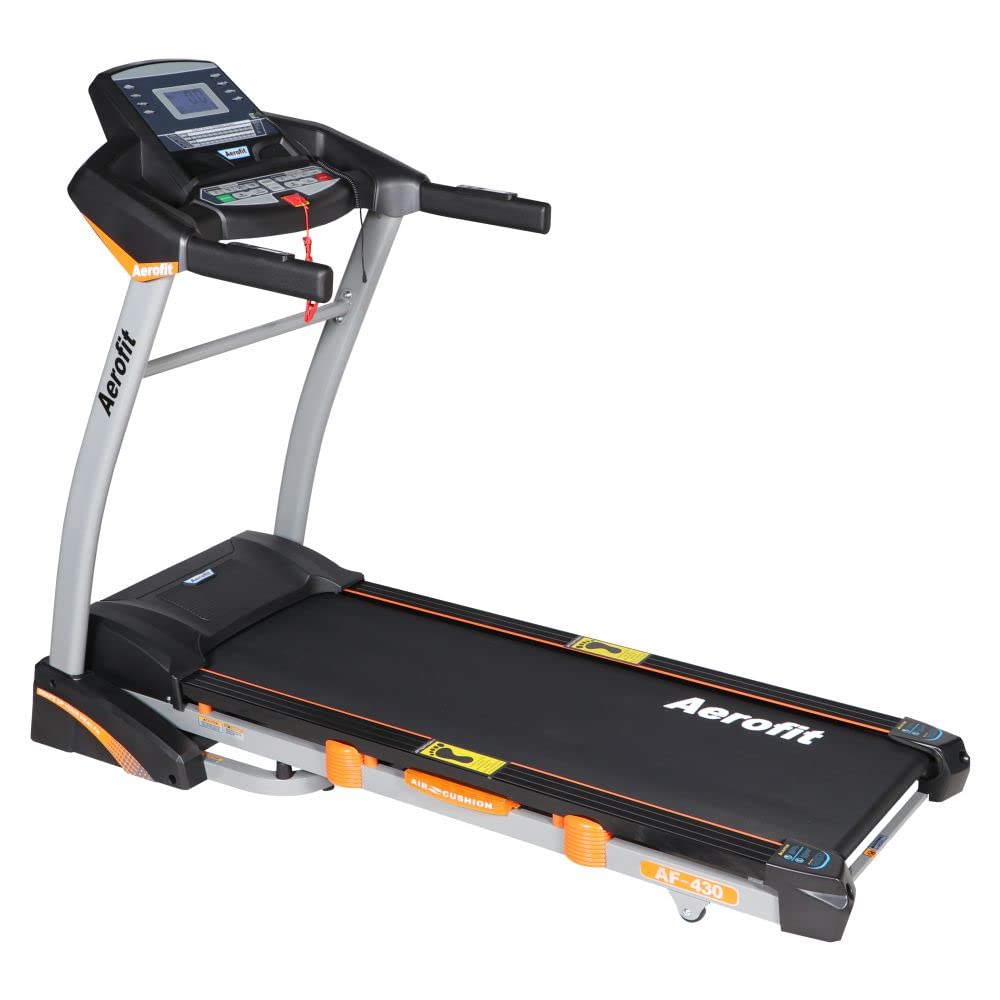
Image 1.1: The Aerofit Treadmill Model AF 430, showcasing its overall design and structure.
2. Important Safety Instructions
To reduce the risk of serious injury, read all instructions before using this treadmill. The manufacturer assumes no responsibility for personal injury or property damage sustained by or through the use of this product.
- Always consult with a physician before starting any exercise program.
- Keep children and pets away from the treadmill during operation.
- Place the treadmill on a solid, level surface with at least 2 meters (6.5 feet) of clear space behind it and 0.6 meters (2 feet) on each side.
- Wear appropriate exercise clothing and athletic shoes. Do not wear loose clothing that could get caught in moving parts.
- Use the safety key at all times. Attach the clip to your clothing before starting your workout. In case of an emergency, the safety key will stop the treadmill.
- Do not operate the treadmill if it has a damaged cord or plug, or if it is not working properly.
- Maximum user weight for this treadmill is 130 kg. Exceeding this limit may result in injury or damage to the equipment.

Image 2.1: Graphic illustrating the maximum user weight capacity of 130 Kgs for the treadmill.
3. Package Contents
Carefully unpack your Aerofit Treadmill AF 430 and verify that all components listed below are present. If any parts are missing or damaged, please contact customer service.
- CONSOLE & DISPLAY
- POWER CORD
- MP3 CORD
- SAFETY KEY
- SILICON OIL
- MANUAL (This document)
- RUBBER GRIPS TO COVER GAPS BETWEEN HANDLE
- NUT BOLT SET
- SUPPORT ROD BETWEEN 2 SIDE POLES
4. Assembly Instructions
Assembly is required for the Aerofit Treadmill AF 430. While designed for easy installation, it is recommended to follow the steps carefully. Refer to the included assembly diagram for visual guidance.
- Unpack Components: Remove all parts from the packaging and lay them out on a clear, flat surface.
- Attach Support Rods: Secure the support rods between the side poles using the provided nut and bolt set.
- Mount Console: Carefully attach the console and display unit to the top of the support poles, ensuring all cables are connected correctly.
- Secure Handles: Fasten any remaining handle components and cover gaps with the rubber grips.
- Final Checks: Ensure all bolts are tightened and the treadmill is stable before plugging it in.
5. Operating Instructions
Familiarize yourself with the control panel before beginning your workout.
5.1 Control Panel Overview

Image 5.1: Detailed view of the user-friendly control panel, highlighting Quick Incline Buttons, Quick Speed Buttons, MP3 Player, and display metrics like Speed, Pulse, Calories, Time, and Distance.
- LCD Display: Shows Speed, Pulse, Calories, Time, and Distance.
- Quick Speed Buttons: Allows for rapid adjustment of speed to preset levels.
- Quick Incline Buttons: For quick adjustment of the treadmill's incline (if applicable to this model).
- MP3 Player: Connect your MP3 device using the provided MP3 cord for audio playback.
- Safety Key Slot: Insert the safety key here to enable treadmill operation.
5.2 Starting a Workout
- Plug the power cord into a grounded electrical outlet.
- Attach the safety key clip to your clothing and insert the safety key into its designated slot on the console.
- Step onto the treadmill belt, holding onto the handrails for balance.
- Press the 'START' button to begin your workout. The belt will start moving at a low speed.
- Adjust the speed using the '+' and '-' buttons or the Quick Speed buttons.
5.3 Stopping a Workout
- Press the 'STOP' button to gradually slow down and stop the treadmill.
- Alternatively, pull the safety key from its slot for an immediate emergency stop.
6. Folding and Storage
The Aerofit Treadmill AF 430 features a foldable design for convenient storage, making it a space-saver for home gyms.

Image 6.1: The treadmill in its folded position, demonstrating its space-saving capability and ease of movement with wheels.
- Ensure the treadmill is turned off and unplugged.
- Gently lift the running deck until it locks into the upright position.
- To unfold, release the locking mechanism and slowly lower the running deck until it rests flat on the floor.
- The treadmill is equipped with wheels for easy relocation.
7. Maintenance
Regular maintenance ensures the longevity and optimal performance of your treadmill.
- Cleaning: Wipe down the treadmill surfaces with a damp cloth after each use. Avoid using abrasive cleaners.
- Belt Lubrication: Apply silicon oil (included) under the running belt every 3-6 months, or as needed, to reduce friction. Refer to the specific instructions for lubrication in the full manual.
- Belt Adjustment: Periodically check the running belt for proper tension and alignment. Adjust if the belt is slipping or drifting to one side.
- Motor Compartment: Keep the motor compartment clean and free of dust. Unplug the treadmill before cleaning this area.

Image 7.1: Illustration of the 220V AC Motor, designed for long-lasting performance and extended workout sessions.
8. Troubleshooting
If you encounter any issues with your treadmill, refer to the following common problems and solutions:
- Treadmill Not Starting:
- Ensure the power cord is securely plugged into a working outlet.
- Verify the safety key is fully inserted into its slot.
- Check the circuit breaker on the treadmill and your home's electrical panel.
- Running Belt Slipping:
- The running belt may need tension adjustment. Refer to the maintenance section or the full manual for instructions.
- The belt may require lubrication.
- Unusual Noises:
- Check for loose parts or debris under the belt.
- Ensure the treadmill is on a level surface.
For persistent issues, please contact Aerofit customer support.
9. Specifications
Detailed technical specifications for the Aerofit Treadmill Model AF 430:

Image 9.1: Graphic detailing key specifications including AC Motor, Speed Range, Incline, Programs, and Display Type.
| Feature | Detail |
|---|---|
| Brand | Aerofit |
| Model | AF 430 |
| Product Grade | Home |
| Material | Alloy Steel |
| Maximum Speed | 12 Kilometers per Hour |
| Special Feature | Foldable |
| Target Audience | Adult, Youth |
| Motor Horsepower | 2.5 HP Continuous Duty, 4.0 HP Peak Duty (AC Motor) |
| Assembly Required | Yes |
| Display Type | LCD (Single Window Display) |
| Power Source | Corded Electric |
| Connectivity Technology | Power cord, MP3 cord |
| Metrics Measured | Speed |
| Maximum Weight Recommendation | 130 Kilograms |
| Item Weight | 85 kg |
| Programs | 9 Programs (8 Preset, 1 Fat, 1 Manual) |
| Incline Range | 0% to 15% |

Image 9.2: Diagram showing the dimensions of the treadmill: Length 72", Width 34", Height 53".
10. Warranty and Support
For warranty information, please refer to the warranty card included with your product or contact Aerofit customer service. For technical support or inquiries, please visit the official Aerofit website or contact their customer support channels.