
1. Introduction
Thank you for purchasing the LEKATO Mini Guitar Amplifier JA-02 II. This compact and versatile amplifier is designed for guitarists seeking a portable solution for practice and small performances. It features two sound channels, Bluetooth connectivity, and a rechargeable battery for extended use.
Please read this manual thoroughly before using the product to ensure proper operation and to maximize its lifespan.

Image 1.1: Front view of the LEKATO Mini Guitar Amplifier JA-02 II, showcasing its compact design and control knobs.
2. Package Contents
Upon opening the package, please verify that all items listed below are included:
- LEKATO Mini Guitar Amplifier JA-02 II (x1)
- USB Charging Cable (x1)
- User Manual (x1)
3. Product Overview
3.1. Controls and Ports
Image 3.1: Front panel controls of the amplifier.
- Bluetooth Button: Press to activate/deactivate Bluetooth pairing mode.
- B.T./AUX VOL Knob: Adjusts the volume for Bluetooth and AUX input.
- VOLUME Knob: Adjusts the main output volume of the guitar.
- POWER Button: Turns the amplifier on/off.
- TONE Knob: Adjusts the tonal characteristics (treble/bass) of the guitar sound.
- CLEAN / OVER DRIVE Switch: Toggles between Clean and Overdrive sound channels.
- GAIN Knob: Adjusts the input sensitivity and distortion level for the Overdrive channel.
- INPUT Jack: 1/4-inch input for connecting your guitar.

Image 3.2: Rear panel with AUX IN and Headphone Output.
- AUX IN Jack: 3.5mm input for connecting external audio devices (e.g., smartphone, MP3 player).
- 3.5mm Headphone Output: For private practice with headphones.
- USB Charging Port: USB-C port for charging the internal battery.
4. Setup
4.1. Charging the Amplifier
Before first use, fully charge the amplifier. Connect the supplied USB charging cable to the USB Charging Port on the rear of the amplifier and to a standard USB power adapter (not included) or a computer USB port. The charging indicator light will show charging status (e.g., red for charging, off when fully charged).

Image 4.1: Connecting the USB charging cable to the amplifier.
4.2. Initial Power On
Press and hold the POWER button for a few seconds to turn the amplifier on. The power indicator light will illuminate.
5. Operating Instructions
5.1. Connecting Your Guitar
Plug your guitar cable into the INPUT Jack on the front panel of the amplifier.
5.2. Adjusting Sound Channels (Clean/Overdrive)
The amplifier offers two distinct sound channels:
- Clean Channel: Provides a clear, undistorted guitar tone.
- Overdrive Channel: Adds distortion and sustain for rock and blues tones.
Use the CLEAN / OVER DRIVE Switch to select your desired channel. When the Overdrive channel is active, you can use the GAIN Knob to adjust the amount of distortion.

Image 5.1: Illustration of the two sound channels: Clean and Overdrive.
5.3. Volume and Tone Control
- Use the VOLUME Knob to control the overall output volume of your guitar.
- Use the TONE Knob to adjust the brightness or warmth of your guitar sound. Turning it clockwise generally increases treble, while counter-clockwise increases bass.
5.4. Bluetooth Connectivity
To connect an external device via Bluetooth:
- Press the Bluetooth Button on the amplifier. The Bluetooth indicator light will flash, indicating pairing mode.
- On your external device (smartphone, tablet, computer), enable Bluetooth and search for available devices.
- Select "JA-02 II" from the list of devices. Once connected, the Bluetooth indicator light will remain solid.
- Play music from your device. Adjust the playback volume using the B.T./AUX VOL Knob on the amplifier and your device's volume controls.

Image 5.2: Connecting the amplifier to a smartphone via Bluetooth.
5.5. Using AUX Input
To connect an external audio device via AUX cable (not included):
- Connect a 3.5mm audio cable from your external device's headphone jack to the AUX IN Jack on the rear of the amplifier.
- Play music from your device. Adjust the playback volume using the B.T./AUX VOL Knob on the amplifier and your device's volume controls.
5.6. Headphone Practice
For silent practice, connect a pair of headphones to the 3.5mm Headphone Output on the rear of the amplifier. The main speaker output will be muted, allowing you to practice without disturbing others.

Image 5.3: A user practicing guitar with the amplifier.
6. Maintenance
- Keep the amplifier clean by wiping it with a soft, dry cloth. Do not use liquid cleaners or abrasive materials.
- Avoid exposing the amplifier to extreme temperatures, humidity, or direct sunlight.
- Store the amplifier in a dry, cool place when not in use.
- Do not attempt to disassemble or repair the amplifier yourself. Refer to qualified service personnel for any repairs.
7. Troubleshooting
| Problem | Possible Cause | Solution |
|---|---|---|
| No sound from guitar. |
|
|
| No sound from Bluetooth/AUX. |
|
|
| Bluetooth connection issues. |
|
|
| Short battery life. |
|
|
8. Specifications
| Feature | Detail |
|---|---|
| Model | JA-02 II (M02294) |
| Brand | LEKATO |
| Power Output | 5W |
| Sound Channels | Clean, Overdrive |
| Connectivity | Bluetooth 5.0, 3.5mm AUX Input, 3.5mm Headphone Output, 1/4" Guitar Input |
| Battery | Rechargeable, approximately 6 hours continuous use |
| Dimensions (L x W x H) | 14.7 cm x 7.5 cm x 9.6 cm (5.8 x 3.0 x 3.8 inches) |
| Weight | 0.42 kg (0.93 lbs) |
| Color (Current Variant) | Orange |
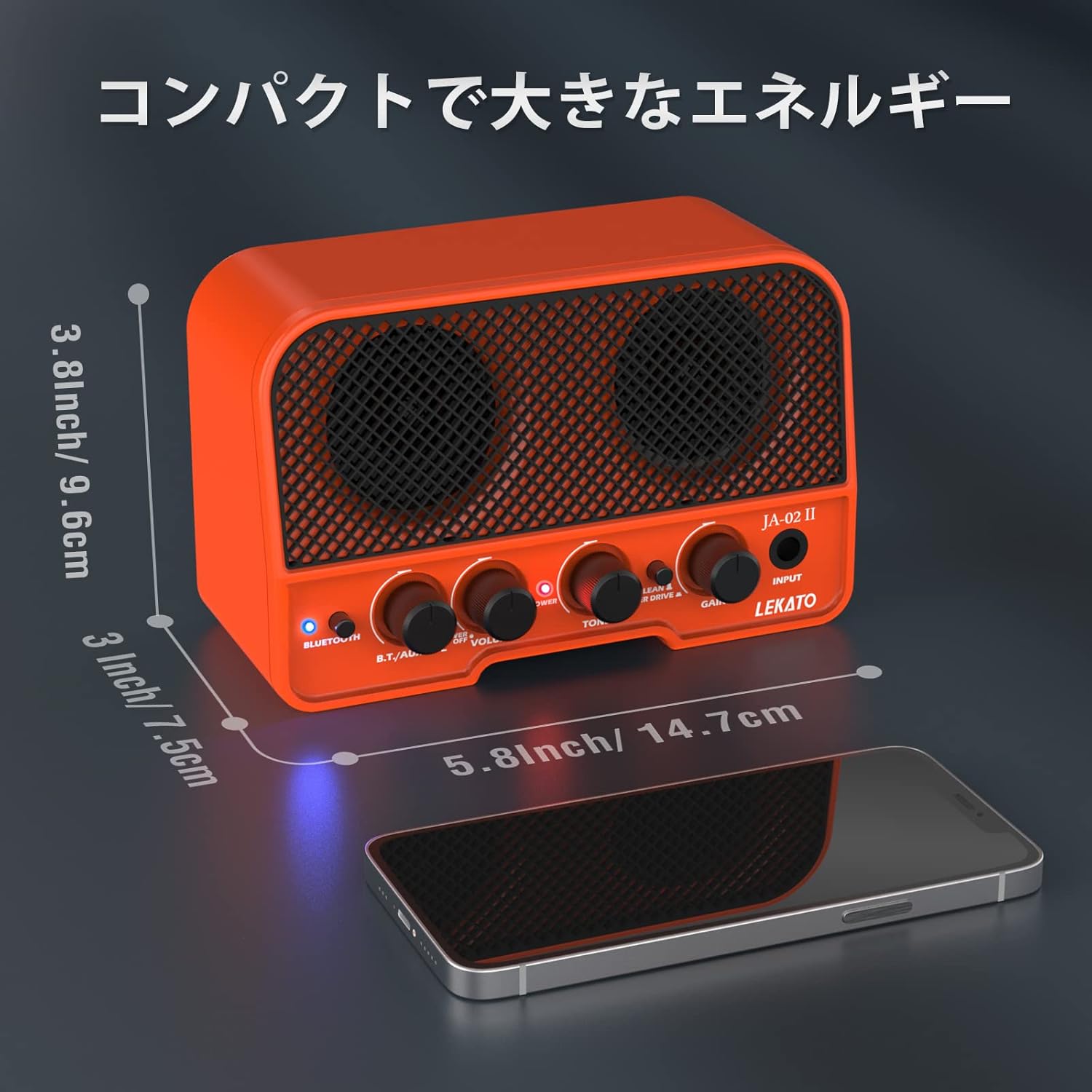
Image 8.1: Dimensions of the LEKATO Mini Guitar Amplifier JA-02 II.
9. Warranty and Support
This LEKATO Mini Guitar Amplifier comes with a 1-year warranty from the date of purchase. If you encounter any issues or have questions regarding your product, please contact our customer support team via email. We are committed to providing prompt assistance according to our store policy.
For further assistance, please refer to the contact information provided with your purchase or visit the official LEKATO website.

Image 9.1: The portable amplifier being used outdoors.