
Introduction
This manual provides detailed instructions for the installation, operation, and maintenance of your SSV Works RZ5-Q3ARC Audio Kit. This kit is designed for 2020-2023 Polaris RZR Pro models equipped with Ride Command systems, offering a 3-speaker audio solution. Please read this manual thoroughly before installation and use to ensure proper function and longevity of your audio system.
The SSV Works RZ5-Q3ARC system includes 6.5" front door speaker-pods, a 10" subwoofer enclosure with a Kicker Comp RT Subwoofer, a Phase EQ Amplifier, and a plug-and-play wire harnessing system for seamless integration with your Ride Command system.
Safety Information
Always observe the following safety precautions:
- Disconnect the vehicle's battery before beginning any electrical installation.
- Ensure all wiring is properly routed and secured to prevent damage from moving parts, heat, or abrasion.
- Do not operate the audio system at excessively high volumes for prolonged periods, as this may cause hearing damage.
- This product contains chemicals known to the State of California to cause cancer and birth defects or other reproductive harm (Proposition 65 warning). Wash hands after handling.
- Consult a professional if you are unsure about any installation steps.
Package Contents
Verify that all components are present before beginning installation:
- 6.5" Front Door Speaker-Pods with SSV Works Speakers
- 10" Subwoofer-Enclosure with Kicker Comp RT Subwoofer
- Phase EQ Amplifier
- Pre-Mounted Direct-Fit Amp Mounting Plate
- Plug-&-Play Wire Harnessing for Ride Command System
- Installation Hardware (screws, zip ties, etc.)
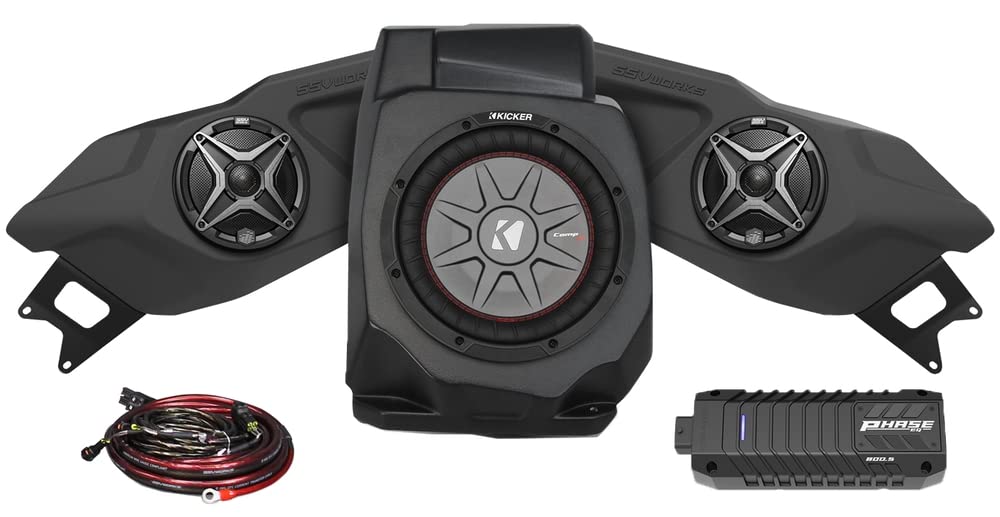
Image: Overview of the SSV Works RZ5-Q3ARC Audio Kit components, including speaker pods, subwoofer, amplifier, and wiring harness.
Setup and Installation
This kit is designed for plug-and-play installation. No soldering, cutting, or crimping is required for the main connections. Refer to the detailed installation guide provided with your kit for vehicle-specific instructions.
General Installation Steps:
- Prepare the Vehicle:
- Park the vehicle on a level surface and engage the parking brake.
- Disconnect the negative terminal of the vehicle's battery.
- Remove any necessary panels or seats to access installation locations for speakers, subwoofer, and amplifier.
- Install Door Speaker-Pods:
- Mount the 6.5" front door speaker-pods in the designated factory locations using the provided hardware.
- Ensure a secure fit and proper alignment.
- Install Subwoofer-Enclosure:
- Position the 10" subwoofer-enclosure in its intended location (typically under a seat or behind a panel).
- Secure the enclosure using the provided mounting hardware.
- Mount Amplifier:
- Attach the Phase EQ Amplifier to the pre-mounted direct-fit amp mounting plate.
- Install the amplifier and mounting plate in a secure, dry location, away from excessive heat or moisture.
- Connect Wiring Harness:
- Connect the plug-and-play wire harnessing to the speakers, subwoofer, amplifier, and the vehicle's Ride Command system.
- Follow the color-coded connections carefully.
- Route all wiring away from sharp edges, moving parts, and heat sources. Secure with zip ties.
- Final Checks:
- Double-check all connections for security and proper polarity.
- Ensure no wires are pinched or exposed.
- Reconnect the vehicle's battery.
Operating Instructions
Your SSV Works audio system integrates with your Polaris RZR Pro Ride Command system. The Phase EQ amplifier features a patented Rock 'N Ride switch for optimized audio profiles.
Initial Power-Up:
- Turn the vehicle's ignition key to the "ON" position.
- Access the audio settings through your Ride Command display.
- Verify that the SSV Works audio system is recognized and functioning.
Rock 'N Ride Switch:
The Rock 'N Ride switch allows you to toggle between two distinct audio profiles:
- RIDE Mode: Optimized for in-cab listening while riding. This profile compensates for wind and engine noise, and boosts frequencies typically lost when wearing a helmet, providing an energized listening experience.
- ROCK Mode: Optimized for outdoor listening when the vehicle is stationary, such as at a campsite. This profile provides a fuller, more optimal sound experience outside the vehicle.
Locate the Rock 'N Ride switch in your standard rocker switch location and press to switch between modes.
Bluetooth Connectivity:
Your system supports Bluetooth connectivity for wireless audio streaming.
- Ensure Bluetooth is enabled on your mobile device.
- Navigate to the Bluetooth settings on your Ride Command display.
- Select "SSV Works Audio" (or similar name) from the list of available devices.
- Pair your device. Once paired, you can stream audio wirelessly.
Maintenance
The SSV Works RZ5-Q3ARC Audio Kit is designed for durability in off-road environments. Regular maintenance will ensure optimal performance and longevity.
- Cleaning: Clean speaker grilles and enclosures with a damp cloth. Avoid using harsh chemicals or abrasive cleaners. Do not spray water directly into speaker cones or amplifier vents.
- Inspections: Periodically check all wiring connections for tightness and signs of wear or corrosion. Ensure mounting hardware for speakers, subwoofer, and amplifier remains secure.
- Environmental Protection: While designed to withstand sand, dust, water, prolonged exposure to extreme conditions should be minimized. Ensure all covers and seals are properly in place.
Troubleshooting
If you encounter issues with your audio system, refer to the following common problems and solutions:
| Problem | Possible Cause | Solution |
|---|---|---|
| No sound from speakers. |
|
|
| Distorted or poor sound quality. |
|
|
| Bluetooth connection issues. |
|
|
For further assistance, contact SSV Works customer support.
Specifications
| Feature | Detail |
|---|---|
| Model Number | 220-RZ5-Q3ARC |
| Compatible Vehicle Type | UTV (2020-2023 Polaris RZR Pro, Pro XP, Pro R, Turbo R) |
| Speaker Size | 6.5 Inches (Front Door Speakers) |
| Subwoofer Diameter | 10 Inches |
| Number of Audio Channels | 3.0 |
| Mounting Type | Door Mount (Speakers), Enclosure (Subwoofer) |
| Connectivity Protocol | Bluetooth |
| Power Source | Corded Electric (Vehicle Power) |
| Item Weight | 58 Pounds |
| Built-In Media | Speaker Enclosures, Subwoofer, Amplifier, Plug & Play Harnessing |
| Waterproof | No (Designed to withstand off-road conditions, but not fully submersible) |
Warranty Information
SSV Works provides the following warranty for the RZ5-Q3ARC Audio Kit:
- Speakers: Limited Lifetime Warranty
- Electronics (Amplifier, Wiring, etc.): 1 Year Warranty
Please retain your proof of purchase for warranty claims. The warranty covers defects in materials and workmanship under normal use. It does not cover damage caused by misuse, accident, modification, or unauthorized repair. For full warranty terms and conditions, please visit the SSV Works official website or contact customer support.
Customer Support
For technical assistance, troubleshooting, or warranty inquiries, please contact SSV Works customer support:
- Website: www.ssvworks.com
- Phone: Refer to the SSV Works website for current contact numbers.
- Email: Refer to the SSV Works website for current contact email.
When contacting support, please have your product model number (220-RZ5-Q3ARC) and proof of purchase readily available.


