1. Introduction
This manual provides essential information for the safe and efficient use of your LG 32LQ570BPSA Smart LED TV. Please read it thoroughly before operating the product and retain it for future reference. It covers setup, operation, maintenance, and troubleshooting to ensure optimal performance and longevity of your television.
2. Important Safety Information
Always follow basic safety precautions when using this product to reduce the risk of fire, electric shock, or injury.
- Do not expose the TV to rain or moisture.
- Do not block ventilation openings.
- Ensure proper grounding of the power plug.
- Do not place the TV on an unstable cart, stand, tripod, bracket, or table.
- Unplug the TV during lightning storms or when unused for long periods.
- Refer all servicing to qualified service personnel.
3. What's in the Box
Verify that all components are present before proceeding with the setup.
- 1 x LG 32LQ570BPSA LED TV
- 1 x Remote Control (with 2 AAA batteries included)
- 2 x Table Top Stand components
- 1 x Power Cord
- Documentation (User Manual, Warranty Card)
4. Setup Guide
4.1 Unpacking
Carefully remove the TV and all accessories from the packaging. It is recommended to keep the original packaging for future transport or servicing.
4.2 Stand Installation
If you are not wall-mounting the TV, attach the table-top stands. Place the TV face down on a soft, clean surface to prevent screen damage. Align each stand component with the corresponding slots on the bottom of the TV and secure them with the provided screws.

Figure 4.2.1: Angled view of the LG 32LQ570BPSA TV with table-top stands.

Figure 4.2.2: Close-up of the TV stand base for proper installation.
4.3 Wall Mounting (Optional)
This TV is compatible with VESA standard wall mounts. Remove the table-top stands before wall mounting. Consult a professional for wall mount installation to ensure safety and proper alignment. Refer to the wall mount kit's instructions for specific details.
4.4 Connecting External Devices
Connect your external devices such as set-top boxes, gaming consoles, or Blu-ray players to the TV's input ports. The TV features HDMI and USB ports.
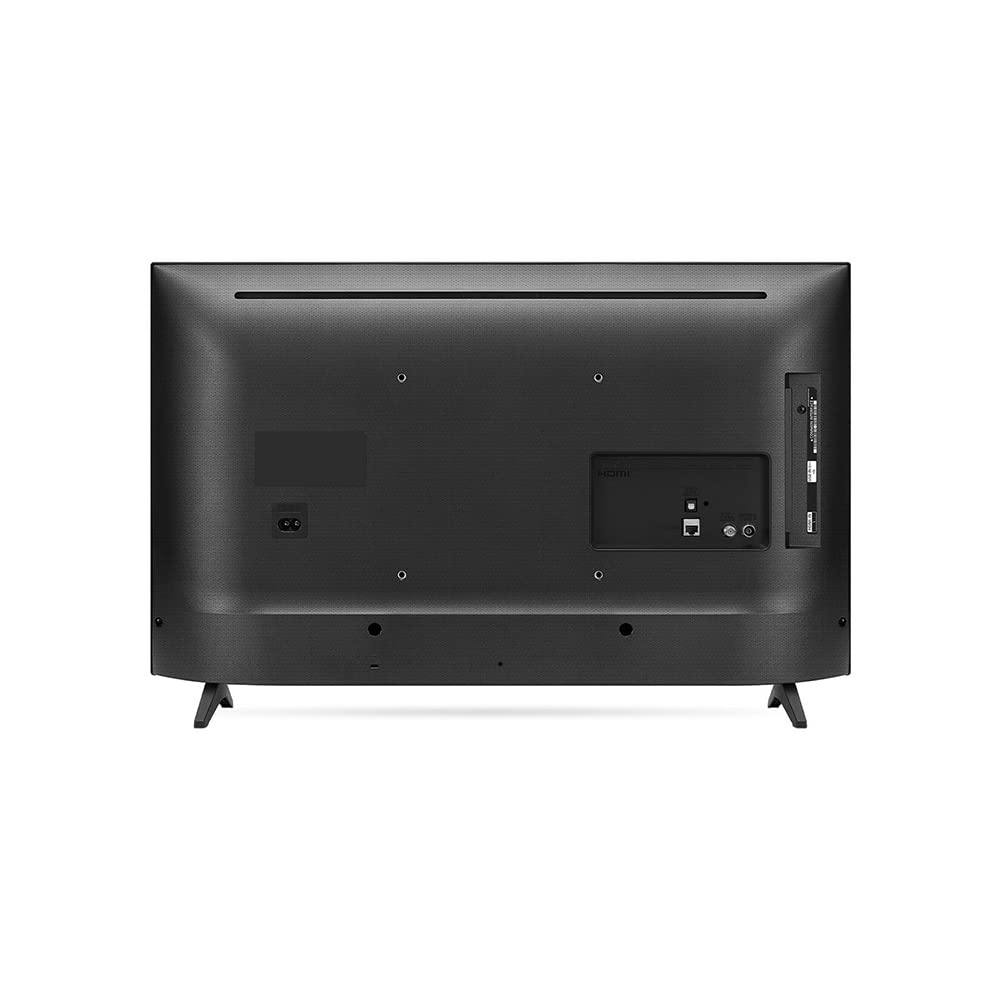
Figure 4.4.1: Rear panel of the TV with various input/output ports.
- HDMI: For high-definition audio and video. Use an HDMI cable to connect devices like gaming consoles or cable boxes.
- USB: For connecting USB storage devices to play media files.
- Antenna/Cable: Connect an antenna or cable TV feed for broadcast channels.
4.5 Power Connection
Plug the power cord securely into the TV's power inlet, then plug the other end into a wall outlet. Ensure the power outlet is easily accessible.
4.6 Initial Setup
After connecting power, press the power button on the remote control. The TV will guide you through the initial setup process, including language selection, network connection (Wi-Fi), and channel scanning.
5. Operating Your TV
5.1 Remote Control Overview
The included remote control allows you to navigate the TV's features. Familiarize yourself with the buttons for power, volume, channel, input selection, and smart TV functions.
5.2 Basic Functions
- Power On/Off: Press the power button on the remote.
- Volume Control: Use the Volume Up/Down buttons.
- Channel Selection: Use the Channel Up/Down buttons or number pad.
- Input Selection: Press the 'Input' or 'Source' button to switch between connected devices (HDMI, USB, TV).
5.3 Smart TV Features (WebOS)
Your LG TV runs on the WebOS operating system, providing access to a variety of smart features and applications. Connect your TV to the internet via Wi-Fi to access streaming services like Netflix, YouTube, and Amazon Instant Video, as well as a web browser.

Figure 5.3.1: The LG 32LQ570BPSA Smart LED TV in operation.
5.4 Picture and Sound Settings
Access the TV's settings menu to adjust picture modes (e.g., Standard, Vivid, Cinema), brightness, contrast, and sound modes (e.g., Standard, Cinema, Sports). The TV supports HDR10 Pro for enhanced contrast and color with compatible content.

Figure 5.4.1: Visual comparison of SDR and HDR10 Pro picture quality.
5.5 Gaming Features
The TV includes a Game Optimizer feature to enhance your gaming experience by adjusting settings like low latency and black stabilizer for improved visibility in dark scenes.

Figure 5.5.1: Game Optimizer settings interface.
6. Maintenance and Care
- Cleaning the Screen: Gently wipe the screen with a soft, dry, lint-free cloth. For stubborn marks, use a screen cleaner specifically designed for TVs, applied to the cloth, not directly to the screen.
- Cleaning the Cabinet: Use a soft, dry cloth to wipe the TV cabinet. Do not use abrasive cleaners or solvents.
- Ventilation: Ensure the ventilation openings are clear of dust and debris to prevent overheating.
- Power Cord: Regularly check the power cord for any damage. If damaged, replace it immediately with an authorized LG part.
7. Troubleshooting
Before contacting service, try the following solutions for common issues:
| Problem | Possible Solution |
|---|---|
| No power | Check if the power cord is securely plugged into the TV and the wall outlet. Ensure the outlet is functional. |
| No picture, but sound is present | Check the input source. Ensure external devices are powered on and connected correctly. Try another HDMI port. |
| No sound, but picture is present | Check the volume level and mute status. Ensure external audio systems are connected and configured correctly. |
| Remote control not working | Replace the batteries (2 AAA). Ensure there are no obstructions between the remote and the TV's IR sensor. |
| Cannot connect to Wi-Fi | Check your router and modem. Restart them. Re-enter the Wi-Fi password in the TV's network settings. |
8. Specifications

Figure 8.1.1: Product dimensions of the LG 32LQ570BPSA TV.
| Feature | Detail |
|---|---|
| Brand | LG |
| Model | 32LQ570BPSA |
| Display Size | 32 Inches (81.28 cm) |
| Display Technology | LED |
| Resolution | HD Ready (1366x768 Pixels) |
| Refresh Rate | 60 Hz |
| Operating System | WebOS |
| Connectivity | HDMI, USB, Wi-Fi |
| Audio Output | 10 Watts, 2.0 Channel Stereo |
| Special Features | Wide Viewing Angle, HDR10 Pro, Game Optimizer |
| Product Dimensions (LxWxH) | 73.9 x 16.8 x 47.2 cm |
| Item Weight | 4.9 kg |
| Power Source | Corded Electric (50 Watts) |
9. Warranty and Support
Your LG 32LQ570BPSA Smart LED TV comes with a 1-year manufacturer's warranty. To avail warranty services, please retain your purchase invoice. For technical support, service requests, or further assistance, please visit the official LG India website or contact LG customer service directly. Contact details can typically be found on the LG website or in the warranty card included with your product.