
DELTACO ARM-1153
DELTACO Tilt Wall Mount for 32-55" TV/Monitor
User Manual
Introduction
Thank you for choosing the DELTACO Tilt Wall Mount (Model: ARM-1153). This manual provides detailed instructions for the safe and proper installation, operation, and maintenance of your new TV wall mount. Please read this manual thoroughly before beginning installation and keep it for future reference.
Important Safety Information
WARNING:
- Do not attempt to install this product if you do not understand these instructions or have doubts about the safety of the installation. Consult a qualified installer.
- Ensure the mounting surface can safely support the combined weight of the mount and the display.
- Use only the provided hardware. Do not overtighten screws.
- This product is intended for indoor use only.
- Keep children and pets away during installation.
Package Contents
Please verify that all components are present and undamaged before installation. If any parts are missing or damaged, contact DELTACO customer support.
- Wall Plate Assembly
- TV Bracket Arms (2x)
- Mounting Hardware Kit (screws, anchors, washers, spacers)
- Bubble Level (integrated or separate)

Image: Overview of the DELTACO Tilt Wall Mount and its included components as packaged.
Setup and Installation
Tools Required (Not Included): Pencil, Stud Finder, Drill, Drill Bits, Phillips Head Screwdriver, Socket Wrench (optional).
- Prepare the Wall: Use a stud finder to locate the center of the wood studs in your desired mounting location. Mark the stud centers with a pencil. Ensure there are no hidden electrical wires or plumbing.
- Mount the Wall Plate: Position the wall plate on the marked stud centers. Use the integrated bubble level to ensure it is perfectly horizontal. Mark the drill holes. Drill pilot holes into the studs. Secure the wall plate to the wall using the appropriate lag bolts and washers provided. Do not overtighten.
- Attach Brackets to TV: Carefully place your TV face down on a soft, clean surface. Identify the VESA mounting holes on the back of your TV. Select the correct size screws, washers, and spacers from the hardware kit that fit your TV's VESA pattern (200x200, 300x300, 400x200, 400x400). Attach the two TV bracket arms to the back of your TV, ensuring they are securely fastened and evenly spaced.
- Mount TV to Wall Plate: With assistance, carefully lift the TV with the attached brackets and hook the brackets onto the top edge of the wall plate. Gently lower the TV until the brackets engage fully with the wall plate. Secure the TV to the wall plate using the safety screws or locking mechanisms provided, typically located at the bottom of the TV bracket arms.

Image: Front view of the wall mount, showing the integrated bubble level for accurate installation.
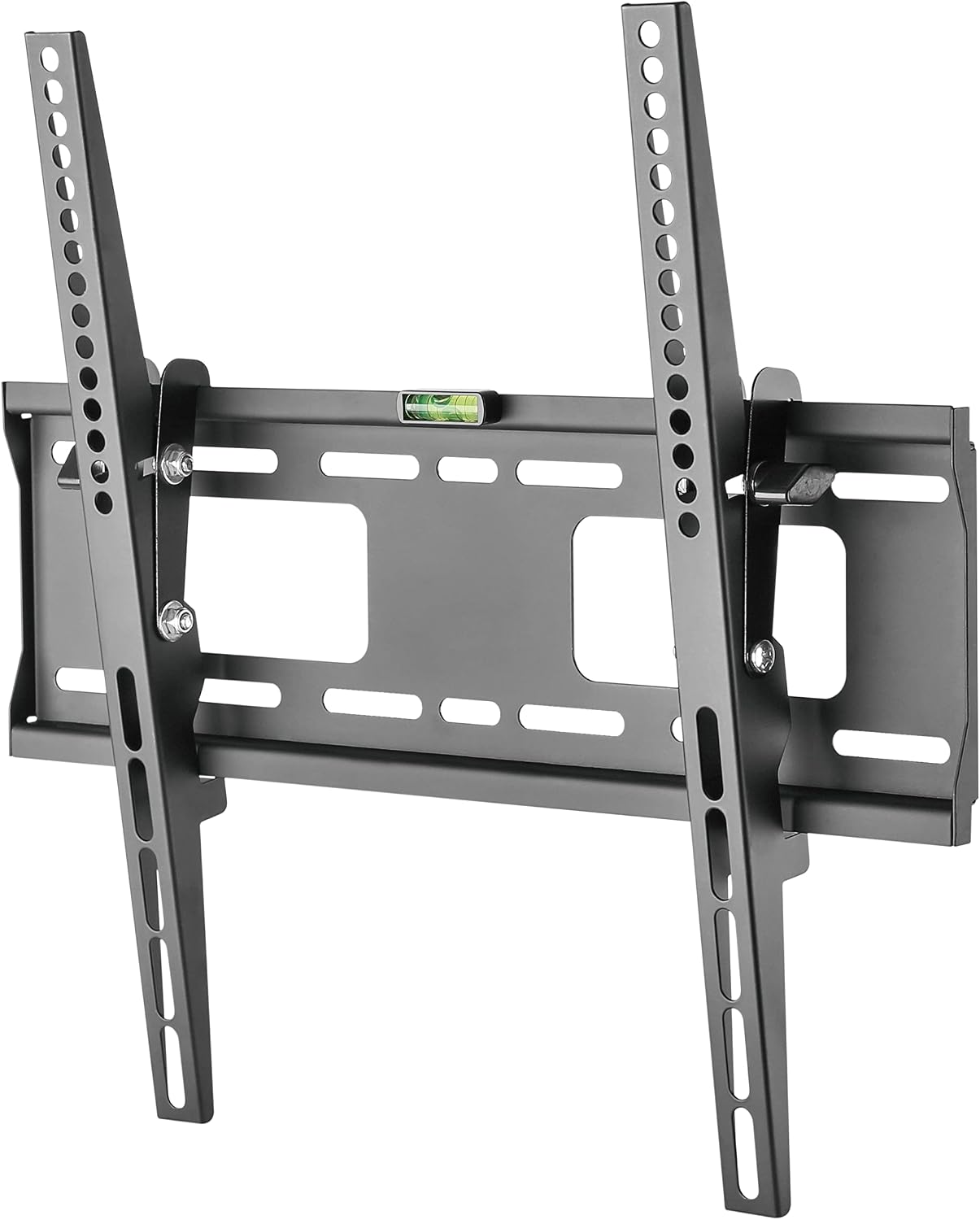
Image: Angled view of the assembled wall mount, demonstrating how the TV bracket arms connect to the main wall plate.
Operating Instructions
This DELTACO wall mount features a tilt adjustment mechanism to optimize your viewing angle.
- Tilt Adjustment: The mount allows for a tilt range of 0 to -10 degrees. To adjust the tilt, loosen the tilt adjustment knobs or bolts on the side of the TV bracket arms (if applicable). Carefully tilt the TV to your desired angle. Once the desired angle is achieved, tighten the knobs/bolts to secure the TV in place.

Image: Side profile of the wall mount, illustrating its slim design and the tilt adjustment mechanism.
Maintenance
- Cleaning: Wipe the mount with a soft, dry cloth. Do not use abrasive cleaners or solvents.
- Periodic Check: Periodically check all screws and connections to ensure they remain tight and secure.
- Damage: If any part of the mount appears damaged or worn, do not use it. Contact customer support for replacement parts or advice.
Troubleshooting
| Problem | Possible Cause | Solution |
|---|---|---|
| TV is not level. | Wall plate not level during installation. | Remove TV, re-level wall plate, and re-mount. |
| Mount feels unstable. | Screws are loose or incorrect wall anchors used. | Ensure all screws are tightened. Verify wall type and use appropriate anchors/studs. Do not exceed weight capacity. |
| Cannot tilt TV. | Tilt adjustment knobs/bolts are too tight. | Loosen tilt adjustment knobs/bolts, adjust, then re-tighten. |
Specifications
| Feature | Detail |
|---|---|
| Model Number | ARM-1153 |
| Screen Size Compatibility | 32" - 55" |
| Max Load Capacity | 50 kg (110 lbs) |
| VESA Compatibility | 200x200, 300x300, 400x200, 400x400 mm |
| Tilt Angle | 0° to -10° |
| Distance from Wall | 40 mm (1.57 inches) |
| Material | Durable Metal (Legierter Stahl oder Aluminium) |
| Color | Black |
| Item Weight | 4.18 pounds |
| Package Dimensions | 18.5 x 6.1 x 1.97 inches |

Image: Technical drawing illustrating the dimensions and tilt capabilities of the wall mount.
Warranty and Support
The DELTACO Tilt Wall Mount (ARM-1153) is backed by a 5-year warranty, ensuring its durability and reliability. This warranty covers defects in materials and workmanship under normal use.
For technical support, warranty claims, or replacement parts, please contact DELTACO customer service through their official website or the retailer where the product was purchased. Please have your model number (ARM-1153) and proof of purchase ready.
Website: www.deltaco.se (General DELTACO website, specific support link may vary by region)
Related documentsARM-1153


Ask a question about this manual
Ask about setup, troubleshooting, compatibility, parts, safety, or missing instructions. Manuals+ will review the question and use this page’s manual context to help answer it.