
Introduction
The Oclean TravelGo FlowSet Sonic Electric Toothbrush is designed to provide an efficient and gentle cleaning experience with its advanced sonic technology. This manual provides essential information for the proper setup, operation, and maintenance of your new toothbrush, ensuring optimal oral hygiene.
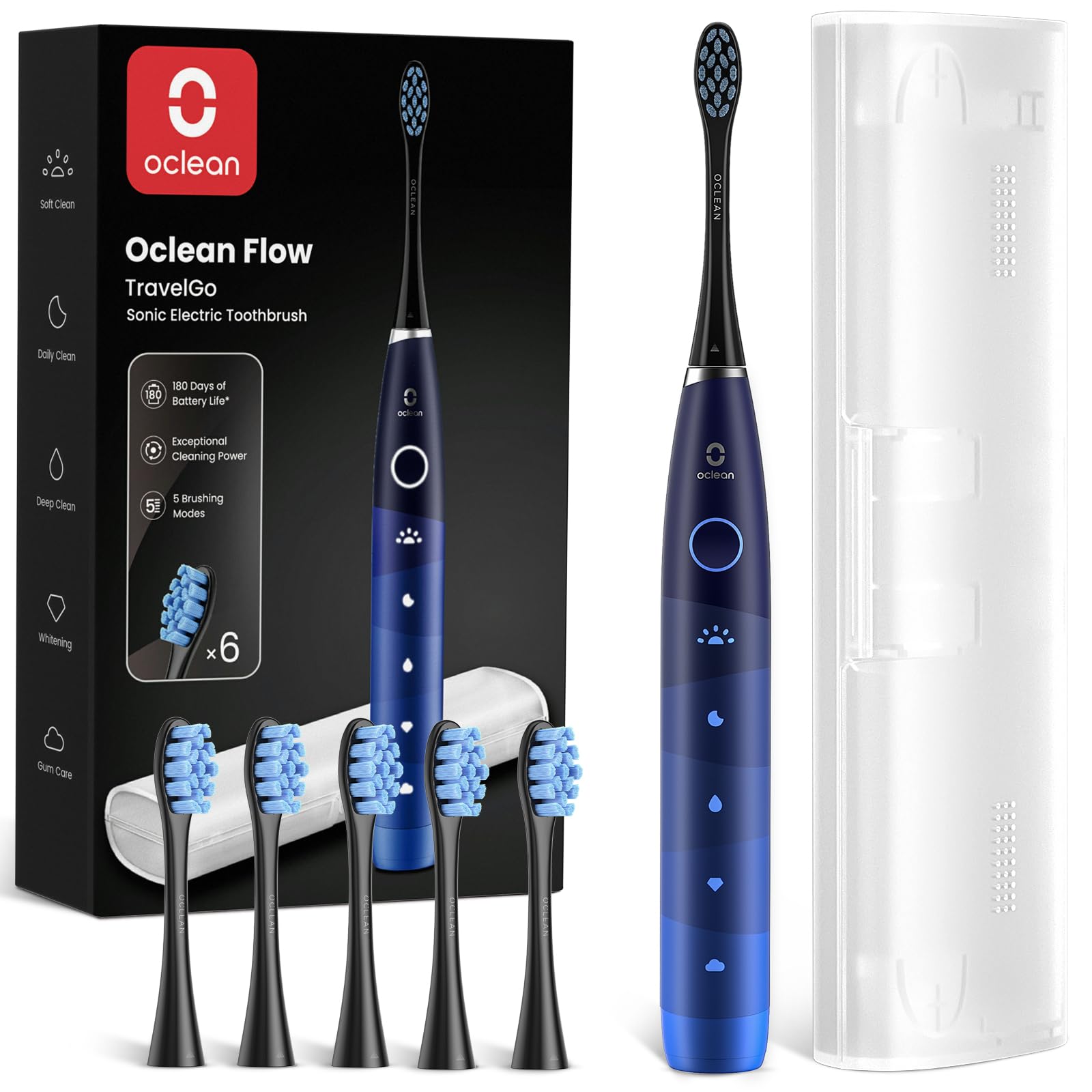
The Oclean TravelGo FlowSet Sonic Electric Toothbrush, showcasing its sleek design and ergonomic handle.
What's in the Box
Carefully unpack your Oclean TravelGo FlowSet. The package should contain the following items:
- 1 x Oclean Electric Toothbrush Handle
- 6 x DuPont Replacement Brush Heads
- 1 x Travel Case
- 1 x USB Charging Cable

All components included in the Oclean TravelGo FlowSet package: the toothbrush handle, multiple brush heads, and a travel case.
Setup
- Initial Charge: Before the first use, fully charge the toothbrush. Connect the USB charging cable to the charging port at the bottom of the handle and plug it into a compatible USB power source. The indicator light will show charging status.
Operating Instructions
- Attach Brush Head: Firmly push a brush head onto the metal shaft of the toothbrush handle.
- Prepare for Brushing: Wet the brush head and apply a small amount of toothpaste.
- Select Mode: Press the power button to turn on the toothbrush. Press the button again to cycle through the available brushing modes until you find your desired setting.
- Brush Your Teeth: Place the brush head against your teeth at a slight angle towards the gum line. Move the brush slowly across all surfaces of your teeth. The toothbrush features a 2-minute timer and a reminder every 30 seconds to switch to a different quadrant of your mouth.
- Rinse: After brushing, rinse your mouth thoroughly and clean the brush head under running water.
- Storage: For travel or hygienic storage, place the toothbrush and brush heads in the provided travel case.

The Oclean toothbrush features a smart 2-minute timer to ensure adequate brushing time for all quadrants of your mouth.
Modes of Operation
The Oclean TravelGo FlowSet offers 5 distinct brushing modes, each designed for specific oral care needs. You can switch between modes by pressing the power button after the toothbrush is turned on.
- Morning Mode: Moderate intensity for a refreshing start to your day.
- Night Mode: High intensity for thorough cleaning before sleep.
- Standard Cleaning Mode: Balanced intensity for effective daily plaque removal.
- Whitening Mode: Variable intensity for stain removal and brightening.
- Gentle Mode: Low intensity, ideal for sensitive teeth and gums.

Visual representation of the five distinct brushing modes available on the Oclean TravelGo FlowSet toothbrush.
Charging
The Oclean TravelGo FlowSet is equipped with a long-lasting battery, providing up to 180 days of use on a single charge. This makes it highly convenient for travel and reduces the frequency of recharging.
- To charge, connect the provided USB cable to the charging port at the base of the toothbrush.
- Plug the USB cable into a standard USB power adapter (not included) or a computer USB port.
- The indicator light will illuminate to show that the device is charging.

The Oclean TravelGo FlowSet offers an impressive 180-day battery life, with a convenient USB charging port located at the bottom of the handle.
Maintenance
Proper maintenance ensures the longevity and effectiveness of your Oclean toothbrush.
- Cleaning the Brush Head: After each use, rinse the brush head thoroughly under running water.
- Cleaning the Handle: Wipe the toothbrush handle with a damp cloth to remove any toothpaste residue. Do not use abrasive cleaners.
- Replacing Brush Heads: For optimal hygiene and cleaning performance, replace the brush head every three months, or sooner if the bristles appear frayed or worn.

A close-up view of the soft yet effective DuPont bristles in action, demonstrating thorough cleaning.
Safety Warnings
Please read and adhere to the following safety warnings to prevent injury or damage to the product:
- Charger Compatibility: Do not use a Type-C to Type-C charger. Only use the provided USB charging cable with a compatible USB power adapter.
- Water Immersion: While the toothbrush is IPX7 waterproof, do not completely immerse the entire unit in water for extended periods.
- Children: Keep the toothbrush and its components out of reach of young children to avoid any choking hazards.
Troubleshooting
If you encounter any issues with your Oclean TravelGo FlowSet, please refer to the following common troubleshooting steps:
- Toothbrush Not Turning On: Ensure the battery is sufficiently charged. If the battery is low, connect the toothbrush to the charger and allow it to charge for several hours.
- Weak Vibration: A weak vibration often indicates a low battery. Recharge the toothbrush fully.
- Brush Head Not Fitting Securely: Ensure the brush head is correctly aligned with the metal shaft and pushed down firmly until it clicks into place.
- Unusual Noise: If the toothbrush makes an unusual noise, ensure the brush head is properly attached. If the issue persists, contact customer support.
Specifications
| Feature | Specification |
|---|---|
| Battery | 1 Lithium-polymer (included) |
| Dimensions (L x W x H) | 2.72 x 2.72 x 18.86 cm |
| Weight | 292.1 grams |
| Manufacturer | Oclean |
| Model Number | TravelGo Flow Set Blue |
| Country of Origin | China |
| Waterproof Rating | IPX7 |
| Power Source | Electric cable |
| Bristle Firmness | Soft |
| Color | Blue Set |
| Material | Plastic |
| Brush Head Shape | Oval |
| Included Components | 6 DuPont brush heads, charging cable, travel case |
| Operating Modes | 5 |
| Movement Type | Vibrating |
Warranty and Support
For warranty information, product registration, or technical support, please visit the official Oclean website or contact their customer service department. You can also find additional resources and contact information through the Oclean store on Amazon.
Oclean Store on Amazon: Visit Oclean Store

The included travel case provides convenient and hygienic storage for your Oclean toothbrush and brush heads, perfect for on-the-go use.