
Introduction
This manual provides detailed instructions for the setup, operation, maintenance, and troubleshooting of your HOMPOW Native 1080P 4K Supported Bluetooth Projector. Please read this manual thoroughly before using the product to ensure proper function and longevity.
What's in the Box
- Remote Control
- User Manual
- Power Cord
- HDMI Cable
Key Features
- 1080P Full HD High Performance: Native resolution of 1920*1080 with 6000:1 contrast ratio, supporting 4K input. Delivers 10% brighter images than similar projectors.
- Bluetooth Connection & HiFi Stereo Speaker: Supports various Bluetooth speakers and headphones for immersive sound. Features built-in HiFi stereo speakers for quality audio.
- Wide Compatibility: Connects via HDMI to Laptops, TV Sticks, ROKU, PS4, Smartphones (adapter not included). Also features AV and USB ports for versatile connectivity.
- Keystone Correction & Zoom: Adjustable vertical and horizontal angles (±15°) via keystone correction. Zoom function allows image size reduction to 50% without moving the projector.
- Long Lamp Life: LED bulb designed for 100,000 hours of lamp lifetime.
Setup
1. Placement
Place the projector on a stable, flat surface or mount it securely. Ensure adequate ventilation around the projector to prevent overheating. Consider the projection distance to achieve your desired screen size.

Figure 1: The projector supports various installation methods, including front projection on a table, ceiling mount, and rear projection.
2. Power Connection
Connect the power cord to the projector's power input and then to a power outlet.
3. Connecting Devices
The projector offers multiple input options:
- HDMI: Use the provided HDMI cable to connect your Laptop, TV Stick, ROKU, PS4, or other HDMI-enabled devices.
- USB: Insert a USB flash drive into the USB port to play videos or view pictures directly.
- AV: Use an AV cable to connect older devices like DVD players.
- Bluetooth: Pair with external Bluetooth speakers or headphones for enhanced audio.
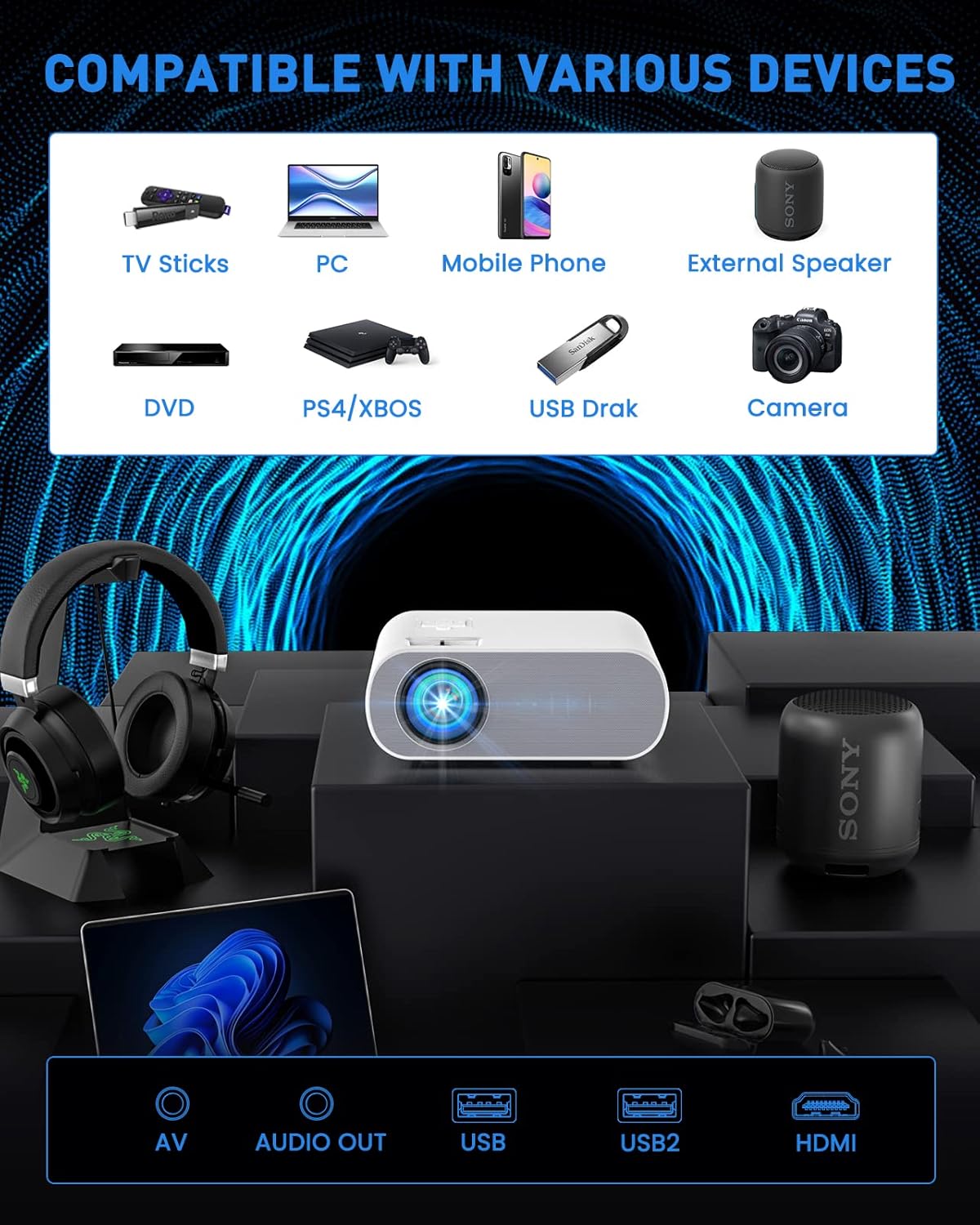
Figure 2: The projector is compatible with a wide range of devices via its multiple input ports.

Figure 3: Connect your smartphone or iPad using an HDMI adapter (not included) for screen mirroring.
4. Image Adjustment
- Focus: Rotate the focus ring on the projector lens until the image is clear and sharp.
- Keystone Correction: Use the keystone correction function (manual ±15°) to adjust the vertical and horizontal angles of the image if it appears trapezoidal.
- Zoom: Utilize the ZOOM function to reduce the image size to 50% without physically moving the projector.

Figure 4: Adjust focus and keystone correction for optimal image clarity and shape.
Operating Instructions
1. Power On/Off
Press the power button on the projector or the remote control to turn the unit on or off.
2. Source Selection
Use the "Source" button on the remote or projector to select the desired input source (HDMI, USB, AV).
3. Audio Settings
The projector has built-in HiFi stereo speakers. For external audio, connect Bluetooth speakers or headphones via the Bluetooth pairing function in the projector's settings menu.

Figure 5: The projector features Bluetooth 5.0 for wireless audio connectivity.
4. Usage Scenarios
The HOMPOW projector is ideal for home cinema and video games. For optimal performance, use in a relatively dark room environment.

Figure 6: Enjoy immersive outdoor movie experiences with the HOMPOW projector.

Figure 7: Experience a large, immersive display up to 200 inches.
Maintenance
1. Lamp Life
The projector's LED lamp has a lifespan of approximately 100,000 hours, reducing the need for frequent bulb replacements.
2. Cleaning
- Regularly clean the lens with a soft, lint-free cloth designed for optical surfaces.
- Keep the projector's ventilation openings clear of dust and debris to ensure proper airflow.
Troubleshooting
If you encounter issues with your projector, please refer to the following common solutions:
- No Picture/Signal:
- Ensure the correct input source is selected (HDMI, USB, AV).
- Check all cable connections (HDMI, power) to ensure they are secure.
- Verify the connected device (laptop, TV stick) is powered on and outputting a signal.
- No Sound:
- Adjust the volume on both the projector and the connected device.
- If using external speakers, ensure they are properly connected or paired via Bluetooth.
- Note: The projector does not support Dolby sound. If playing videos from services like Netflix or Amazon Prime Video, ensure Dolby sound is turned off in your source device's audio settings (e.g., Settings > Display & Sounds > Audio > Dolby Digital Output > OFF).
- Blurry Image:
- Adjust the focus ring on the projector lens.
- Use the keystone correction to correct any trapezoidal distortion.
- Ensure the projection surface is flat and smooth.
- Overheating:
- Ensure the projector has adequate ventilation and its vents are not blocked.
- Avoid operating the projector in excessively hot environments.
Specifications
| Feature | Detail |
|---|---|
| Brand | HOMPOW |
| Model Number | C10 |
| Native Resolution | 1920 x 1080 (1080P Full HD) |
| 4K Support | Yes |
| Contrast Ratio | 6000:1 |
| Brightness | 10% brighter than similar projectors (specific lumens not provided in feature bullets, but 6000L is mentioned in an image) |
| Connectivity Technology | Bluetooth (5.0), HDMI, USB, AV |
| Speaker | Built-in HiFi Stereo Speaker |
| Keystone Correction | Manual ±15° (Vertical and Horizontal) |
| Zoom Function | Image size reduction to 50% |
| Lamp Life | 100,000 hours |
| Item Weight | 4.33 pounds |
| Package Dimensions | 12.01 x 9.88 x 5.47 inches |
Warranty & Support
HOMPOW provides a 2-Year Warranty for this projector, along with lifetime professional technical support. For any problems or inquiries, please feel free to contact us anytime.

Figure 8: Dedicated customer support is available for assistance.


