
1. Introduction
Thank you for choosing the Fanmusic TRN EMX Earphone. This manual provides essential information for the proper setup, operation, and maintenance of your new HiFi flat earbuds. Please read this manual thoroughly before using the product to ensure optimal performance and longevity.
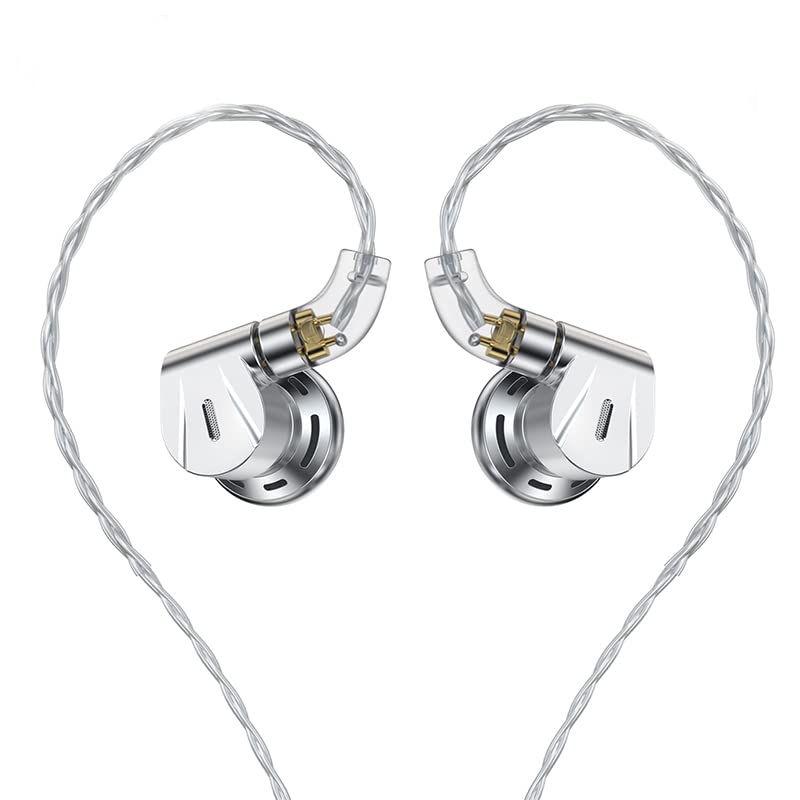
Figure 1: Fanmusic TRN EMX Earphone overview.
Key Features:
- 14.2mm Beryllium-Plated Diaphragm Unit: Delivers magnificent low-frequency performance with clean speed and power.
- Aluminum Alloy Cavity: Precision CNC-cut to effectively suppress resonance, ensuring comfortable and natural high-frequency extension.
- Professional Acoustic Structure: Optimizes dynamic coil performance for a rich and full sound experience.
- Acoustic Airflow Design: Half-open exhaust design for easy pressure relief, enhancing bass dive and power.
- Interchangeable Plugs: Features 2.5mm, 3.5mm, and 4.4mm jack types for versatile connectivity.
- 2-Pin Gold-Plated Connector: Ensures secure and high-quality signal transmission.
2. What's in the Box
Upon unpacking your TRN EMX Earphone, please ensure all the following items are present:
- TRN EMX Earbuds (1 pair)
- Audio Cable with 2-Pin connectors
- Interchangeable Plugs (2.5mm, 3.5mm, 4.4mm)
- Various Ear Tips (silicone and foam, different sizes)
- User Manual (this document)

Figure 2: TRN EMX Earphone components including earbuds, cable, and interchangeable plugs.
3. Setup
3.1 Attaching the Cable to Earbuds
- Identify the left (L) and right (R) earbuds and the corresponding connectors on the cable. The earbuds typically have 'L' and 'R' markings.
- Align the 2-pin connector on the cable with the receptacle on the earbud. Ensure the pins are correctly oriented.
- Gently push the connector into the earbud until it clicks securely into place. Do not force it.
- Repeat for the other earbud.

Figure 3: Close-up of the 2-pin connector being attached to the earbud housing.
3.2 Choosing and Installing Ear Tips
Selecting the correct ear tips is crucial for sound quality and comfort. Experiment with different sizes and materials (silicone or foam) to find the best fit for your ears.
- Gently remove the pre-installed ear tips by pulling them off the nozzle.
- Select a new pair of ear tips.
- Push the new ear tip onto the earbud's nozzle, ensuring it is fully seated and secure.
3.3 Attaching Interchangeable Plugs
The TRN EMX features interchangeable audio plugs for compatibility with various devices.
- Unscrew the currently attached plug from the cable.
- Select the desired plug (2.5mm, 3.5mm, or 4.4mm).
- Screw the new plug onto the cable connector until it is firmly attached.

Figure 4: The interchangeable audio plugs (2.5mm, 3.5mm, 4.4mm) provided with the TRN EMX Earphone.
4. Operating Instructions
4.1 Wearing the Earphones
- Insert the earbuds into your ears, ensuring a comfortable and secure fit. The cable is designed to be worn over the ear for better stability and reduced microphonics.
- Adjust the cable over your ears so it rests comfortably.

Figure 5: Proper wearing technique for the TRN EMX Earphone with the cable routed over the ear.
4.2 Connecting to an Audio Source
- Ensure the correct interchangeable plug is attached to your earphone cable.
- Insert the audio plug into the corresponding jack on your audio device (smartphone, DAP, amplifier, etc.).
- Start playing your audio. Adjust the volume on your audio device to a comfortable listening level.
4.3 Using the In-line Remote (if applicable)
If your cable includes an in-line remote, it may offer basic controls such as play/pause, track skip, and call management. Refer to your audio device's manual for specific compatibility and functions.
5. Maintenance
5.1 Cleaning the Earbuds and Ear Tips
- Regularly clean your earbuds and ear tips to maintain hygiene and sound quality.
- Gently wipe the earbud housings with a soft, dry cloth.
- Remove ear tips and wash them with mild soap and water. Rinse thoroughly and allow them to dry completely before reattaching.
- Use a small, soft brush or cotton swab to carefully remove any earwax or debris from the earbud nozzles.
5.2 Cable Care
- Avoid sharp bends or excessive pulling on the cable to prevent damage.
- When storing, coil the cable loosely to prevent tangling.
5.3 Storage
When not in use, store your TRN EMX Earphone in a clean, dry place, preferably in a protective case, to prevent dust accumulation and physical damage.
6. Troubleshooting
6.1 No Sound or Intermittent Sound
- Ensure the audio plug is fully inserted into the audio source.
- Check that the 2-pin connectors are securely attached to the earbuds.
- Verify the volume on your audio device is turned up and not muted.
- Test with a different audio source or cable to rule out device or cable issues.
- Inspect the earbud nozzles for any blockages (e.g., earwax) and clean if necessary.
6.2 Distorted Sound
- Reduce the volume on your audio device.
- Ensure the audio source is playing high-quality audio files.
- Check for any damage to the cable or earbuds.
6.3 Uncomfortable Fit
- Try different sizes and materials of ear tips to find the most comfortable and secure fit.
- Adjust the cable's position over your ear.
7. Specifications
| Product Model | TRN-EMX |
| Transducer Type | Flat head earplugs, Dynamic Circle |
| Driver Size | 14.2mm Beryllium-plated diaphragm unit |
| Frequency Response | 20Hz-20000Hz |
| Impedance | 45Ω |
| Sensitivity | 120dB |
| Connector Type | 2Pin-S |
| Jack Type | 2.5mm, 3.5mm, 4.4mm (Interchangeable) |
| Cable Length | 1.2m ±3cm |
| Weight (Headphone + cable) | 8.6g + 26g |
| Color | Silver |
| Enclosure Material | Aluminum |

Figure 6: Frequency response graph of the TRN EMX Earphone. Note: Actual use may vary slightly.
8. Warranty & Support
8.1 Warranty Information
The Fanmusic TRN EMX Earphone comes with a 1-YEAR WARRANTY from the date of purchase. This warranty covers manufacturing defects and workmanship under normal use. It does not cover damage caused by misuse, accidents, unauthorized modifications, or normal wear and tear.
8.2 Customer Support
For technical assistance, warranty claims, or any questions regarding your TRN EMX Earphone, please contact your retailer or visit the official Fanmusic website for support resources.