
Important Safety Instructions
Please read all instructions carefully before using your COOKTRON induction cooktop. Keep this manual for future reference.
- Do not touch hot surfaces. Always use handles or knobs.
- To protect against electrical shock, do not immerse the power cord, plugs, or the cooktop unit in water or any other liquid.
- Close supervision is necessary when the appliance is used by or near children.
- Unplug the cooktop from the outlet when not in use and before cleaning. Allow it to cool completely before handling or storing.
- Do not operate any appliance with a damaged cord or plug, or if the appliance malfunctions or has been damaged in any manner. Contact customer support for assistance.
- The use of accessory attachments not recommended by the appliance manufacturer may cause injuries.
- Do not use the cooktop outdoors. It is designed for indoor use only.
- Do not let the power cord hang over the edge of a table or counter, or touch hot surfaces.
- Do not place the cooktop on or near a hot gas or electric burner, or in a heated oven.
- Exercise extreme caution when moving an appliance containing hot oil or other hot liquids.
- Always attach the plug to the appliance first, then plug the cord into a grounded wall outlet. To disconnect, turn any control to the "off" position, then remove the plug from the wall outlet.
- Do not use the appliance for purposes other than its intended use.
- Ensure adequate ventilation around the cooktop during operation.
- Use only magnetic cookware suitable for induction cooking.
Product Overview
Components and Controls

The COOKTRON 2-burner induction cooktop features an intuitive control panel designed for ease of use. Familiarize yourself with the following components:
- Timer Set up Button: Used to activate and adjust the cooking timer.
- Child Lock Indicator: Illuminates when the child lock function is active.
- Digital Displayer: Shows power levels, temperature settings, and timer duration.
- Power or Temperature More Button: Increases power or temperature settings.
- On/Off Button: Powers the cooktop on or off.
- Rotary Knob: Adjusts power or temperature settings with precision.
Key Features
- Dual Control System: Combines responsive touch controls with a precise rotary knob for versatile cooking adjustments.
- High Power Output: A total of 3500W, with the left zone providing up to 2000W and the right zone up to 1500W, ensuring rapid heating and efficient cooking for various culinary tasks.
- 10 Power/Temperature Levels: Offers 10 adjustable power and temperature settings, allowing precise control from gentle melting to intense frying.
- 4-Hour Timer: Integrated timer function for setting cooking durations up to 4 hours.
- Child Lock: A safety feature to prevent accidental operation.
- Easy to Clean: Features a smooth glass surface for effortless maintenance and cleaning.
- Portable Design: Compact and flexible, suitable for use in various kitchen settings, both indoors and outdoors (with appropriate power supply).
- Fast Heat Dissipation: Equipped with cooling fans for efficient heat management.
Setup
1. Unpacking
Carefully remove the cooktop and all packaging materials from the box. Inspect the appliance for any signs of damage. If any damage is found, do not use the cooktop and contact customer support.
2. Placement
Place the cooktop on a stable, flat, and heat-resistant surface. Ensure there is sufficient clearance around the unit for proper ventilation. Do not block the air vents located on the underside or sides of the cooktop.
3. Power Connection
Plug the power cord into a standard, grounded electrical outlet. Ensure the voltage and frequency of your power supply match the specifications listed on the cooktop's rating label.
4. Cookware Compatibility
The COOKTRON induction cooktop requires magnetic cookware. Use pots and pans made of cast iron, magnetic stainless steel, or enameled iron. Cookware with a flat bottom and a diameter between 12 cm and 26 cm is recommended for optimal performance.

This image illustrates the types of cookware compatible with the COOKTRON induction cooktop. It shows examples of cast iron pans, iron pots, magnetic pots, and stainless steel pots, along with a size range of 12cm to 26cm. Incompatible materials such as ceramic, glass, aluminum, and copper are also indicated.
Operating Instructions
1. Powering On/Off
- To Turn On: Place suitable cookware on the desired heating zone. Press the On/Off Button. The display will light up.
- To Turn Off: Press the On/Off Button again. The cooktop will turn off, and the display will show "H" if the surface is still hot.
2. Adjusting Power/Temperature

This image illustrates the COOKTRON 2-burner induction cooktop in operation, featuring a pot on the left 2000W zone and a frying pan on the right 1500W zone. It highlights the individual power capacities of each heating area.
- After turning on, select the desired heating zone (left or right).
- Use the Rotary Knob to increase or decrease the power level or temperature. The display will show the current setting.
- Alternatively, use the Power or Temperature More Button for incremental adjustments.
- The left zone has a maximum power of 2000W, and the right zone has a maximum power of 1500W.
3. Using the Timer Function

This image highlights the 4-hour timer function of the COOKTRON induction cooktop, allowing users to set precise cooking durations.
- While the cooktop is operating, press the Timer Set up Button.
- Use the Rotary Knob or the Power or Temperature More Button to set the desired cooking time (up to 4 hours).
- The timer will count down, and the cooktop will automatically turn off when the set time expires.
4. Child Lock Function

This image depicts the Child Lock safety feature of the COOKTRON induction cooktop, designed to prevent accidental operation by children.
- To Activate: With the cooktop on or off, press and hold the Child Lock Button (often indicated by a lock icon) for a few seconds until the Child Lock indicator illuminates. All controls will be locked.
- To Deactivate: Press and hold the Child Lock Button again for a few seconds until the indicator turns off.
Maintenance and Cleaning
Regular cleaning and maintenance will ensure the longevity and optimal performance of your COOKTRON induction cooktop.

This image demonstrates the ease of cleaning the COOKTRON induction cooktop. A hand is shown wiping the smooth surface with a cloth, and an inset highlights its scratch-resistant properties, ensuring effortless maintenance.
- Before Cleaning: Always unplug the cooktop from the power outlet and allow it to cool completely.
- Cleaning the Surface: Wipe the glass surface with a soft, damp cloth and a mild detergent. For stubborn stains, use a non-abrasive cleaner specifically designed for glass cooktops. Avoid abrasive pads, harsh chemicals, or scouring powders, as these can scratch the surface.
- Cleaning the Body: Wipe the exterior body with a soft, damp cloth. Do not immerse the cooktop in water.
- Air Vents: Ensure the air vents on the underside and sides are free from dust and debris to maintain proper ventilation. Use a soft brush or vacuum cleaner to gently clear any blockages.
- Storage: When not in use for extended periods, store the cooktop in a dry, safe place, away from direct sunlight and moisture.
Troubleshooting
If you encounter any issues with your COOKTRON induction cooktop, refer to the table below for common problems and solutions.
| Problem | Possible Cause | Solution |
|---|---|---|
| Cooktop does not turn on. | No power supply; Power cord not properly plugged in; Child lock is active. | Check if the power cord is securely plugged into a working outlet. Ensure the child lock is deactivated. |
| Cooktop beeps or displays an error code. | Incompatible cookware; No cookware on the heating zone; Overheating. | Ensure you are using magnetic cookware. Place cookware on the heating zone. Allow the cooktop to cool down if it's overheated. |
| Cooking process is slow or inefficient. | Cookware is too small or too large for the heating zone; Low power setting. | Use cookware with a diameter between 12-26 cm. Increase the power level. |
| Fan noise during operation. | Normal operation for cooling. | This is normal. The internal cooling fans activate to dissipate heat and prevent overheating. |
If the problem persists after attempting these solutions, please contact COOKTRON customer support.
Specifications
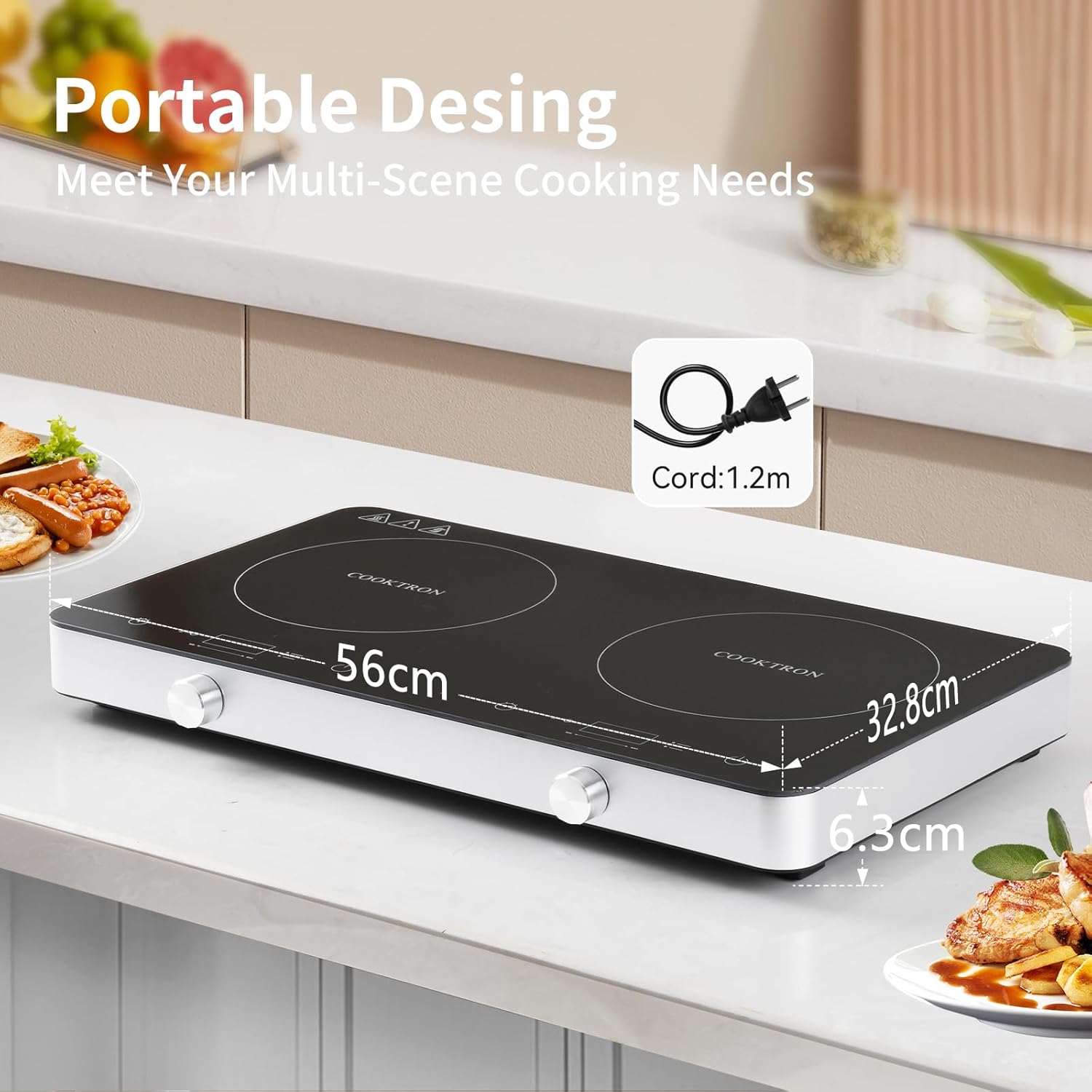
This image provides the physical dimensions of the COOKTRON induction cooktop, measuring 56cm in width, 32.8cm in depth, and 6.3cm in height. It also shows the included 1.2-meter power cord.
| Feature | Specification |
|---|---|
| Brand | COOKTRON |
| Model Number | AKDEU-CT-FS-IRC112-G |
| Power (Total) | 3500 W |
| Heating Elements | 2 (Left: 2000W Max, Right: 1500W Max) |
| Control Type | Touch and Rotary Knob |
| Material | Glass (Surface) |
| Product Dimensions (D x W x H) | 31 cm x 56 cm x 4.8 cm |
| Power Source | Wired |
| Included Components | Power Cord |
| UPC / GTIN | 673143711937 |
Warranty and Support
For warranty information, product registration, or technical support, please refer to the documentation included with your purchase or visit the official COOKTRON website. Keep your proof of purchase for any warranty claims.
If you have any questions or require assistance, please do not hesitate to contact COOKTRON customer service.


