
1. Introduction
Thank you for choosing the PETKIT EVERSWEET SOLO SE Pet Water Fountain. This innovative water fountain is designed to provide fresh, clean water for your cats and dogs, encouraging them to drink more and stay hydrated. Featuring a wireless pump, multi-layer filtration, and a quiet operation, it ensures a safe and pleasant drinking experience for your beloved pets.

Image: The PETKIT EVERSWEET SOLO SE Pet Water Fountain in white, accompanied by a PETKIT Filter Unit 3.0 package.
2. Product Features
- 3.0 Wireless Pump: Features an upgraded wireless pump for enhanced stability and safety, eliminating wire entanglement. Includes a foam filter at the water inlet to intercept impurities and prolong pump lifespan. The removable pump structure simplifies cleaning.
- Separable Water Tank and Base: The water tank and power supply base are designed to be separable, offering increased safety compared to non-separable designs. This detachable structure also facilitates easy water refilling and cleaning.
- Filter 3.0: Equipped with a PETKIT Filter 3.0, which contains an increased amount of filtration material for superior filtration, ensuring your pet always has access to fresh water.
- Dry Burning Prevention: The pump automatically ceases operation when water levels are low, preventing the device from overheating or burning out, thus ensuring your pet's safety.
- Indicator Light Reminder: An integrated indicator light provides real-time status updates. A flashing blue light signals low water levels, reminding you when to refill the fountain.
- Gushing Cat Fountain Design: The flowing water design attracts pets, encouraging increased water intake. This design also contributes to the fountain's ultra-quiet operation.
- Ultra-Quiet Operation: The upgraded Pump 3.0 reduces operational noise to below 25 dB, ensuring a peaceful environment for both you and your pet.
- Large Capacity: With a 65oz/1.85L capacity, the fountain can provide fresh water for approximately 8-10 days, reducing the frequency of refills.
3. Package Contents
Please check the package contents upon unboxing to ensure all items are present and in good condition:
- PETKIT EVERSWEET SOLO SE Water Fountain Unit (Water Tank and Top Tray)
- Wireless Pump 3.0
- PETKIT Filter 3.0 (1 piece)
- Power Adapter
- Instruction Manual (this document)
4. Setup Guide
- Unpack Components: Carefully remove all parts from the packaging.
- Clean Before First Use: Wash the water tank, top tray, and pump thoroughly with water. Ensure all components are clean before assembly.
- Install Filter: Place the PETKIT Filter 3.0 into the designated filter slot in the top tray. Ensure it is seated correctly.
- Assemble Wireless Pump: Insert the wireless pump into its designated position within the water tank. The wireless design means no direct electrical connection between the pump and the base, enhancing safety.
- Fill Water Tank: Fill the water tank with clean water up to the MAX fill line. The 65oz/1.85L capacity allows for extended use.
- Place Top Tray: Carefully place the top tray onto the water tank, ensuring it is securely fitted.
- Connect Power: Connect the power adapter to the base unit and plug it into a wall outlet. The indicator light on the base will illuminate.

Image: Illustration of the wireless water pump and its placement within the fountain, highlighting the absence of exposed wires.
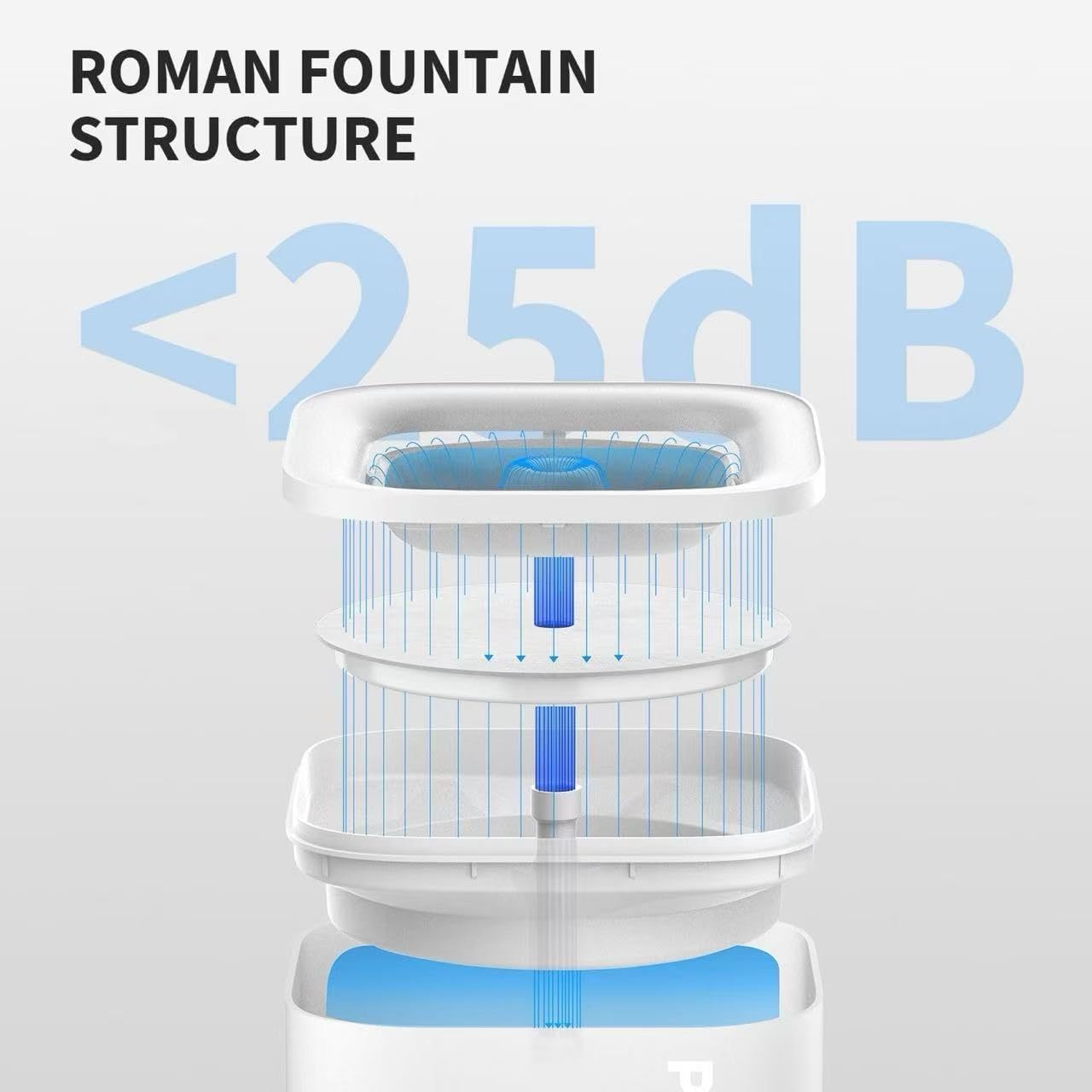
Image: The separable water tank and power base, demonstrating the detachable design for easy water adding and enhanced safety.
5. Operating Instructions
Once assembled and powered on, the PETKIT EVERSWEET SOLO SE will begin operating automatically. The fountain is designed for continuous operation to ensure fresh water is always available for your pet.
- Automatic Water Flow: The fountain will continuously circulate water, providing a gushing flow that encourages pets to drink.
- Indicator Light Status:
- Solid Green Light: Indicates normal operation and sufficient water level.
- Flashing Blue Light: Indicates low water level. Please refill the water tank promptly.
- Quiet Operation: The advanced pump technology ensures the fountain operates at a very low noise level (below 25 dB), minimizing disturbance.

Image: Diagram illustrating the Roman fountain structure, designed for quiet water circulation and encouraging pet hydration.

Image: Exploded view of the Filter Unit 3.0, showing its high-density filter, coconut shell activated charcoal, and ion exchange resin layers for comprehensive water purification.
6. Maintenance and Cleaning
Regular cleaning and maintenance are crucial to ensure the longevity and optimal performance of your PETKIT water fountain, and to provide the freshest water for your pet.
- Daily Water Refill: Check the water level daily and refill as needed. The flashing blue light indicates low water.
- Weekly Cleaning:
- Unplug the fountain from the power outlet.
- Separate the water tank from the power base. Note: The power base should NOT be immersed in water.
- Remove the top tray and the wireless pump.
- Wash the water tank, top tray, and pump thoroughly with mild soap and water. Use a soft brush to clean any hard-to-reach areas.
- Rinse all components thoroughly to remove any soap residue.
- Reassemble the fountain after cleaning.
- Filter Replacement: Replace the PETKIT Filter 3.0 approximately every 2-4 weeks, or more frequently if you have multiple pets or notice reduced water quality. Replacement filters can be purchased separately.
- Pump Cleaning: Periodically disassemble the wireless pump and clean its internal components to prevent mineral buildup and ensure smooth operation.

Image: Disassembled components of the PETKIT water fountain, illustrating the ease of cleaning each part.
7. Troubleshooting
| Problem | Possible Cause | Solution |
|---|---|---|
| Fountain not dispensing water. |
|
|
| Flashing blue indicator light. | Low water level. | Refill the water tank immediately. The pump will automatically resume operation once water is detected. |
| Fountain is noisy. |
|
|
| Water tastes or smells bad. |
|
|
8. Specifications
| Attribute | Detail |
|---|---|
| Brand | PETKIT |
| Model Name | PETKIT EVERSWEET SOLO SE |
| Item Model Number | 60645 |
| Capacity | 1.8 Liters (65oz) |
| Product Dimensions (LxWxH) | 7 x 7 x 7 inches |
| Item Weight | 2.2 pounds |
| Material | ABS Plastic |
| Color | White with Wireless Pump |
| Manufacturer | PETKIT |
| Country of Origin | China |
| Care Instructions | Clean the water tank and pump regularly |
| Included Components | Pump |
9. Warranty and Support
The PETKIT EVERSWEET SOLO SE Pet Water Fountain comes with a 1-year manufacturer's warranty from the date of purchase. This warranty covers defects in materials and workmanship under normal use.
For warranty claims, technical support, or any inquiries regarding your product, please contact PETKIT customer service. Keep your proof of purchase for warranty validation.
You can find more information and contact details on the official PETKIT website or through the retailer where you purchased the product.


