
1. Introduction and Overview
The PETKIT Cat Backpack Carrier is designed to provide a comfortable and secure travel experience for your feline companion or small dog. Featuring an innovative ventilation system, adjustable lighting, and ergonomic design, this carrier ensures your pet's well-being and your comfort during outings. It is suitable for pets under 17 lbs.

Image: The PETKIT Cat Backpack Carrier in green, showcasing its sleek design.
2. Key Features
- Comfortable and Breathable: Updated 2.0 Ventilation system accelerates air circulation. Wind power is adjustable via a fan knob. Multiple air vents create convection for fresh air.
- Ease Tension of Your Shoulder: Thicker high-density sponge evenly distributes pressure, reducing shoulder strain. Ergonomic design provides strong back and lumbar support.
- Lightweight & Spacious: Entire backpack weighs only 3.5 lbs. Dimensions are 13L x 8W x 18H inches, providing ample space for pets under 17 lbs. (Airline approved - generally acceptable for use, please consult your airline before traveling).
- Thoughtful Design: Appropriate window and hidden zone meet pet curiosity while providing security. Semi-transparent window reduces environmental irritation and glare.
- Adjustable Lighting: Mechanical rotary button adjusts light brightness, allowing easy observation of your pet in the dark and reducing sudden glare discomfort.
- Detachable Design: Upgraded 2.0 version features a removable design for easy cleaning. Can be washed or wiped with a damp cloth.
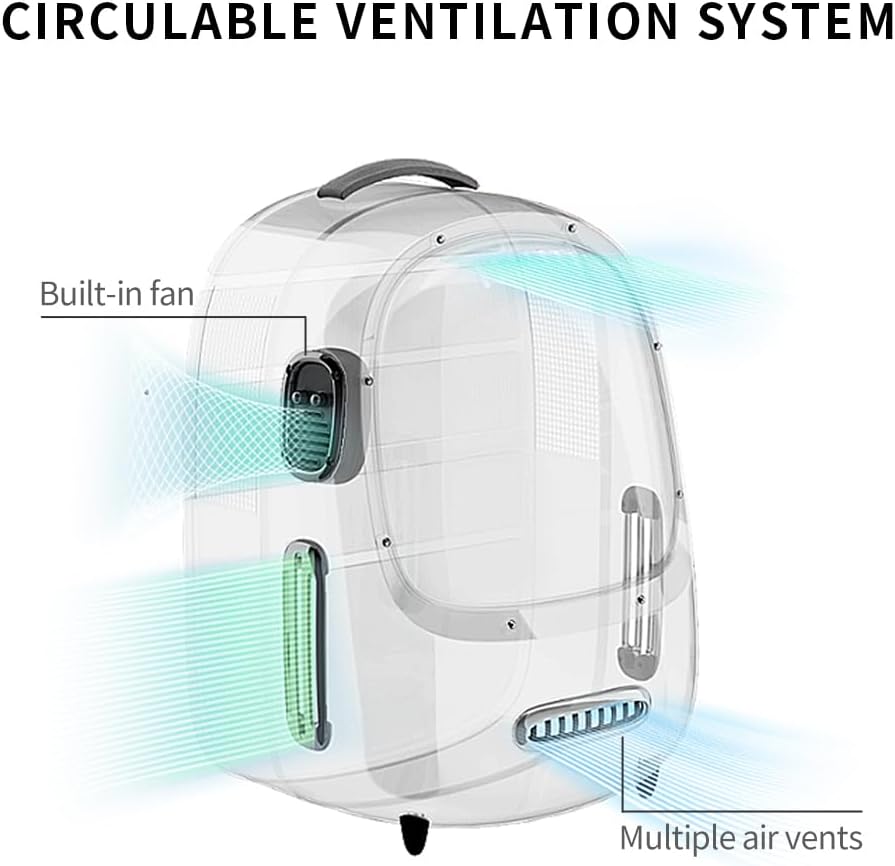
Image: Diagram illustrating the circulable ventilation system with a built-in fan and multiple air vents.

Image: Detailed view of the backpack's padded back and shoulder straps designed to relieve pressure.

Image: Visual representation of the carrier's large capacity and dimensions.

Image: Close-up of the wide tinted window, offering UV protection and glare reduction.

Image: The interior lighting system of the carrier, showing adjustable brightness.

Image: The detachable design of the carrier, showing how it separates for cleaning and storage.
3. Setup
3.1 Assembling the Carrier
The PETKIT Cat Backpack Carrier features a detachable design for ease of assembly and cleaning. To assemble, align the main backpack section with the transparent front shell and securely zip them together. Ensure all zippers are fully closed to prevent accidental openings.
3.2 Powering the Fan and Light
The internal fan and light require an external power bank (not included). Locate the USB cable inside the side pocket of the backpack. Connect this cable to your power bank. The power bank can be stored in the designated side pocket for convenience.

Image: Close-up of the mechanical rotary buttons for adjusting wind speed and light brightness.
3.3 Pet Entry and Exit
The carrier features a wide opening for easy pet entry and exit. Unzip the main compartment fully to create a large access point. For timid pets, allow them to explore the carrier at their own pace before attempting to place them inside. The detachable design also allows for the front shell to be completely removed for easier access during initial familiarization.
3.4 Instructional Video: How to Use PETKIT Ventilated Pet Backpack Carrier
Video: A comprehensive guide on how to set up and use the PETKIT Ventilated Pet Backpack Carrier, demonstrating its features and functionality.
4. Operating Instructions
4.1 Fan Operation
Once the power bank is connected, the fan will start in auto mode. To adjust the fan speed, use the mechanical rotary knob located on the side of the carrier. Rotate the knob to cycle through different wind power settings (e.g., low, medium, high) to ensure optimal comfort for your pet.
4.2 Light Operation
The internal light can be controlled using the second mechanical rotary knob on the side. Rotate the knob to turn the light on/off and adjust its brightness. This feature is useful for observing your pet in low-light conditions and can be dimmed to reduce irritation.
4.3 Instructional Video: PETKIT Cat Backpack Carrier with Inbuilt Fan & Light
Video: A brief overview demonstrating the fan and light features of the PETKIT Cat Backpack Carrier.
5. Maintenance
5.1 Cleaning the Carrier
Thanks to its upgraded detachable design, the PETKIT Cat Backpack Carrier is easy to clean. The main backpack section and the transparent shell can be separated. Wipe down all surfaces with a damp cloth and mild soap if necessary. Ensure all parts are completely dry before reassembling to prevent mold or mildew.
6. Troubleshooting
If you encounter any issues with the fan or light functionality, first ensure your external power bank is fully charged and properly connected to the USB cable. If problems persist, please refer to the warranty and support section for further assistance.
7. Specifications
| Attribute | Value |
|---|---|
| Item Weight | 4.4 pounds (2 Kilograms) |
| Manufacturer | PETKIT |
| Item Model Number | BP2 |
| Product Dimensions | 13"L x 12"W x 18"H |
| Material | Acrylonitrile Butadiene Styrene (ABS) |
| Color | Green |
| Special Feature | Backpack with a fan |
8. Warranty & Support
The PETKIT Cat Backpack Carrier comes with a 1-year warranty from the date of purchase. For warranty claims, technical support, or any product-related inquiries, please contact PETKIT customer service directly. Refer to the product packaging or the official PETKIT website for the most up-to-date contact information.