
1. Product Overview
The WINGBO SYCF5202 is a 52-inch flush mount DC ceiling fan designed for indoor use. It features a modern aesthetic, four reversible blades, and an ultra-quiet 6-speed DC motor. This fan is ideal for rooms with low ceilings, offering efficient air circulation without an integrated light fixture.
- Modern/Contemporary Design: A sleek, low-profile design suitable for various interior styles.
- 52-Inch Blade Span: Optimized for medium to large rooms such as bedrooms, kitchens, and living rooms.
- Dual-Finish Reversible Blades: Blades feature a Matte Black finish on one side and a White finish on the other, allowing for customization.
- Ultra-Quiet 6-Speed DC Motor: Provides powerful airflow with quiet operation, up to 70% more efficient than traditional fans.
- Reversible Airflow: Supports both downdraft (summer mode) and updraft (winter mode) for year-round comfort.
- Low Profile Design: Hugger style housing fits flush to the ceiling, making it suitable for ceilings less than 9 feet high. Fan height is 7.5 inches from ceiling to blades, and 10 inches from ceiling to the bottom of the fan.
2. Safety Information
Please read and understand all instructions before beginning installation. Failure to follow these instructions could result in electric shock, fire, or personal injury.
- Ensure the power is turned off at the circuit breaker before installation or maintenance.
- All wiring must be in accordance with national and local electrical codes.
- The mounting structure must be capable of supporting the weight of the fan (approximately 15 lbs).
- Do not operate the fan if any part is damaged.
- Keep hands, clothing, and other objects clear of the fan blades when the fan is operating.
- This fan is for indoor use only in dry locations.
3. Packing List
Verify that all components are present before beginning installation.
- Fan Motor Assembly
- 4 Reversible Fan Blades
- Mounting Bracket
- Remote Control and Receiver
- Hardware Pack (screws, wire nuts, etc.)
- Instruction Manual
4. Setup and Installation
Follow these steps for proper installation of your WINGBO ceiling fan. It is recommended to watch the installation video for visual guidance.
Video: WINGBO Flush Mount Ceiling Fan with No Lights Installation. This video provides a step-by-step visual guide for installing the ceiling fan.
Step-by-Step Installation:
- Prepare for Installation: Ensure power is off at the circuit breaker. Remove the existing fixture and prepare the electrical box.
- Attach Blades to Motor: Secure each fan blade to the motor assembly using the provided screws. Ensure they are firmly attached.
- Install the Cap: Place the decorative cap over the blade attachment points on the motor assembly.
- Connect Receiver Wires: Connect the receiver wires to the fan wires. Match colors: Red (receiver) to Red (fan), Yellow (receiver) to Yellow (fan), Grey (receiver) to Grey (fan). Use wire nuts to secure connections.
- Install Mounting Bracket: Secure the mounting bracket to the ceiling electrical box using appropriate screws. Ensure it is tightly fastened and can support the fan's weight.
- Hang the Motor: Carefully lift the fan motor assembly and hang it onto the hook provided on the mounting bracket. This allows for hands-free wiring.
- Connect Ceiling Wires to Receiver: Connect the ceiling wires to the receiver. Match colors: Ground (ceiling) to Ground (receiver), White (receiver) to Neutral (ceiling), Black (receiver) to Hot (ceiling). Secure with wire nuts.
- Secure Fan to Mounting Bracket: Once wiring is complete, carefully tuck all wires into the electrical box. Align the fan motor assembly with the mounting bracket and secure it with the remaining screws.
- Final Check: Ensure all connections are secure and the fan is properly mounted. Restore power at the circuit breaker.
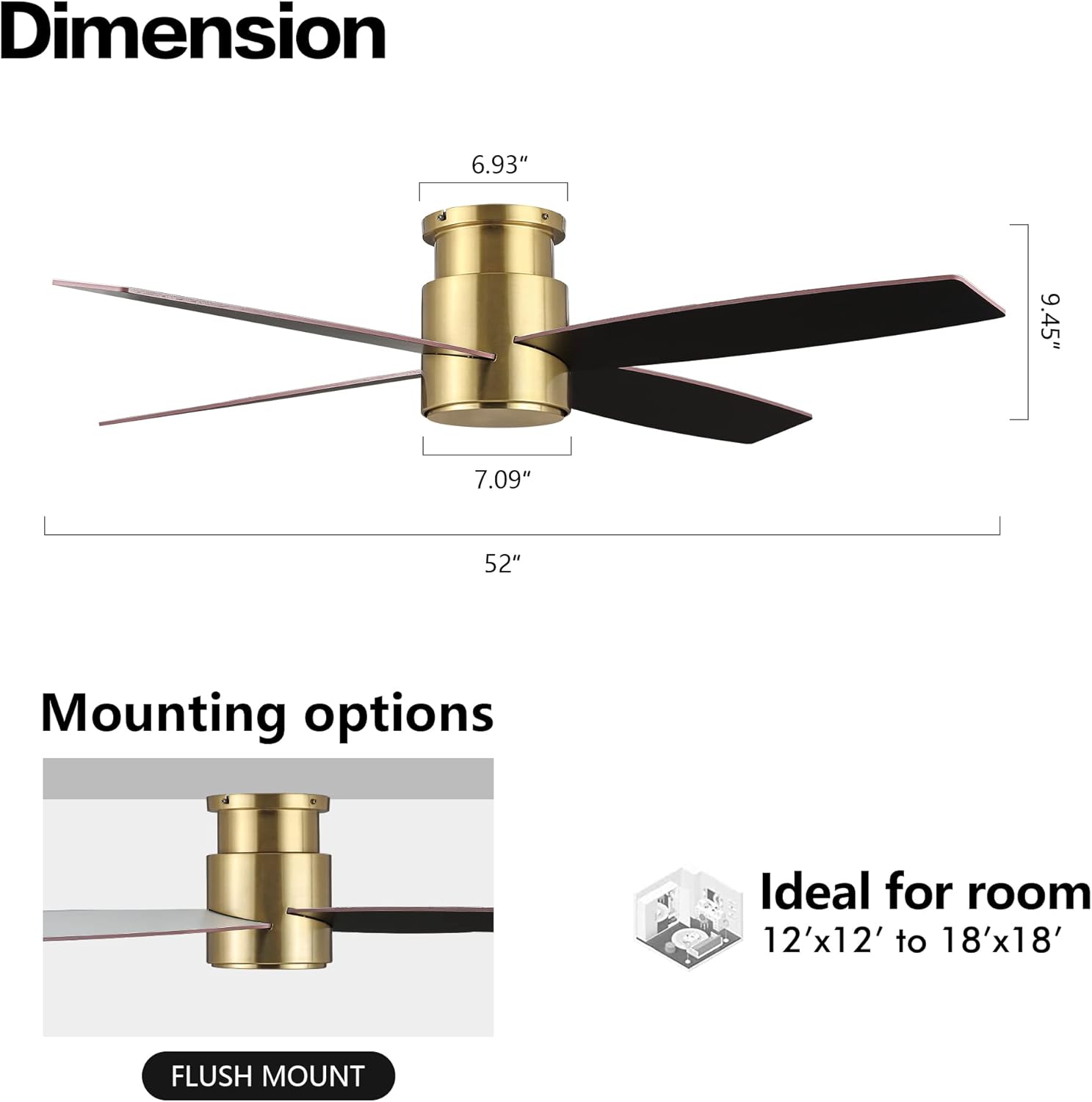
Image: Fan dimensions and flush mount installation detail. The fan has a 52-inch diameter and a low-profile design, ideal for rooms between 12'x12' and 18'x18'.
5. Operating Instructions
Your WINGBO ceiling fan is operated using the included handheld remote control.
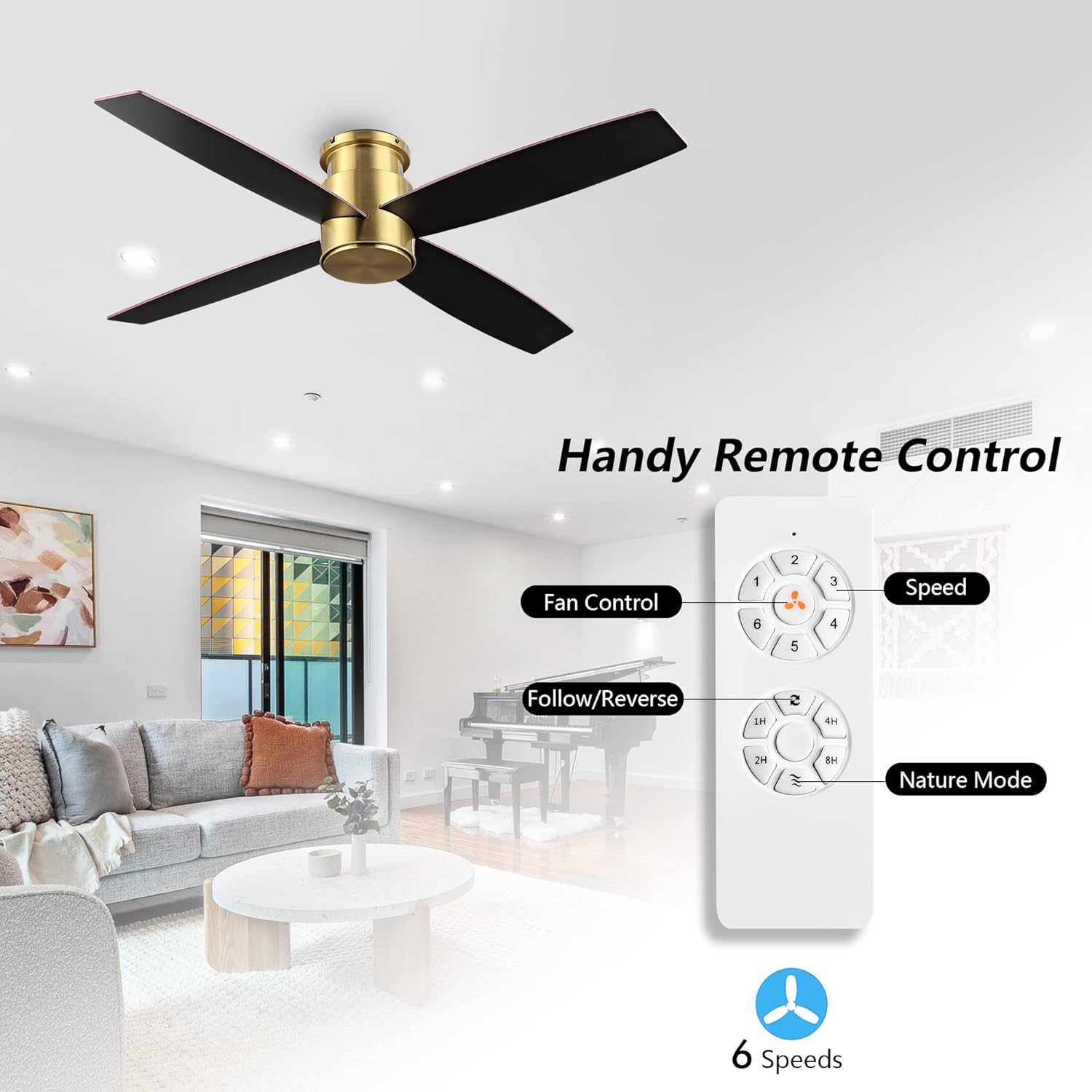
Image: Remote control for the WINGBO ceiling fan. It features buttons for fan speed (1-6), follow/reverse mode, and nature mode.
Remote Control Functions:
- Fan Control (1-6): Press buttons 1 through 6 to select the desired fan speed, with 6 being the highest speed.
- Follow/Reverse Button: Press this button to change the direction of the fan blades.
- Summer Mode (Downdraft): Blades rotate counter-clockwise, pushing air downwards to create a cooling breeze.
- Winter Mode (Updraft): Blades rotate clockwise, drawing air upwards to circulate warm air trapped near the ceiling.
- Nature Mode: Activates a variable speed setting that simulates natural breezes.
- Timer (1H, 2H, 4H, 8H): Press to set the fan to automatically turn off after 1, 2, 4, or 8 hours.
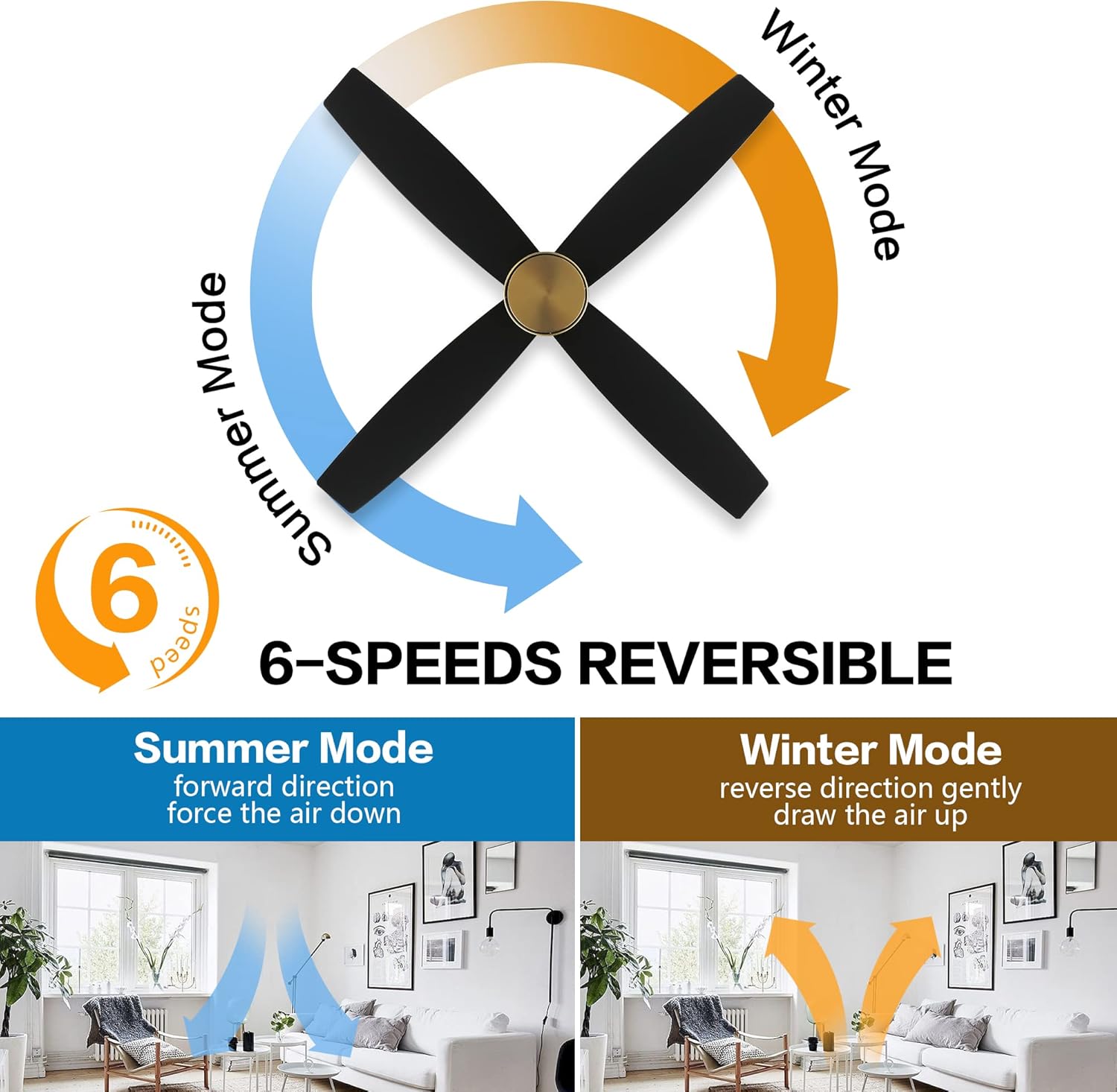
Image: Explanation of 6-speed reversible airflow. Blue arrows indicate downdraft for summer, and orange arrows indicate updraft for winter.
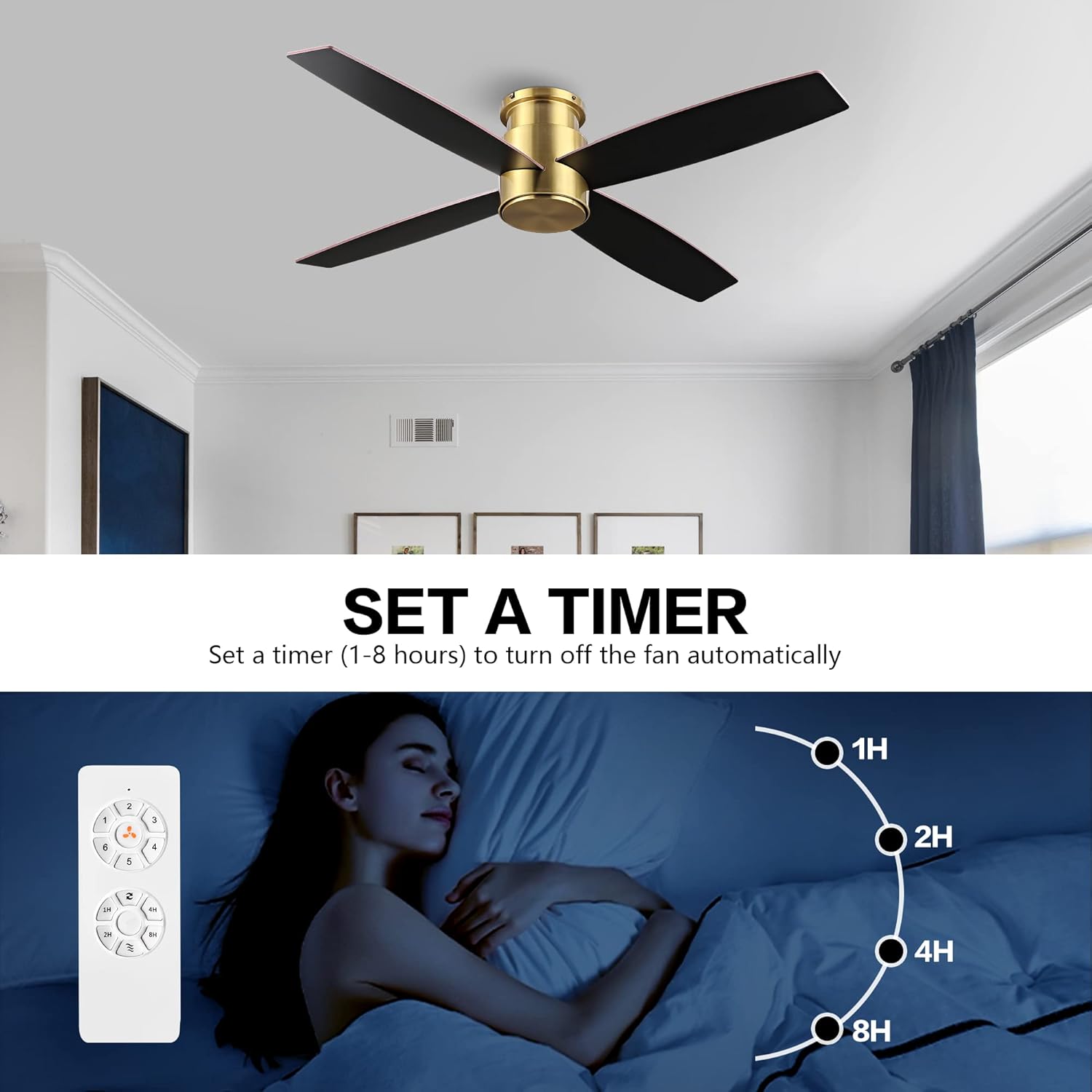
Image: Timer function. The fan can be set to turn off automatically after 1, 2, 4, or 8 hours.
6. Maintenance
Regular maintenance ensures optimal performance and longevity of your ceiling fan.
- Cleaning: To prevent damage to the finish, clean the fan with a soft, damp cloth. Do not use abrasive cleaners or solvents.
- Blade Cleaning: Dust the blades regularly. For deeper cleaning, wipe with a slightly damp cloth. Ensure blades are dry before operating the fan.
- Tighten Fasteners: Periodically check all screws and fasteners on the fan and mounting hardware. Tighten any loose connections to prevent wobbling or noise.
- Motor Lubrication: The DC motor is permanently lubricated and does not require additional oiling.
7. Troubleshooting
If you experience issues with your fan, refer to the following common problems and solutions.
| Problem | Possible Cause | Solution |
|---|---|---|
| Fan does not start | No power to the fan; Loose wire connections; Remote control battery low or not paired. | Check circuit breaker and wall switch. Ensure all wire connections are secure. Replace remote battery or re-pair remote with receiver. |
| Fan wobbles | Loose blade screws; Unevenly installed blades; Loose mounting bracket. | Tighten all blade screws. Ensure blades are installed evenly. Verify mounting bracket is securely fastened to the ceiling. |
| Noisy operation | Loose screws; Fan not properly balanced; Internal motor issue. | Check and tighten all screws. Ensure blades are clean and free of obstructions. If noise persists, contact customer support. |
| Remote control not working | Low or dead battery; Remote not paired with receiver; Obstruction between remote and receiver. | Replace remote battery. Re-pair remote with receiver according to specific instructions (usually involves pressing a button on the receiver or remote within a short time after power-up). Ensure clear line of sight. |
8. Specifications
- Brand: WINGBO
- Model Name: SYCF5202
- Color: Brass (finish)
- Electric Fan Design: Ceiling Fan
- Power Source: DC
- Style: Modern
- Product Dimensions: 52"D x 52"W x 10"H
- Room Type: Bedroom, Living Room, Kitchen, Covered Outdoor
- Special Feature: No Light
- Recommended Uses For Product: Indoor
- Finish Type: Painted
- Number of Blades: 4
- Blade Length: 52 Inches
- Switch Type: Remote
- Item Weight: 14.97 pounds (6.8 Kilograms)
- Included Components: Fan Blades, Remote Control, Mounting Hardware
- Indoor/Outdoor Usage: Indoor
- Control Method: Remote
- Efficiency: Up to 70% more efficient than traditional fans
- Number of Power Levels: 6
- Motor Type: DC Motor
- Installation Type: Flush mount
- UPC: 786661544700
9. Warranty Information
This WINGBO product is covered by a manufacturer's warranty against defects in materials and workmanship. Please refer to the warranty card included with your purchase for specific terms, conditions, and duration. Keep your proof of purchase for warranty claims.
10. Support
For technical assistance, replacement parts, or any questions regarding your WINGBO ceiling fan, please contact WINGBO customer service. Contact information can typically be found on the product packaging or the official WINGBO website.