
1. Introduction
The Metronic Touchbox HD4 is a digital satellite decoder designed to receive free-to-air (FTA) satellite channels in HD. It offers features such as USB recording, Time Shift functionality, and multimedia playback. This device is not compatible with TNTSAT or FRANSAT encrypted channels.

Image 1.1: Metronic Touchbox HD4 Digital Satellite Decoder, front-angled view.
2. Setup
2.1 Unpacking
Carefully remove all components from the packaging. Ensure the following items are present:
- Metronic Touchbox HD4 Decoder
- Remote Control
- Power Adapter
- User Manual (this document)
2.2 Connections
Before connecting, ensure all devices are powered off. Refer to the diagram below for port identification.
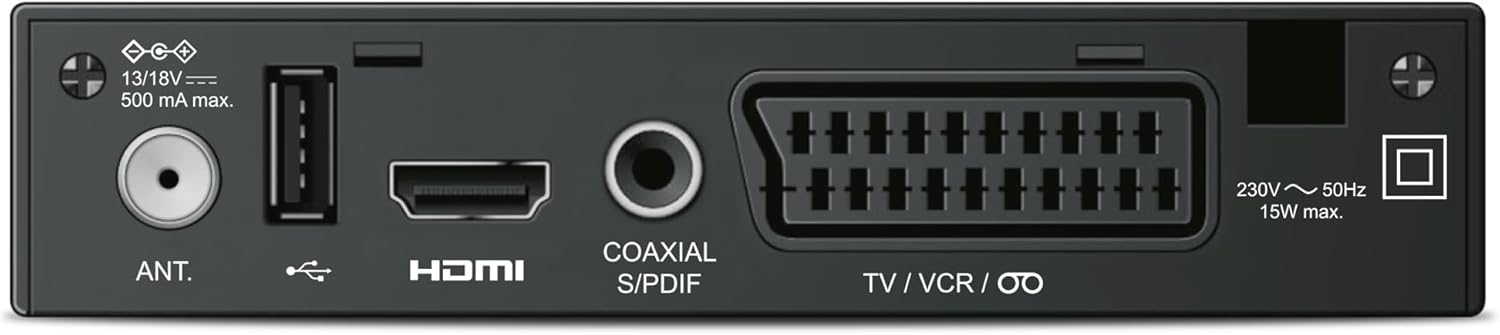
Image 2.1: Rear panel connections including Antenna In, USB, HDMI, Coaxial S/PDIF, and SCART (TV/VCR).
- Satellite Antenna Connection: Connect your satellite dish cable to the "ANT." input port on the rear of the decoder.
- HDMI Connection: Use an HDMI cable to connect the "HDMI" output port on the decoder to an HDMI input on your television.
- Power Connection: Connect the power adapter to the decoder's power input and then plug it into a wall outlet.
- USB Device (Optional): For recording or media playback, connect a USB flash drive or external hard drive to the USB port on the front or rear of the decoder.
2.3 First Time Setup and Channel Scan
After connecting all cables, power on your television and select the correct HDMI input. Then, power on the Metronic Touchbox HD4. The device will likely guide you through an initial setup wizard. Follow the on-screen prompts to:
- Select your preferred language.
- Configure satellite settings (LNB type, frequency, etc. - consult your satellite dish installer if unsure).
- Perform an automatic channel scan to find available free-to-air satellite channels. This process may take several minutes.
Once the scan is complete, the decoder will display the first available channel.
3. Operating Instructions
This section details the primary functions of your Metronic Touchbox HD4 decoder using the remote control.

Image 3.1: Metronic Touchbox HD4 decoder with its dedicated remote control.
3.1 Basic Operation
- Power On/Off: Press the POWER button on the remote control or the front panel.
- Channel Selection: Use the CH+ / CH- buttons to navigate channels sequentially, or enter the channel number directly using the numeric keypad.
- Volume Control: Use the VOL+ / VOL- buttons to adjust the audio volume.
- Menu Access: Press the MENU button to access the main settings and features. Use arrow keys to navigate and OK to confirm.
- Electronic Program Guide (EPG): Press the EPG button to view program schedules.
3.2 Recording (PVR Function)
To record programs, a USB storage device (flash drive or external hard drive, not included) must be connected to the decoder's USB port.

Image 3.2: Connecting a USB storage device to the front USB port for recording and media playback.
- Instant Recording: While watching a program, press the REC button on the remote control to start recording. Press STOP to end the recording.
- Scheduled Recording (Timer): Access the EPG or the Timer menu to schedule recordings for future programs. Set the start time, end time, and channel.
- Recorded files are typically saved in MKV or MP4 format and can be played back on the decoder or on a PC/Mac using compatible software (e.g., VLC).
3.3 Time Shift Function
The Time Shift function allows you to pause live television and resume watching later. A USB storage device must be connected for this feature.
- While watching live TV, press the PAUSE button. The program will pause, and the decoder will begin recording to the USB device.
- Press PLAY to resume watching from where you left off.
- You can use FFW (Fast Forward) and REW (Rewind) to navigate within the buffered content.
- Press STOP to exit Time Shift mode and return to live TV.
3.4 Multimedia Playback
The USB port also supports playback of multimedia files (videos, photos, music) stored on a USB device.
- Connect your USB device.
- Access the "Media" or "USB" menu from the main menu.
- Browse your files and select the desired content for playback.
3.5 Subtitling (DVB)
If a broadcast offers DVB subtitles, you can enable them through the decoder's menu or a dedicated subtitle button on the remote (if available).
4. Maintenance
4.1 Cleaning
To clean the decoder, disconnect it from the power supply. Use a soft, dry cloth to wipe the exterior. Do not use liquid cleaners or abrasive materials.
4.2 Software Updates
Periodically check the manufacturer's website (www.metronic.com) for any available software updates. Follow the instructions provided with the update file carefully to avoid damaging the device.
5. Troubleshooting
If you encounter issues with your Metronic Touchbox HD4, refer to the following common problems and solutions:
| Problem | Possible Cause | Solution |
|---|---|---|
| No picture or sound | Incorrect HDMI input selected on TV, loose cable connections, decoder not powered on. | Check TV input, ensure all cables are securely connected, verify decoder power. |
| "No Signal" message | Satellite dish misalignment, antenna cable issue, incorrect satellite settings. | Check antenna cable connection, verify satellite settings in the menu, consider professional satellite dish alignment. |
| Cannot record to USB | USB device not connected, insufficient storage space, incompatible USB format. | Ensure USB device is connected and recognized, check available space, format USB device to a compatible file system (e.g., FAT32, NTFS). |
| Cannot receive TNTSAT/FRANSAT channels | The decoder is not designed for these encrypted services. | This decoder only receives free-to-air satellite channels and does not support TNTSAT or FRANSAT. No solution for this specific decoder. |
6. Specifications
Below are the technical specifications for the Metronic Touchbox HD4 decoder:
- Model: Touchbox HD4
- Brand: Metronic
- Color: Black
- Resolution: HD 1080p (Supports 576i/p, 720i/p, 1080i/p)
- Tuner: 950-2150MHz
- Demodulator: Standard DVB-S / DVB-S2
- USB Ports: 1 (configurable front or rear)
- Connectivity: HDMI, SCART (Péritel), USB, Coaxial S/PDIF
- Audio Output Mode: Stereo
- Supported Audio Format: PCM
- Container Formats (Recording/Playback): MKV / MP4
- Features: Time Shift, USB Recording, EPG, DVB Subtitling, Timer Programming
- Dimensions (L x W x H): 14.3 cm x 8 cm x 3.2 cm
- Power Consumption: Max 15W
- Origin: China

Image 6.1: Physical dimensions of the Metronic Touchbox HD4 decoder.
7. Warranty and Support
7.1 Warranty Information
This product comes with a standard manufacturer's warranty. Please refer to the warranty card included in your product packaging or visit the official Metronic website for detailed terms and conditions. Keep your proof of purchase for warranty claims.
7.2 Customer Support
For technical assistance, troubleshooting beyond this manual, or service inquiries, please contact Metronic customer support. Contact details can typically be found on the manufacturer's website or on the product packaging.
Metronic Official Website: www.metronic.com

