1. Introduction
1.1 Product Overview
This document provides instructions for the Generic replacement infrared (IR) remote control designed for various Sanyo HVAC AC Air Conditioner units. This remote serves as a functional replacement for your original unit's remote. Please note that as a replacement, it may not support all functions present on the original remote control.

Image 1: Front view of the remote control, showing the display, power button, LED Clean button, 1HR button, and temperature adjustment buttons.
1.2 Compatibility
This remote control is compatible with Sanyo HVAC AC Air Conditioner models including, but not limited to: 6233135830, RCS-8VPULS4U, KS3682, KS3082, 30KS82, 36KS82, 30KHS82, KHS3082, 36KHS82, and KHS3682. It is crucial to verify your air conditioner's model number against this list before use to ensure proper functionality.
2. Setup
2.1 Battery Installation
To begin using your remote control, batteries must be installed. The remote requires 15 AAA batteries. Follow these steps for proper installation:
- Locate the battery compartment on the back of the remote control.
- Slide the battery compartment cover downwards or outwards to open it.
- Insert the 15 AAA batteries, ensuring that the positive (+) and negative (-) ends align correctly with the markings inside the compartment. Incorrect battery orientation can prevent the remote from functioning.
- Slide the battery compartment cover back into place until it clicks securely.
Note: Batteries are not included with the remote control.

Image 2: Rear view of the remote control with the battery cover open, illustrating the battery insertion area.
3. Operating Instructions
3.1 Basic Functions
- Power On/Off: Press the ON-I / OFF-O button to turn the air conditioner unit on or off.
- Temperature Adjustment: Use the TEMP. ▲ (up) and ▼ (down) buttons to increase or decrease the desired temperature setting.
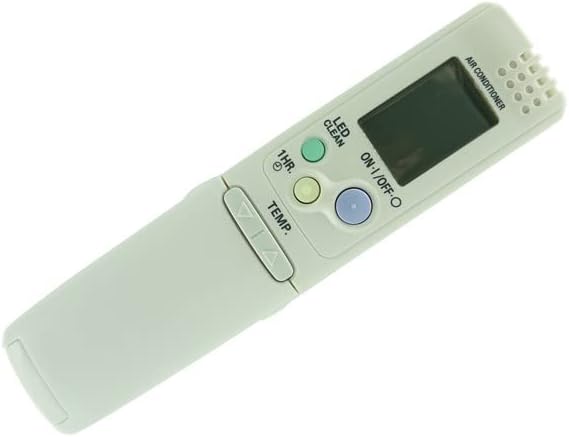
Image 3: Angled view of the remote control, providing a clearer perspective of the button layout.
3.2 Specific Functions
- LED Clean: Press the LED CLEAN button for specific cleaning functions, if supported by your AC unit. Refer to your AC unit's manual for details on this feature.
- 1HR. Timer: Press the 1HR. button to activate a 1-hour timer function, if supported by your AC unit.
Important Note: This remote control cannot change temperature readings from Celsius to Fahrenheit or vice versa. The display will show the temperature in the unit's default setting.
4. Maintenance
4.1 Cleaning
To maintain the remote control's appearance and functionality, wipe it regularly with a soft, dry cloth. Do not use abrasive cleaners, solvents, or chemical sprays, as these can damage the remote's surface or internal components.
4.2 Storage
When not in use for extended periods, store the remote control in a cool, dry place away from direct sunlight and extreme temperatures. Remove batteries if storing for more than a few weeks to prevent leakage and potential damage to the remote.
5. Troubleshooting
5.1 Common Issues
- Remote not responding:
- Ensure batteries are installed correctly with proper polarity (+/-).
- Replace old or depleted batteries with new ones.
- Check for any obstructions between the remote control and the air conditioner's infrared receiver.
- Ensure you are within the effective operating range of the air conditioner.
- Certain functions do not work:
- As a replacement remote, some advanced or specific functions of your original air conditioner remote may not be supported. This is a common characteristic of universal or replacement remotes.
- Verify that your air conditioner model is listed as compatible. If your model is not explicitly listed, the remote may not function correctly or at all.
6. Specifications
| Attribute | Detail |
|---|---|
| Brand | Generic |
| Model Numbers | 6233135830, RCS-8VPULS4U, KS3682, KS3082, 30KS82, 36KS82, 30KHS82, KHS3082, 36KHS82, KHS3682 |
| Compatible Devices | Sanyo HVAC AC Air Conditioner units |
| Connectivity Technology | Infrared (IR) |
| Controller Type | Button Control |
| Batteries Required | 15 AAA batteries (not included) |
| Special Feature / Limitation | Cannot change from Celsius to Fahrenheit |
7. Warranty and Support
7.1 Warranty Information
Specific warranty details for this Generic replacement remote control are not provided in the product information. Please refer to the seller's return policy or contact the seller directly for any warranty-related inquiries.
7.2 Customer Support
For any questions, issues, or support regarding this remote control, please contact the seller, SZHKHXD, through the platform where the purchase was made. They can provide assistance with product functionality and troubleshooting.


