
1. Product Overview
The Pokitter PKT-PTC1200 is a compact and efficient ceramic fan heater designed to provide rapid and comfortable warmth. Featuring advanced PTC ceramic heating technology, it offers energy-saving operation, multiple safety features, and a quiet, light-free heating experience. Its portable design makes it suitable for various indoor environments.

Figure 1.1: The Pokitter PKT-PTC1200 ceramic heater in operation, demonstrating its wide oscillation and warm air output.
2. Safety Information
Please read all safety instructions carefully before using this appliance. Failure to follow these instructions may result in electric shock, fire, or serious injury.
- Always place the heater on a firm, level surface.
- Do not cover the heater or block the air inlets/outlets.
- Keep flammable materials at least 1 meter (3 feet) away from the heater.
- Do not use in bathrooms, laundry areas, or similar wet locations.
- Unplug the heater when not in use or before cleaning.
- This appliance is equipped with an automatic tip-over switch and overheat protection for enhanced safety.
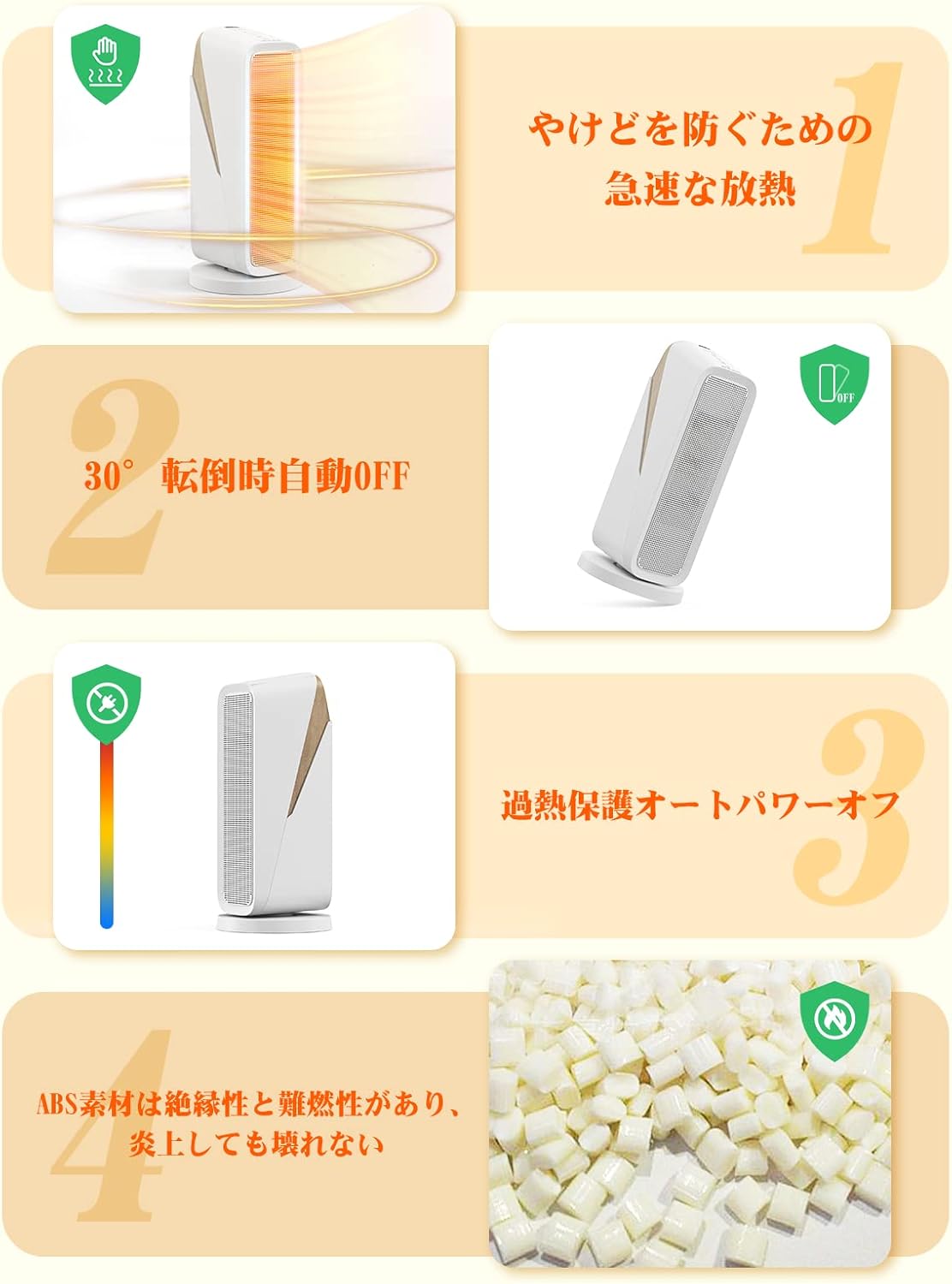
Figure 2.1: Key safety features of the PKT-PTC1200 heater, including rapid heat dissipation, automatic tip-over shut-off, overheat protection, and the use of flame-retardant ABS material.
3. Setup
Setting up your Pokitter ceramic heater is quick and easy.
- Unpack: Carefully remove the heater from its packaging. Retain packaging for future storage or transport.
- Placement: Place the heater on a stable, flat, and heat-resistant surface. Ensure there is at least 1 meter (3 feet) of clear space around the heater to allow for proper airflow and prevent overheating.
- Power Connection: Plug the power cord into a standard electrical outlet. Ensure the voltage matches the heater's requirements (refer to specifications).

Figure 3.1: The heater and its packaging, ready for setup.
4. Operating Instructions
The Pokitter PKT-PTC1200 heater features intuitive controls for ease of use.
4.1 Power On/Off
Press the power button on the top panel to turn the heater on or off. The heater will begin operating in the last used mode or default to a low heat setting.

Figure 4.1: Operating the control panel on the top of the heater.
4.2 Heat Settings
The heater offers three heat settings:
- Fan Only (7W): Circulates air without heat.
- Low Heat (700W): Provides gentle warmth for smaller spaces or energy saving.
- High Heat (1200W): Delivers maximum warmth for quick heating of larger areas.
Cycle through the settings using the mode button on the control panel.

Figure 4.2: The heater's three power modes and 80-degree oscillation feature.
4.3 Oscillation Function
Press the oscillation button to activate the 80-degree wide-angle oscillation, distributing heat more evenly across the room. Press again to stop oscillation.

Figure 4.3: The heater's oscillation feature in action.
4.4 Timer Function
The built-in 12-hour timer allows you to set the heater to automatically turn off after a specified period. Press the timer button repeatedly to select the desired duration.

Figure 4.4: The 12-hour timer function for convenient operation.
5. Maintenance
Regular maintenance ensures optimal performance and longevity of your heater.
- Cleaning: Before cleaning, always unplug the heater and allow it to cool down completely. Use a soft, damp cloth to wipe the exterior surfaces. Do not use abrasive cleaners or solvents.
- Storage: When not in use, store the heater in a cool, dry place, preferably in its original packaging, to protect it from dust and damage.
- Air Inlet/Outlet: Periodically check and clean the air inlets and outlets to ensure they are free from dust and debris, which can impede airflow and reduce efficiency.
6. Troubleshooting
If you encounter issues with your heater, refer to the following common problems and solutions:
| Problem | Possible Cause | Solution |
|---|---|---|
| Heater does not turn on. | No power, tip-over switch activated, or overheat protection activated. | Check power cord connection. Ensure heater is upright. Unplug and allow to cool for 30 minutes before restarting. |
| No heat output. | Fan-only mode selected, or heating element issue. | Ensure a heat mode (700W or 1200W) is selected. If problem persists, contact customer support. |
| Heater stops unexpectedly. | Overheat protection or tip-over switch activated. | Check for obstructions around the heater. Ensure it is on a stable surface. Allow to cool down. |
| Unusual noise. | Dust buildup or internal component issue. | Clean air inlets/outlets. If noise persists, discontinue use and contact customer support. |
If the problem is not listed or persists after attempting the solutions, please contact Pokitter customer support.
7. Specifications
| Feature | Detail |
|---|---|
| Model Number | PKT-PTC1200 |
| Brand | Pokitter |
| Power Output | 7W (Fan), 700W (Low Heat), 1200W (High Heat) |
| Oscillation Angle | 80° |
| Timer | Up to 12 hours |
| Safety Features | Overheat Protection, Tip-over Auto-Off (30°), Flame-retardant ABS material |
| Dimensions (L x W x H) | Approximately 21 x 21 x 45 cm (8.3 x 8.3 x 17.7 inches) |
| Weight | Approximately 2.25 kg (4.96 lbs) |
| Color | White |
8. Warranty and Support
Pokitter products are designed for reliability and performance. For warranty information and customer support, please refer to the warranty card included in your product packaging or visit the official Pokitter website. Please have your model number (PKT-PTC1200) and purchase date ready when contacting support.
For further assistance, you may also refer to the Pokitter Brand Store on Amazon.
