
Introduction
This manual provides comprehensive instructions for the safe and effective use of your Alonefire SV53 36W 365nm UV Flashlight. This device is designed for various applications, including pet urine detection, UV resin curing, mineral exploration, and amber identification. Please read this manual thoroughly before operating the flashlight and retain it for future reference.
Safety Information
WARNING: Ultraviolet (UV) light can be harmful to eyes and skin. Direct exposure to the UV beam, even for short periods, can cause severe eye damage. Always wear the provided UV safety glasses when operating this flashlight. Do not point the flashlight at people or animals. Keep out of reach of children.
- Always wear UV protective eyewear when using the flashlight.
- Avoid direct exposure of skin to UV light.
- Do not disassemble the flashlight or attempt to modify its components.
- Use only the specified rechargeable battery and charging method.
- Store the flashlight in a cool, dry place away from direct sunlight and extreme temperatures.
Package Contents
Verify that all items are present in your package:
- Alonefire SV53 36W 365nm UV Flashlight
- Rechargeable Lithium-Ion Battery
- USB-C Charging Cable
- UV Safety Glasses
- Carrying Pouch
- User Manual

Image: Contents of the Alonefire SV53 package, showing the flashlight, USB-C cable, safety glasses, and carrying pouch.
Product Overview
Familiarize yourself with the components of your Alonefire SV53 UV Flashlight:

Image: Exploded view illustrating the main components of the Alonefire SV53 UV flashlight.
- 3 x 4-Core 365nm UV LED: High-power ultraviolet light source.
- Black UV Filter Lens: Filters out unwanted ambient light, ensuring a purer UV output.
- Non-slip Grip: Provides secure handling.
- Charging Indicator/On-Off Switch: Multifunctional button for operation and charge status.
- Type-C USB Charging Port: For convenient recharging.
- Fixing Ring: Secures the lens assembly.
- Heat Sink Fins: Designed for efficient heat dissipation.
- Spring Contact: Ensures proper battery connection.

Image: Diagram showing how the black UV filter lens purifies the UV light by blocking ambient light.
Setup
- Insert Battery: Unscrew the tail cap of the flashlight. Insert the provided rechargeable Lithium-Ion battery with the positive (+) end facing towards the head of the flashlight. Screw the tail cap back on securely.
- Initial Charge: For optimal performance, fully charge the flashlight before first use. Refer to the "Charging" section for detailed instructions.
- Wear Safety Glasses: Always put on the UV safety glasses before activating the flashlight.
Operating Instructions
The Alonefire SV53 features a single button for power and mode selection.
- Power On/Off: Press the power button once to turn the flashlight on. Press it again to turn it off.
- Mode Selection: While the flashlight is on, quickly press the power button to cycle through the available brightness modes (e.g., High, Low).
- Application: Direct the UV beam towards the area you wish to inspect. The UV light will cause fluorescent materials to glow, making them visible.

Image: Various applications of the UV flashlight, such as detecting pet stains, verifying currency, and identifying minerals.

Image: Proper grip and handling of the Alonefire SV53 UV flashlight.
Charging
The Alonefire SV53 UV Flashlight is equipped with a USB-C charging port for convenient recharging.
- Connect Cable: Open the rubber cover of the USB-C charging port on the flashlight. Insert the provided USB-C cable into the port.
- Power Source: Connect the other end of the USB-C cable to a compatible USB power source (e.g., wall adapter, computer USB port, power bank).
- Charging Indicator: The charging indicator light will illuminate red while charging. Once fully charged, the indicator will turn green.
- Charging Time: A full charge typically takes 6-8 hours.
- Disconnect: Once charging is complete, disconnect the USB-C cable and close the rubber cover to protect the port from dust and moisture.
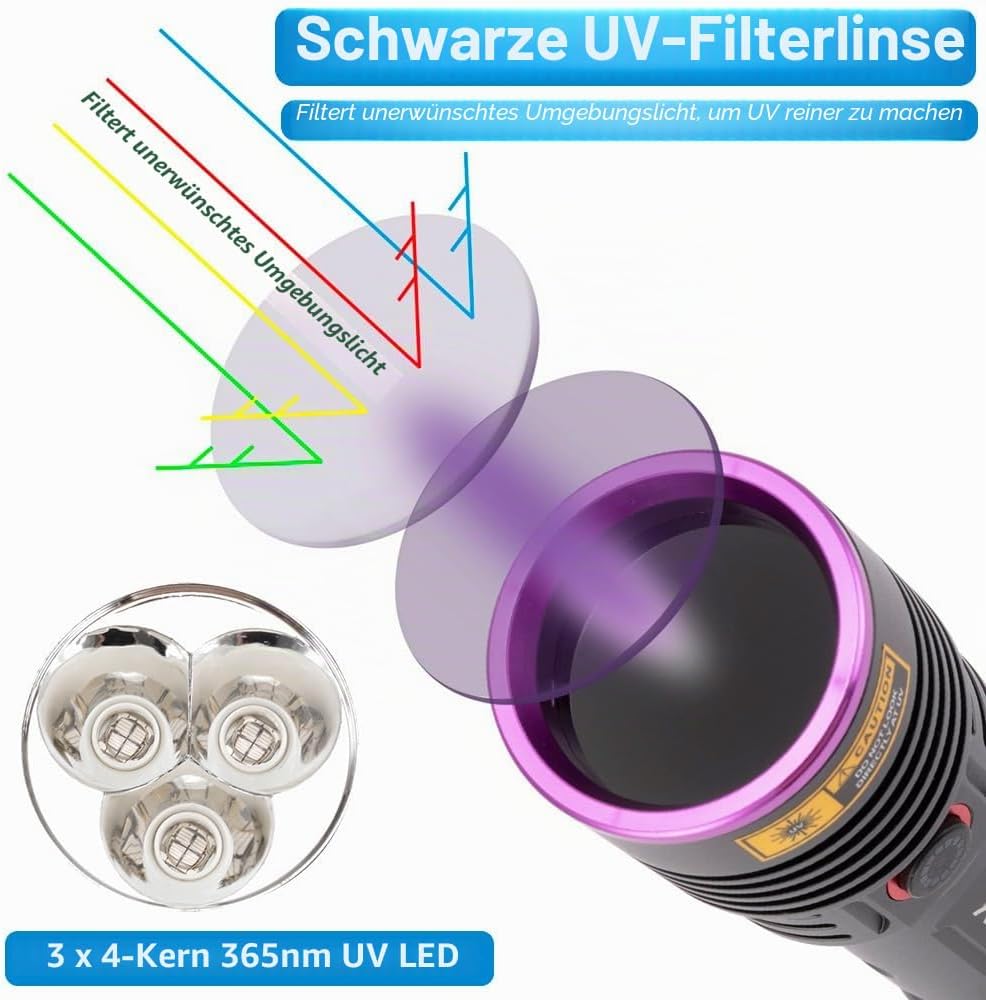
Image: The flashlight connected for charging, showing the charging indicator and estimated charging time/battery life.
Maintenance
- Cleaning: Wipe the flashlight body with a soft, damp cloth. Do not use abrasive cleaners or solvents. Keep the lens clean for optimal performance.
- Battery Care: If the flashlight will not be used for an extended period, remove the battery to prevent leakage. Recharge the battery every 3-6 months to maintain its lifespan.
- Storage: Store the flashlight in a cool, dry place.
Troubleshooting
| Problem | Possible Cause | Solution |
|---|---|---|
| Flashlight does not turn on. | Battery is depleted or incorrectly inserted. | Ensure the battery is fully charged and inserted with the correct polarity. |
| Light is dim or flickers. | Low battery charge. | Recharge the battery fully. If the issue persists, the battery may need replacement. |
| Charging indicator does not light up. | Charging cable or power source issue. | Check the USB-C cable connection and try a different USB power source. |
| UV light does not appear pure. | Lens is dirty or ambient light is too strong. | Clean the black UV filter lens. Use the flashlight in a darker environment for best results. |
Specifications
- Model: SV53
- UV LED Type: 3 x 4-core 365nm UV LEDs
- UV Output Power: 6000 mW
- Power Consumption: 36 Watts
- Material: Aluminum alloy
- Color: Black
- Battery Type: Lithium-Ion (rechargeable)
- Charging Port: USB Type-C
- Charging Time: Approximately 6-8 hours
- Estimated Battery Life: Approximately 2.5 hours (on high mode)
- Water Resistance: Waterproof
- Item Weight: 165 grams
- Recommended Use: Pet urine detection, UV resin curing, mineral exploration, amber searching
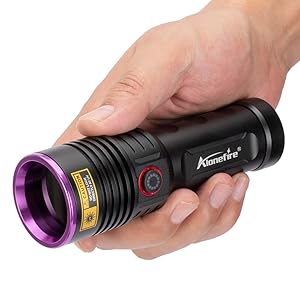
Image: Dimensions of the Alonefire SV53 UV flashlight.
Warranty and Support
For warranty information or technical support, please refer to the contact details provided with your purchase or visit the official Alonefire website. Keep your proof of purchase for any warranty claims.


