
Baseus NGTW200002
Baseus Bowie WM05 True Wireless Earbuds User Manual
Model: NGTW200002
Product Overview
The Baseus Bowie WM05 True Wireless Earbuds are designed to provide a superior audio experience by effectively eliminating ambient noise and offering seamless transitions between various listening modes. These earbuds feature a low-latency mode for synchronized audio and video, making them ideal for gaming and media consumption. With a large-capacity battery and efficient wireless technology, they offer extended usage throughout the day. An intelligent AI neural network algorithm enhances voice clarity during calls by filtering out surrounding noise, ensuring your conversations are loud and clear. The earbuds are available in a cream white finish.
Key features include:
- Effective ambient noise isolation and seamless mode switching.
- Low-latency mode for smooth audio and video synchronization.
- Large capacity battery with low-power wireless technology for extended use.
- Quick charging: up to two hours of battery life with only 10 minutes of charging.
- AI neural network algorithm for clear call quality by filtering ambient noise.

Image: Baseus Bowie WM05 True Wireless Earbuds shown inside their charging case, highlighting their compact and sleek design.
Package Contents
Please ensure all items are present in the package:
- 1 x Pair of Baseus Bowie WM05 True Wireless Earbuds
- 1 x Charging Case
- 1 x USB-C Charging Cable
- 3 x Pairs of Eartips (Small, Medium, Large)
- 1 x User Manual

Image: The retail packaging of the Baseus Bowie WM05 earbuds, displaying the product and key features.
Setup Guide
1. Initial Charging
Before first use, fully charge the earbuds and the charging case. Connect the provided USB-C cable to the charging port on the case and a power source. The indicator light on the case will show charging status.

Image: Top view of the Baseus Bowie WM05 charging case, showing the Baseus logo and smooth finish.
2. Pairing with a Device
- Ensure the earbuds are in the charging case and the case lid is open.
- On your device (smartphone, tablet, etc.), enable Bluetooth.
- Search for new Bluetooth devices. The earbuds should appear as "Baseus Bowie WM05".
- Select "Baseus Bowie WM05" to pair. Once connected, a voice prompt will confirm successful pairing.
- The earbuds will automatically connect to the last paired device when removed from the case and Bluetooth is enabled on the device.
Operating Instructions
Wearing the Earbuds
Choose the correct size eartips for a comfortable and secure fit. Insert the earbuds into your ears and gently twist them until they feel snug and the sound quality is optimal.
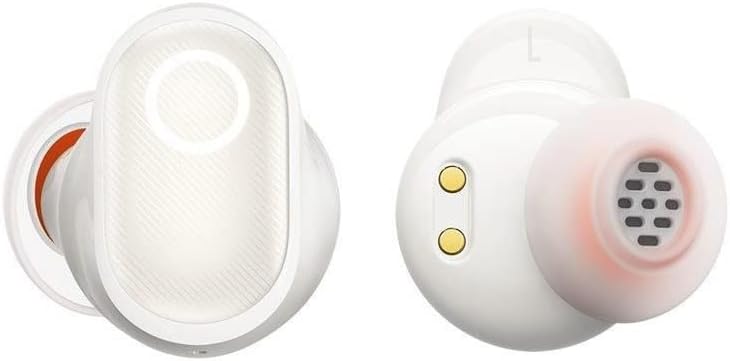
Image: Detailed view of the Baseus Bowie WM05 earbuds, showing the in-ear design and charging contacts.
Touch Controls
The Baseus Bowie WM05 earbuds feature touch-sensitive areas for easy control of music playback, calls, and modes.
| Action | Control |
|---|---|
| Play/Pause | Double-tap either earbud |
| Next Track | Triple-tap right earbud |
| Previous Track | Triple-tap left earbud |
| Answer/End Call | Double-tap either earbud |
| Reject Call | Press and hold either earbud for 2 seconds |
| Activate Low-Latency Mode | Press and hold left earbud for 2 seconds |
| Toggle Noise Control (ANC/Transparency) | Press and hold right earbud for 2 seconds |
| Activate Voice Assistant | Quadruple-tap either earbud |
Maintenance and Care
Proper maintenance ensures the longevity and optimal performance of your Baseus Bowie WM05 earbuds.
- Cleaning: Regularly clean the earbuds and charging case with a soft, dry, lint-free cloth. Do not use abrasive cleaners or solvents.
- Eartips: Remove eartips and clean them with mild soap and water if necessary. Ensure they are completely dry before reattaching.
- Charging Contacts: Gently wipe the charging contacts on both the earbuds and inside the case with a dry cotton swab to prevent accumulation of dirt or debris.
- Storage: When not in use, store the earbuds in their charging case to protect them and keep them charged. Avoid extreme temperatures.
- Water Resistance: The earbuds are not waterproof. Avoid exposure to excessive moisture, rain, or submersion in water.
Troubleshooting
If you encounter issues with your earbuds, refer to the following common solutions:
- No Sound:
- Ensure earbuds are charged.
- Check Bluetooth connection on your device.
- Increase volume on both the earbuds and your device.
- Try re-pairing the earbuds.
- Earbuds Not Pairing:
- Ensure earbuds are in pairing mode (open case lid).
- Turn off and on Bluetooth on your device.
- Forget "Baseus Bowie WM05" from your device's Bluetooth list and try pairing again.
- Ensure no other devices are connected to the earbuds.
- Charging Issues:
- Check if the USB-C cable is properly connected.
- Try a different USB-C cable or power adapter.
- Clean the charging contacts on both earbuds and case.
- Poor Call Quality:
- Ensure earbuds are properly seated in your ears.
- Check for strong Bluetooth signal (stay close to your device).
- Ensure the microphone is not obstructed.
If problems persist, please contact Baseus customer support.
Specifications
| Feature | Detail |
|---|---|
| Brand | Baseus |
| Model Name | Bowie WM05 |
| Item Model Number | NGTW200002 |
| Color | Cream White |
| Ear Placement | In-Ear |
| Noise Control | Active Noise Cancellation |
| Connectivity Technology | Wireless |
| Wireless Communication Technology | Bluetooth |
| Product Dimensions | 10 x 5 x 3 cm |
| Item Weight | 230 grams |
| Batteries | 1 Non-standard battery required. (Included) |
| First Available Date | September 8, 2022 |
Warranty and Support
Baseus products are manufactured to the highest quality standards. For information regarding warranty coverage, please refer to the warranty card included in your product packaging or visit the official Baseus website.
For technical support, troubleshooting assistance, or any product-related inquiries, please contact Baseus customer service through their official channels. Contact information can typically be found on the product packaging or their official website.
Related documentsNGTW200002

Ask a question about this manual
Ask about setup, troubleshooting, compatibility, parts, safety, or missing instructions. Manuals+ will review the question and use this page’s manual context to help answer it.