
Introduction
This manual provides detailed instructions for the proper use and maintenance of your Cellularline FINE Transparent TWS Wireless In-Ear Earbuds. Please read this manual thoroughly before using the product to ensure optimal performance and longevity.
The Cellularline FINE Transparent TWS Wireless In-Ear Earbuds feature a distinctive transparent design, showcasing the internal components of both the earbuds and their charging case. Designed for comfort and high-quality audio, these earbuds offer up to 3.5 hours of playtime per charge, extended to a total of 10 hours with the charging case. They include intuitive touch controls for managing calls and music, and an auto-pairing function for effortless connection. The Double Master function allows for independent use of either earbud.
Safety Information
- Do not expose the earbuds or charging case to extreme temperatures, humidity, or liquids.
- Avoid dropping, impacting, or disassembling the device. This may void the warranty.
- Keep out of reach of children and pets.
- Use only the provided charging cable or a certified equivalent.
- Listen at moderate volume levels to prevent hearing damage.
- Do not use the earbuds in situations where inability to hear ambient sounds could be dangerous (e.g., driving, cycling, walking in traffic).
Package Contents
Please check the package for the following items:
- Cellularline FINE Transparent TWS Wireless In-Ear Earbuds (Left and Right)
- Charging Case
- USB Charging Cable
- User Manual
Product Overview
The Cellularline FINE earbuds are designed for ease of use and a distinctive aesthetic. Below is an overview of the main components.
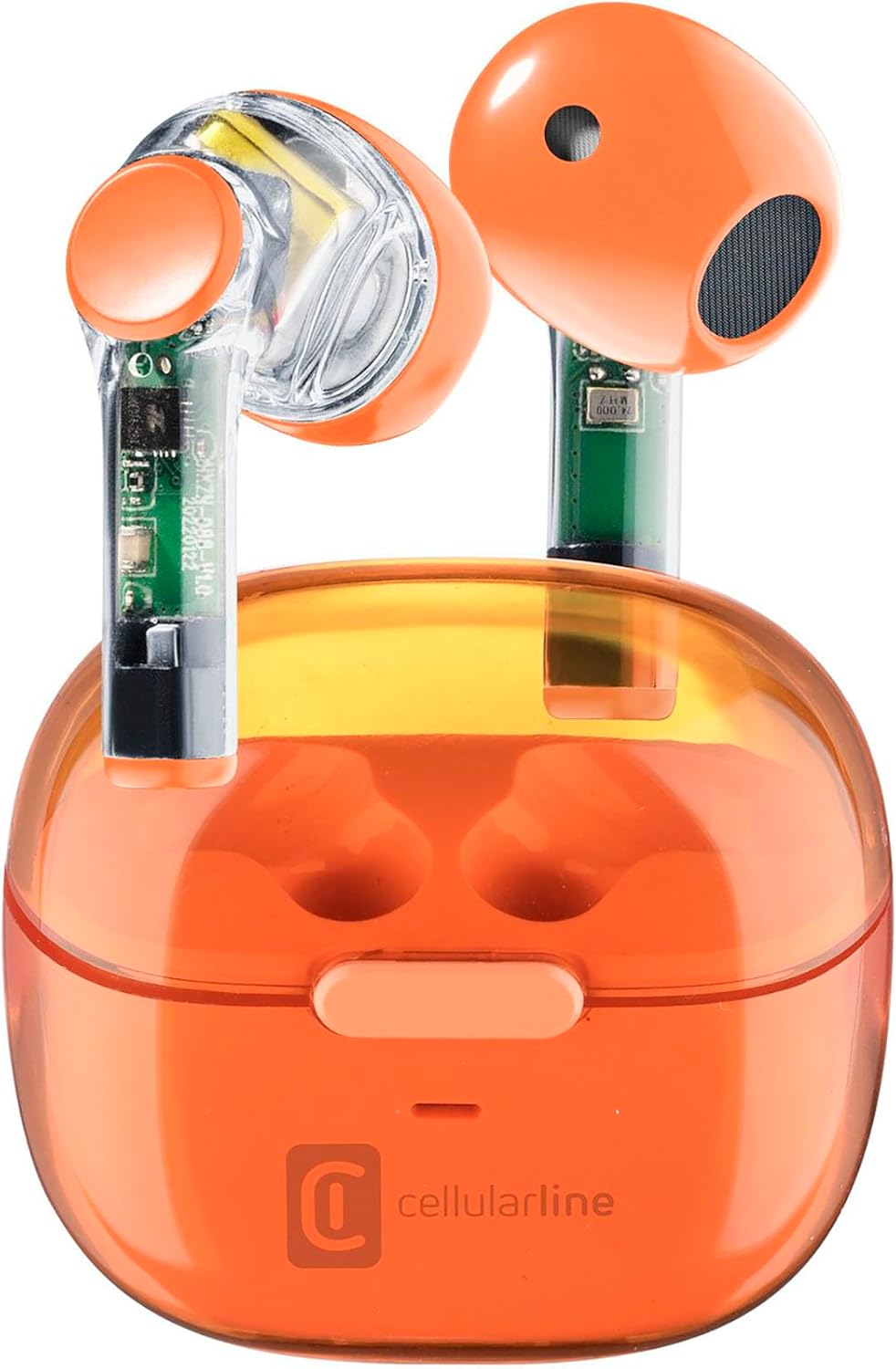
Image: Cellularline FINE Transparent TWS Wireless In-Ear Earbuds in their charging case. The earbuds and case feature a transparent orange design, revealing internal circuitry.

Image: Close-up view highlighting the transparent design of the Cellularline FINE earbuds, showing the internal components.
Components:
- Earbuds: Left and Right, with touch control surfaces and microphones.
- Charging Case: Houses and charges the earbuds, with a charging port and LED indicator.
- Touch Control Area: Located on the outer surface of each earbud for various functions.
- Microphone: Integrated into each earbud for calls.
Setup
1. Charging the Earbuds and Case
Before first use, fully charge the earbuds and the charging case.
- Place both earbuds into the charging case. Ensure they are correctly seated.
- Connect the USB charging cable to the charging port on the case and to a compatible USB power source (e.g., computer, wall adapter).
- The LED indicator on the charging case will show the charging status. Once fully charged, the indicator will change or turn off.
- A full charge provides approximately 3.5 hours of playtime for the earbuds, and the case can provide up to 4 additional charges, totaling 10 hours of playtime.

Image: Illustration showing the earbuds and charging case, indicating 3.5 hours of playtime per single charge and 10 hours of total playtime with the charging case.
2. Pairing with Your Device (Auto-Pairing)
The earbuds feature an auto-pairing function for quick and easy connection.
- Ensure your device's Bluetooth is turned on.
- Open the charging case and remove both earbuds. They will automatically power on and enter pairing mode.
- On your device, search for Bluetooth devices and select "Cellularline FINE" (or similar name) from the list.
- Once connected, you will hear an audible confirmation, and the earbuds will be ready for use.
- For subsequent uses, the earbuds will automatically connect to the last paired device when removed from the case.

Image: A smartphone displaying a music player interface, with the Cellularline FINE earbuds and charging case nearby, illustrating the fast Bluetooth pairing process.
3. Wearing the Earbuds
For optimal sound quality and comfort, ensure the earbuds are properly seated in your ears.
- Gently insert each earbud into the corresponding ear (L for left, R for right).
- Adjust the earbud until it feels secure and comfortable.

Image: A woman smiling while wearing the Cellularline FINE earbuds, demonstrating comfort and stability during use.
Operating Instructions
Touch Controls
The Cellularline FINE earbuds feature intuitive touch controls on each earbud. The specific functions may vary slightly depending on your device and operating system.
| Action | Function |
|---|---|
| Single Tap (Left or Right Earbud) | Play/Pause music, Answer/End call |
| Double Tap (Right Earbud) | Next Track |
| Double Tap (Left Earbud) | Previous Track |
| Triple Tap (Left or Right Earbud) | Activate Voice Assistant |
| Long Press (Right Earbud) | Increase Volume |
| Long Press (Left Earbud) | Decrease Volume |
| Long Press (2 seconds) during incoming call | Reject Call |
Single Earbud Use (Double Master Function)
The Double Master function allows you to use either the left or right earbud independently. This is useful for calls or when you need to be aware of your surroundings.
- Simply remove one earbud from the charging case. It will automatically connect to your device.
- The other earbud can remain in the case or be used later.
- To switch back to stereo mode, simply remove the second earbud from the case.
Maintenance
Cleaning
- Regularly clean the earbuds and charging case with a soft, dry, lint-free cloth.
- Do not use abrasive cleaners, alcohol, or chemical solvents.
- Gently remove any earwax or debris from the earbud tips and speaker mesh using a small, soft brush or cotton swab.
- Ensure the charging contacts on both the earbuds and the case are clean and free of dust.
Storage
- When not in use, always store the earbuds in their charging case to protect them and keep them charged.
- Store the device in a cool, dry place, away from direct sunlight and extreme temperatures.
Troubleshooting
If you encounter any issues with your Cellularline FINE earbuds, refer to the following common solutions:
| Problem | Possible Solution |
|---|---|
| Earbuds not pairing or connecting |
|
| Only one earbud working |
|
| Low volume or poor sound quality |
|
| Earbuds not charging |
|
Specifications
| Feature | Detail |
|---|---|
| Brand | Cellularline |
| Model Number | BTFINETWSO |
| Color | Transparent Orange |
| Ear Placement | In-Ear |
| Form Factor | In-Ear |
| Noise Isolation | Acoustic Isolation |
| Connectivity Technology | Wireless (Bluetooth) |
| Included Components | Earbuds |
| Rechargeable Battery | Yes (Lithium-ion) |
| Special Features | Volume Control, Microphone Included |
| Control Method | Touch |
| Recommended Uses | Music Listening, Phone Calls, Sports, Outdoor Leisure |
| Compatible Devices | Laptops, Tablets, Mobile Phones, Music Production Equipment |
| Material | Plastic |
| Earbud Playtime | Up to 3.5 hours |
| Total Playtime (with case) | Up to 10 hours |
Warranty and Support
Cellularline products are designed and manufactured to the highest quality standards. For information regarding warranty coverage, technical support, or service, please refer to the official Cellularline website or contact their customer service directly. Keep your proof of purchase for warranty claims.
For further assistance, please visit: www.cellularline.com


