
Important Safeguards
When using electrical appliances, basic safety precautions should always be followed to reduce the risk of fire, electric shock, and/or injury to persons, including the following:
- Read all instructions before using the appliance.
- Do not touch hot surfaces. Use handles or knobs.
- To protect against electrical shock, do not immerse cord, plugs, or appliance in water or other liquid.
- Close supervision is necessary when any appliance is used by or near children.
- Unplug from outlet when not in use and before cleaning. Allow to cool before putting on or taking off parts, and before cleaning the appliance.
- Do not operate any appliance with a damaged cord or plug or after the appliance malfunctions or has been damaged in any manner. Contact Ninja Customer Service for examination, repair, or adjustment.
- The use of accessory attachments not recommended by the appliance manufacturer may cause injuries.
- Do not use outdoors.
- Do not let cord hang over edge of table or counter, or touch hot surfaces.
- Do not place on or near a hot gas or electric burner, or in a heated oven.
- Extreme caution must be used when moving an appliance containing hot oil or other hot liquids.
- To disconnect, turn any control to 'OFF', then remove plug from wall outlet.
- Do not use appliance for other than intended use.
Getting Started & Setup
Unpacking and Initial Cleaning
- Carefully remove all packaging materials and promotional labels from your waffle maker.
- Wipe down the exterior of the waffle maker with a damp cloth.
- Clean the nonstick cooking plates by wiping them with a damp cloth or sponge. Do not use abrasive cleaners or scouring pads.
- Ensure the waffle maker is completely dry before use.
Placement and Power Connection
- Place the waffle maker on a clean, dry, flat, heat-resistant surface. Ensure there is adequate space around the appliance for ventilation.
- Plug the power cord into a standard 120V AC electrical outlet.

Image: The Ninja BW1000C Belgian Waffle Maker in its compact vertical design, ready for use.
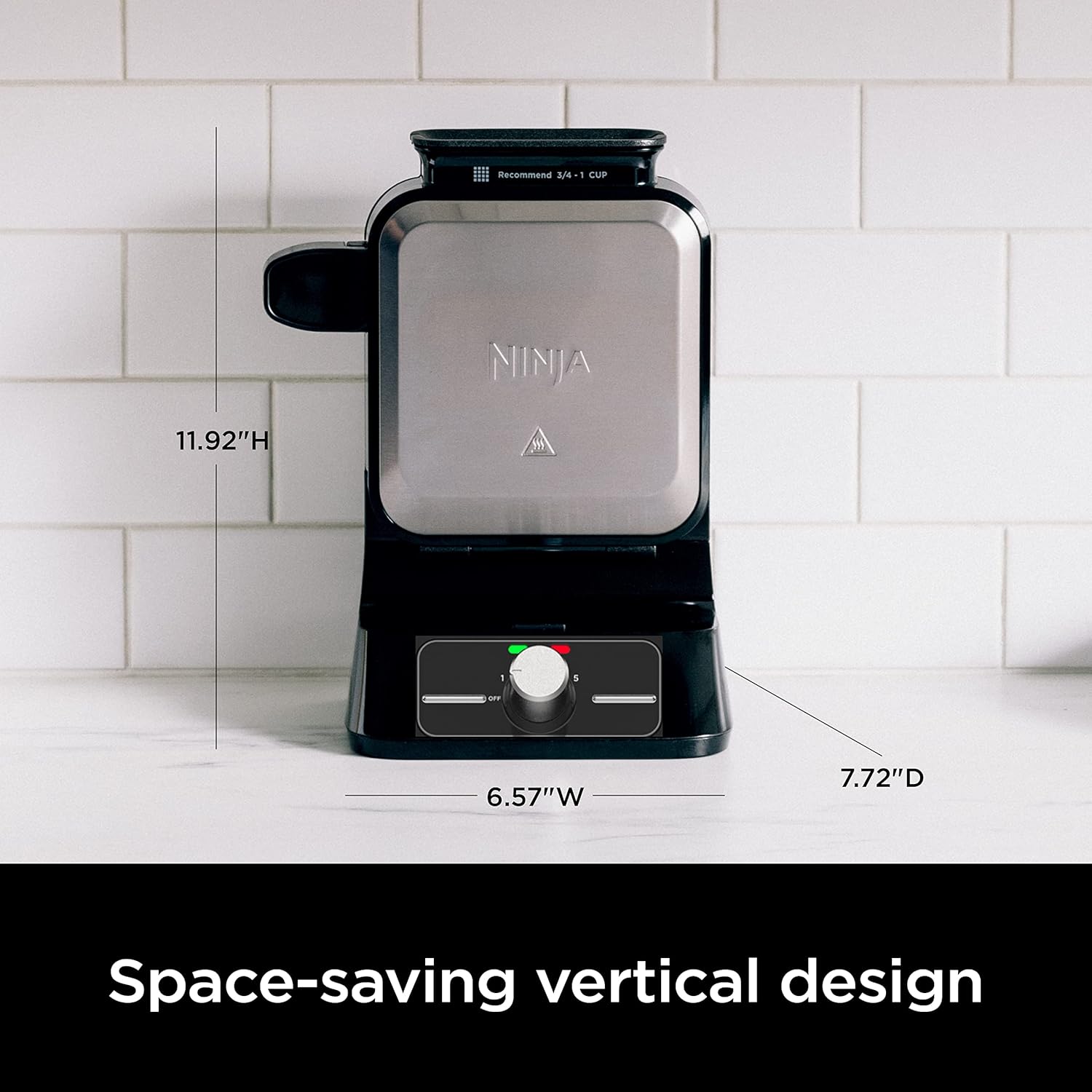
Image: Visual representation of the waffle maker's dimensions (11.92"H x 6.57"W x 7.72"D), highlighting its space-saving vertical design.
Operating Instructions
Preheating the Waffle Maker
- Ensure the waffle maker is closed and plugged in.
- Turn the shade setting dial to your desired shade (1-5 or 'S' for Specialty). The green indicator light will illuminate, indicating the unit is preheating.
- Wait for the waffle maker to preheat. The green indicator light will turn off, and an audible beep will sound when it is ready to add batter.
Adding Batter and Cooking
- Once preheated, open the lid.
- Use the included PrecisionPour cup to measure the appropriate amount of batter. The recommended amount is 3/4 to 1 cup of batter.
- Carefully pour the batter into the top opening of the waffle maker. Close the lid immediately.
- The green indicator light will turn on again, signifying that cooking has begun.
- When the waffle is cooked to your selected shade setting, the green indicator light will turn off, and an audible beep will sound.

Image: A person using the PrecisionPour cup to accurately pour waffle batter into the vertical opening of the waffle maker.

Image: A close-up view of the control dial, showing shade settings from 1 to 5 and an 'OFF' position, with green and red indicator lights.
Removing Waffles
- Once the cooking cycle is complete, open the lid.
- Carefully remove the waffle using heat-resistant, non-metallic utensils (e.g., silicone or wooden tongs). Do not use metal utensils, as they can damage the nonstick coating.
- Close the lid to begin preheating for the next waffle, or turn the dial to 'OFF' if you are finished.

Image: A person using tongs to remove perfectly cooked Belgian waffles from the open waffle maker, showcasing the nonstick surface.

Image: The open waffle maker revealing its cooking plates, illustrating the edge-to-edge heating design for consistent results.
Care and Maintenance
Cleaning the Waffle Maker
- Always unplug the waffle maker and allow it to cool completely before cleaning.
- Wipe the nonstick cooking plates with a damp cloth or sponge. For stubborn batter residue, a small amount of cooking oil can be applied to soften it before wiping.
- Clean the exterior of the waffle maker with a damp cloth. Do not use abrasive cleaners or metal scouring pads, as they can scratch the surface.
- The PrecisionPour cup can be washed with warm, soapy water.
- Do not immerse the waffle maker in water or any other liquid.
Storage
- Store the waffle maker in its vertical position to save counter or cabinet space.
- Ensure the power cord is neatly wrapped before storage.
Troubleshooting
| Problem | Possible Cause | Solution |
|---|---|---|
| Waffles are sticking to the plates. | Plates were not properly seasoned or cleaned. Too much sugar in batter. | Ensure plates are clean. Lightly brush with cooking oil before first use or if sticking occurs. Reduce sugar in batter if necessary. |
| Waffles are not cooking evenly. | Insufficient preheating. Uneven batter distribution. | Allow the waffle maker to fully preheat until the green light turns off and it beeps. Ensure batter is poured evenly. |
| Waffles are too light or too dark. | Incorrect shade setting selected. | Adjust the shade setting dial to a higher number for darker waffles or a lower number for lighter waffles. |
| Waffle maker does not turn on. | Not plugged in. Power outlet issue. | Ensure the power cord is securely plugged into a working electrical outlet. Check the circuit breaker. |
Specifications
- Model: BW1000C
- Voltage: 120 Volts
- Wattage: 1000 watts
- Product Dimensions: 6.57"D x 7.72"W x 11.93"H
- Item Weight: 5.7 Pounds
- Material: Cast Iron (cooking plates), Plastic/Metal (exterior)
- Special Features: Non-Stick Coating, Temperature Control (5 shade settings + specialty), Vertical Design, Audible & Visual Alerts
- Included Components: Ninja® Belgian Waffle Maker, PrecisionPour cup
Warranty and Support
Limited Warranty
This Ninja appliance is covered by a limited warranty. For specific details regarding the warranty period and coverage, please refer to the warranty card included with your purchase or visit the official Ninja website.
Customer Support
For product assistance, troubleshooting not covered in this manual, or to inquire about replacement parts, please contact Ninja Customer Service. Contact information can typically be found on the official Ninja website or on your product packaging.
Please have your model number (BW1000C) and date of purchase available when contacting support.


