
Snom M110
Snom M110 IP-DECT Phone System User Manual
Model: M110 | Brand: Snom
1. Introduction and Overview
This manual provides comprehensive instructions for the setup, operation, and maintenance of your Snom M110 IP-DECT Phone System. This system is designed for reliable and flexible communication in various environments, offering advanced features for both home and office use.
Key Features:
- Easy Communication: Supports up to 10 Snom M10 SC Handsets and 8 SIP accounts, ensuring constant connectivity.
- Strong Performance: Experience crystal-clear audio quality and simplified call management with "Shared Call Emulation." Supports up to 6 simultaneous calls for enhanced flexibility.
- Comfortable Usage: Features a large display and backlit keyboard for easy operation. Includes 4 freely programmable LED function keys.
- Long Battery Life: Offers up to 9 hours of talk time or one week of standby time, ideal for extended use.
- Easy Maintenance: Supports Over-The-Air (OTA) software updates and features a user-friendly web interface. Power supply via PoE switch ensures continuous readiness.
2. What's in the Box
Please verify that all components listed below are included in your package:
- DECT Handset Unit
- Base Station Unit
- Charging Cradle
- Power Adapter
- Belt Clip
- Quick Installation Guide (QIG)
- Information Sheets (Security, Standards)

Image: Snom M110 IP-DECT Phone System, showing both the cordless handset in its charging cradle and the base station unit.
3. Setup
3.1 Base Station Setup
- Power Connection: Connect the power adapter to the base station and plug it into a power outlet. Alternatively, if using Power over Ethernet (PoE), connect an Ethernet cable from a PoE-enabled switch to the LAN port on the base station.
- Network Connection: Connect the base station to your network router or switch using an Ethernet cable.
- Placement: Place the base station in a central location to ensure optimal DECT signal coverage for all handsets. Avoid placing it near large metal objects or other electronic devices that may cause interference.

Image: The Snom M110 IP-DECT Base Station, a compact black unit with an antenna and connection ports.
3.2 Handset Setup
- Battery Installation: Open the battery compartment cover on the back of the handset. Insert the provided AAA battery, ensuring correct polarity. Close the cover securely.
- Charging: Place the handset in the charging cradle. Ensure the charging indicator on the handset or cradle illuminates, indicating proper contact. Charge the handset for at least 8-10 hours before first use to ensure full battery capacity.
- Handset Registration: Follow the on-screen prompts on the handset to register it with the base station. This typically involves pressing a registration button on the base station and then initiating registration from the handset's menu. Refer to the Quick Installation Guide for specific steps.
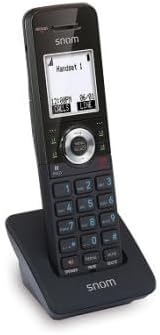
Image: The Snom M110 IP-DECT Handset, a black cordless phone with a display and keypad, resting in its charging cradle.
4. Operating Instructions
4.1 Basic Call Functions
- Making a Call: Press the green call button, then dial the number. Alternatively, dial the number first and then press the green call button.
- Answering a Call: When the phone rings, press the green call button or pick up the handset from the charging cradle.
- Ending a Call: Press the red end call button or place the handset back in the charging cradle.
- Speakerphone: During a call, press the speakerphone button (often indicated by a speaker icon) to activate or deactivate the speakerphone.
4.2 Advanced Features
- Programmable Keys: The 4 LED function keys can be customized via the handset menu or the web interface to quickly access frequently used features or contacts.
- Shared Call Emulation: This feature allows multiple handsets to share the same SIP line, enabling seamless call handling across different devices.
- Intercom: If multiple handsets are registered, you can use the intercom function to call another handset directly. Consult the handset menu for this option.
- Call Transfer: During an active call, you can transfer the call to another internal or external number. Refer to the handset's on-screen menu for transfer options.
5. Maintenance
- Cleaning: Use a soft, dry cloth to clean the handset and base station. Do not use liquid cleaners or aerosols directly on the devices.
- Battery Care: To maximize battery life, avoid extreme temperatures. If the handset will not be used for an extended period, remove the battery.
- Software Updates: The Snom M110 supports Over-The-Air (OTA) software updates. Regularly check for and install updates via the handset menu or the web interface to ensure optimal performance and access to new features.
- Web Interface Access: The base station features a web interface for advanced configuration and management. Access it by entering the base station's IP address into a web browser on a device connected to the same network.
6. Troubleshooting
| Problem | Possible Cause | Solution |
|---|---|---|
| No dial tone / Cannot make calls | Base station not powered or connected to network; Handset not registered. | Check power and Ethernet connections to the base station. Ensure the handset is properly registered to the base station. |
| Poor audio quality / Static | Handset too far from base station; Interference from other devices. | Move closer to the base station. Relocate the base station away from other electronic devices (e.g., Wi-Fi routers, microwaves). |
| Handset not charging | Handset not properly seated in cradle; Dirty charging contacts. | Ensure the handset is correctly placed in the charging cradle. Clean the charging contacts on both the handset and cradle with a dry cloth. |
| Handset display is blank | Battery is depleted or not installed correctly. | Place the handset in the charging cradle. Check battery installation and ensure it is charged. |
7. Specifications
| Feature | Detail |
|---|---|
| Model Number | 00004610 |
| Product Dimensions | 11.6 x 15.1 x 4.24 cm |
| Item Weight | 227 Grams |
| Batteries | 1 AAA battery required (included) |
| Material | Acrylnitril-Butadien-Styrol (ABS) |
| Power Source | Battery-powered (Handset), PoE or Power Adapter (Base Station) |
| Phone Type | Cordless |
| Answering Machine Type | Digital |
8. Warranty and Support
For warranty information and technical support, please refer to the documentation provided with your product or visit the official Snom website. The manufacturer's website typically provides detailed warranty terms, FAQs, and contact information for customer service.
Online Resources:
- Snom Official Website: www.snom.com
- Product Support Pages (search for M110 model)
Related documentsM110


Ask a question about this manual
Ask about setup, troubleshooting, compatibility, parts, safety, or missing instructions. Manuals+ will review the question and use this page’s manual context to help answer it.